Catch frustrated merchants before they leave a 1-star review
How to spot rising frustration in Shopify app support, step in while the thread is still open, recover well, and keep one-star reviews from happening.
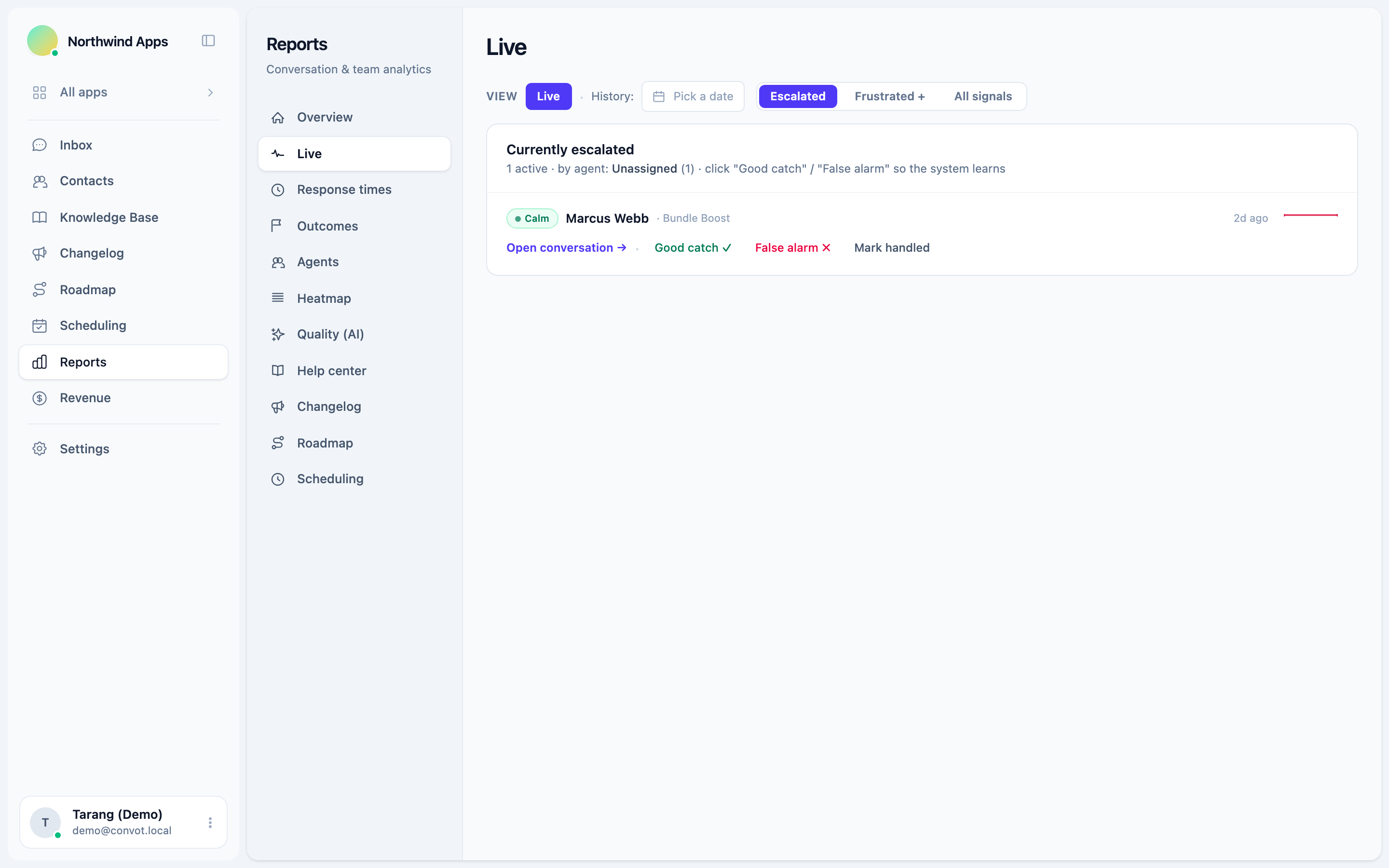
To catch frustrated merchants before they leave a one-star review, watch every open conversation for the signs of rising frustration, put the flagged ones in front of someone who can act within minutes, reply to the actual problem rather than with a canned apology, and follow up until it is fixed. A support conversation that goes wrong while it is still open is one of the most avoidable routes to a one-star review, and the moment to fix it is before the merchant closes the chat and opens the review form.
This guide covers what frustration looks like in support threads, how to catch it across every conversation, what to say when you step in, and how it connects to your App Store rating.
Why does catching frustration early matter for a Shopify app?
Catching frustration early matters because Shopify weights an app’s overall rating toward recent, useful and trustworthy reviews rather than a simple average (shopify.dev, “Manage app reviews”, checked 1 October 2026), so this month’s angry review weighs more than you might expect.
Shopify also says positive reviews make an app appear higher in App Store search results and category pages, so the rating affects how many merchants find you. Merchants can leave a review for up to 45 days after they uninstall, so a merchant who leaves angry can still rate you.
A frustrated merchant who gets a fast, useful recovery has no reason to write that review. One who is ignored has every reason.
What are the signs a merchant is getting frustrated?
The signs of frustration in a support thread are usually visible before the merchant says they are angry:
- Repeated follow-ups, such as “any update?” or “this is the third time I’ve asked.”
- Shorter, sharper replies, after earlier messages that were friendly and detailed.
- Stronger language, including capitals, exclamation marks and words like “useless” or “unacceptable”.
- Mentions of leaving, such as uninstalling, switching apps or a refund.
- Mentions of a review, the clearest warning of all.
- Long gaps after your reply, followed by a short message saying the problem is still there.
A person reading one thread spots these easily. The difficulty is spotting them across every open conversation, every day, especially in a busy week when the team is answering in order of arrival.
How do you catch frustration across every conversation?
Catch frustration across every conversation by having a system read each new customer message and flag the ones that show frustration, rather than relying on an agent to notice while they are busy with something else. Then send the flagged conversations to one place a lead checks often, and alert the right person when one is serious.
Convot’s frustration escalation does this. It watches every incoming customer message and runs a three-stage check: a keyword list, then a sentiment classifier, then a language model that makes the final call. Each flagged conversation gets a level:
| Level | Label | What it means |
|---|---|---|
| 0 | Calm | No frustration detected |
| 1 | Mild | Slight impatience or mild dissatisfaction |
| 2 | Frustrated | Clear frustration; the merchant is unhappy |
| 3 | Escalated | Demands a supervisor, very strong language, or repeated unresolved complaints |
Flagged conversations appear in a Live view, for owners and admins, that refreshes every 30 seconds. It shows level 3 by default, and you can widen it to levels 2 and 3 or to all signals. Each row shows the merchant, the app, the agent handling it, why it was flagged, an excerpt from the message, and whether frustration is rising or steady. People you set as escalation recipients get an alert, and you can also post “Frustrated customer” events to a Slack channel.
What should you do when a conversation is flagged?
A lead should read a flagged conversation’s whole thread within 15 minutes during working hours, then take it over or support the agent who has it. Four steps work for most cases:
- Read the full thread first, so you do not ask the merchant to repeat themselves, which is often what frustrated them.
- Reply to the actual problem, in plain words, saying what went wrong and what happens next.
- Give a time and keep it. “I’ll update you by 3pm your time” is better than “we’re looking into it.”
- Follow up until it is fixed, then confirm with the merchant that it works for their store.
In Convot, the Live view lets you open the conversation directly, mark the flag a good catch or a false alarm so the detection gets more precise, and mark it handled once someone has taken over. Use false alarm only when the flag was wrong, because it removes the flag.
Can AI detect frustration in support conversations?
AI can detect likely frustration in support messages by scoring wording, tone and repetition, though it flags cases rather than proving them. In Convot, a keyword list, a sentiment classifier and a language model rate each conversation from 0 (calm) to 3 (escalated), and your team marks each flag as a good catch or a false alarm to make it more precise. A person should still read the thread before replying.
How should a small team set up escalation?
A small team should set up escalation so that every flagged conversation reaches one named person quickly, during working hours and outside them. Four decisions cover it:
- Choose the escalation recipients. On a team of two or three, that is usually the founder or the most senior person on support. They get the alert when a conversation is flagged.
- Set a target for the first action, such as a lead reading the thread within 15 minutes during working hours. Make it a number, so you can check it.
- Pick one place to watch, such as the live escalations view or a dedicated Slack channel, so flagged conversations do not get lost among everything else.
- Decide who covers evenings and weekends, even if the answer is “the founder, as an escalation recipient with push alerts on.” Then use the level filter in the live view to decide what to triage first.
Review the setup after the first month. If level 1 flags are noisy, watch only levels 2 and 3. If you miss real problems, widen it.
How do you handle frustration outside working hours?
Handle frustration outside working hours by being honest about when you will reply, answering simple questions automatically, and making sure the serious cases still reach a person. A merchant who knows a human will reply at 9am is far less frustrated than one who hears nothing.
- Show honest away times in the chat widget, so merchants see when to expect a reply.
- Let an AI agent answer what it can. Convot’s Cove AI, on paid plans, can reply on its own when your team is away, answering from your help center and handing off to a person when it is not sure.
- Keep alerts on for the worst cases. Make the person covering evenings an escalation recipient and leave frustrated-customer alerts on in the Convot iOS or Android app, so they get a push when a conversation is flagged. The app also pushes when a conversation is assigned to you or a merchant replies in one you own.
How do you respond to an angry customer in support chat?
Respond to an angry customer in support chat in four moves: agree with what went wrong, name the cause in their terms, commit to a specific time for the next update, and offer a faster channel such as a call. Skip the generic apology. Here is an illustrative reply; adapt it to your app and the real issue:
“You’re right, and I’m sorry you had to ask three times. The sync stopped because of a bug on our side with stores that have more than 500 products. I’ve raised it as urgent with our engineer, and I’ll update you here by 4pm your time with either a fix or a workaround. If you’d rather talk it through, I can call you in the next hour.”
That message works because it agrees with the merchant, explains the cause in their terms, commits to a time and offers a faster channel. A canned “We apologise for any inconvenience” does the opposite: it tells the merchant nobody read their message.
Which frustrated merchants should you reach first?
Reach first the frustrated merchants who are most at risk and most valuable: anyone at level 3, anyone who mentions a review or uninstalling, and merchants on your higher plans. For example, a frustrated merchant paying you $200 a month needs a senior reply now. A frustrated free-plan merchant still needs a good reply, and soon.
For Shopify apps, Convot shows each merchant’s plan, MRR and lifetime revenue to date beside the conversation, once your app identifies the shop with a signed Convot.identify call. Revenue is visible to owners by default, and owners can grant it to admins. The guide to why support is a revenue function covers how to set response targets by merchant tier.
How do you recover after a bad experience?
Recover by fixing the problem fully, telling the merchant it is fixed, and checking it works on their store. Where it makes sense, offer something proportionate: a credit on next month’s bill, a setup call, or early access to the fix. Keep the offer about making up for the problem, never about the review; Shopify’s rules on reviews are covered in the next section.
Can you ask a merchant to update a Shopify app review?
You can ask a merchant to consider updating a review only after the problem behind it is genuinely fixed, and never forcefully or in exchange for anything. Shopify’s guidance allows that request (shopify.dev, “Manage app reviews”, checked 1 October 2026); ask once, privately, in the support thread. Review requests must use neutral language, and you must never offer incentives for reviews or ask for positive ones.
What causes one-star reviews for Shopify apps?
Support failures are a common and avoidable cause of one-star reviews for Shopify apps, and in our experience running several Shopify apps, five show up again and again: a slow first reply, making the merchant repeat themselves, a bug with no update, answers that miss the point, and being passed between people. Each is fixable before the merchant reaches the review form. Product bugs, missing features and billing surprises cause one-star reviews too, but how support handles them often decides whether the merchant writes one.
| Cause | What the merchant experiences | Fix |
|---|---|---|
| Slow first reply | Waiting hours with no sign anyone saw the message | A response target, and a daily check of unanswered conversations |
| Repeating themselves | Explaining the problem again to a new person | Read the full thread before replying; keep notes on the conversation |
| A bug with no update | Silence after “we’re looking into it” | Promise a time for the next update, and keep it |
| Answers that miss the point | A help article that does not match the question | Read the whole message, and ask one clarifying question if needed |
| Being passed around | Several people replying, none taking ownership | One owner per conversation |
Fixing these reduces frustration before it starts, which is cheaper than catching it.
How do you measure whether this is working?
Track three numbers each month:
- Escalation rate = conversations flagged at level 2 or 3 ÷ all conversations.
- Time to first action on flagged conversations, from flag to a lead’s first reply.
- Recovery rate = flagged conversations resolved with the merchant confirming the fix ÷ flagged conversations.
With illustrative figures: if 600 conversations come in during a month, 18 are flagged at level 2 or 3, and 15 of those end with the merchant confirming the fix, the escalation rate is 3 percent and the recovery rate is about 83 percent. Watch the trend: a falling escalation rate means fewer problems are reaching the frustration stage, and a rising recovery rate means the team handles them better when they do. Mark false alarms as you go, so the numbers reflect real frustration. To find the replies that caused frustration in the first place, AI quality grading scores every conversation and flags the bad ones with a reason.
Common questions about frustrated merchants
Should you reply to every bad review? Reply to every bad review you can respond to helpfully, briefly and calmly, naming the problem and the fix. The reply is public, so merchants considering your app read it too.
What if the merchant is wrong? Even when the merchant has misunderstood something, the frustration is real. Explain the misunderstanding kindly, show how to get the result they wanted, and improve the help article or screen that confused them.
Catching frustration, in six steps
- Watch every conversation for frustration, not only the ones an agent happens to reread.
- Put flagged conversations in one place and alert the right person.
- Read the full thread, reply to the real problem, and give a time.
- Reach the most at-risk and most valuable merchants first.
- Recover fully, and ask about a review only after a real fix, privately and without pressure.
- Fix the causes, and track escalation and recovery rates monthly.
Getting reviews in the first place is the other half; see the guide to getting more Shopify app reviews. Start free while you are under $1,000 in monthly revenue; frustration escalation is included on the free plan, and the Cove AI agent is on paid plans.
About the author
Tarang Agarwal is the founder of Convot. Convot is built by Sidepanda, a small studio that runs several Shopify apps of its own, including Appointo, Depo and Panda Bundle, and supports all of them from one Convot inbox.
Revenue-aware support for Shopify app teams.
Live chat, help center, and every merchant's MRR, plan, and LTV beside the conversation. Free under $1k MRR.
Start free