AI support quality grading: how to score every conversation
How AI quality grading scores every support conversation, what it should check, how to read the results, and how to turn low scores into coaching.
On this page
- Why does manual support QA miss most problems?
- How does auto QA for customer service work?
- How do you set up AI quality grading?
- What belongs in a support conversation scoring rubric?
- What is a good support quality score?
- How do you read an AI quality report?
- How do you coach support agents with QA scores?
- What should you fix beyond the agent?
- Should AI grading also cover your AI agent’s replies?
- How do you prioritise quality problems?
- What can AI quality grading not do?
- How much does AI quality grading cost?
- Common questions about AI support quality grading
- AI quality grading, in seven steps
AI support quality grading, or AI quality assurance for customer support, uses a language model to score each support conversation against a rubric, so a team can review every conversation instead of a small sample. The useful output is not the average score; it is the short list of bad conversations, each with a reason and an excerpt, that a lead can read and act on the same week.
This guide covers why manual QA misses most problems, what a grader should check, how to read the results, how to turn them into coaching and what grading cannot do.
Why does manual support QA miss most problems?
Manual support QA misses most problems because a lead can only read a small sample, and the sample is rarely the conversations that went wrong. Reading and scoring a conversation properly takes real time, so a busy team can only review a small sample, and QA is the first thing dropped when the inbox fills up.
Three things go wrong with sampling:
- The worst conversations are rare, so a small random sample often contains none of them.
- Reviewers pick familiar conversations, which skews towards the agents and topics they already know.
- Problems are found weeks later, when the customer has already left or written a review.
Grading every conversation automatically fixes the coverage problem. It does not replace a person’s judgment; it decides which conversations a person should read.
How does auto QA for customer service work?
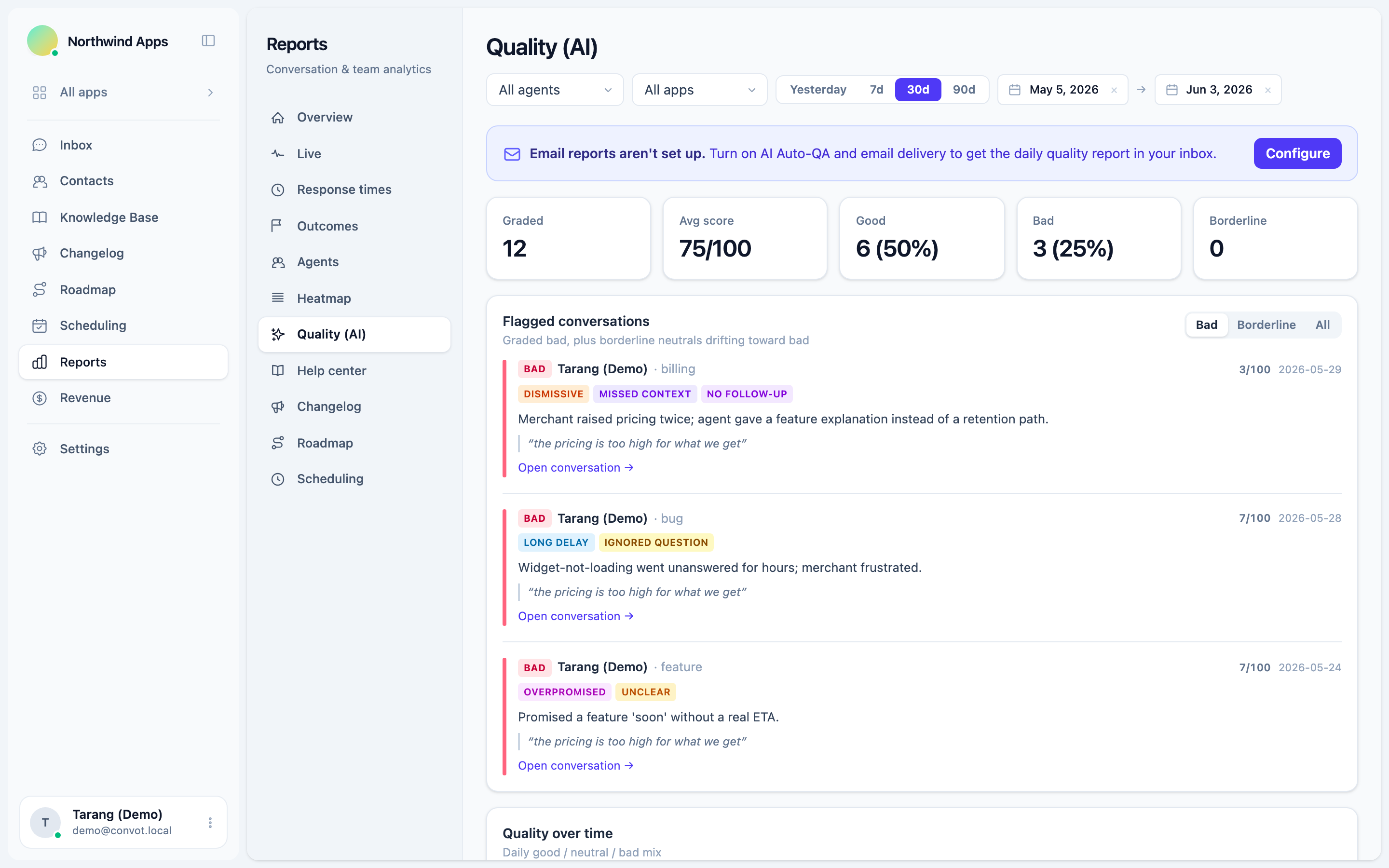
Auto QA for customer service works by sending each conversation to a language model with a rubric, and storing a score, a grade and the reasons. In Convot, the grading runs as a daily pass:
- Each day, every conversation that had an agent reply is graded, once per conversation, even if it spanned several sessions.
- The conversation gets a score from 0 to 100 and a grade of good, neutral or bad.
- Bad and borderline conversations get issue tags, a plain-English summary of what went wrong, and a quoted excerpt as evidence.
- A conversation that gets another agent reply on a later day is re-graded in place, so the score reflects the latest state.
Owners and admins see the results under Reports, Quality (AI), and can have a daily report emailed; a weekly summary rolls up the same grades on Mondays without grading again. Grading has to be switched on as Auto-QA in the report settings.
How do you set up AI quality grading?
Set up AI quality grading in three steps: switch grading on, decide who receives the reports, and agree how the team will use them before the first scores arrive. The third step matters most, because scores that appear without context can feel like surveillance.
- Switch it on. In Convot, turn on Auto-QA in the report settings; graded conversations then appear under Reports, Quality (AI).
- Decide whether to turn on the email. The daily quality email goes to admins only if you opt in to notifications in the report settings, and a weekly summary arrives on Mondays. The report is always visible in the app either way.
- Tell the team how scores will be used: to find conversations worth reading and to coach, not to rank people.
The first week of results is a baseline. Read a handful of good and bad conversations to check the grader’s judgment matches yours before you rely on it.
What belongs in a support conversation scoring rubric?
A support conversation scoring rubric should check whether the customer was actually helped, not whether the agent was polite on paper: whether the agent understood the issue, resolved it, gave correct information, kept a good tone, saved the customer effort and wrote clearly. Weight the checks by how much each one matters to the customer, so resolution and accuracy count far more than grammar.
Convot’s grader uses ten weighted categories that add up to 100. Each is scored 0 (poor), 1 (acceptable with a real shortfall) or 2 (done well), or marked not applicable when it was outside the agent’s control, such as a customer who stopped replying; not-applicable categories are left out rather than counted against the agent.
| Category | Weight | What it checks |
|---|---|---|
| Resolution | 22 | Drove a correct solution or the correct next step |
| Accuracy | 18 | The information was correct |
| Comprehension | 15 | Understood the real issue |
| Tone | 12 | Professional, courteous and empathetic |
| Efficiency | 10 | Did not make the customer repeat themselves |
| Clarity | 8 | Clear and easy to act on |
| Process | 5 | Asked for the right information and routed correctly |
| Personalization | 5 | Tailored, not blind copy-paste |
| Proactivity | 3 | Set expectations and closed cleanly |
| Grammar | 2 | Readable spelling and grammar |
Four serious failures override the score and set it to 0: stating something false, mishandling personal data, being rude, and making a false promise or misquoting a policy or price. Flagged conversations also carry issue tags, such as ignored question, missed context, long delay, no follow-up, overpromised and abandoned, so you can see the failure at a glance.
What is a good support quality score?
On Convot’s 0 to 100 scale, a score of 70 or higher is graded good, below 40 is bad, and 40 to 69 is neutral; a neutral score under 50 is marked borderline and shown for review next to the bad ones. The grader is calibrated so that a competent but imperfect conversation lands around 70 to 85, and full marks are reserved for genuinely excellent handling.
| Score | Grade | What to do |
|---|---|---|
| 70 to 100 | Good | Nothing, or use it as a coaching example |
| 50 to 69 | Neutral | Read a sample when you have time |
| 40 to 49 | Neutral, flagged borderline | Read this week |
| 0 to 39 | Bad | Read this week, lowest first |
Other tools use different scales and rubrics, so compare a team with its own past rather than another company’s number. Track three numbers monthly: the average score, the share of conversations graded bad, and the bad rate on your three biggest topics. The target bad share is a team choice, not a fixed benchmark; a falling bad share matters more than a rising average, so aim to lower your own month on month.
How do you read an AI quality report?
Read an AI quality report from the bad conversations first, then the patterns. The average score moves slowly and says little on its own; the flagged list tells you what to do this week.
Read an AI quality report in five steps: flagged conversations, issue tags, topics, trend, then agents.
- Flagged conversations. Read the bad ones, lowest score first, then the borderline ones that are drifting towards bad.
- Issue tags. If one tag dominates, such as ignored question or no follow-up, that is a habit to fix across the team.
- Topics. A high bad rate on one topic, such as billing or refunds, usually points to a process or knowledge gap rather than one agent.
- Trend. A sudden rise in bad grades on a particular day usually means something changed, such as a release or a new team member.
- By agent. Use per-agent scores to decide who to coach, keeping in mind that small samples are unreliable.
In Convot’s report, the flagged list shows five conversations at a time, each with the grade, agent, topic, score, issue tags, a summary and an excerpt, and a link to open it. The topics table shows up to 12 topics by volume with a bad rate for each, and agents with fewer than 5 graded conversations in the period are marked so you do not over-read their score.
How do you coach support agents with QA scores?
Coach support agents with QA scores by using real flagged conversations as examples, one habit at a time. A score alone tells an agent little; a specific thread with “here is what was missed and here is a better reply” teaches far more.
A simple weekly routine for a small team:
- Pick two or three flagged conversations that show the same issue.
- Read them with the agent, and ask what they would do differently.
- Write the better reply together, and save it as a saved reply or help article if it will come up again.
- Check next week’s report for the same tag.
Keep it about the work, not the person. A low score can mean a hard conversation as well as a weak reply, so treat it as a reason to read the thread, not a verdict. Convot also gives agents their own feed of coaching notes on conversations and calls they handled, without the numeric score, so they can review their own work.
What should you fix beyond the agent?
Fix a low support quality score by changing its root cause, which is often outside the agent: an outdated help article, a missing saved reply, an unclear policy, thin coverage or a routing gap. Many low scores are not the agent’s fault.
| Pattern in the report | Likely cause | Fix |
|---|---|---|
| Wrong info on one topic, across several agents | Out-of-date internal knowledge | Update the help article and saved replies |
| Long delay on one shift | Not enough coverage | Change hours or routing |
| Ignored question on long messages | Agents answer the first question only | Coach to reply to every question in order |
| Abandoned conversations | No clear owner | Assign every conversation to one person |
| A topic with a high bad rate | A confusing feature or policy | Fix the screen or rewrite the policy |
The guide to customer support metrics for Shopify apps covers how quality sits next to response time and resolution time.
Should AI grading also cover your AI agent’s replies?
AI grading should cover every conversation your customers have, including ones an AI agent answered, because an AI agent can also give wrong information or miss the question. Grading shows whether the agent’s answers hold up, and which help articles produce poor answers.
If you use Convot’s Cove AI, it answers from your help center and other sources you add and hands off to a person when it is not sure. Grading those conversations alongside your team’s shows where the sources need work. The guide to what an AI support agent is explains how grounding keeps answers tied to your own content.
How do you prioritise quality problems?
Prioritise quality problems by how many customers they affect and what is at stake. A problem that repeats across a topic matters more than a single bad reply, and a bad reply to a merchant on a high plan matters more than the same reply to someone on a free trial.
For Shopify apps, Convot can show a merchant’s plan, MRR and lifetime revenue to date beside the conversation, once your server identifies the shop with a signed shop_hash; revenue is visible to owners by default. Reading flagged conversations with that context helps you decide which to follow up on first.
What can AI quality grading not do?
AI quality grading cannot judge everything a person can, and it should not be used on its own to rate people. Its limits:
- It can be wrong. A grader can misread sarcasm, a technical detail or a policy it does not know about.
- It does not know your context. A reply that looks curt might be exactly what that customer asked for.
- Scores need volume. A handful of graded conversations is not enough to judge an agent.
- It costs AI usage. In Convot, grading runs on included fair-use AI credits and pauses if the credits run out.
Use grading to find conversations worth reading, and let a person decide what they mean.
How much does AI quality grading cost?
AI quality grading of every support conversation with an agent reply is included on every Convot plan, so it is not a separate product to buy. It is on every plan, including the free plan for teams under $1,000 MRR, and runs on fair-use AI credits that come with the plan. Paid plans start at $49 a month for 1 app and 3 seats.
Common questions about AI support quality grading
Is AI grading accurate enough to trust? AI grading is accurate enough to find conversations worth reading, which is its job. Read a flagged conversation before acting on it, and do not use scores alone for performance reviews.
Do agents see their scores? In Convot, owners and admins see the Quality report and scores. Agents see coaching notes on their own conversations without the numeric score.
How does AI grade support tickets? Convot grades every conversation that had an agent reply that day, once per conversation, and re-grades it in place if an agent replies again on a later day. Conversations imported from Crisp are not graded unless they resume live. If your AI credits run out, grading pauses until they renew.
How often should a team review quality? Review flagged conversations weekly and the trends monthly. A daily email helps a lead catch problems quickly, but a weekly coaching session is where habits change.
AI quality grading, in seven steps
- Turn on grading for every conversation, not a sample.
- Read the bad and borderline conversations first each week.
- Look for repeated issue tags and topics with a high bad rate.
- Coach with real threads, one habit at a time.
- Fix the causes beyond the agent: articles, saved replies, routing.
- Grade your AI agent’s conversations too.
- Treat scores as a reason to read, never as a verdict on their own.
See the AI layer, or start free while you are under $1,000 MRR, with 1 app and 3 seats.
About the author
Tarang Agarwal is the founder of Convot. Convot is built by Sidepanda, a small studio that runs several Shopify apps of its own, including Appointo, Depo and Panda Bundle, and supports all of them from one Convot inbox.
Revenue-aware support for Shopify app teams.
Live chat, help center, and every merchant's MRR, plan, and LTV beside the conversation. Free under $1k MRR.
Start free