SaaS Customer Support: A Practical Guide for Lean Teams
How to run SaaS customer support with a small team: what makes it different, which channels to run, how to staff it at each stage, and what to measure.
On this page
- What are SaaS customer support best practices?
- How should a startup run customer support?
- What makes SaaS customer support different?
- Which support channels should a SaaS company run?
- How should SaaS support be staffed at each stage?
- When should a SaaS company hire its first support person?
- What should SaaS support measure?
- Why should SaaS support become self-serve early?
- How does customer context change how SaaS support prioritises?
- How should SaaS support work with the product team?
- How do you write support replies for a SaaS product?
- How do you handle bugs reported to support?
- Where does AI fit in SaaS support?
- What should SaaS teams look for in a support tool?
- How does Convot fit a lean SaaS team?
- Common questions about SaaS customer support
- SaaS customer support, in seven steps
SaaS customer support is the help a software company gives its subscribers to set up, use and keep getting value from the product. It differs from one-off customer service because the relationship continues month after month, the questions are technical and tied to the product, and every conversation is with someone who pays month to month.
A lean team runs it well with a few channels done properly, usually in-app chat, a shared inbox and a help center, plus clear ownership, a handful of metrics and a self-serve layer that answers the repeat questions.
This guide covers what makes SaaS support different, which channels to run, how to staff it at each stage, what to measure, where AI fits and what to look for in tools.
What are SaaS customer support best practices?
SaaS customer support best practices for startups and small teams come down to seven habits:
- Run in-app chat, a shared inbox and a help center before adding other channels.
- Write a help article for every question you answer twice.
- Give every conversation one owner.
- Track median first response time first, then a few more metrics for your current problem.
- Answer outages, feature questions and routine questions with self-serve.
- Send what support learns to the product team every week.
- Use grounded AI only for routine questions, with a clear path to a person.
How should a startup run customer support?
A startup should run customer support itself at first, with founders answering from one shared inbox and in-app chat, and write down every answer given twice. That written record becomes the help center, the training for the first hire and the evidence for when to hire. Add channels and routing only as volume and customer requests justify them.
What makes SaaS customer support different?
SaaS customer support differs from general customer service in four ways:
| Difference | What it means in practice |
|---|---|
| The relationship recurs | The same customer comes back over months, so their history matters |
| The questions are technical | Answers need product knowledge, not a script |
| Support sees problems first | Every confusing screen and bug shows up in the inbox before anywhere else |
| Volume grows with the customer base | More subscribers means more questions, so leverage matters more than headcount |
Each one shapes how you run it. A recurring relationship means one customer record across every conversation. Technical questions mean the people answering need product access and good documentation. Seeing problems first means support should feed the product team. Growing volume means self-serve has to answer the common questions.
Which support channels should a SaaS company run?
A SaaS company should run the few channels its customers actually use, and run them well. For most small teams, that means three:
- In-app chat. It catches the question at the moment of friction, inside the product, with context about who is asking. Start here. The guide to adding live chat to an app covers the setup.
- Email in a shared inbox. For anything that is not urgent, with the whole team seeing the same thread and the customer’s history in one place.
- A help center. Not a channel you staff, but the one that answers the most questions. The ticket deflection playbook covers how.
Add other channels only when customers ask for them and you can staff them. A channel answered slowly is worse than no channel.
| Channel | Best for | Add it when |
|---|---|---|
| In-app chat | Questions in the middle of a task | From day one |
| Shared inbox email | Questions that can wait, and follow-ups | From day one |
| Help center | Questions with one right answer | From day one, growing with every repeat question |
| Phone or video calls | Complex setup and high-value accounts | Customers ask and you can schedule them |
| Community forum | Customers helping each other | You have enough active customers to keep it lively |
| Social channels | Public questions and complaints | Customers already reach you there |
How should SaaS support be staffed at each stage?
A SaaS company should have founders answer support until the first dedicated hire, then add routing and clear ownership as the team grows. Founder-led support suits the first customers, a first support hire suits steady daily volume, and a team with ownership by product or topic suits a growing customer base.
| Stage | Who answers | What to set up |
|---|---|---|
| Founder-led | The founders | One shared inbox, a chat widget, an article for every question answered twice |
| First support hire | One dedicated person, with founders as backup | Saved replies, a fuller help center, escalation rules, two or three metrics |
| Growing team | A team with clear ownership | Routing by product or topic, cover for outages, a weekly feedback loop to product |
Founder-led support is an advantage while it lasts: founders hear every problem directly and fix the cause quickly. Write down answers as you go, because they become the help center and the training for your first hire.
The first support hire should inherit written answers, a tone guide and a clear list of what to escalate to the founders. Pick the metrics you will hold the line on before volume hides problems.
A growing team needs ownership, so every conversation has one person responsible, and a routine for passing product problems to engineering.
When should a SaaS company hire its first support person?
Hire the first support person when the founders miss product commitments because of support, or when you have missed a reply time you promised customers more than once in a month. Either one is a sign that support and product can no longer share the same people.
Before you hire, write down the common answers, so the new person inherits a help center, a tone guide and a list of what to escalate. A first hire who starts from written answers is useful within days; one who starts from the founders’ memory takes much longer. Keep founders in the loop afterwards, for example by reading a sample of conversations each week, so they still hear problems directly.
What should SaaS support measure?
SaaS support should measure a handful of metrics that map to its current bottleneck: median first response time, resolution time, first contact resolution, abandoned conversations and conversations per customer, plus a quality measure. Start with median first response time, because it is the one customers feel first.
The guide to customer support metrics and KPIs covers how to calculate each, how to set targets against your own baseline, and which to pick for which problem.
Why should SaaS support become self-serve early?
SaaS support should become self-serve early because a small team cannot answer its way through growth. When every common question needs a person, support load grows in step with the customer base and the team spends its days on the same answers.
A self-serve layer has four parts:
- A help center with one article per common question, searchable inside the chat widget.
- A status page so outages are answered once, publicly.
- A changelog and public roadmap for “what changed?” and “are you building this?”.
- A grounded AI agent for routine questions, with clear handoff to a person.
Keep the path to a person one click away at every step. Self-serve that blocks customers who need help does more harm than good.
How does customer context change how SaaS support prioritises?
Customer context changes how SaaS support prioritises because each conversation is with a customer who decides every month whether to keep paying, and some have far more at stake than others. A slow or unresolved problem can give a subscriber a reason to leave. Support also sees upgrade questions and requests from your most valuable customers before anyone else.
Two practical habits connect support to what customers pay:
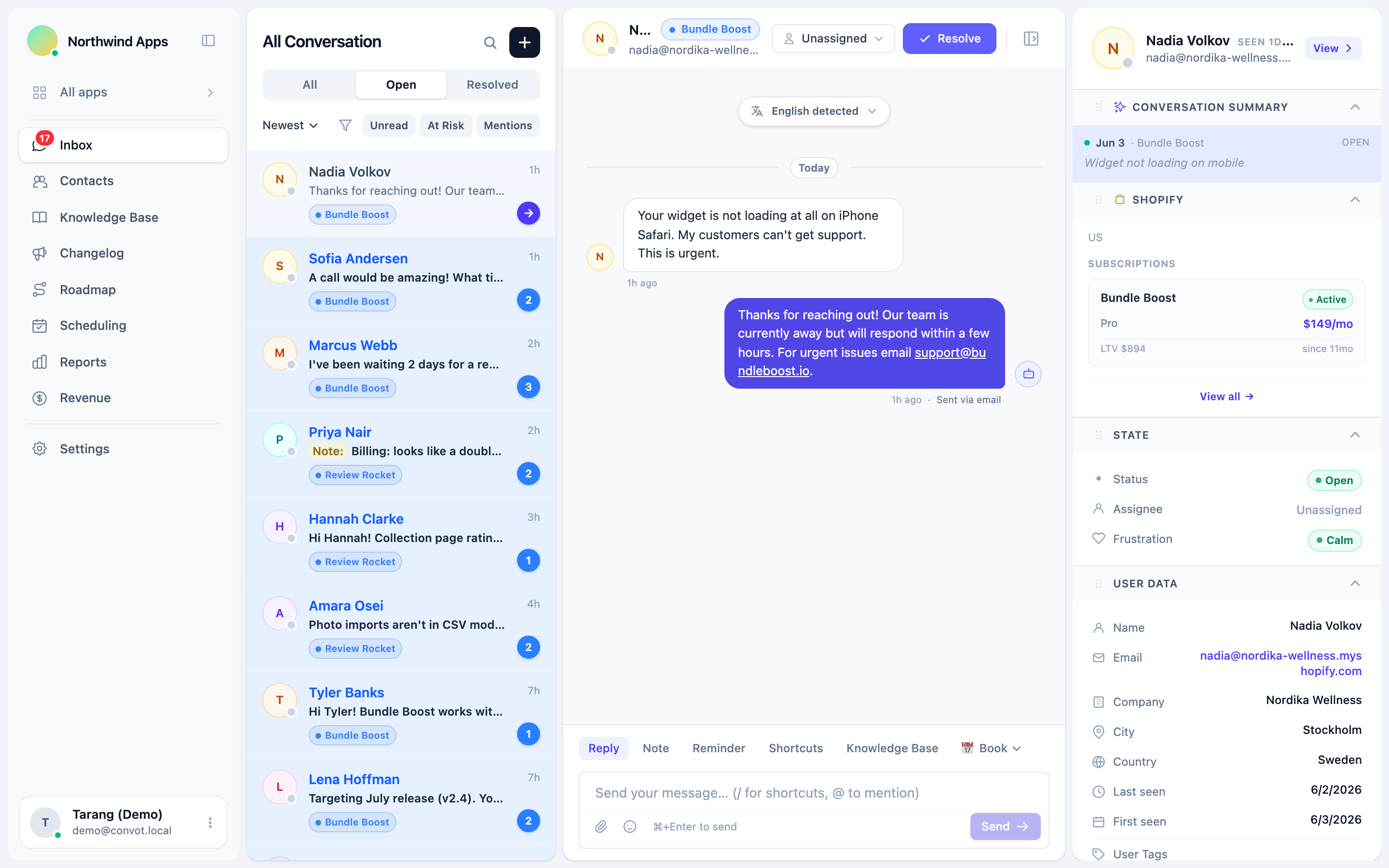
- Put each customer’s value beside the conversation, such as their plan and what they pay, so the team can prioritise the conversations with the most at stake.
- Look back when customers leave, and check whether a support problem came first. That tells you which part of support to fix next.
For Shopify apps, Convot shows each merchant’s plan, MRR, lifetime revenue to date and recent lifecycle events beside the conversation, once the Partner API is connected and your app identifies the shop with a signed shop_hash. Revenue is visible to owners by default, owners can grant it to admins, and agents do not see it. With the Partner API connected, when a merchant uninstalls, Convot reopens their conversation if they wrote in within the last 7 days (the default window) and posts an AI verdict on whether support may have contributed. The verdict is best-effort: a signal to review, not a finding. The guide to what happens when a merchant uninstalls covers what to do next.
How should SaaS support work with the product team?
SaaS support should send the product team a short, regular summary of what customers struggle with, because support sees every confusing screen and bug first. Without a routine, those signals stay in individual conversations and nobody acts on them.
A weekly routine that works for small teams:
- Tag conversations by topic or screen as you resolve them.
- List the top three sources of questions each week.
- Send bugs to engineering with the customer’s words and steps, and tell the customer when it is fixed.
- Add repeated feature requests to a public roadmap, so customers can vote and see progress.
The public roadmap guide covers collecting and closing the loop on requests.
How do you write support replies for a SaaS product?
Write support replies for a SaaS product that answer the question in the first line, give exact steps using the names on screen, and say what happens next. Customers are usually in the middle of a task, so a reply they can act on immediately is worth more than a polite one they have to decode.
A reply structure that works for most questions:
- The answer first, in one sentence.
- Numbered steps, using the exact names of buttons and settings.
- A link to the help article, so the customer has it for next time.
- What happens next, especially for bugs: who is looking at it and when you will update them.
Save the replies you write most often as saved replies, but edit each one for the customer in front of you. A saved reply sent unchanged to a question it does not quite fit is a common reason customers have to ask twice.
How do you handle bugs reported to support?
Handle bugs reported to support by confirming the problem, collecting what engineering needs, giving the customer a time for the next update, and keeping that promise. Bugs are where support most often loses trust, because the customer is waiting on someone they cannot see.
Collect the same details every time: the account, the steps to reproduce it, what the customer expected, what happened instead, and a screenshot if possible. Pass it to engineering in one place, and update the customer when the status changes, even if the update is “still working on it”.
Where does AI fit in SaaS support?
AI fits in SaaS support for routine questions with one right answer in your documentation, for drafting replies, and for answering outside working hours, with one rule: keep it grounded. An agent that answers only from your help content and hands off when it is not sure answers routine questions accurately. One that improvises gives confident wrong answers and erodes the trust support exists to build.
Three sensible uses:
- Drafts for your team, reviewed before sending.
- Automatic answers outside working hours, for routine questions.
- Quality grading of every conversation, so a lead reads the ones that went wrong.
The guide to what an AI support agent is explains grounding and how to keep an agent from hallucinating.
What should SaaS teams look for in a support tool?
SaaS teams should look for a support tool that covers the channels they run in one place and keeps one record per customer. A checklist:
| Need | Why it matters |
|---|---|
| Chat, shared inbox and help center together | One place for the team, one history per customer |
| Customer and revenue context beside the conversation | Prioritise by what is at stake |
| A grounded AI agent with clear handoff | Answer routine questions without inventing answers |
| Reports for response times and outcomes | Measure without building spreadsheets |
| Seat pricing you can predict | You know how many people can reply before the bill changes |
| Support for several products, if you run them | One inbox across products instead of several tools |
Compare options with the guide to the best help desk software for small teams. Before connecting billing, CRM or Slack to whichever tool you pick, read the guide to third party integrations for SaaS support teams on which kind of integration to choose and what access to allow. If you are considering Zendesk, Zendesk pricing explained shows how its tiers add up for a small team.
How does Convot fit a lean SaaS team?
Convot fits lean SaaS teams that want chat, a shared inbox, a help center, a changelog, a roadmap and a status page in one tool, especially teams running more than one product. Each product gets its own widget and help center, and every conversation lands in one shared inbox with one record per customer.
Pricing is set by how many apps you run, with seats included: Starter is $49 a month for 1 app and 3 seats, and Growth, Pro and Scale include 7, 12 and 20 seats. An extra seat is $10 a month and an extra app is $20 a month; see pricing for the full table. Convot is free for teams under $1,000 MRR with 1 app and 3 seats. The Cove AI agent is not on the free plan; on paid plans it costs $0.20 per resolved conversation in which it sent an automatic reply.
Common questions about SaaS customer support
Does a small SaaS team need a help desk tool? A small SaaS team needs a shared inbox and chat as soon as more than one person answers customers, so conversations have one owner and one history. A personal email inbox works for a solo founder but breaks as soon as a second person helps.
Should SaaS support be available around the clock? Most small SaaS teams do not need round-the-clock staffing. Clear working hours, an honest away message and a help center, plus an AI agent for routine questions, cover most out-of-hours needs.
Is live chat better than email for SaaS support? Live chat is better for questions in the middle of a task, and email for questions that can wait. Many teams run both into one inbox.
SaaS customer support, in seven steps
- Run in-app chat, a shared inbox and a help center.
- Write an article for every question you answer twice.
- Staff for your stage, with one owner per conversation.
- Track three or four metrics, starting with median first response time.
- Add a status page, changelog and roadmap.
- Put customer value beside the conversation and review why customers leave.
- Use grounded AI for routine questions, with a clear path to a person.
Start free while you are under $1,000 MRR, with 1 app and 3 seats.
About the author
Tarang Agarwal is the founder of Convot. Convot is built by Sidepanda, a small studio that runs several Shopify apps of its own, including Appointo, Depo and Panda Bundle, and supports all of them from one Convot inbox.
Revenue-aware support for Shopify app teams.
Live chat, help center, and every merchant's MRR, plan, and LTV beside the conversation. Free under $1k MRR.
Start free