Meet Cove AI: a support agent that answers from your docs
How Cove AI answers from your own knowledge, shows its sources, hands off when it is not sure, and moves from suggested drafts to automatic replies.
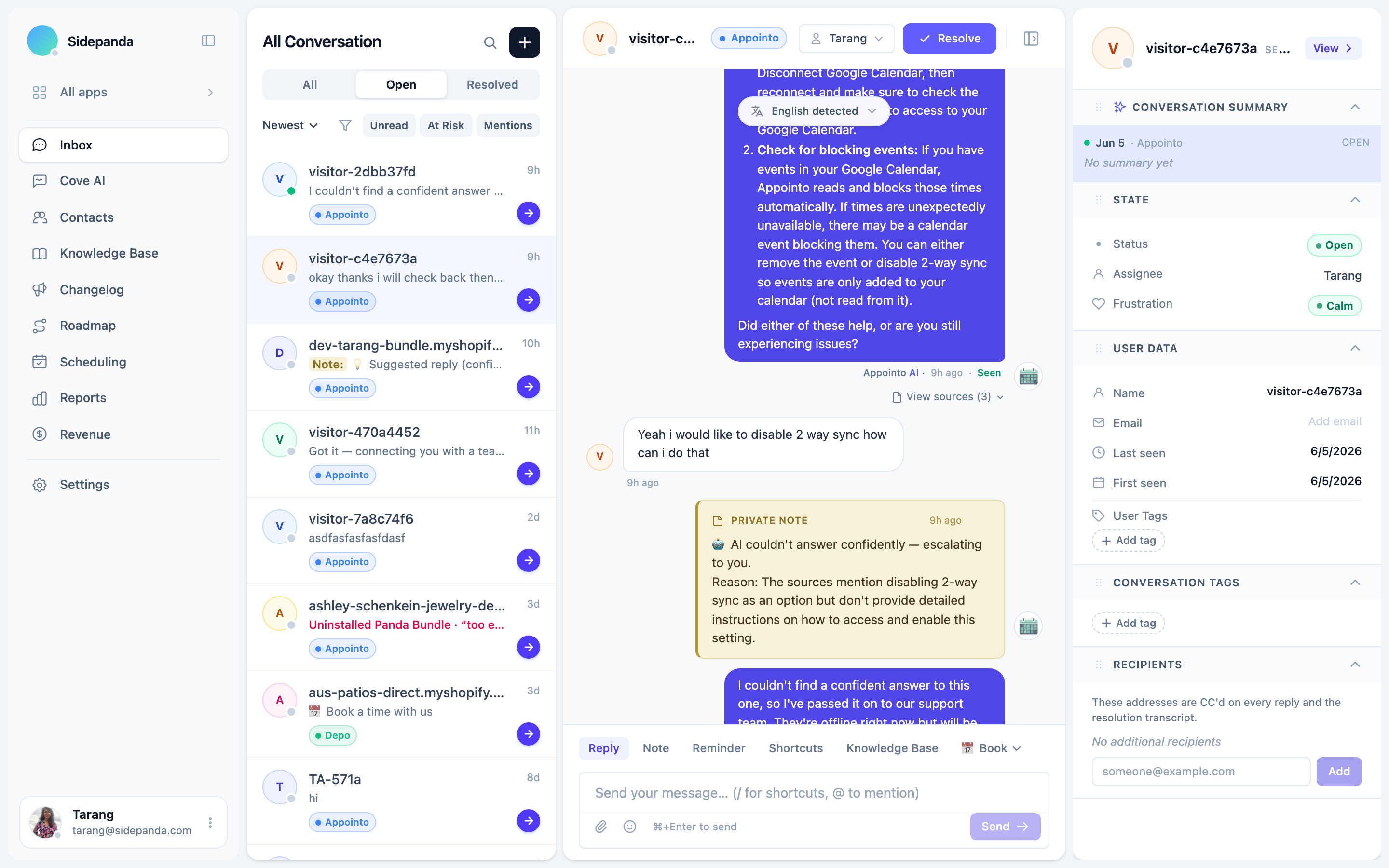
Cove AI is the support agent built into Convot. It answers customer questions only from knowledge you give it, such as your help center, web pages, uploaded files and hand-written answers, shows which source an answer came from, and hands the conversation to your team when it is not confident enough instead of guessing. It starts in Suggest mode, where your team approves each draft, and moves to automatic replies when your team is ready. It costs $0.20 per resolved conversation on top of a Convot paid plan from $49 a month.
This post explains how Cove AI is grounded, when it stops, how it moves from drafts to replies, what it knows about Shopify merchants, and what it costs.
What makes Cove AI a grounded support chatbot?
A grounded support chatbot answers only from sources you provide, not from general model knowledge. Cove AI searches your help center, web pages, files and Q&A snippets, writes the answer from the passages it finds, can show the source, and escalates when the sources do not cover the question.
We built it that way because a confident wrong answer is worse than no answer for a software app. A wrong setting, plan or billing step does not save a support conversation; it creates a second one, and sometimes a bad review. A generic chatbot that always has an answer will sometimes invent one.
So Cove AI works the other way round. It looks for the answer in your sources first, answers from what it finds, and when the sources do not cover the question, it says so and brings in a person. The guide to what an AI support agent is explains grounding in general terms.
What knowledge does Cove AI answer from?
Cove AI answers from four kinds of source you control: help center articles, web pages, uploaded .txt, .md or .csv files, and hand-written Q&A snippets.
| Source | How it gets in |
|---|---|
| Help center articles | Your published articles are embedded when you train |
| Web pages | Paste a URL and Cove fetches it once; it does not stay in sync |
| Uploaded files | FAQs, notes or specs as .txt, .md or .csv |
| Q&A snippets | Hand-written answers to specific, high-priority questions |
You choose what goes in and run Train AI to embed it. A well-structured help center is the best starting point, because each article answering one question gives Cove a clear source to answer from. Q&A snippets are useful for questions where you want an exact answer every time, such as refund policy wording.
Cove AI can also look up live account data, such as a verified customer’s orders, bookings, plan or settings, if you connect it to your own REST endpoint or MCP server, so it can answer account questions instead of escalating them.
How does Cove AI find the right answer?
Cove AI finds the right answer by searching your sources in two ways at once, by meaning and by keywords, then reranking the results to pick the passages most relevant to the exact question. It writes the answer from those passages and can show the customer which article or page it used.
Behavior settings let you choose the model, turn on vision so it can read screenshots, show or hide citations, set the tone of voice, reply in the customer’s language, and decide whether it asks a clarifying question when a message is unclear. Business context and instruction rules in its persona settings apply to every reply.
How do you give Cove AI the right context?
Give Cove AI the right context with a short business context and a few instruction rules in its persona settings. The business context is a plain description of your product and your customers, and it is added to every answer before Cove reads your sources, so it is the single most important setting for answer quality.
A useful business context covers:
- What the product does, in one or two sentences.
- Who the customers are, such as Shopify merchants running small stores.
- What matters in answers, such as plan names, where settings live, and anything customers often confuse.
Instruction rules are short, specific rules Cove follows in every reply, such as “Always link the help article you used” or “Never promise a delivery date for a feature.” You can also set a display name and avatar, so the agent matches your brand.
How does Cove AI use your changelog, roadmap and scheduling?
Cove AI uses the rest of your Convot setup to give better answers than a help center alone. It knows about your changelog, so it can mention a recent update when a customer asks whether something was fixed. It knows your public roadmap, so it can point a customer to a planned feature instead of saying “no”. And with scheduling turned on, it can offer to book a call when a question needs a live conversation.
Roadmap and scheduling awareness matters for small app teams, because many questions are really “is this coming?” or “can someone walk me through this?”. A grounded agent that can point to the roadmap or offer a call handles those without a person and without inventing a promise.
When does Cove AI hand off to a person?
Cove AI hands off to a person when its confidence is below your threshold, when a question genuinely needs a human, or when the topic is one you have fenced off. Cove AI does not guess to fill the gap.
Three controls decide when Cove escalates: a confidence threshold, a scope fence for topics that always go to a person, and a maximum number of bot replies per thread.
| Control | What it does |
|---|---|
| Confidence threshold | Low (0.5), Medium (0.6, recommended) or High (0.75); below it, Cove escalates |
| Scope fence | Topics that always go to a person, such as billing disputes, cancellations or legal questions |
| Max replies before handoff | After a set number of bot replies in one thread, it hands off automatically |
When it hands off, Cove sends a short handoff line written for that conversation, not a generic template, and routes the conversation to your inbox. An AI disclosure toggle in Guardrails labels Cove’s replies so customers know they are talking to an AI. Customer messages are treated as untrusted input, so attempts to make it ignore its instructions are declined.
What is the difference between Suggest mode and Auto mode in Cove AI?
In Suggest mode, Cove AI drafts a reply and an agent accepts, edits or rejects it before anything is sent. In Auto mode, Cove replies to the customer directly. Two more modes sit between Suggest and Auto:
| Mode | What happens |
|---|---|
| Suggest | Cove drafts a reply; an agent accepts, edits or rejects it before it is sent |
| Auto | Cove replies to customers directly |
| Auto when offline | Cove replies only when no one on your team is online |
| Hybrid | Suggest when someone is online, Auto when no one is |
Start in Suggest. Every accept, edit and reject is tracked, and once the acceptance rate (accepted plus edited) reaches 80 percent across at least 20 drafts, Convot suggests trying Auto when offline. Moving to Auto when offline is a sensible first step: Cove covers nights and weekends while your team handles the day.
How do you test Cove AI before it talks to customers?
Test Cove AI in the test console before it replies to anyone. Ask the questions customers actually ask, in their words, and check three things for each:
- The answer is correct, and matches your help article.
- The source shown is the right one.
- The confidence score makes sense, high for questions your docs cover, low for ones they do not.
If Cove escalates a question your docs do cover, the article is usually unclear or answers several questions at once. Fix the article, train again and retest.
Is Cove AI an AI support agent for Shopify apps?
Cove AI is built for Shopify app teams. It answers from your help center and, with your Shopify Partner account connected, knows whether each merchant is on a free install or paying, how much they pay you a month and whether they are a Shopify Plus merchant. Plan-aware answers use that to stay honest about paid features: when a merchant on a free install asks about a feature on a paid plan, Cove can say it is on a paid plan instead of pretending it does not exist.
You choose how it handles that moment, for example simply stating the plan or gently suggesting an upgrade. Cove only mentions an upgrade link or a price that appears word for word in your sources or plan details; it never invents a link, price or upgrade steps. The guide to Shopify Partner revenue metrics explains the numbers behind this.
How do you see what Cove AI handles and misses?
See what Cove AI handles and misses in its analytics and the knowledge gaps report:
| Metric | What it shows |
|---|---|
| Deflection | Share of handled conversations Cove answered without escalating |
| Handled | Conversations Cove touched, answered or escalated |
| CSAT | Share of feedback responses marked helpful |
| Cost | Model and retrieval cost of Cove’s replies for the period, not the $0.20 resolution charge |
The knowledge gaps report groups the recurring questions Cove could not answer by topic, so you know exactly what to write next. With AI Suggested Articles turned on, those gaps can become draft help articles. Grading Cove’s conversations alongside your team’s with AI quality grading shows where its answers fall short.
Can agents use Cove AI without letting it reply?
Agents can use Cove AI without letting it reply to anyone. Draft with AI generates a reply on demand inside the inbox, grounded in the same knowledge, and for Shopify apps aware of the merchant’s plan and revenue. The agent reviews and edits it before sending. Owners control which agents can use it.
This suits teams that want faster replies but are not ready for any automatic answers, and it shows the team how good the answers are before turning on Suggest or Auto.
How much does Cove AI cost?
Cove AI costs $0.20 per resolved conversation, on top of a Convot paid plan that starts at $49 a month for 1 app and 3 seats; it is not on the free plan. A conversation is charged once, only if Cove sent at least one automatic reply in it and it was then resolved, whether Cove or your team finished it. Drafts your team reviews and sends in Suggest mode, and Draft with AI, are not resolution charges; they draw on the AI credits included with your plan. There is no per-seat AI fee.
| Item | Cost |
|---|---|
| Convot paid plan | From $49 a month for 1 app and 3 seats |
| Cove automatic replies | $0.20 per resolved conversation Cove replied in |
| Suggest-mode drafts and Draft with AI | Included AI credits |
| Free plan | Cove not included |
For a sense of scale, with illustrative figures, 300 resolved conversations a month in which Cove sent a reply would cost $60. The Cost figure in Cove’s analytics tracks model usage, not your bill.
What can Cove AI not do?
Cove AI cannot answer questions your sources do not cover, and it is designed not to try. It also cannot:
- Change anything in a customer’s account unless you connect it to your own endpoint for lookups, and even then it reads rather than acts.
- Handle topics you fence off. Topics you list, such as billing disputes, cancellations or legal questions, always go to a person.
- Stay in sync with crawled web pages, which are fetched once; train again after you change them.
- Replace judgment on frustrated customers. Convot’s frustration detection flags those conversations for a person, and it works whether or not Cove is on.
Common questions about Cove AI
What is Cove AI? Cove AI is the AI support agent built into Convot. It answers customer questions from your own help center and sources, shows where answers came from, and hands off to your team when it is not confident, at $0.20 per resolved conversation on paid plans.
Does Cove AI escalate to humans? Cove AI escalates to your team when its confidence is below your threshold, when a topic is on your fenced list, or after a set number of bot replies, and sends a short handoff line first.
Is Cove AI available on the free plan? Cove AI is available on Convot’s paid plans. The free plan, for teams under $1,000 MRR, includes chat, the help center, AI quality grading and frustration escalation, but not Cove.
Does Cove AI make up answers? Cove AI answers only from your sources and escalates when its confidence is below your threshold. Like any AI it can still be wrong, which is why it starts in Suggest mode and shows its sources.
Can Cove AI answer in other languages? Cove AI can reply in the customer’s language when that setting is on, even if your help articles are in English.
Does each app get its own Cove AI? Each app has its own Cove settings and knowledge, so it answers from that app’s help center and sources.
Setting up Cove AI, in seven steps
- Write or tidy the help articles for your most common questions.
- Add sources and run Train AI.
- Test real customer questions in the test console.
- Set the confidence threshold and fence off sensitive topics.
- Start in Suggest mode and review drafts.
- Move to Auto when offline once acceptance passes 80 percent.
- Write new articles from the knowledge gaps report each week.
See how Cove AI works, or start free and add Cove when you move to a paid plan.
About the author
Tarang Agarwal is the founder of Convot. Convot is built by Sidepanda, a small studio that runs several Shopify apps of its own, including Appointo, Depo and Panda Bundle, and supports all of them from one Convot inbox.
Revenue-aware support for Shopify app teams.
Live chat, help center, and every merchant's MRR, plan, and LTV beside the conversation. Free under $1k MRR.
Start free