How to run a public roadmap your merchants vote on
How to run a public roadmap for a Shopify app: collecting requests, voting, choosing columns, closing the loop when you ship, and pairing it with a changelog.
On this page
- Why should a Shopify app have a public roadmap?
- How do you collect feature requests?
- How do you find feature requests hidden in support conversations?
- What should a roadmap item say?
- How should you moderate merchant submissions?
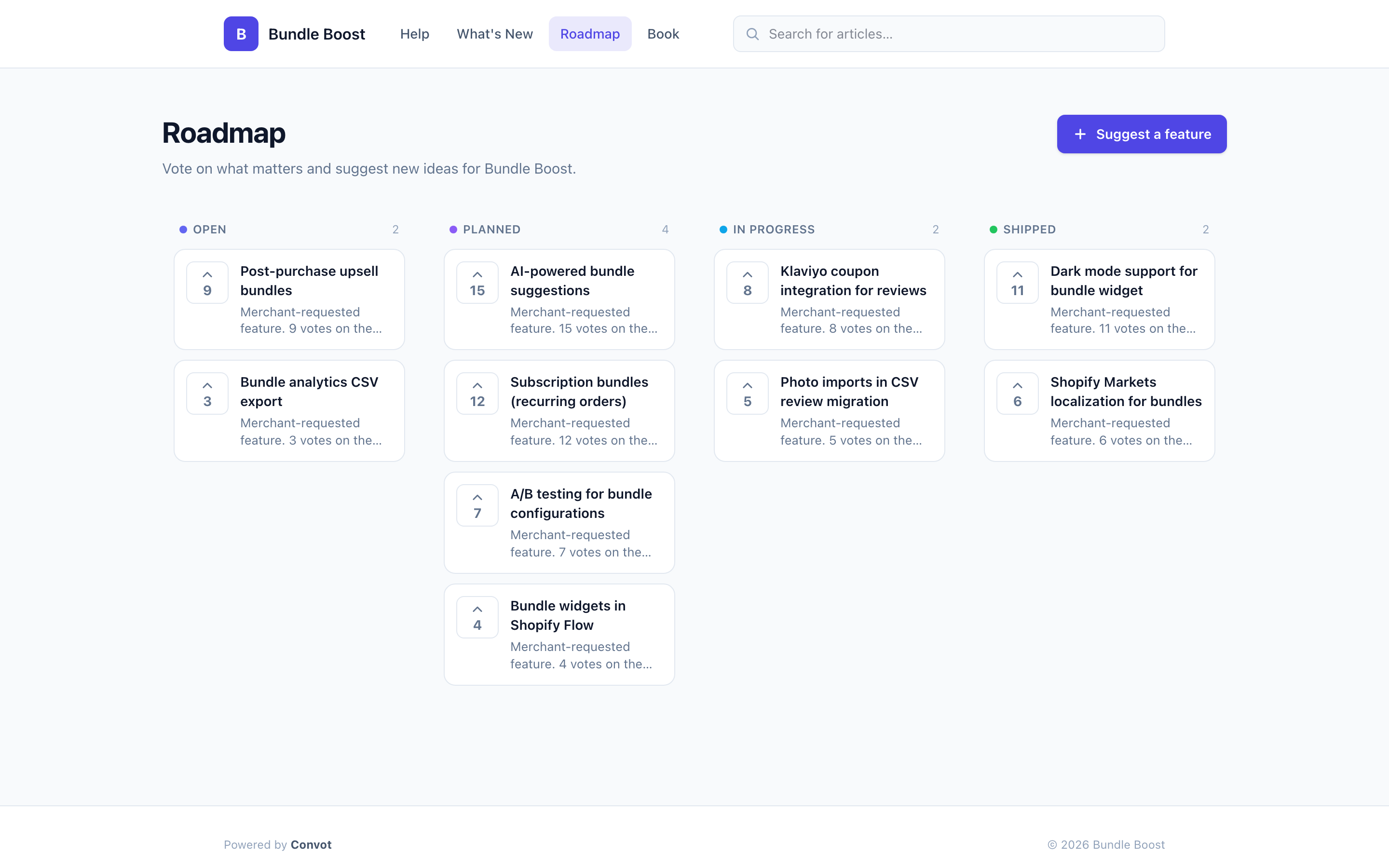
- Which columns should a public roadmap have?
- How do you decide what to build from roadmap votes?
- How do you close the loop when a feature ships?
- Should the roadmap live inside your app?
- What are feature voting board best practices?
- How do you get merchants to vote?
- How do you reply to roadmap comments?
- Why pair a roadmap with a changelog?
- How do you keep a public roadmap honest?
- What is a Canny alternative for Shopify apps?
- Common questions about public roadmaps
- Running a public roadmap, in seven steps
To run a public roadmap merchants vote on, collect feature requests in one place, let merchants vote and comment, show a few honest status columns such as under consideration, planned, in progress and shipped, review new requests weekly, and tell everyone who voted when a request ships. Pair it with a public changelog, so merchants see both what is coming and what already arrived. A roadmap that is updated and acted on shows merchants you listen; one full of requests that never move does the opposite.
This guide covers how to collect and moderate requests, how to choose columns, how to decide what to build, how to close the loop, and how to keep the roadmap honest.
Why should a Shopify app have a public roadmap?
A public roadmap gives merchants one place to ask for features and see what is coming, instead of asking the same question in support conversations one at a time. It does three useful jobs for an app team:
- It collects demand in one place. Votes show which requests matter to many merchants, not just the loudest one.
- It answers “is this coming?” without a support conversation. A merchant can check the board instead of writing in.
- It shows the app is alive. Merchants deciding whether to stay, or whether to install, can see that the app is being developed.
A public roadmap is not right for every app. If your plans are secret for competitive reasons, keep the internal roadmap private and publish only what you are confident about.
How do you collect feature requests?
Collect feature requests from three places, and send them all to the same board:
- Merchant submissions on the board, with a title, a description and, where useful, a screenshot.
- Support conversations, where many requests arrive in passing (“it would be great if…”).
- Your own team’s ideas, added directly.
Support conversations are the source most teams miss, because the request is buried in a conversation about something else. In Convot, merchants can submit ideas on the public board with a title, description and up to 4 images, and AI Roadmap can scan resolved support conversations for feature requests and add them for your review; if a similar item already exists, it adds a vote to that item instead of creating a duplicate.
How do you find feature requests hidden in support conversations?
Find feature requests hidden in support conversations by reviewing resolved conversations on a schedule and pulling out every “it would be great if” with the merchant’s own words attached. Done by hand, that means someone rereading a month of threads; most teams never do it, so requests that arrived in passing are lost.
Convot’s AI Roadmap does this on a weekly or monthly schedule:
- It scans resolved conversations from the past 30 days.
- It extracts genuine feature requests, each with a supporting quote from the merchant.
- It skips anything already covered by your help articles, changelog or roadmap.
- It puts new items in an AI Suggested queue, visible only to admins and owners.
For each suggestion you choose accept, which adds it to the roadmap as a draft you can edit, already exists, or discard. Nothing is published automatically, and it does not read open conversations. After each run, admins and owners get an email with the top three ideas and a link to the queue.
A merchant’s own quote tells you the size of a problem. As an illustrative example, “Merchants want CSV export” is easy to ignore, while a quote like “I spend an hour every Friday copying orders into a spreadsheet” shows what the request is worth.
What should a roadmap item say?
A roadmap item should say what problem it solves in the merchant’s words, not just name a feature. Merchants vote on what they recognise, so “Export bookings to a spreadsheet” collects more votes than “CSV export v2”.
A useful item has four parts:
| Part | Example |
|---|---|
| Title in the merchant’s words | Export bookings to a spreadsheet |
| The problem it solves | Merchants copy bookings by hand for their accountant |
| What it will do | A button that downloads bookings for a date range |
| Status | Planned |
Keep descriptions short and avoid dates unless you are sure. You can add detail in an official comment as the work takes shape.
How should you moderate merchant submissions?
Moderate submissions before they appear publicly, so the board stays clear and useful. A weekly review works for most small teams:
- Edit titles and descriptions for clarity, in the merchant’s language rather than your internal names.
- Merge duplicates by keeping one item and pointing the other submitter to it, asking them to vote.
- Assign a status, such as under consideration or planned.
- Hide requests that are not a fit, and tell the submitter why in their support thread, so they are not left waiting.
In Convot, merging is manual, and a hidden request is not announced to the submitter, so a short reply in their conversation matters. The submitter’s name and email are visible to admins in the item editor and never shown publicly.
Which columns should a public roadmap have?
A public roadmap should have a small number of columns that mean something to merchants. Four cover most apps:
| Column | What it tells merchants |
|---|---|
| Under consideration | We have seen this and are weighing it |
| Planned | We intend to build this and have scoped it; no date promised |
| In progress | We are building it now |
| Shipped | It is live |
Avoid columns like “Maybe someday”, which collect requests forever. Only move an item to Planned when you genuinely intend to build it. Convot’s roadmap lets you name your own status columns, choose their colors and icons, and choose which ones appear on the public board.
How do you decide what to build from roadmap votes?
Decide what to build from votes plus context, not votes alone. A request with many votes from merchants who barely use the app may matter less than one with a few votes from merchants who depend on it every day.
Weigh four things for each candidate:
- Votes, as a rough measure of demand.
- Who voted. Check whether voters are active, paying merchants, and what plans they are on.
- Fit with your app’s direction, so you do not build something that pulls the product sideways.
- Effort, so a small, popular request can ship before a large one.
In Convot, each roadmap item shows who voted, so you can look up those merchants. For Shopify apps, the conversation sidebar can show a merchant’s plan, MRR and lifetime revenue to date. That needs a connected Partner account and a Convot.identify call that passes the shop plus a shop_hash signed on your server with your identity secret. Revenue is visible to owners by default, and owners can grant it to admins. It helps you see whether a request comes from your most valuable merchants.
How do you close the loop when a feature ships?
Close the loop by telling everyone who asked when their request ships, in the same week it goes live. Teams often ship a requested feature and never tell the people who asked, which wastes the best moment to show merchants you listened. Four steps:
- Move the item to Shipped on the board.
- Email everyone who voted, with the feature name and one line on what changed.
- Link the changelog entry, so merchants can see the details.
- Reply in any open support conversation that asked for it.
In Convot, when you click Ship on a roadmap item, it becomes visible on the public board and moves to your status named Shipped (if you renamed that column, the status is left as it is), and Convot emails everyone who voted and has a known email address; anonymous votes from the widget do not receive an email. Anonymous voters still see the item move to Shipped on the board. Convot can create a linked changelog entry in the same step, so merchants who did not vote also see what changed.
Should the roadmap live inside your app?
Put the roadmap where merchants already are: inside your support widget, with a link from your app and help center. A roadmap on a separate site that nobody visits collects few votes.
Convot’s roadmap can appear as a section in the chat widget, so merchants can browse requests and vote without leaving your app; the section is off by default, and the “Suggest a feature” button appears once you enable submissions. The public board also lives on the same domain as your help center and changelog. The guide to help desks with a built-in changelog and status page compares how other tools handle this.
What are feature voting board best practices?
Seven practices keep a feature voting board useful:
- Send every request, from the board, support and your team, to one board.
- Write titles in the merchant’s words.
- Moderate weekly.
- Use four or fewer statuses.
- Look at who voted, not only how many.
- Tell voters when it ships.
- Decline openly when you will not build something.
How do you get merchants to vote?
Get merchants to vote by sending them to the roadmap at the moment they ask for something. When a merchant requests a feature in chat, reply with a link to the matching item and ask them to vote, or add their request as a new item. Three more habits help:
- Link the roadmap from your help center and app menu, so merchants find it without asking.
- Mention new planned items in your changelog, so merchants see what is coming next to what just shipped.
- Ask voters for detail in a comment, which tells you how they would use the feature.
How do you reply to roadmap comments?
Reply to roadmap comments with official answers when merchants ask for detail, such as how a planned feature will work or when it might arrive. A short official reply on a popular item saves you answering the same question in many support conversations.
Convot lets your team reply to comments with an official badge, pin important comments, and hide ones that should not be public. Keep promises vague on dates unless you are sure: “planned for later this year” is better than a specific day you might miss.
Why pair a roadmap with a changelog?
Pair a roadmap with a changelog because they answer two different questions: the roadmap shows what is coming, and the changelog shows what already shipped. Together they show that the app is improving, which matters to merchants deciding whether to stay.
A changelog is most useful when:
- Each entry has a type, such as New, Improved or Fixed, so merchants can scan.
- It appears inside your app, so merchants see updates without visiting another page.
- It has an RSS feed, for merchants and partners who follow updates.
Convot’s changelog has types you can rename, a “What’s new” card inside the widget with a badge for unseen entries, a public page on your help center domain, and an RSS feed. The Canny comparison and Beamer comparison cover dedicated feedback and changelog tools, and the Productboard comparison covers Productboard, an internal product planning tool with a customer portal.
How do you keep a public roadmap honest?
Keep a roadmap honest by moving items deliberately and pruning ones you will not build. Three habits help:
- Review the board monthly. Move what moved, and close requests that are no longer relevant.
- Decline openly. If you will not build something, say so in a comment, with a reason.
- Do not over-promise. Merchants accept a slow roadmap more readily than a Planned column that never moves.
What is a Canny alternative for Shopify apps?
Convot is a Canny alternative for Shopify app teams that want the roadmap inside their support tool. It includes a voting board, changelog and status page for each app, next to live chat and a help center, and for Shopify apps the conversation sidebar can show a voter’s plan and MRR once the shop is identified with a signed call. Canny is a dedicated feedback tool without live chat; its Pro plan is $79 a month billed yearly, while Convot Starter is $49 a month for 1 app with chat, a help center, roadmap and changelog. The Canny comparison has the full side-by-side.
Common questions about public roadmaps
Should a Shopify app roadmap be public? A public roadmap suits most small Shopify apps, because it collects demand and shows the app is improving. Keep anything competitively sensitive private, and only show what you intend to do.
Can merchants vote without an account? Merchants can vote from the widget without an account, but anonymous voters do not receive the email when the item ships, so encourage merchants who care about a request to vote while signed in.
How often should you update the roadmap? Review new submissions weekly and the whole board monthly. A roadmap that changes regularly is more credible than a large one that never moves.
What if a popular request is one you will never build? Say so on the item in an official comment, with the reason, and keep it visible in a public status such as Declined. In Convot the default Declined status is admin-only, so turn on its public visibility if you want merchants to see the reason. Merchants accept a clear no more readily than a request that sits unanswered for a year.
Do you need a separate tool for a roadmap? You do not need a separate tool if your help desk includes one. Convot includes a roadmap, changelog and status page for each app, alongside chat and a help center.
Running a public roadmap, in seven steps
- Collect requests from the board, support conversations and your team.
- Moderate weekly: clarify, merge duplicates, assign a status.
- Use a few honest columns: under consideration, planned, in progress, shipped.
- Decide with votes plus who voted, fit and effort.
- Put the roadmap inside your support widget.
- Email voters and post a changelog entry when an item ships.
- Review the board monthly and decline openly.
See the public roadmap and changelog for Shopify apps, or start free while you are under $1,000 MRR, with 1 app and 3 seats.
About the author
Tarang Agarwal is the founder of Convot. Convot is built by Sidepanda, a small studio that runs several Shopify apps of its own, including Appointo, Depo and Panda Bundle, and supports all of them from one Convot inbox.
Revenue-aware support for Shopify app teams.
Live chat, help center, and every merchant's MRR, plan, and LTV beside the conversation. Free under $1k MRR.
Start free