How to build a help center for your Shopify app
How to build a help center for a Shopify app: what to write first, how to structure articles, where it should live, and how to measure what it deflects.
On this page
- Why does a Shopify app need a help center (knowledge base)?
- What should you write first?
- How should you structure a help center?
- How do you write a help article merchants actually use?
- What should a help center editor let you do?
- How do help center articles power an AI agent?
- Where should a Shopify app’s help center live?
- How do you support more than one language in a help center?
- How does a help center help your app’s SEO?
- How do you measure whether your help center works?
- How do you keep a help center up to date?
- How do you run help centers for several apps?
- Common questions about Shopify app help centers
- Building a help center, in seven steps
To build a help center for a Shopify app, start with the questions merchants already ask your support team, write one short article per question with numbered steps and screenshots, put the help center on your own subdomain and make it searchable inside your chat widget, and review its search and feedback data every month to see what is missing. In our experience, ten articles that answer your ten most common questions are a better start than fifty written from a content plan.
This guide covers what to write first, how to structure articles, where the help center should live, how to handle more than one language, and how to measure whether it is working.
Why does a Shopify app need a help center (knowledge base)?
A help center, also called a knowledge base, is the public set of articles that answers your merchants’ recurring questions. A Shopify app needs one because many support questions have one right answer, and merchants would rather find it themselves than wait for a reply. Every answer a merchant finds alone is a conversation your team does not have to handle, at any hour.
A help center does three more jobs for an app team:
- A help center gives an AI agent something to answer from. An agent grounded in your articles can only be as good as the articles.
- A help center brings in search traffic. Merchants search for setup problems before they install, and a page that answers one can introduce your app.
- A help center shortens support replies. Your team can send a link instead of rewriting the same steps.
What should you write first?
A Shopify app help center should start with about ten articles in five groups: getting started, turning the app on in the theme, plans and billing, common problems, and leaving or pausing. Pick the exact ten by reading last month’s support conversations and writing one article for each of the most repeated questions. Do not start with a content plan; start with your inbox.
| Group | Typical first articles |
|---|---|
| Getting started | Installing the app, the first setup steps, reaching the first result |
| Turning it on in the theme | Enabling the app embed or block in the theme editor, and checking it shows |
| Plans and billing | What each plan includes, what happens when the trial ends, changing plans |
| Common problems | The three or four errors merchants hit most, each with its fix |
| Leaving or pausing | Uninstalling cleanly and what happens to their data |
If one question accounts for a large share of conversations, write that article first.
How should you structure a help center?
Structure a help center around the tasks merchants are trying to do, not around your app’s menu. Group articles into a handful of categories, such as Getting started, Settings, Billing and Troubleshooting, and keep each category short enough to scan.
Inside each category, order articles by how often merchants need them. Link related articles to each other, so a merchant who lands on the wrong one can reach the right one in a click. A help center with eight categories of three articles each is easier to use than two categories of twelve.
How do you write a help article merchants actually use?
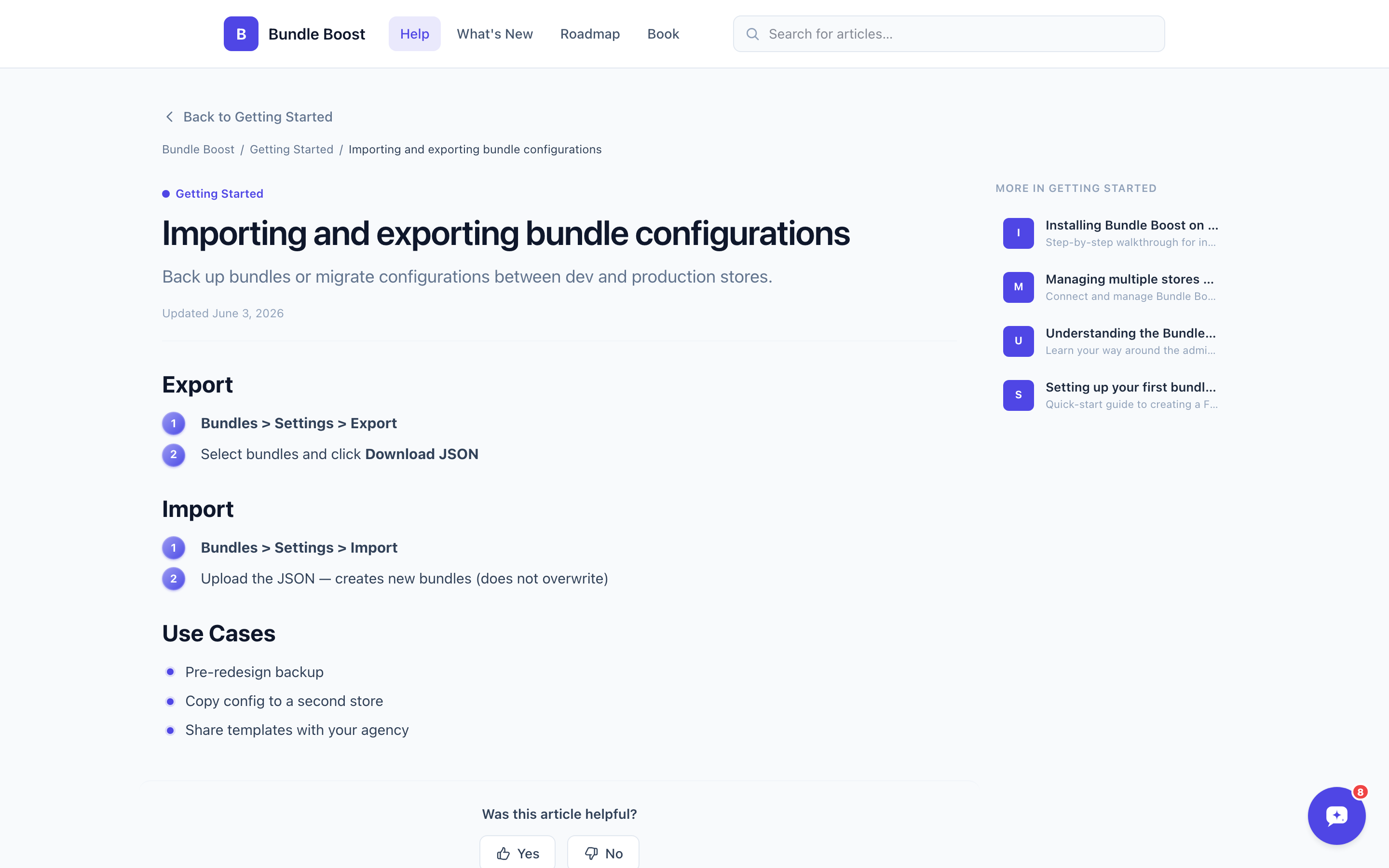
A good help article has five parts: a title that is the merchant’s question, the answer in the first two sentences, numbered steps with one action each, a screenshot for any unfamiliar screen, and a link to chat if it still does not work. Write for a merchant who is half-frustrated and scanning, not reading. For example, a title like “Booking settings” becomes “Why isn’t the booking button showing on my store?”. In detail:
- A title that is the question, in the merchant’s words, such as “Why isn’t the booking button showing on my store?”
- The answer in the first two sentences, before any background.
- Numbered steps, one action per step.
- A screenshot or short video for any step involving a screen the merchant has not seen.
- What to do if it still does not work, with a link to chat.
Keep sentences short and avoid internal names for features that merchants never see. If your support team calls something the “sync engine” but merchants see “Update products”, write “Update products”.
What should a help center editor let you do?
A help center editor should make it quick to write, format and update articles, because a slow editor is the main reason help centers go stale. Look for:
- Simple formatting, such as Markdown, so writing a step list or a heading takes seconds.
- Callouts for warnings and tips, so the important line stands out.
- Images and short video embeds, for steps on screens the merchant has not seen.
- Draft and hidden states, so you can prepare an article before a release or pull one while you fix it.
- Per-article search titles and descriptions, for SEO.
Convot’s article editor uses Markdown with callouts and images, embeds from YouTube, Loom, Figma and Scribe, and lets each article be visible, a draft or hidden.
How do help center articles power an AI agent?
Help center articles power an AI agent because a grounded agent answers only from the sources you give it, so the articles set the limit on what it can answer well. A clear article with the answer up front produces a clear AI reply; a vague or outdated one produces a vague or wrong reply, or a handoff.
Three habits make articles work for both merchants and AI:
- One question per article, so the agent finds the right one.
- The answer in the first sentences, so it does not get lost in background.
- Exact names for settings and screens, so the agent can match a merchant’s question to the right steps.
Convot’s Cove AI answers from each app’s own help center and other sources you add, can show which article it used, and hands off to a person when it is not sure. It is available on paid plans at $0.20 per resolved conversation. The guide to what an AI support agent is explains how grounding works.
Where should a Shopify app’s help center live?
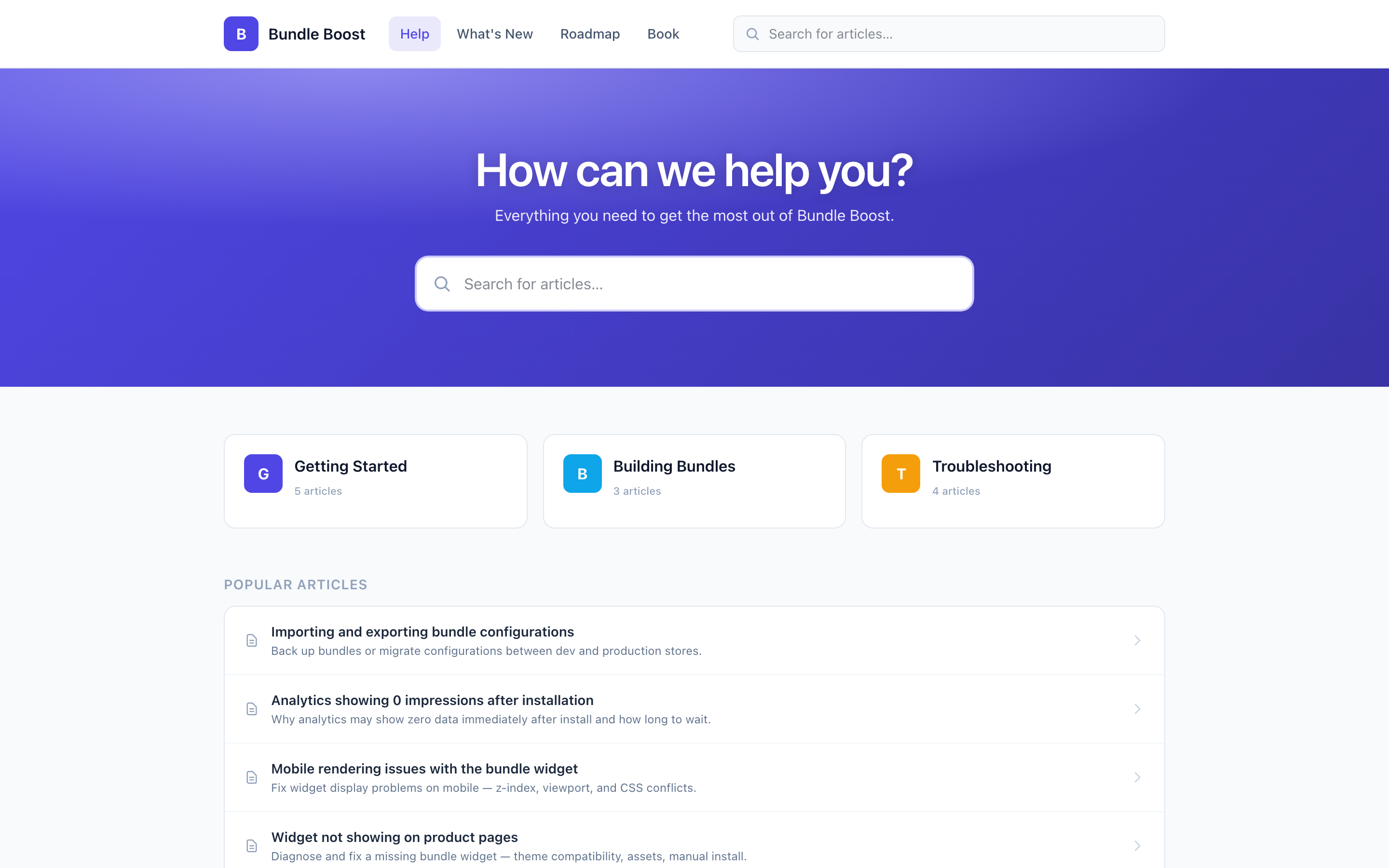
A Shopify app’s help center should live on a subdomain of your own website, such as help.yourapp.com, and be searchable inside your support widget and linked from your app’s screens. A help center nobody can find does not answer anything.
Each placement does a different job:
- On your own subdomain, it builds search traffic for your domain and looks like part of your product.
- Inside the chat widget, merchants can search it before they start a conversation.
- Linked from your app’s screens, merchants find the answer at the moment they need it.
Setting up a custom subdomain takes three steps:
- Choose the subdomain, such as help.yourapp.com, and enter it in your help center settings.
- Add the DNS records your provider gives you at your DNS host. In Convot, those are a CNAME that routes traffic and a TXT record that proves you own the domain.
- Wait for the records to verify; the certificate is then issued and renewed automatically.
In Convot, every app gets a help center at an address on convot.help by default, and you can point your own subdomain at it instead. The same articles are searchable inside that app’s chat widget, so a merchant can find an answer without leaving your app. The help center is included in every Convot plan, so you do not need a separate knowledge base subscription; the Zendesk comparison shows how the two differ.
How do you support more than one language in a help center?
Support more than one language by publishing translated versions of your most-read articles, starting with the languages your merchants use most. Look at where your merchants are before translating everything; a handful of well-translated core articles helps more than a full library in many languages with errors.
Convot’s help center supports 12 languages: English, Spanish, French, German, Italian, Portuguese, Dutch, Japanese, Chinese, Arabic, Hindi and Russian. You add a language, then write each article’s translated version. Live chat translation is separate and wider: replies are translated automatically across 60+ languages. The guide to multilingual support for Shopify apps covers both.
How does a help center help your app’s SEO?
A help center helps your app’s search traffic when its articles answer questions merchants search for, sit on your own domain and have clear titles and descriptions. Merchants often search for a problem before they know which app solves it, such as “how to add a booking button to Shopify”, and a help article that answers it introduces your app.
Give each article a meta title and description that match how merchants phrase the question; Convot lets you set both per article. Keep public articles visible and draft or hide ones that are out of date, so search engines and merchants only find current answers.
How do you measure whether your help center works?
Measure a help center with four signals: article views, searches with no results, “Was this helpful?” ratings, and conversations about topics that already have an article. Track the helpful rate per article each month, which is “yes” ratings divided by all ratings. With illustrative figures, an article with 40 ratings and 12 “yes” has a 30 percent helpful rate and needs a rewrite.
| Signal | What it tells you |
|---|---|
| Article views | Which problems come up most |
| Searches with no results | Articles you have not written yet |
| ”Was this helpful?” ratings | Articles that need rewriting |
| Conversations about a topic that has an article | The article is hard to find or unclear |
Convot’s help center analytics shows article views, unique visitors, top articles, search queries, zero-result searches and article feedback.
How do you keep a help center up to date?
Keep a help center up to date by updating articles whenever you ship a change merchants will notice, and reviewing the gaps every month. Three habits cover it:
- Update articles in the same week as a release. If a screen changes, its screenshots and steps change too. Pairing releases with a public changelog helps merchants find what is new.
- Write from the gaps. Zero-result searches and repeated questions are your next articles. If you use Cove AI, you can turn on AI Suggested Articles: each week it groups the conversations where Cove had no answer and the ones customers marked unhelpful, and proposes the recurring gaps as new articles.
- Hide what is out of date. An article can be visible, a draft, or hidden while you fix it, so merchants never follow wrong steps.
How do you run help centers for several apps?
Run a separate help center for each app, with its own domain and articles, while your team manages them all in one place. Merchants of one app should not wade through another app’s articles, and each app needs its own search and its own answers for an AI agent.
In Convot, each app gets its own help center, widget and settings, and every conversation still lands in one shared inbox. The guide to help desks for teams running more than one app compares how other tools handle this.
Common questions about Shopify app help centers
How many articles does a Shopify app help center need? Start with ten articles that answer your ten most common questions, then add one whenever a search returns nothing or the same question arrives three times.
Should help articles have videos? Short videos help for steps on screens a merchant has not seen, such as the theme editor. Keep the written steps too, because many merchants scan rather than watch, and text is searchable.
Does a help center reduce support tickets? A help center reduces support conversations for questions that have one right answer and a findable article. It does less for bugs and account-specific problems, which still need a person. The guide to reducing support tickets covers measuring this.
Who should write the help center articles? The people who answer support should write the first articles, because they know the exact questions and the words merchants use. A founder or engineer can then check them for accuracy.
Can the help center live on my own domain? A help center can live on your own subdomain, such as help.yourapp.com: you add the DNS records your provider gives you and the certificate is issued for you. A subdomain keeps search traffic on your own domain. In Convot the default address is on convot.help, and a custom subdomain takes a CNAME and a TXT record.
Building a help center, in seven steps
- Read last month’s conversations and list the ten most common questions.
- Write one short article per question, answer first, with numbered steps.
- Group articles into a few task-based categories.
- Put the help center on your own subdomain and inside your chat widget.
- Translate your most-read articles into your merchants’ main languages.
- Review views, zero-result searches and helpful ratings monthly.
- Update articles in the same week as every release.
Start free if your app is under $1,000 MRR, with 1 app and 3 seats. Every app you add gets its own help center.
About the author
Tarang Agarwal is the founder of Convot. Convot is built by Sidepanda, a small studio that runs several Shopify apps of its own, including Appointo, Depo and Panda Bundle, and supports all of them from one Convot inbox.
Revenue-aware support for Shopify app teams.
Live chat, help center, and every merchant's MRR, plan, and LTV beside the conversation. Free under $1k MRR.
Start free