The best help desk software for small teams and small businesses (2026)
Help desk software for a small business or a team of 2 to 50: seven tools with checked prices, cost as you grow, and which suits email, chat or many products.
On this page
- Which help desks have a free plan?
- What should a small team look for in help desk software?
- Is Zendesk good for small teams?
- Is Freshdesk good for small teams?
- Is Help Scout good for small teams?
- Is Intercom good for small teams?
- Is Front good for small teams?
- Is Crisp good for small teams?
- Is Convot good for small teams?
- How do the help desks compare?
- Which help desk suits email, chat or phone support?
- Which help desk needs the least setup?
- How does help desk cost grow with team size?
- How do you choose help desk software for a small team?
- Common questions about help desk software for small teams
- Help desk software for small teams, in summary
The best help desk software for a small team or small business in 2026 depends on how your customers reach you: Help Scout for email-first support with a free plan, Freshdesk for email ticketing with SLA policies at a low per-agent price, Crisp for low-cost live chat, Front for email-heavy account management, Intercom for in-product messaging with budget, Zendesk for structured ticketing and voice, and Convot for small software teams that run more than one product and want chat, a help center, changelog, roadmap and status page for each on one bill. For most teams of 2 to 10, the deciding factors are price at your size in a year, how much setup the tool needs, and whether the AI answers from your own content.
This guide covers what small teams need, each tool with prices checked on vendor pricing pages on 30 September and 1 October 2026, how cost grows with team size, and how to choose. We make Convot, so its section comes last and uses the same published-price standard.
Which help desks have a free plan?
Help Scout, Crisp and Convot are the only help desks here with a free plan; Zendesk and Freshdesk offer a 14-day trial, and Intercom and Front have no free plan.
| Tool | Free plan limit | First paid price |
|---|---|---|
| Help Scout | Up to 5 users, 1 inbox, 1 Docs site | Help Scout Standard, $25 per user a month billed annually ($30 monthly) |
| Crisp | 2 seats | Mini, $45 a month for 4 seats |
| Convot | Under $1,000 MRR, 1 app, 3 seats | Starter, $49 a month for 1 app and 3 seats |
| Zendesk | None, 14-day trial | Support Team, $19 per agent a month (annual) |
| Freshdesk | None, 14-day trial | Freshdesk Growth, $19 per agent a month (annual) |
What should a small team look for in help desk software?
A small team should look for help desk software that works without a dedicated administrator and stays affordable as the team grows. Five things matter most:
| Need | What to check |
|---|---|
| Predictable pricing | The price at your team size in 12 months, not today |
| Low setup | Whether you can answer customers on day one without configuration |
| Your channels in one inbox | Email and chat together, plus phone or messaging apps if you use them |
| A help center | Self-serve answers that the widget and AI can search |
| AI that does not make things up | Answers from your content, sources shown, a clear handoff to a person |
Is Zendesk good for small teams?
Zendesk offers structured ticketing with voice, IVR and skills-based routing, and its plans step up quickly in price. It is priced per agent, billed annually: Support Team at $19 covers email and tickets only, Suite Team at $55 adds messaging and a help center, and Suite Professional is $115. There is no free plan, only a 14-day trial.
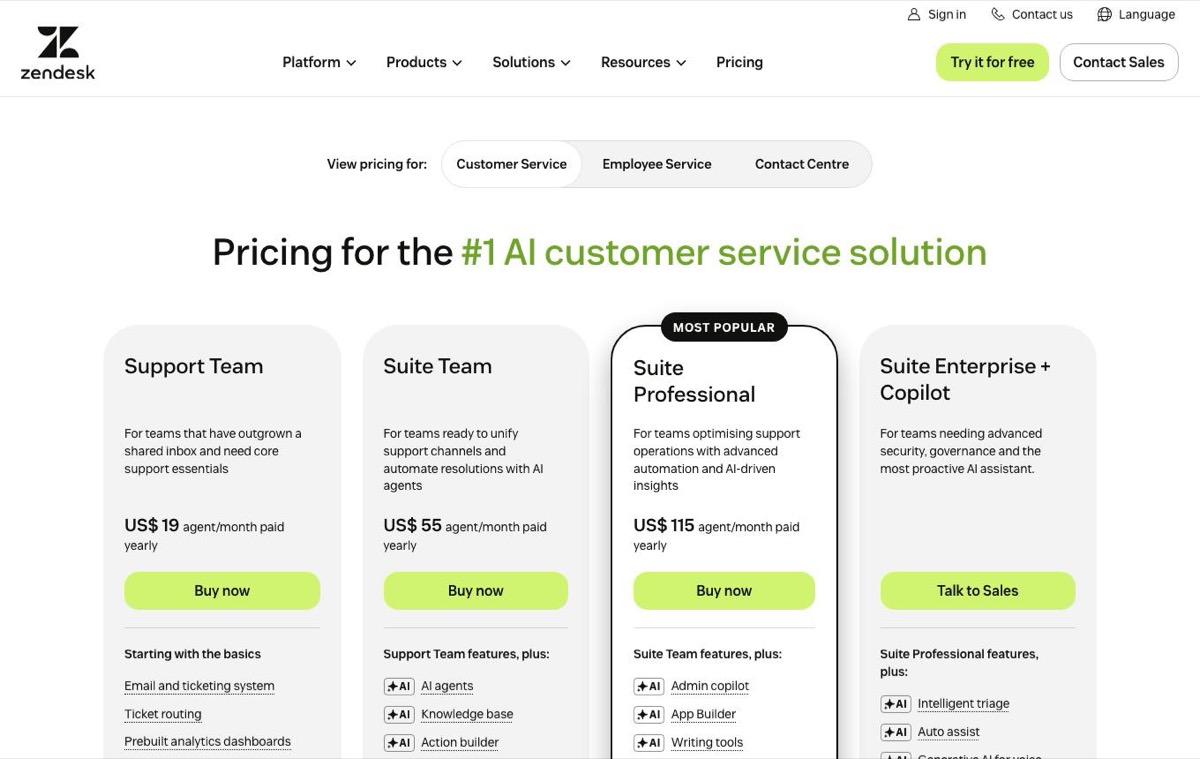 Zendesk pricing page, captured 3 October 2026.
For 3 agents on Suite Team that is $165 a month, with 5 AI resolutions per agent included each month and then a per-resolution charge reported at about $2.00 pay as you go, less on a committed plan. It suits a team moving toward a structured ticketing operation; the Zendesk alternatives guide covers other options.
Is Freshdesk good for small teams?
Freshdesk is good for small teams that want a ticketing desk with SLA policies and automation at a lower per-agent price than Zendesk. Its pricing page, checked on 1 October 2026, lists a knowledge base, multiple SLA policies and the Freddy AI Agent, but no chat widget, WhatsApp or phone on its plans; Freshworks sells those in other products. The Freshdesk alternatives guide compares eight options. Freshdesk Growth is $19, Freshdesk Pro $55 and Freshdesk Enterprise $89 per agent a month, billed annually. Freshdesk has no free plan; it offers a 14-day trial.
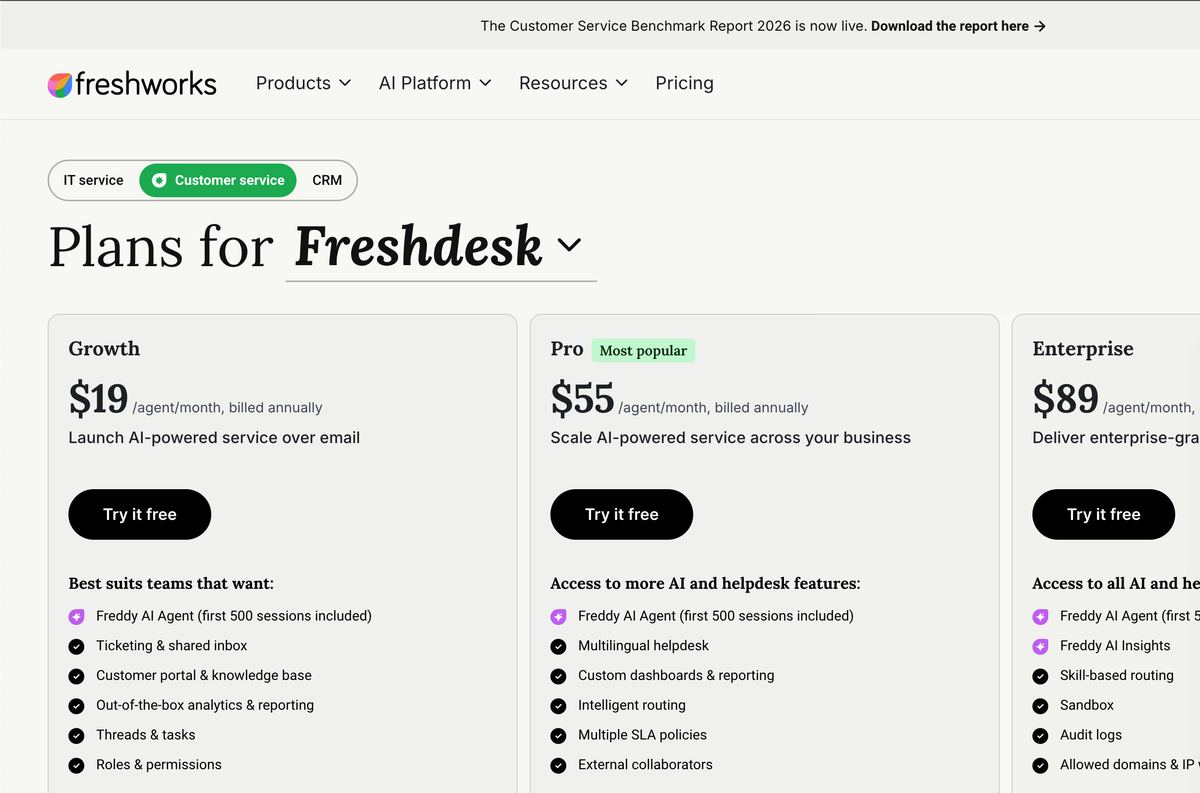 Freshdesk pricing page, captured 3 October 2026 (US pricing).
For 3 agents, Freshdesk Growth is $57 a month. Its Email AI Agent includes 500 sessions, then charges $49 per 100 sessions, and live translation needs Copilot at $29 per agent a month.
Is Help Scout good for small teams?
Help Scout is good for small teams whose support is mostly email. It is built around a shared email inbox and includes a Docs help center and the Beacon widget. Its free plan covers up to 5 users with 1 inbox and 1 Docs site.
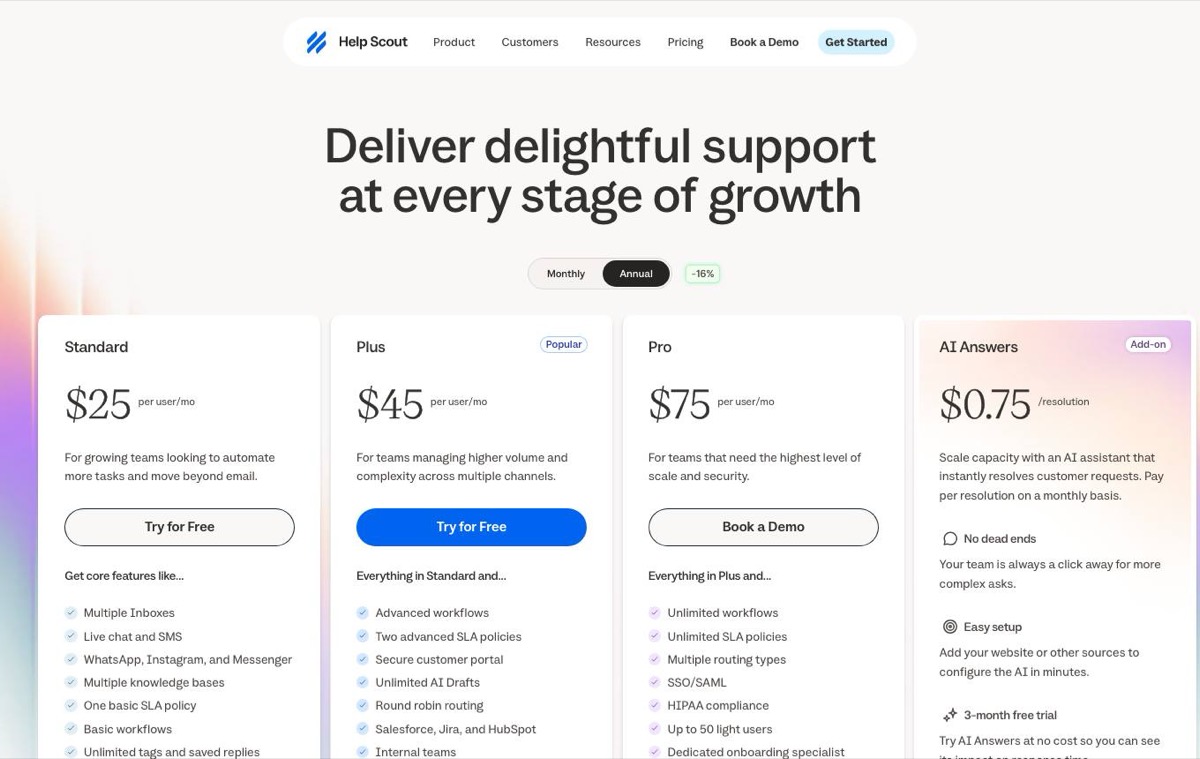 Help Scout pricing page on annual billing, captured 3 October 2026.
Help Scout’s paid plans are Help Scout Standard at $30, Help Scout Plus at $54 and Help Scout Pro at $90 per user a month billed monthly, or $25, $45 and $75 billed annually, and AI Answers costs $0.75 per resolution. Its free plan includes live chat through Beacon, and pricing grows with each user.
Is Intercom good for small teams?
Intercom is good for small teams that need in-product messaging, product tours and an AI agent, and have the budget. It is priced per seat, billed annually, at $29, $85 or $132 a month, with no free plan, and its Fin AI agent costs from $0.99 per outcome on top.
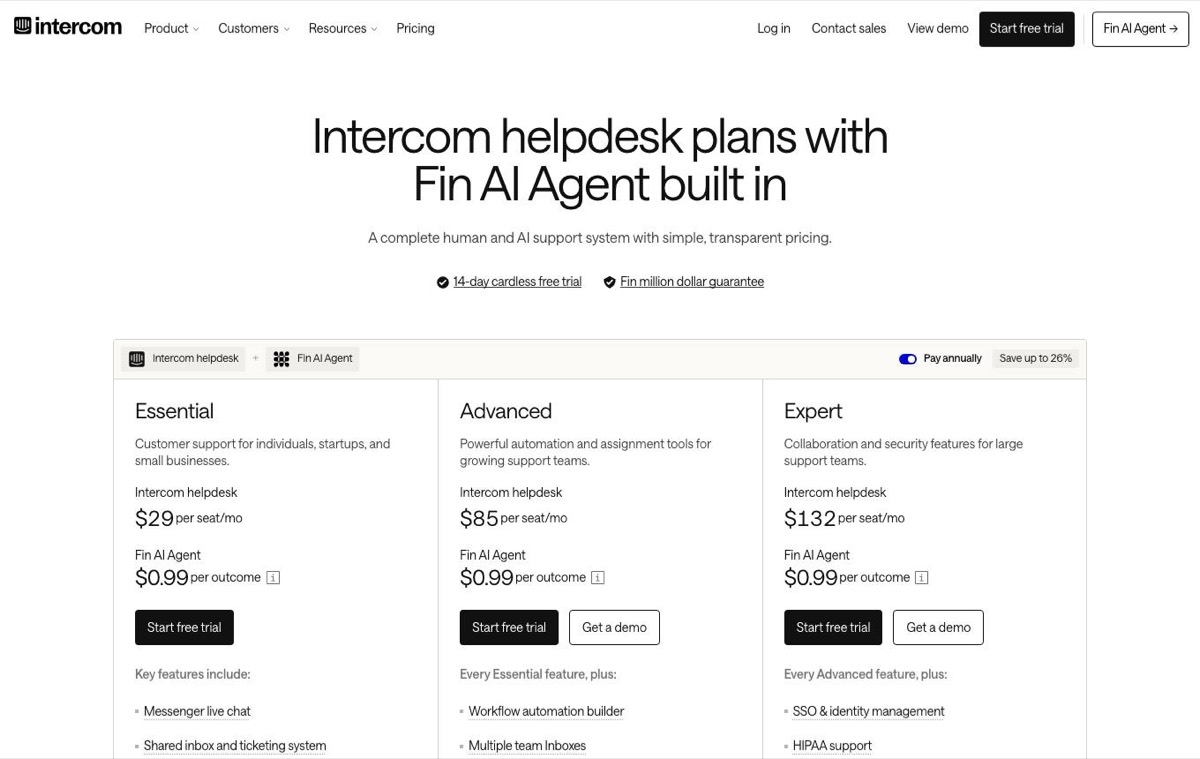 Intercom pricing page, captured 3 October 2026.
For 3 people on Intercom Advanced that is $255 a month before AI. The Intercom alternatives guide compares it with other options.
Is Front good for small teams?
Front is good for small teams that support customers mostly by email from one collaborative shared inbox.
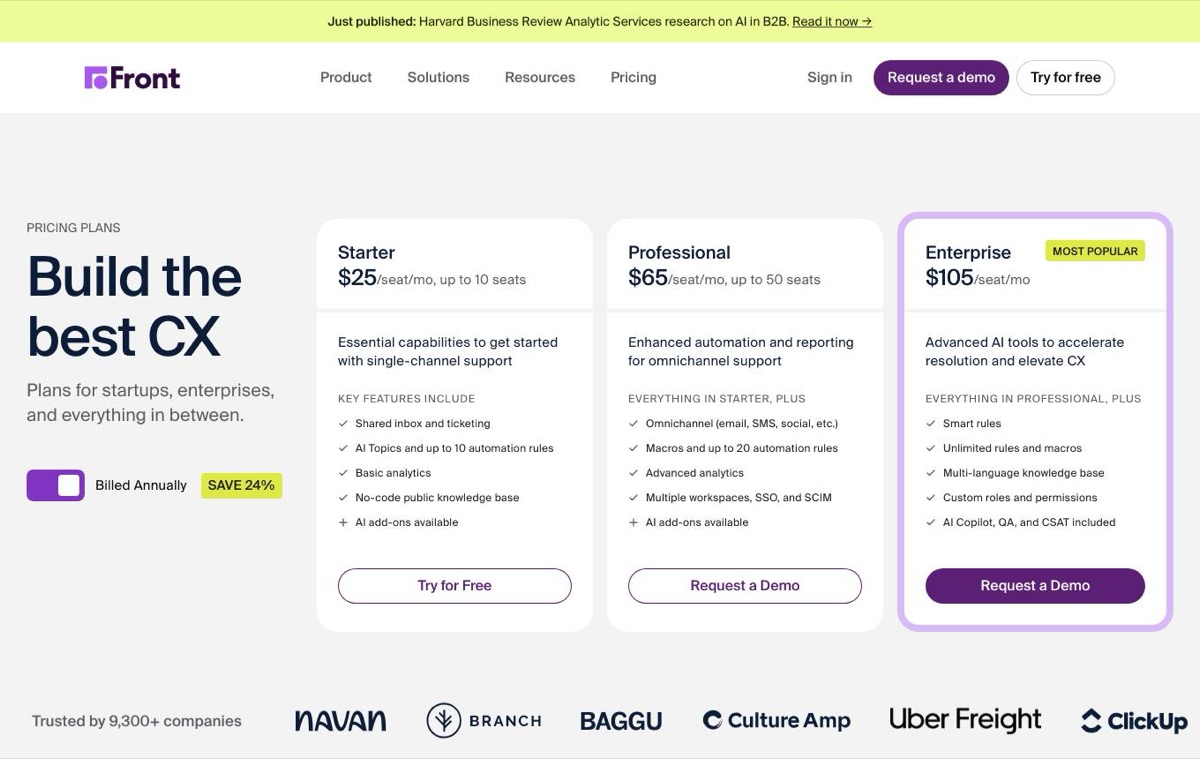 Front pricing page, captured 3 October 2026.
Front Starter is $25 per seat a month billed annually, or $75 for 3 seats, with 1 workspace and one channel type; Front Professional is $65 per seat. Front Starter supports one channel type (email, Front Chat or SMS), so live chat plus email needs Front Professional, $195 for 3 seats billed annually. It includes a basic knowledge base, with a customisable one on Front Professional, but its focus is the shared inbox. AI is sold as add-ons: Copilot at $20 per seat and Autopilot from $0.05 per conversation.
Is Crisp good for small teams?
Crisp is good for early-stage teams that want low-cost live chat. It is priced per workspace, one per website: free for 2 seats, then Mini at $45 for 4 seats, Essentials at $95 with 10 seats, a help center and an AI chatbot, and Plus at $295. AI credits are bundled with paid plans, and it can bring WhatsApp, Instagram and SMS into the inbox.
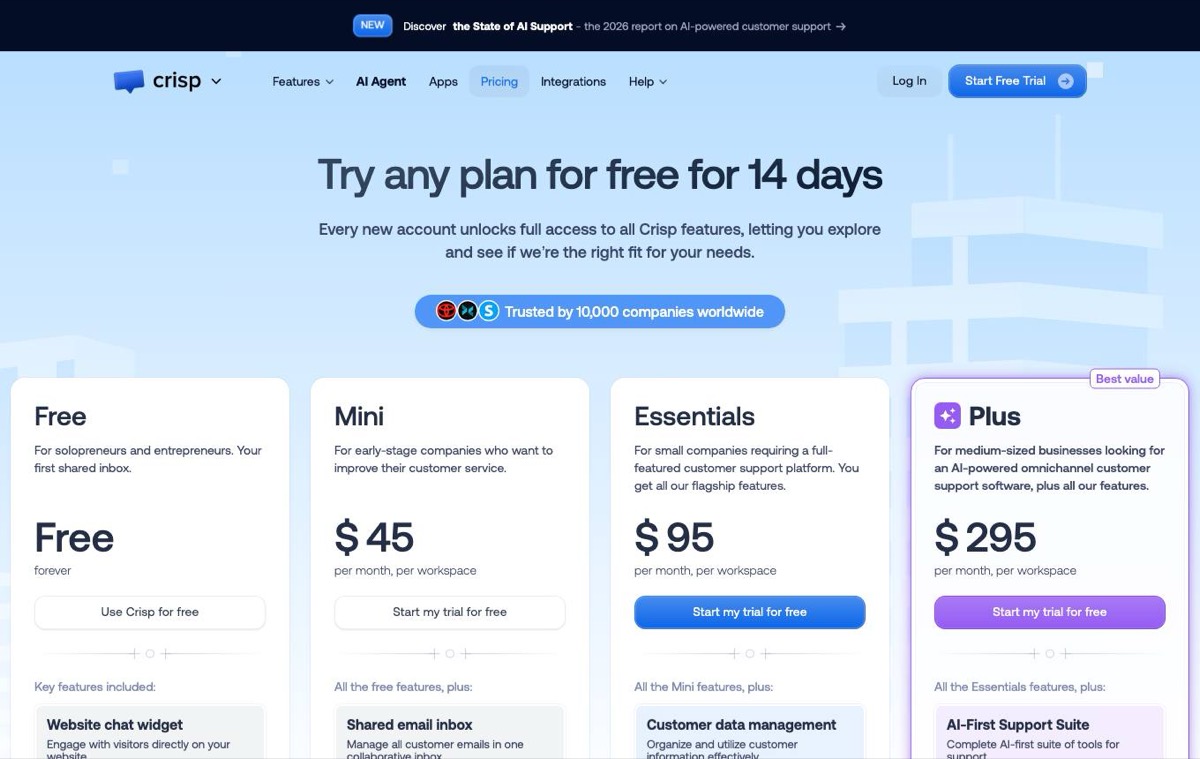 Crisp pricing page, captured 3 October 2026.
Each additional website is another Crisp workspace on another bill, with 20 percent off from 3 workspaces.
Is Convot good for small teams?
Convot is good for small software teams, especially those running more than one product. Each product gets its own chat widget, help center, changelog, roadmap with voting, status page and in-chat scheduling, and every conversation, from chat and email, lands in one shared inbox with one record per customer.
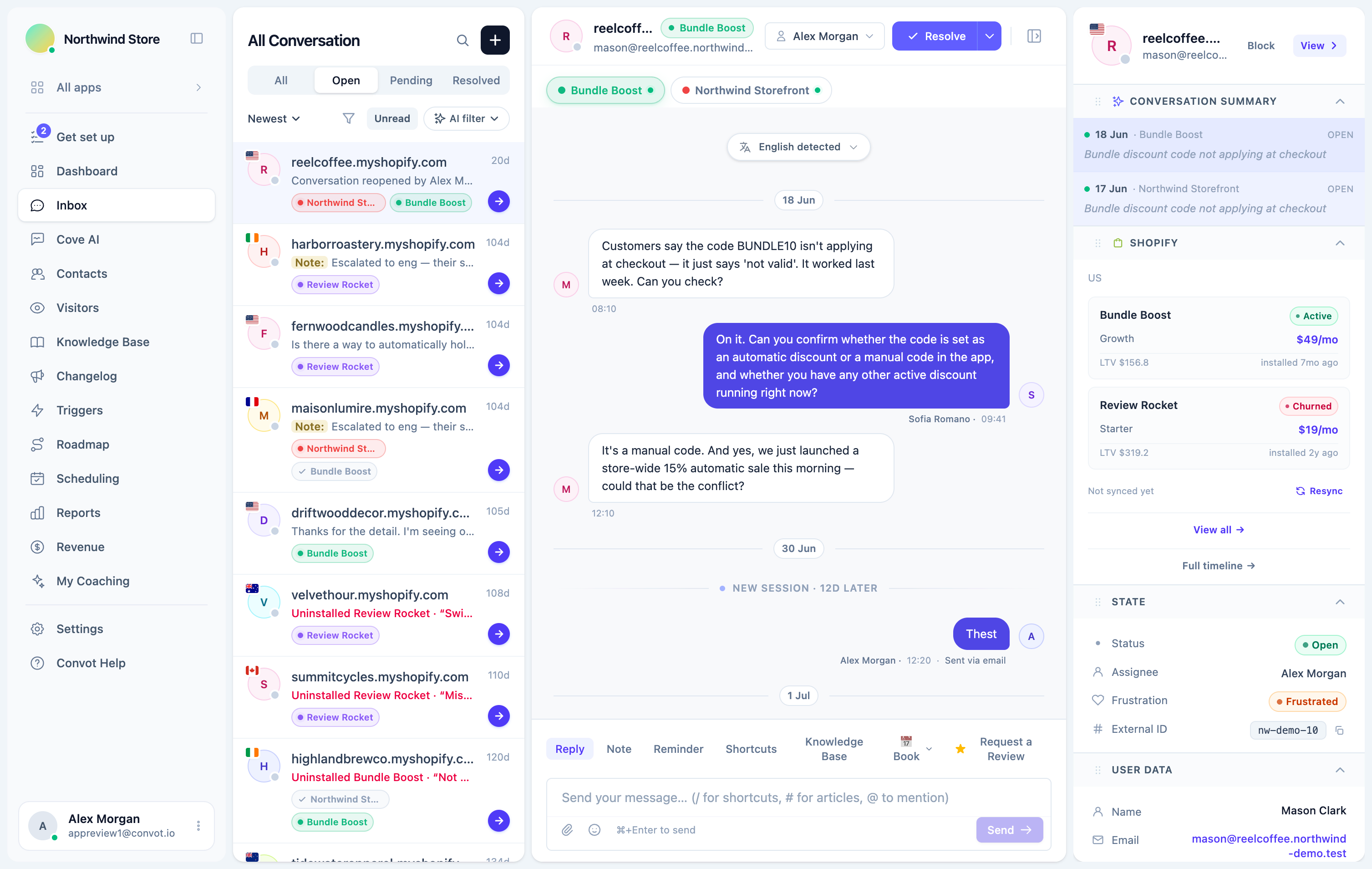 The Convot inbox, with conversations from every app in one place.
Convot is priced by how many apps you run, with seats included: free under $1,000 MRR for 1 app and 3 seats, then Starter at $49 a month for 1 app and 3 seats, Growth at $79 for 2 apps and 7 seats, and Pro at $149 for 5 apps and 12 seats, with $20 per extra app and $10 per extra seat. The Cove AI agent is available on paid plans at $0.20 per resolved conversation in which it sent an automatic reply. AI quality grading and frustration escalation are included on every plan.
Convot’s limits: it has no voice, phone or messaging apps such as WhatsApp, its integration ecosystem is smaller than the incumbents’, and only Crisp has a self-serve importer. The Convot team runs Zendesk, Intercom and Freshdesk migrations for you, free, keeping original conversation dates.
How do the help desks compare?
| Tool | Pricing unit | Lowest paid price per person | Price for 3 people, per month | AI agent price |
|---|---|---|---|---|
| Zendesk | Per agent | $19 (annual) | $165, Suite Team, annual | 5 per agent included, then about $2.00 pay as you go (reported) |
| Freshdesk | Per agent | $19 (annual) | $57, Freshdesk Growth, annual | 500 sessions included, then $49 per 100 |
| Help Scout | Per user | $25 (annual) | $75, Help Scout Standard, annual ($90 monthly) | $0.75 per resolution |
| Intercom | Per seat | $29 (annual) | $87 (Essential) to $396 (Expert), annual | Fin, from $0.99 per outcome |
| Front | Per seat | $25 (annual) | $75, Front Starter, annual | Autopilot from $0.05 per conversation |
| Crisp | Per workspace | Not per seat | $45, Mini with 4 seats; $95, Essentials with 10 | Credits bundled with paid plans, about $0.055 per automated conversation |
| Convot | Per app, seats included | Not per seat | $49, Starter with 1 app and 3 seats | Cove, $0.20 per resolved conversation |
AI prices use different units, resolutions, sessions, outcomes or conversations, so compare definitions as well as numbers.
Which help desk suits email, chat or phone support?
The right help desk depends on the channel most of your customers use, because each tool is built around one:
| Main channel | Strongest fits | Why |
|---|---|---|
| Help Scout, Front | Inboxes that feel like email, with collaboration on top | |
| Live chat in your product | Intercom, Crisp, Convot | Chat widgets built for in-product questions |
| Phone or messaging apps such as WhatsApp | Zendesk, Crisp (messaging apps from Essentials) | Voice or messaging channels in the same desk |
| Several products | Convot | A widget, help center and status page per product, one inbox |
Most small software teams use email and chat together, so check that both land in one inbox with one record per customer, whichever tool you choose.
Which help desk needs the least setup?
Tools built around one main channel need the least setup: Help Scout for email, and chat-first tools such as Convot, which starts working once you add one script tag. Zendesk offers voice, phone and skills-based routing, and Zendesk and Freshdesk both offer SLA tooling, which suits larger teams and involves more configuration. None of these vendors publishes a setup time, so test it yourself during a trial. Whatever you choose, write your ten most common answers as help articles in the first week; that setup pays off more than any configuration.
How does help desk cost grow with team size?
Help desk cost grows with whatever the vendor charges for: people, products or volume. Per-agent and per-seat tools grow with every person who answers; per-workspace tools grow with every website or product; tools priced by app grow with each product but include a set number of seats.
With published prices, for illustration:
| People | Zendesk Suite Team | Freshdesk Growth | Help Scout Standard (annual) | Convot, cheapest plan that covers the seats |
|---|---|---|---|---|
| 3 | $165 | $57 | $75 | $49 (Starter, 1 app) |
| 7 | $385 | $133 | $175 | $79 (Growth, includes 2 apps) |
| 12 | $660 | $228 | $300 | $129 (Growth plus 5 extra seats at $10, includes 2 apps) |
Convot figures are the cheapest plan that covers the seats, and competitor figures are for one inbox. Zendesk, Freshdesk and Help Scout are billed annually; Help Scout billed monthly is $30 per user, so $90, $210 and $360. At 1 app, Crisp Mini at $45 is cheaper than Convot Starter at $49; Convot’s per-app pricing pays off as you add products.
Price the tool at your expected size in a year; the help desk price calculator shows the monthly bill on six help desks at your seats, products and AI volume. The guide to help desks with flat pricing compares more tools at 3, 7 and 12 agents, and the guide to help desks for teams running more than one app prices several products.
How do you choose help desk software for a small team?
| If your team… | Best fit |
|---|---|
| Needs voice, IVR and skills-based routing | Zendesk |
| Wants email ticketing with SLA policies at a lower per-agent price | Freshdesk |
| Is email-first and values simplicity, with a free plan | Help Scout |
| Has budget and wants in-app messaging and product tours | Intercom |
| Supports customers mostly by email from a shared inbox | Front |
| Is early-stage, cost-sensitive and chat-focused | Crisp |
| Runs several products and wants one inbox with a full self-serve layer per product | Convot |
Test your top two on real conversations for a week before deciding, and price each at next year’s size.
Common questions about help desk software for small teams
What is the best help desk software for a small business? For a startup with one product, start on a free plan: Help Scout (up to 5 users, email-first), Crisp (2 seats, chat-first) or Convot (under $1,000 MRR, 1 app, 3 seats). Move to a paid plan when you need more seats or features the free plan lacks. Small businesses that mainly answer email should also price Freshdesk Growth at $19 per agent a month billed annually.
What is the cheapest help desk for a small team? The cheapest help desk software is a free plan: Help Scout (up to 5 users), Crisp (2 seats) or Convot (under $1,000 MRR, 1 app, 3 seats). The cheapest paid plan for one product is Crisp Mini at $45 a month, then Convot Starter at $49, and Freshdesk Growth or Zendesk Support Team (email only) at $57 for 3 people billed annually, with Front Starter at $75. The help desk pricing index lists 23 tools’ current prices side by side.
Does a small team need a help desk or is a shared inbox enough? A shared inbox is enough until more than one person answers regularly; then you need one owner per conversation, a help center and basic reporting, which is what a help desk adds.
When should a small team move off a free plan? Move off a free plan when you hit its limits in a way that costs you customers: more people answering than it allows, a help center you need but it lacks, or AI you want to try. Price the next plan at your size in a year before upgrading, since that is where tools differ most.
Which help desk has the best AI for small teams? Look for AI that answers from your own help center, shows its sources and hands off when unsure. Prices differ widely by unit: Front’s Autopilot from $0.05 per conversation, Convot’s Cove at $0.20 per resolved conversation, Help Scout’s AI Answers at $0.75 per resolution and Intercom’s Fin from $0.99 per outcome. Test each on your own common questions.
Help desk software for small teams, in summary
- Help Scout suits email-first teams, with a free plan.
- Freshdesk suits teams needing email ticketing with SLA policies at a low per-agent price.
- Crisp suits early-stage teams focused on chat.
- Front suits email-heavy account management.
- Intercom suits teams with budget for in-product messaging.
- Zendesk suits structured ticketing and voice.
- Convot suits small teams running several products.
Check our pricing page, or start free while you are under $1,000 MRR, with 1 app and 3 seats; Cove AI is added on a paid plan.
About the author
Tarang Agarwal is the founder of Convot. Convot is built by Sidepanda, a small studio that runs several Shopify apps of its own, including Appointo, Depo and Panda Bundle, and supports all of them from one Convot inbox.
Revenue-aware support for Shopify app teams.
Live chat, help center, and every merchant's MRR, plan, and LTV beside the conversation. Free under $1k MRR.
Start free