What to do when a merchant uninstalls your Shopify app
An uninstall is not the end of the conversation. How to reach out in the first 48 hours, find the real reason, win back the saveable, and fix what caused it.
On this page
- Why do the first 48 hours after an uninstall matter?
- How do you reach out without sounding like a survey?
- What should you say for each uninstall reason?
- How do you win back merchants who uninstalled?
- Why do merchants uninstall Shopify apps?
- How do you find the real reason a merchant uninstalled?
- What happens after a merchant uninstalls a Shopify app?
- How does Convot handle an uninstall?
- How do you reduce Shopify app uninstalls?
- How do you stop uninstalls in the first week?
- How do you measure uninstalls and win-backs?
- What should you do when a merchant reinstalls?
- Common questions about Shopify app uninstalls
- The uninstall checklist in six steps
When a merchant uninstalls your Shopify app, reach out within the first 48 hours, as a continuation of any support thread you already had with them. Read that thread before you write, decide quickly whether the merchant is saveable, and record the reason so the next fix in your product targets the most common cause. An uninstall is easy to treat as a closed door, but it is one of the most useful signals you will get all month.
Why do the first 48 hours after an uninstall matter?
The first 48 hours matter because the reason is fresh and the merchant may still answer. Shopify also sets a clock of its own: 48 hours after a store owner uninstalls your app, Shopify sends the shop/redact webhook, which asks you to erase that store’s data from your database (shopify.dev, privacy law compliance, checked 1 October 2026). Plan any outreach inside that window. Once the erasure request arrives, delete that store’s data as Shopify requires, and keep only anonymous counts of uninstall reasons.
A merchant who uninstalled this morning still remembers the setup step that confused them or the bug that broke their week. A merchant who uninstalled a month ago has moved on, and so has their memory of why.
How do you reach out without sounding like a survey?
Reach out as a continuation of the support thread the merchant already has with you, not as a generic “sorry to see you go” form. Name the problem they hit, say what has changed since, and ask one direct question.
Here is an illustrative first message; swap in the details from your own thread:
“Saw you uninstalled. When we last spoke you hit [the issue they reported], and I want to check whether that was the reason. We fixed it on [day]. If you want, I can walk you through the new setup in ten minutes.”
That message works because it shows you read the history. A survey link shows the opposite.
What should you say for each uninstall reason?
Match the message to the reason, keep it to three or four sentences, and offer one concrete next step. These are illustrative messages; adapt the details to your app and your thread:
- A bug you have since fixed: “You hit [the bug] last week, and I’m sorry it cost you time. We shipped a fix on [day], and I checked that it works on stores set up like yours. If you reinstall, I’ll stay on the thread until it’s running.”
- A confusing setup step: “It looks like setup stalled at [the step]. That step trips up a lot of people, and we’ve rewritten the guide for it. I can do it with you on a ten-minute call, or send the three steps here.”
- Price: “If the plan was more than the app was worth to you right now, tell me what you were using it for. There may be a plan that fits better, and if there isn’t, that’s useful for us to hear.”
- A missing feature: “You asked for [the feature] before you left. It’s on our roadmap, and I’ve added your vote. I’ll message you here when it ships.”
None of these asks the merchant to justify leaving. Each one shows you remember them and gives them an easy way back.
How do you win back merchants who uninstalled?
Win back merchants by messaging them within 48 hours, naming their specific problem, and offering one concrete next step. Focus on merchants who left over something you can fix or have fixed: a bug, a missing setting, a confusing setup step or a price objection. Skip merchants whose store closed or whose business changed, because no reply will change that.
| Reason | Worth chasing? | Action |
|---|---|---|
| A bug you have fixed | Yes | A personal note saying what changed |
| A confusing setup step | Yes | Offer a short walkthrough |
| Price | Sometimes | Offer a plan review or a better-fitting plan |
| Store closed or business changed | No | Log the reason and move on |
Decide quickly, using two questions:
- Was the reason something you can fix or have fixed? A bug, a missing setting or a setup step that confused them is fixable. A closed store or a change of business model is not.
- What was the merchant worth? A merchant paying $150 a month deserves a personal message from someone senior. A free-tier tester who never activated may only need a short note.
For Shopify apps, Convot shows each merchant’s plan, MRR and lifetime revenue to date beside the conversation, once your app identifies the shop with a signed Convot.identify call. Revenue is visible to owners by default, and owners can grant it to admins.
Why do merchants uninstall Shopify apps?
Merchants uninstall Shopify apps for five broad reasons: setup was confusing, they hit a bug or a broken feature, a feature they needed was missing, the price did not fit, or their store closed or their business changed. Timing is a clue. Uninstalls in the first days usually point to onboarding, and uninstalls after months usually point to value, price or a competitor. These are common patterns, not measured shares; your own uninstall reasons will tell you which bucket is biggest for your app.
How do you find the real reason a merchant uninstalled?
Start with what the merchant told Shopify, then check it against what they told you. Shopify may pass along an uninstall reason if the merchant chose one, but that reason is often brief, so treat it as a starting point rather than the full story. The fuller signal is in the support history: the questions they asked, the bug they hit, the feature they requested and how long they waited for answers.
Shopify’s own Partner Dashboard also shows uninstalls and “time to uninstall” for each app (shopify.dev, checked 1 October 2026), so you can see whether merchants are leaving in the first days or after months.
What happens after a merchant uninstalls a Shopify app?
Shopify notifies your app through the app/uninstalled webhook, and 48 hours later sends the shop/redact webhook asking you to erase that store’s data. The uninstall then shows in your Partner Dashboard, which tracks installs, uninstalls and time to uninstall for each app (shopify.dev, checked 1 October 2026). After the erasure request, keep only anonymous counts, such as how many merchants left over setup this month, and delete the store-level records.
How does Convot handle an uninstall?
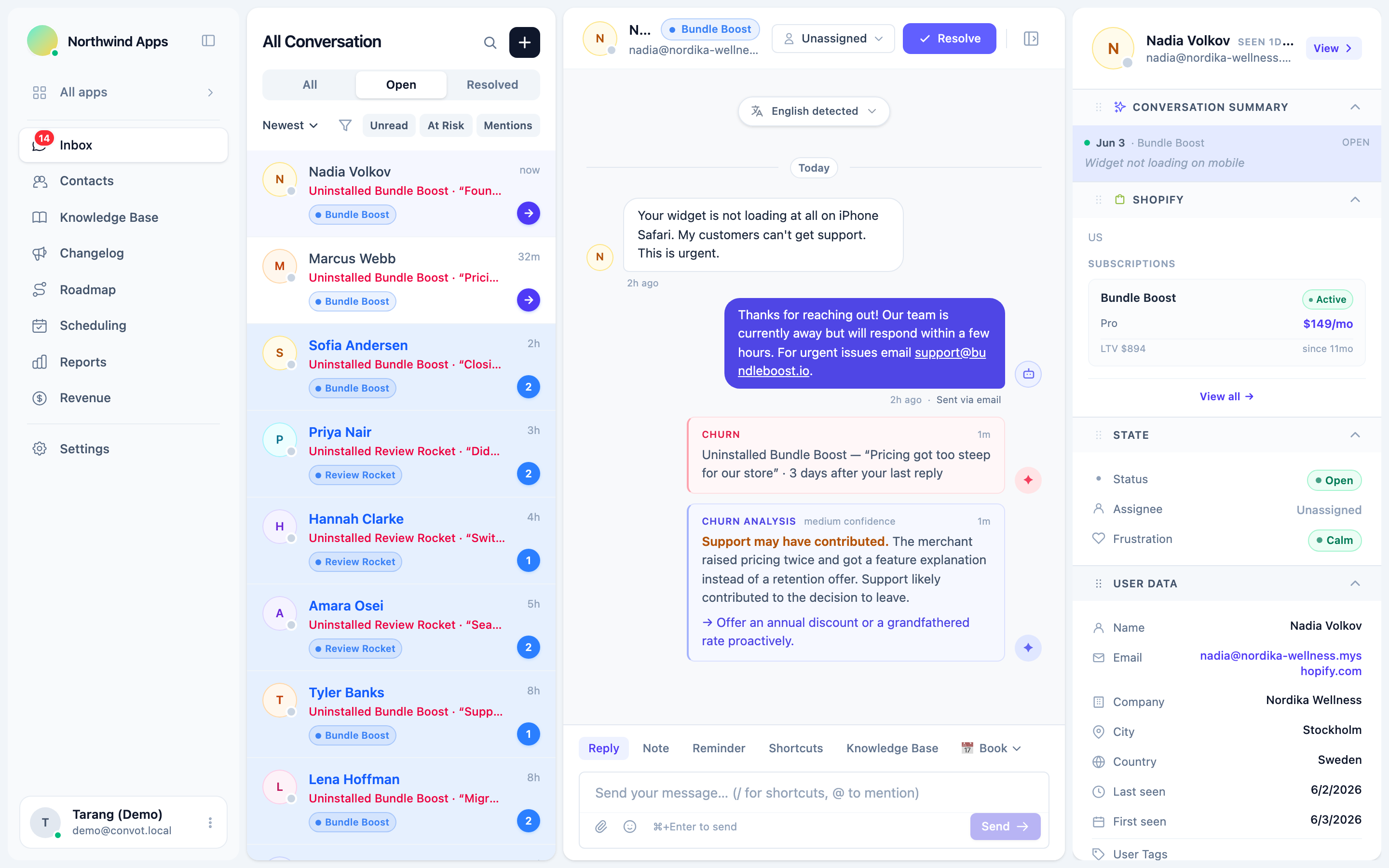
Convot surfaces a Shopify uninstall in the merchant’s support conversation, so your team can respond while the relationship is still warm. It needs the Shopify Partner API connected, and it applies to merchants whose Shopify domain is matched to a contact in Convot.
Here is what happens, from Convot’s own documentation:
- The conversation reopens. If the merchant had a support conversation in the last 7 days (the default window, which you can change), Convot sets it back to Open, so it reappears in your queue.
- An activity message is posted with the app name, the uninstall reason Shopify provided if the merchant gave one, and how many days had passed since your last reply.
- A best-effort AI review follows, saying whether support may have played a part: “support not cause”, “support may have contributed”, or “unclear”, with a suggested next step. Treat it as a prompt to read the thread, not as a verdict.
- A reinstall is noted too. If the merchant reinstalls, Convot posts a “Reinstalled [app name], recovered” note in the same conversation. It does not resolve the conversation for you.
It only acts on fresh uninstalls from the last 48 hours, so connecting your account does not reopen years of old conversations. If there was no conversation in the last 7 days, nothing reopens, and the uninstall still shows in the merchant’s revenue record. You can turn the feature off in your inbox settings.
How do you reduce Shopify app uninstalls?
Reduce uninstalls by fixing the most common cause first, starting with onboarding and the top bug. Tag every uninstall with a reason and keep the monthly count for each reason; once the erasure request is processed, keep the counts, not the store-level notes. After a few weeks the counts tell you where to spend:
| Reason bucket | Usually a fix for |
|---|---|
| Setup was confusing | Onboarding and docs |
| A bug or a broken feature | Engineering |
| A feature they needed was missing | The roadmap |
| Price | Plans and packaging |
| Store closed or business changed | Nothing; note it and move on |
Fix the biggest fixable bucket first, watch whether that bucket shrinks the next month, and repeat. If a missing feature keeps coming up, put it on your public roadmap so the merchants who asked for it can see it coming, and tell them when it ships.
How do you stop uninstalls in the first week?
Stop first-week uninstalls by fixing onboarding: define an activation moment, offer help in the first session, and contact merchants who have not activated by day 2. First-week uninstalls are usually onboarding problems, which makes them the easiest to prevent. A first-week checklist:
- Define your activation moment, the first action that shows the app is working for the merchant, such as a first booking or a first published widget.
- Message new merchants in their first session, from a real person, offering help with setup.
- Put chat on the setup screens, where merchants get stuck, so a question takes a minute instead of an uninstall.
- Check on day 2 who has not activated, and reach out to them first.
- Fix the step where most merchants stall, then measure again the following month.
The onboarding guide for Shopify apps covers this step by step.
How do you measure uninstalls and win-backs?
Three numbers are enough to see whether your uninstall work is paying off:
- Uninstall rate = uninstalls this month ÷ merchants at the start of the month.
- Early uninstall share = uninstalls within 7 days of install ÷ all uninstalls this month. A high share points to onboarding.
- Win-back rate = merchants who reinstall within 30 days of your outreach ÷ merchants you contacted.
For example, if you contact 40 merchants after they uninstall and 6 reinstall within 30 days, your win-back rate is 15 percent. Track the trend month by month; the number matters less than whether it rises after you change your outreach or fix a common cause.
What should you do when a merchant reinstalls?
A merchant who reinstalls deserves a thank-you, a check that the fix works for their store, and a note in the history for the team. A merchant who reinstalls after a fix can be more forgiving than one who never had a problem, because they have seen you respond.
Common questions about Shopify app uninstalls
How soon should you contact a merchant who uninstalled?
Contact them within 48 hours, while the reason is fresh and before Shopify’s shop/redact request asks you to erase their store’s data.
Should you offer a discount to win a merchant back? Offer a discount only when price was the stated reason. A discount does not fix a bug or a confusing setup step, and offering one by default can teach merchants that leaving earns a better deal.
Should you contact every merchant who uninstalls? Prioritise merchants who left for a fixable reason and those who were paying you. A merchant whose store closed does not need a win-back message, though a short thank-you costs nothing.
What is a normal uninstall rate for a Shopify app? Uninstall rates vary widely by app category and price, and there is no reliable public benchmark. Compare each month with your own previous months, and watch the early uninstall share in particular.
The uninstall checklist in six steps
- Reach out in the first 48 hours, before Shopify’s data-erasure request arrives.
- Write as a continuation of the support thread, not a survey.
- Decide quickly whether the reason is fixable and what the merchant was worth.
- Find the real reason in the support history, not only the uninstall form.
- Tag every uninstall and fix the biggest fixable bucket first.
- When a merchant reinstalls, confirm the fix and note it in the new conversation.
For more on keeping merchants before they reach the uninstall button, see the churn reduction playbook. To see uninstalls inside your support inbox, start free while you are under $1,000 in monthly revenue.
About the author
Tarang Agarwal is the founder of Convot. Convot is built by Sidepanda, a small studio that runs several Shopify apps of its own, including Appointo, Depo and Panda Bundle, and supports all of them from one Convot inbox.
Revenue-aware support for Shopify app teams.
Live chat, help center, and every merchant's MRR, plan, and LTV beside the conversation. Free under $1k MRR.
Start free