Reading your Shopify Partner revenue: MRR, ARR, ARPU and LTV explained
MRR, ARR, ARPU, LTV and net payout for a Shopify app: what each one means, how to calculate it, and how to read it from your Partner data.
On this page
- How do you calculate MRR for a Shopify app?
- What is the quick ratio for a Shopify app?
- What mistakes make MRR wrong?
- How do you calculate MRR from a Partner Dashboard export?
- What is ARR, and when should you use it?
- What is ARPU?
- How do you calculate LTV for a Shopify app?
- How do LTV and acquisition cost work together?
- What is net payout, and how does Shopify’s revenue share affect it?
- Does the Shopify Partner Dashboard show MRR?
- How does Convot read your Partner revenue?
- How do you track merchant retention by cohort?
- Why do revenue numbers belong in support?
- The five numbers in one list
- Common questions about Shopify app revenue metrics
A Shopify app business runs on five numbers: MRR (monthly recurring revenue), ARR (MRR times 12), ARPU (MRR divided by active merchants), LTV (ARPU divided by monthly churn) and net payout (what reaches your bank after Shopify’s share and fees). Shopify’s Partner Dashboard shows your earnings, installs and uninstalls, but it does not calculate MRR, churn rate or LTV, so you work those out yourself or connect a tool that reads your Partner data.
These five numbers apply to any Shopify app with recurring subscriptions; apps that bill only one-time or usage charges need a different view. Below is what each one means, how to calculate it, and what to watch.
How do you calculate MRR for a Shopify app?
MRR = the sum of every active subscription’s monthly amount, where each plan’s price is divided by the months in its billing period: annual plans by 12, 90-day plans by 3.
A merchant on a $29 monthly plan adds $29 to MRR every month until they cancel. A merchant on a $290 annual plan adds $290 ÷ 12, about $24.17, even though Shopify charges them once a year. For example, 100 merchants on $29 a month plus 20 merchants on $290 a year give an MRR of (100 × $29) + (20 × $24.17), about $3,383.
Keep one-time charges out of MRR, because they do not recur. Usage charges are worth tracking next to MRR rather than inside it, because they move with how much a merchant uses your app each month.
Watch the trend, not the snapshot. Three movements explain any change in MRR:
- New MRR: revenue from subscriptions that started this month.
- Expansion: merchants moving to a higher plan.
- Churned MRR: revenue lost from subscriptions that were cancelled, plus downgrades.
If new MRR and expansion are bigger than churned MRR, the business is growing.
What is the quick ratio for a Shopify app?
The quick ratio measures how efficiently MRR grows: how much you add for every dollar you lose.
Quick ratio = (new MRR + expansion) ÷ (churned MRR + downgrades).
For example, an app that adds $1,200 in new MRR and $300 in expansion in a month, while losing $400 to cancellations and $100 to downgrades, has a quick ratio of $1,500 ÷ $500 = 3. A ratio above 1 means MRR grew; below 1 means it shrank. Two apps can both grow $1,000 in a month, one by adding $1,100 and losing $100 (a ratio of 11) and one by adding $5,000 and losing $4,000 (a ratio of 1.25). The second is running hard to stand still, and its growth will stall as soon as acquisition slows.
What mistakes make MRR wrong?
Most MRR errors come from counting money that is not recurring, or counting it in the wrong month:
- Counting one-time charges. A $99 setup fee is revenue, but it is not MRR.
- Counting an annual plan in one month. A $290 annual charge is $24.17 of MRR for 12 months, not $290 in the month it lands. Counting it once makes MRR spike and then fall.
- Counting free trials. A merchant on a trial adds nothing to MRR until their first paid charge.
- Ignoring credits and refunds. Application credits and refunds reduce what you actually earn from a merchant, so subtract them when you reconcile MRR with earnings.
- Mixing usage charges into MRR. Usage revenue moves with each merchant’s activity. Track it next to MRR so a busy month does not look like growth in your base.
- Changing the rules mid-year. If you change how you count trials or usage, restate the earlier months, or your trend line will show a jump that never happened.
How do you calculate MRR from a Partner Dashboard export?
The Partner Dashboard exports current merchants, earnings and a charge history as CSV files. To work out MRR in a spreadsheet:
- Export the charge history for your app.
- Keep recurring charges only, and drop one-time and usage charges. Net off any credits and refunds that appear in the history.
- Use the current merchants export to see who is still subscribed, and for each of those merchants take their latest recurring charge.
- Convert each charge to a monthly amount: monthly as is, annual divided by 12, 90-day divided by 3.
- Add up the monthly amounts. The total is your MRR.
Repeat it on the same day each month so the numbers stay comparable. The process works, but it takes time each month, which is why many teams move to a tool that reads the Partner API as their merchant count grows.
What is ARR, and when should you use it?
ARR is MRR multiplied by 12: the yearly run rate if nothing changed. An app with $8,000 in MRR has an ARR of $96,000. Use ARR when you describe the size of the business to an investor, a buyer or an accelerator, and MRR when you run it month to month, because MRR moves fast enough to show the effect of what you just shipped.
What is ARPU?
ARPU = MRR ÷ active merchants. ARPU, average revenue per user, is the average monthly revenue each merchant brings in: an app with $8,000 in MRR and 400 active merchants has an ARPU of $20. Rising ARPU means you are moving merchants onto higher plans or attracting bigger stores. Falling ARPU while merchant count grows usually means most growth is on your cheapest plan.
Count paying merchants only, and keep the rule the same every month. Counting merchants on a free trial lowers ARPU, because they add merchants but no revenue yet; if your tool counts trials as active, note it when you compare months.
How do you calculate LTV for a Shopify app?
LTV, lifetime value, estimates what a merchant is worth across the whole time they stay. The simple version is ARPU divided by your monthly churn rate.
LTV = ARPU ÷ monthly churn rate, where monthly churn rate = merchants lost this month ÷ merchants at the start of the month (for example, 20 ÷ 500 = 4 percent).
For example, if your average merchant pays $30 a month and 4 percent of merchants churn each month, the average merchant stays about 25 months (1 ÷ 0.04), and LTV is about $750 ($30 × 25). If you know your costs, multiply LTV by your gross margin to get the profit a merchant is worth rather than the revenue.
LTV tells you how much you can afford to spend to win a merchant. If it costs you $200 in ads and time to bring in a merchant worth $750, the numbers work. If it costs $900, they do not.
How do LTV and acquisition cost work together?
Compare LTV with CAC, your cost to acquire a merchant: everything you spend on ads, listings, content and sales time in a month, divided by the new paying merchants you won that month. The ratio tells you whether growth pays for itself. A ratio of about 3 to 1 is a common rule of thumb in subscription businesses; treat it as a starting point, not a law.
The payback period is often more useful for a small app, because it tells you how long your cash is tied up:
Payback period = CAC ÷ (ARPU × gross margin).
For example, if CAC is $200, ARPU is $30 and gross margin is 80 percent, each merchant returns $24 a month, so you earn back the $200 in a little over 8 months ($200 ÷ $24). If your average merchant stays 25 months, that is comfortable. If they stay 6, you lose money on every merchant you win.
What is net payout, and how does Shopify’s revenue share affect it?
Net payout = gross app revenue, minus Shopify’s revenue share (0 percent on the first $1,000,000 of lifetime revenue, 15 percent above), minus the 2.9 percent processing fee and any sales tax. Shopify’s current terms (shopify.dev, revenue share, checked 1 October 2026) are:
- You keep 100 percent of your first $1,000,000 in gross app revenue earned from January 1, 2025, and 85 percent of earnings above that. The threshold is lifetime revenue, not a yearly allowance.
- All billing is subject to a 2.9 percent processing fee, plus applicable sales tax.
- Registering for the revenue share plan costs a one-time $19 per Partner account.
For example, an app under the $1,000,000 threshold that bills $10,000 in a month pays about $290 in processing fees (2.9 percent), so roughly $9,710 reaches the developer before tax. Above the threshold, Shopify keeps 15 percent of the earnings over $1,000,000, in addition to the processing fee.
Does the Shopify Partner Dashboard show MRR?
The Shopify Partner Dashboard does not show MRR, churn rate or LTV (shopify.dev, track app usage, checked 1 October 2026). It is free and shows total earnings, payouts, earnings by charge type, merchants with your app, installs, uninstalls and time to uninstall. You can export current merchants, earnings and a full charge history as CSV files, then calculate MRR yourself, or use a tool that reads the Shopify Partner API.
| Option | Shows MRR and LTV | Price |
|---|---|---|
| Shopify Partner Dashboard plus a spreadsheet | You calculate them | Free |
| ChartMogul or Baremetrics | Yes, with deeper reporting | ChartMogul free up to $10,000 MRR, then from $57 a month billed annually; Baremetrics from $49 a month billed annually (checked 1 October 2026) |
| Convot | Yes, beside support conversations | Free under $1,000 MRR, then from $49 a month |
Mantle’s notice set August 14, 2026 as the end date for its services other than billing, and September 30, 2026 for Mantle Billing. The same numbers rebuild from the Partner API. See how to rebuild after Mantle’s shutdown.
How does Convot read your Partner revenue?
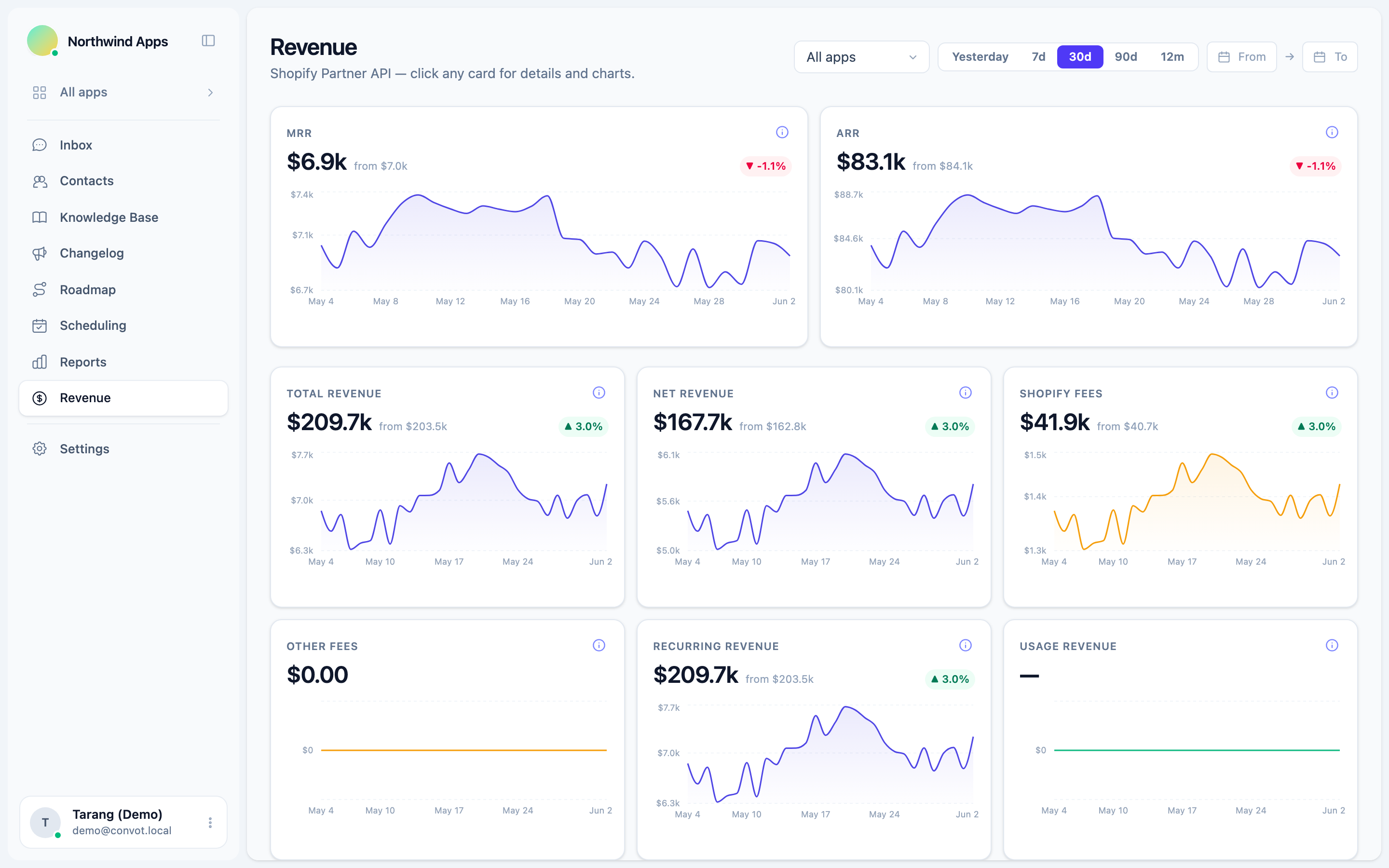
Convot connects to the Shopify Partner API and builds a revenue dashboard from your transactions: MRR, ARR, active merchants, new MRR, churned MRR, ARPU and LTV, with charts by time range and a filter for each app. It converts annual and 90-day plans to a monthly figure, and on first connect it backfills your full transaction history; large accounts can take a few minutes. After that it syncs about every 4 minutes. Convot counts merchants on an active or trialing subscription as active and shows LTV as an estimate, so its ARPU and LTV may differ from the figures you calculate by hand with the formulas above.
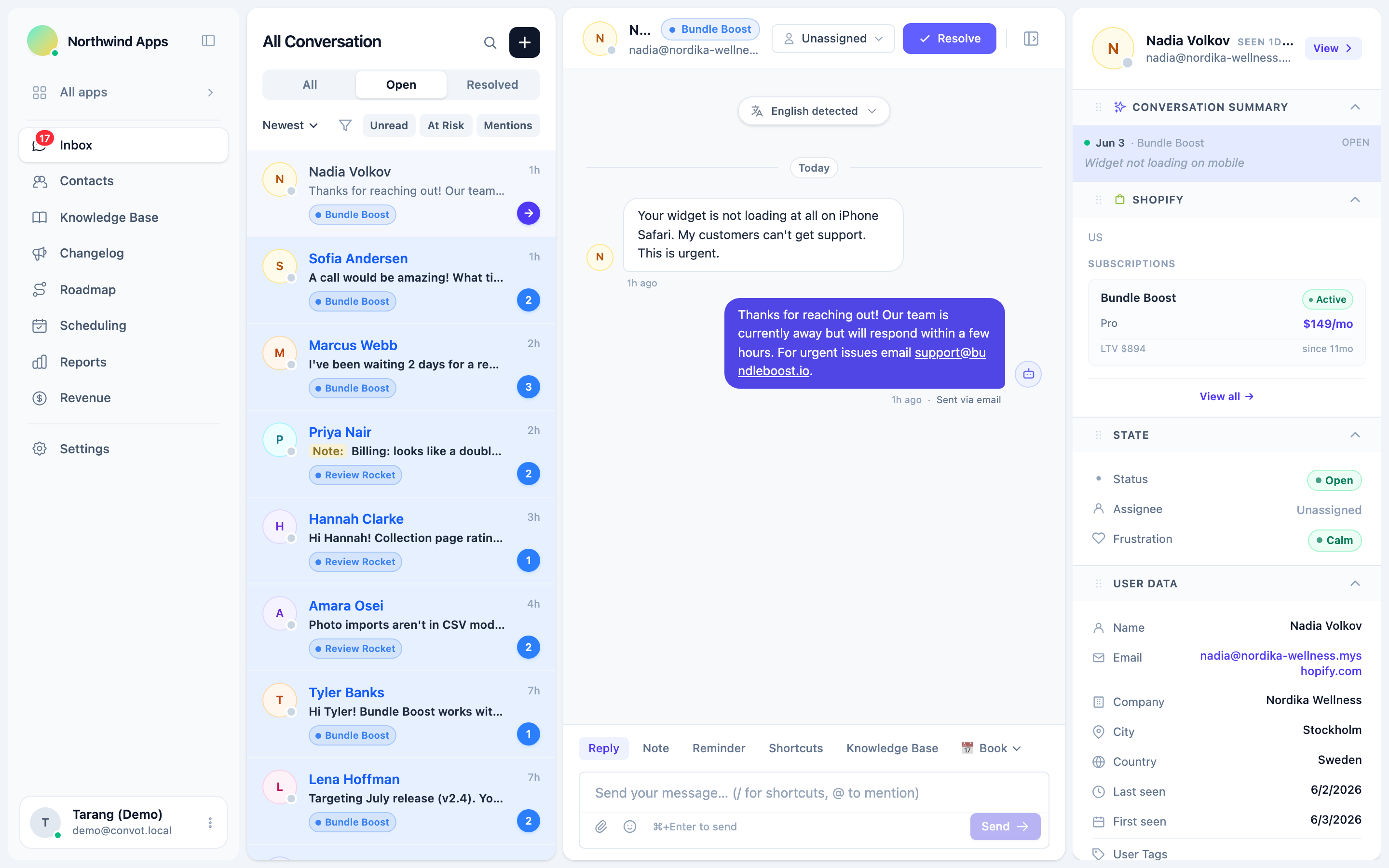
Once your app identifies the shop with a signed Convot.identify call, Convot also shows each merchant’s plan, MRR and lifetime revenue to date, the total gross revenue they have paid you so far, beside their support conversation. The revenue dashboard and the sidebar are visible to owners by default, and owners can grant access to admins.
How do you track merchant retention by cohort?
A cohort groups merchants by the month they first paid, then tracks what share of each group is still paying in later months. Cohorts show whether retention is improving, which a single churn rate hides, because a flood of new merchants can make the overall rate look better while older merchants keep leaving. For example:
| First paid in | Merchants | After 1 month | After 3 months | After 6 months |
|---|---|---|---|---|
| January | 100 | 92 | 80 | 71 |
| April | 120 | 109 | 98 | not yet |
| July | 90 | 86 | not yet | not yet |
In this example, January kept 80 percent of merchants after 3 months and April kept about 82 percent (98 of 120), so retention is improving slightly. If a change to onboarding shipped in April, this is where you would see whether it worked.
Why do revenue numbers belong in support?
Revenue numbers help support most at the moment you answer a ticket. In a dashboard you check weekly they describe the business. Beside a live conversation they change what you do next: a merchant who has paid you $1,800 so far and reports a bug gets a different reply, and a faster one, than a free-tier tester asking a setup question. That is the idea behind revenue-aware support, covered in depth in why support is a revenue function for Shopify apps, and it connects to the churn reduction playbook: know who you are about to lose, and answer them first.
The five numbers in one list
- MRR: monthly recurring revenue, with annual plans divided by 12.
- ARR: MRR × 12.
- ARPU: MRR ÷ active merchants.
- LTV: ARPU ÷ monthly churn rate.
- Net payout: gross revenue minus Shopify’s share (0 percent on your first $1,000,000 lifetime, 15 percent above) and the 2.9 percent processing fee; $10,000 billed under the threshold leaves about $9,710 before tax.
Common questions about Shopify app revenue metrics
Is MRR the same as monthly earnings in the Partner Dashboard? MRR and monthly earnings are different numbers. Earnings include one-time and usage charges and record an annual charge in the month it is paid, while MRR counts only recurring subscriptions, spread evenly across each month.
Do free trials count toward MRR? Free trials do not count toward MRR. A merchant adds to MRR from their first paid recurring charge.
Does Shopify’s revenue share reset every year? Shopify’s current terms use a lifetime threshold, not a yearly one: you keep 100 percent of your first $1,000,000 in gross app revenue earned from January 1, 2025, and 85 percent above that (shopify.dev, checked 1 October 2026).
How often should you check these numbers? Check MRR and churn monthly, on the same day each month, and cohorts every quarter. Daily checks can show noise from the timing of charges.
Start free while you are under $1,000 in monthly revenue, and connect your Partner account to see these numbers beside every Shopify support conversation.
About the author
Tarang Agarwal is the founder of Convot. Convot is built by Sidepanda, a small studio that runs several Shopify apps of its own, including Appointo, Depo and Panda Bundle, and supports all of them from one Convot inbox.
Revenue-aware support for Shopify app teams.
Live chat, help center, and every merchant's MRR, plan, and LTV beside the conversation. Free under $1k MRR.
Start free