How to Reduce Customer Churn: A Retention Playbook for Shopify Apps and SaaS
A practical playbook to reduce customer churn: measure it, spot at-risk customers early, save the ones worth saving, recover failed payments, and grow NRR.
On this page
- How do you measure churn?
- What is a good churn rate?
- How do you measure churn on annual plans?
- How do you spot customers who are about to churn?
- Churn starts long before the cancellation
- How do you decide which customers to save first?
- How do you reduce churn in the first two weeks?
- How does self-serve support reduce churn?
- What is involuntary churn and how do you recover it?
- Tag why customers leave, and fix the biggest bucket
- Should you run save offers?
- What is net revenue retention (NRR)?
- How do you reduce churn for a Shopify app?
- Common questions about customer churn
- The churn playbook in ten steps
To reduce customer churn, measure customer churn and revenue churn separately, flag at-risk accounts from falling usage and unresolved tickets, fix onboarding in the first two weeks, answer support fast, recover failed payments, and grow net revenue retention through expansion. Churn compounds: at 5 percent monthly churn you lose about 46 percent of your customers in a year, so growth has to outrun that leak before it does anything else.
For a Shopify app, churn is an uninstall or a cancelled paid plan, so reach merchants in their first session after install and read the thread behind any uninstall. The rest of this playbook works for any subscription product.
How do you measure churn?
Churn is measured two ways, and you need both, because one number hides two different problems.
- Customer churn rate = customers lost in the period ÷ customers at the start of the period.
- Revenue churn rate = recurring revenue lost to cancellations and downgrades ÷ recurring revenue at the start of the period.
For example, you start a month with 200 customers paying $10,000 in monthly recurring revenue, and 10 customers worth $400 a month cancel. Customer churn is 5 percent (10 ÷ 200) and revenue churn is 4 percent ($400 ÷ $10,000).
The two diverge in a way that matters. Lose ten low-value customers while your big accounts stay, and customer churn looks scary while revenue churn barely moves. Watch both, and give revenue churn more weight, because it is what reaches the bank.
For a Shopify app, count a merchant as churned when they uninstall or cancel their paid plan, and use the same start-of-month base every month so the rate stays comparable.
What is a good churn rate?
A good churn rate is one your growth can outrun: at 1 percent monthly churn you keep about 89 percent of customers over a year, at 3 percent about 69 percent, and at 5 percent about 54 percent. Judge yours against your own price tier and your own cohort trend, because low-priced, self-serve products usually churn faster each month than products sold to larger accounts. Churn compounds on the customers who are left:
| Monthly churn | Customers kept after 12 months | Customers lost |
|---|---|---|
| 1 percent | about 89 percent | about 11 percent |
| 3 percent | about 69 percent | about 31 percent |
| 5 percent | about 54 percent | about 46 percent |
These are arithmetic, not benchmarks: 0.99, 0.97 and 0.95 raised to the 12th power. Track the trend by monthly cohort. If each new cohort keeps more customers than the last, your retention is improving whatever anyone else’s number is.
How do you measure churn on annual plans?
Measure annual plans by renewal rate, because annual customers can only leave at renewal. Renewal rate = customers who renewed ÷ customers whose plan came up for renewal in the period. For example, if 50 annual customers came up for renewal this quarter and 41 renewed, the renewal rate is 82 percent and annual churn for that group is 18 percent.
Do not mix annual and monthly customers in one monthly churn rate. Annual customers make monthly churn look low for eleven months and then spike in the renewal month. Track them separately, or convert the annual rate to a monthly equivalent: an 82 percent renewal rate keeps the same share of customers over a year as roughly 1.6 percent monthly churn (0.984 raised to the 12th power is about 0.82). Watch the renewal month closely; that is when an annual customer who has quietly stopped using the product actually leaves.
How do you spot customers who are about to churn?
Customers who are about to leave usually show it weeks before they cancel. The strongest early signals are falling usage (fewer logins, fewer core actions, fewer active seats), stalled adoption (they never reached the feature that delivers the value) and negative support experiences (slow resolutions, repeated issues, frustration in the thread).
You do not need a data team to act on this. Build a simple health score: pick three or four signals, rate each green, yellow or red, and review the red and yellow accounts every week. For example:
| Signal | Green | Yellow | Red |
|---|---|---|---|
| Weekly logins | Steady or rising | Down by a third | Down by half or more |
| Core feature used | This week | Last month | Never |
| Open support issue | None | One, under 2 days old | Unresolved for days |
The thresholds above are examples to adapt, not rules. A customer whose usage halved and who has an unresolved ticket is at real risk of leaving, and reaching out before they decide is far cheaper than a win-back after.
Churn starts long before the cancellation
The decision to leave often starts well before the cancellation: the night they hit a confusing setup step and got no answer, the week a bug went unfixed, or the day a competitor shipped the feature they asked for. So the first move is not a win-back email. It is faster, better support, and a way to see which conversations are turning sour while they can still be fixed.
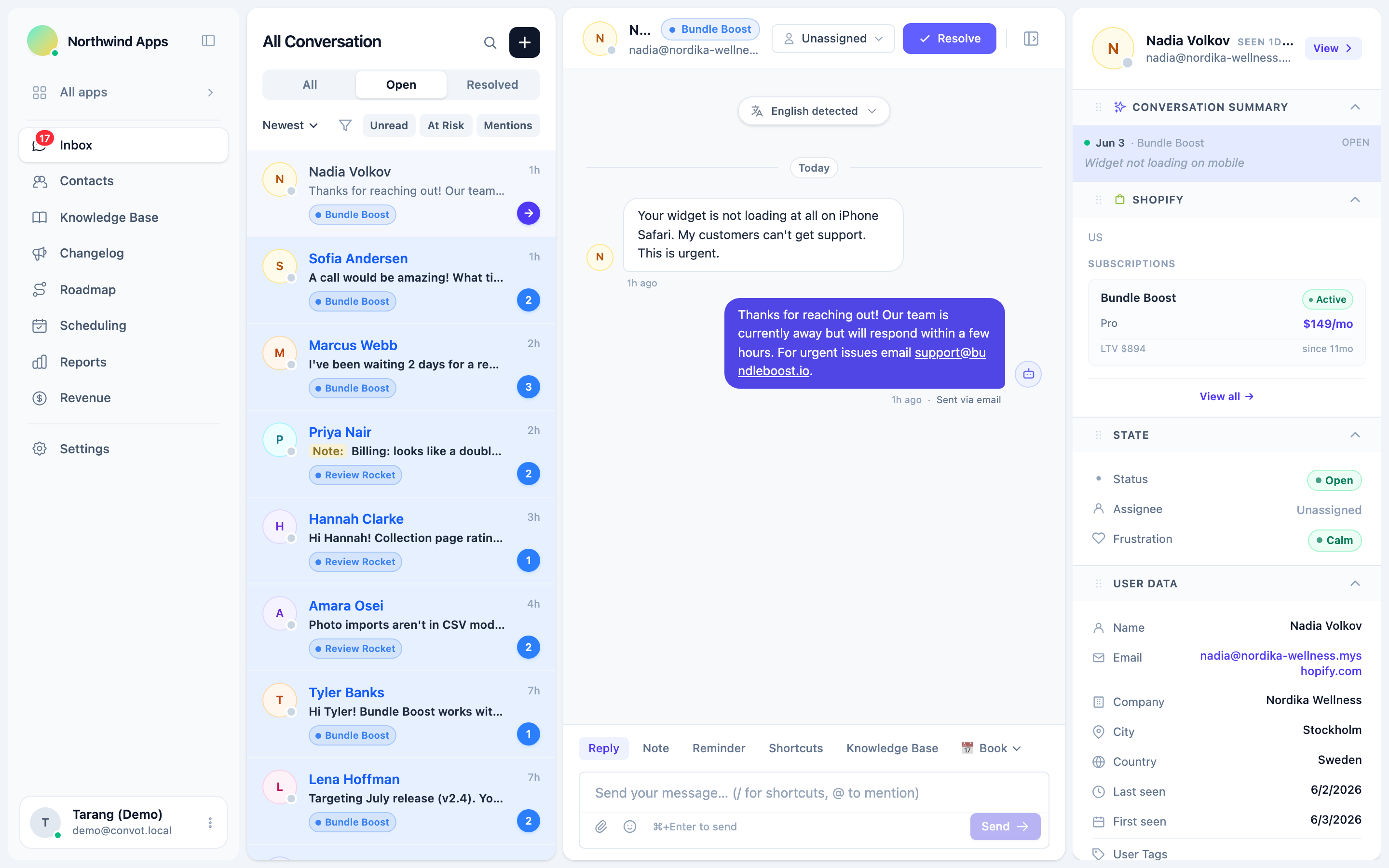
Convot’s frustration escalation watches incoming customer messages and flags conversations that show signs of frustration, so a teammate can step in early. Fast, useful answers also help you earn more reviews, because the customer you rescue is often the one who recommends you.
How do you decide which customers to save first?
Customers do not all deserve the same response time. A customer paying you $200 a month who hits a bug is a different priority from a free-tier user trying things out. Many support tools do not show that difference, so the team treats a customer worth thousands the same as one worth nothing yet.
For Shopify apps, Convot shows each merchant’s MRR, plan, and lifetime value beside the conversation, once you connect your Shopify Partner account and your app identifies the shop with a signed Convot.identify call. Revenue is visible to owners by default, and owners can grant it to admins. It is the same idea as in customer support metrics: connect support activity to revenue, and your priorities sort themselves.
How do you reduce churn in the first two weeks?
Early cancellations are common, so check your own data first: what share of the customers who churned left within their first 14 days? Customers who leave early usually signed up, got stuck, and drifted before the product became a habit.
The fix is proactive onboarding. Reach out during the first session, answer the first question fast, and get the customer to the moment the product pays off. Track where new customers stall, because that step is often both your biggest source of tickets and your biggest driver of early churn.
How does self-serve support reduce churn?
Self-serve support reduces churn by removing effort. Every time a customer waits, repeats themselves or hunts for an answer, they move closer to leaving. Research from CEB, published by Matthew Dixon, Karen Freeman and Nicholas Toman in Harvard Business Review as “Stop Trying to Delight Your Customers” (2010), found that reducing customer effort does more for loyalty than exceeding expectations.
A searchable help center and clear docs remove that effort at the moment it appears. The ticket deflection playbook covers how to build one, and the payoff is not only fewer tickets but fewer customers giving up.
What is involuntary churn and how do you recover it?
Involuntary churn is customers lost to failed payments rather than a decision to leave: expired cards, insufficient funds and bank declines. It is often the easiest kind of churn to recover, because the customer did not choose to cancel.
Recover it in three steps:
- Email customers before a card expires.
- Retry a failed charge over several days, not once.
- Send a clear update-payment link after each failure.
If you bill a Shopify app through Shopify’s App Pricing, Shopify automates recurring charges for you, so check what your billing setup already handles before you build dunning of your own.
Tag why customers leave, and fix the biggest bucket
Tag every cancellation with a reason: price, missing feature, poor onboarding, an unresolved bug, switched to a competitor, or no longer needed. After a few weeks the buckets tell you where to spend. Churn driven by onboarding is a product fix. Churn driven by slow support is a staffing or tooling fix. Churn driven by a missing feature is a roadmap decision. Without the tags, you treat all churn as one problem and fix none of it well.
Should you run save offers?
Run save offers only at the cancel step, as a pause option or a targeted discount, and always capture the reason. They can keep customers who are leaving for fixable reasons, such as a temporary budget squeeze or a feature that ships next month. Lean on them too hard and they hide the real problem: a discount does not fix bad onboarding or slow support, it only delays the churn and teaches customers to threaten leaving.
What is net revenue retention (NRR)?
Net revenue retention (NRR) is the share of recurring revenue you keep from the customers you already had, after upgrades, downgrades and cancellations, with new customers left out.
NRR = (starting MRR plus expansion, minus downgrades, minus churned MRR) ÷ starting MRR.
For example, you start with $10,000 in MRR, existing customers upgrade by $1,500, others downgrade by $300, and $700 churns. NRR is $10,500 ÷ $10,000, or 105 percent. Above 100 percent, your existing customers grow revenue on their own, even with no new sales.
You get there by making successful customers more valuable over time, through usage-based growth, upgrades and new features they adopt, not only by plugging leaks. A customer who is succeeding renews and expands. One who is struggling churns.
How do you reduce churn for a Shopify app?
Shopify app churn shows up as uninstalls and plan cancellations. To reduce it, reach merchants in their first session after install, fix setup friction, answer support fast, prioritise the merchants paying you most, and treat an uninstall right after a support conversation as a reason to read that thread and reach out.
If a Shopify merchant uninstalls within 7 days of a support conversation (the default window), Convot reopens that conversation so you can reach out, and its AI posts a best-effort review of whether support may have played a part. Treat that review as a hint to read the thread, not a verdict. For Shopify apps, Convot also shows MRR, ARR and LTV from your Partner data, so you may not need a separate revenue tool like ChartMogul. Products that do not bill through Shopify still need one.
Common questions about customer churn
What is the difference between churn and retention? Churn and retention are two sides of the same number. If 4 percent of customers leave in a month, 96 percent stay, so monthly retention is 96 percent.
Does a downgrade count as churn? A downgrade counts toward revenue churn but not customer churn, because the customer stays and pays less. Track downgrades with revenue churn, or you will miss revenue leaking out of customers who never cancel.
Should free users count in your churn rate? Free users should not count in your paid churn rate. They pay nothing, so including them mixes signups who never intended to pay with paying customers who leave. Track free-to-paid conversion separately, and for a Shopify app, track free-plan uninstalls as their own number, since they still show whether merchants find value.
How long does it take to see churn improve? Churn improvements show up gradually, because churn is measured over months. Watch each new monthly cohort: if customers who started after a change stay longer than those who started before it, the change is working.
The churn playbook in ten steps
- Measure customer churn and revenue churn separately.
- Know what your monthly rate compounds to over a year.
- Build a simple health score and review it weekly.
- Answer support fast, and watch for frustration.
- Prioritise the customers paying you most.
- Win the first two weeks with proactive onboarding.
- Cut effort with a self-serve help center.
- Recover failed payments.
- Tag why people leave, and fix the biggest bucket.
- Grow net revenue retention through expansion.
Do that consistently and churn stops being a tax and becomes a signal that helps you decide what to build and fix next.
See how revenue-aware support works for Shopify apps, or start free while you are under $1,000 in monthly revenue.
About the author
Tarang Agarwal is the founder of Convot. Convot is built by Sidepanda, a small studio that runs several Shopify apps of its own, including Appointo, Depo and Panda Bundle, and supports all of them from one Convot inbox.
Revenue-aware support for Shopify app teams.
Live chat, help center, and every merchant's MRR, plan, and LTV beside the conversation. Free under $1k MRR.
Start free