7 Status Page Examples Worth Copying in 2026
Seven live status pages checked on 9 November 2026, what each one decided, and what a status page costs a small team today.

On this page
- What do GitHub’s status page decisions teach?
- How does Vercel split status by product and place?
- What does Supabase’s status page show?
- How does Cloudflare handle a huge service catalog?
- What can you copy from Stripe’s status page?
- What does Linear’s short status page leave out?
- What does Convot’s status page do?
- What does a status page cost a small team? (checked 9 November 2026)
- Status page examples compared
- How do you build your own status page?
- Frequently asked questions
A good status page names the parts of your product that customers recognize, shows a 90-day uptime strip beside the live state, and posts timestamped updates through investigation, mitigation and resolution. We checked seven live pages on 9 November 2026 (GitHub, Vercel, Supabase, Cloudflare, Stripe, Linear and Convot) and list what each one decided and what to copy. A status page alone costs a small team $0 to $29 a month today.
Key takeaways
- Name components the way customers describe them, not the way your architecture does.
- Split by region only if a region can fail on its own. Vercel and Linear do; a one-region app should not.
- Offer one push channel and one pull channel. Cloudflare and Supabase publish feeds, Stripe publishes an Atom feed.
- Show planned maintenance separately from outages, as Stripe does for payment partners.
- A standalone status tool costs $0 to $99 a month at small-team size (table below, checked 9 Nov 2026).
What do you tell customers when something breaks, where do you put it, and how much detail do you give before the inbox fills up?
A green banner is not an answer. The seven examples below were chosen because each solves a different communication problem: component-level reporting for large platforms, region splits for services that fail in one place, and short product-level pages for small SaaS teams. Atlassian’s 2023 State of Incident Management study surveyed more than 500 software developers, IT professionals and IT decision-makers and found status pages still used for external incident communication by only around 30% of organizations. Teams still improvise.
Each example gets a short read of layout and messaging and a note on what to copy and what to skip. Steal one decision. Do not clone the whole page.
What do GitHub’s status page decisions teach?
GitHub names the product surface a developer already knows, not the cluster behind it. On 9 November 2026 GitHub Status listed Git Operations, Webhooks, API Requests, Issues, Pull Requests, Actions, Packages, Pages, Copilot, Codespaces and Copilot AI Model Providers, each with a 90-day uptime strip, and a past incidents list underneath.
The page that teaches this pattern is Atlassian’s guide to creating an incident: you select the affected components, and component status can stay in sync with the incident so subscribers see scope, not a company-wide alarm. That is the decision worth copying. A merchant using a Shopify app should see “checkout sync” or “webhooks,” the same way a GitHub user sees Actions.
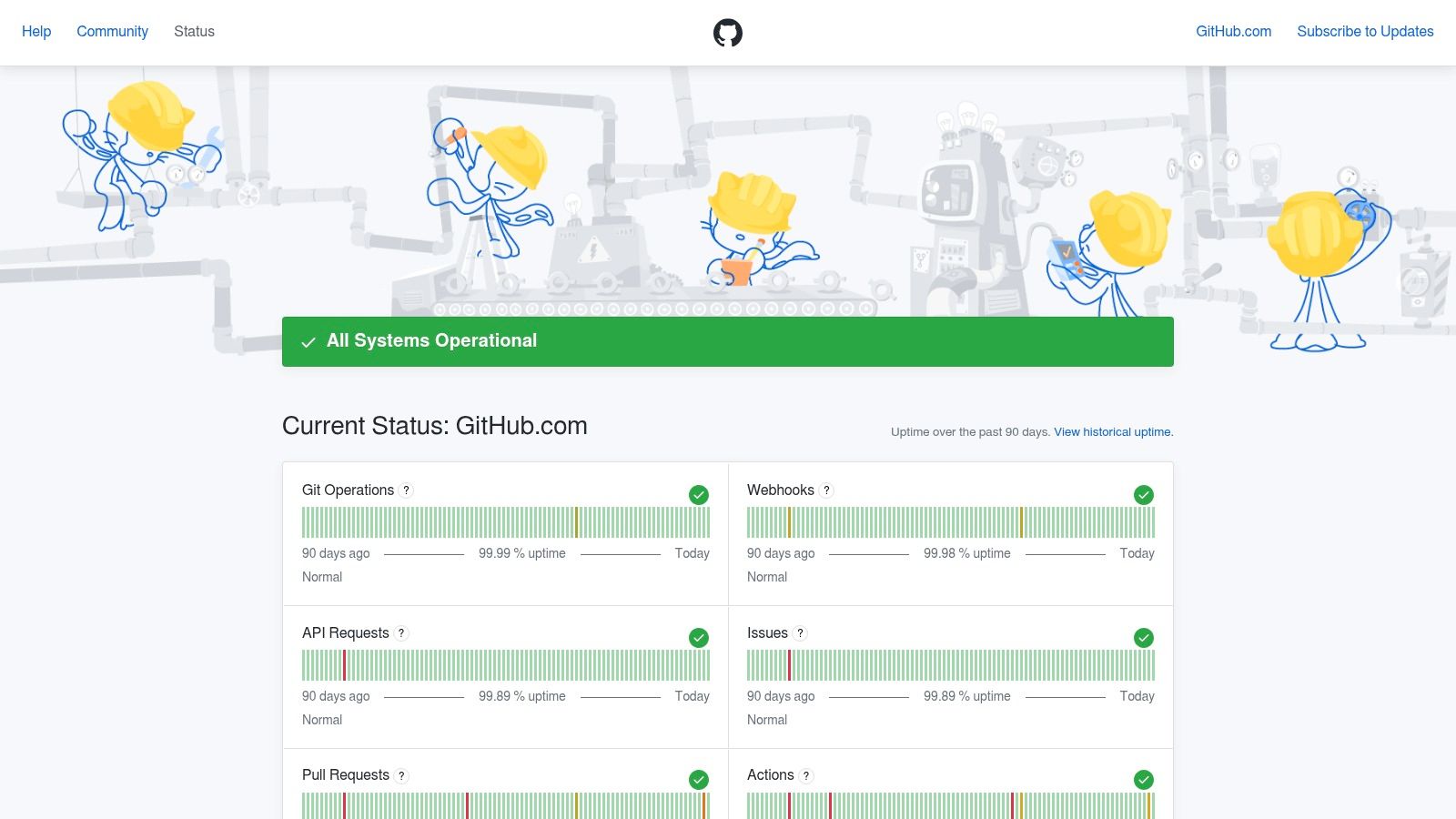
Incident entries are timestamped through investigation, mitigation and resolution. The same day, an incident about timeouts for unauthenticated users carried an entry for each stage with a UTC time. Separate regional status pages exist for GitHub Enterprise Cloud in Australia, the EU, Japan and the US, which helps when one geography is bad and the rest is fine. The cost is density. A long component list feels busy.
Copy this: customer-recognizable names, a rolling uptime strip, and a timeline that does not get rewritten into one vague sentence.
Skip the full catalog if you ship one app. For a Shopify app, a short public page is enough to point merchants at during an outage, which is the point of a status page for your Shopify app. I would rather publish four names people use than twelve internal services.
How does Vercel split status by product and place?
Availability is not uniform, even before your code is involved. Research from the University of Southern California Information Sciences Institute estimates that about 0.3% of the Internet is likely to be unreachable at any time, which they put at 2.5 nines of availability, from global IPv4 outage data collected since October 2013.
Vercel Status applies that reality to a product map. It lists areas such as AI Gateway, API, Build & Deploy, CI/CD and CDN, and the CDN group breaks out by edge location, for example Stockholm, Mumbai, Paris, Washington DC and Sydney, with 90-day uptime and an Atom and RSS feed. A user in one region can see a local failure without assuming the whole platform is down.
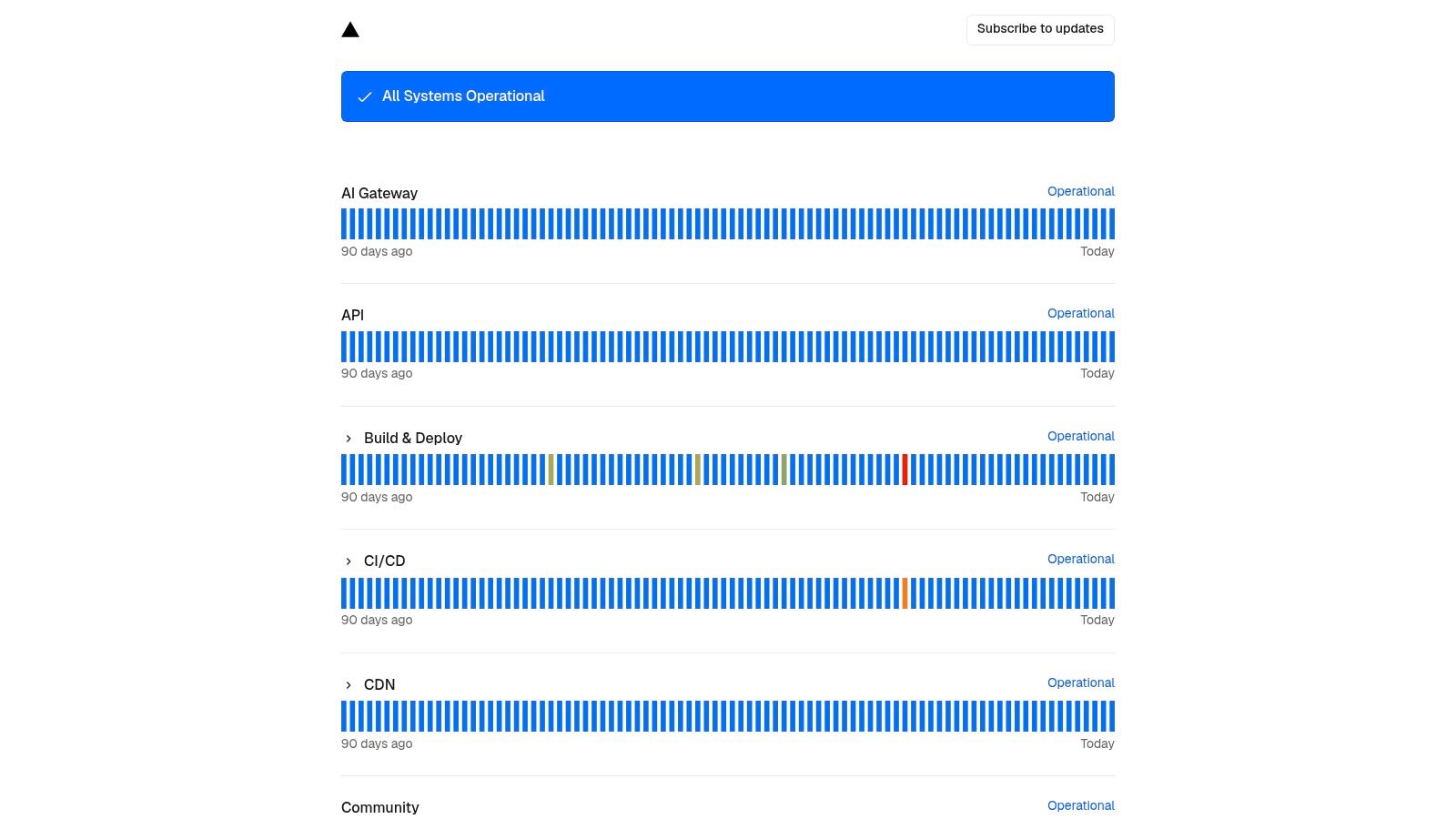
What to copy:
- Product plus place: show the capability and the region when both can fail independently.
- History next to the live state: recent incidents stay reviewable after the banner turns green.
- A bounded list: only regions you deploy to.
Skip region-by-region rows if every customer hits one region. A long list costs scan time during the minute they care about. Twilio’s status redesign, covered by Impekable’s case study, added regional and product-specific detail and a more granular subscription option so users only get notifications relevant to them. The case study does not claim a ticket drop. The design point still holds: filter by the customer’s dependency, not your org chart.
What does Supabase’s status page show?
A shallow “homepage returns 200” check will lie to you. The Google SRE Workbook describes SLO work with Evernote and Home Depot where one example objective is 99.95% uptime over a monthly window. That figure is an example from the case study, not a bar you must hit.
Supabase Status is the public version of that idea for an API-first platform. On 9 November 2026 it grouped services as Branching, Connection Pooler, Data APIs, Functions, Management API, Postgres, Project Creation, Project Resize, Project Restore, Project Upgrades and Storage, most of them with one component per region (18 regions), plus single components for Auth, Billing & Payments, Dashboard, Logging & Observability and Realtime. It offers RSS and Atom feeds. When the screenshot below was taken, an open incident for Storage in two regions carried a plain-language explanation and a “Monitoring” state.
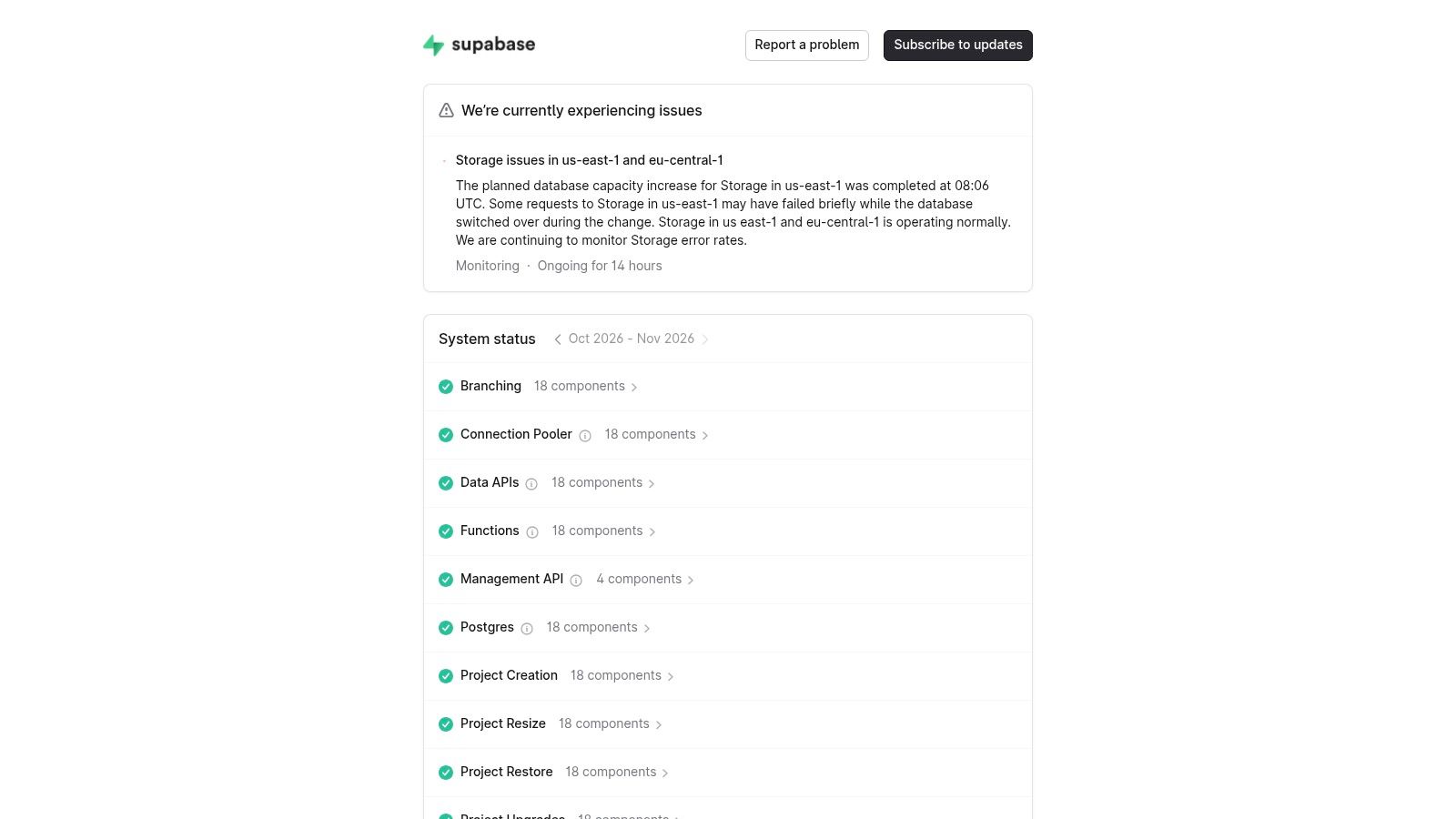
Copy the probe, not the grid. One synthetic check per critical workflow, named the way a customer names it, is enough for a small team. Publish whether the event is total downtime or partial degradation, and say how you measure the window.
Skip the service-and-region matrix unless those combinations fail separately. Density here is honest for Supabase and noisy for a single SaaS app.
How does Cloudflare handle a huge service catalog?
A catalog this large only works if it is grouped. Cloudflare Status is split into Overview, Services & Sites, Locations and History tabs, with active incidents and active maintenance windows on the front page, and it links a Status API, RSS feeds and notification options.
Atlassian’s Statuspage user guide separates the same two jobs: subscribers can follow incidents by email or text, while metrics can show response time and uptime from an API or from tools such as Pingdom, New Relic, Datadog or Librato. Notifications tell people what changed. Metrics show whether health is improving.
Group the list. Offer two channels your customers already open. Do not stand up five integrations because a status vendor lists them.
Copy categories if you have more than a handful of customer-facing capabilities. Copy one push channel and one pull channel, usually email plus a feed or a link you can paste into a reply.
Skip the full channel menu and the giant component tree. A small software team that mirrors Cloudflare’s inventory will overwhelm the same people the page is meant to calm. Scale is the lesson, not the template.
What can you copy from Stripe’s status page?
A billing dependency needs its own sentence. Stripe Status is a public place to check whether payments, APIs or related capabilities are affected, so a support reply can link out instead of re-explaining a platform incident in every thread. It groups by what the customer was trying to do: Global payments (Checkout, Elements, Connect, Payment Links, Terminal, 3DS), Revenue and finance automation (Billing, Invoicing, Tax), Banking-as-a-service, Stripe core components (Dashboard, support, payouts, webhooks) and Acquirers and payment methods.
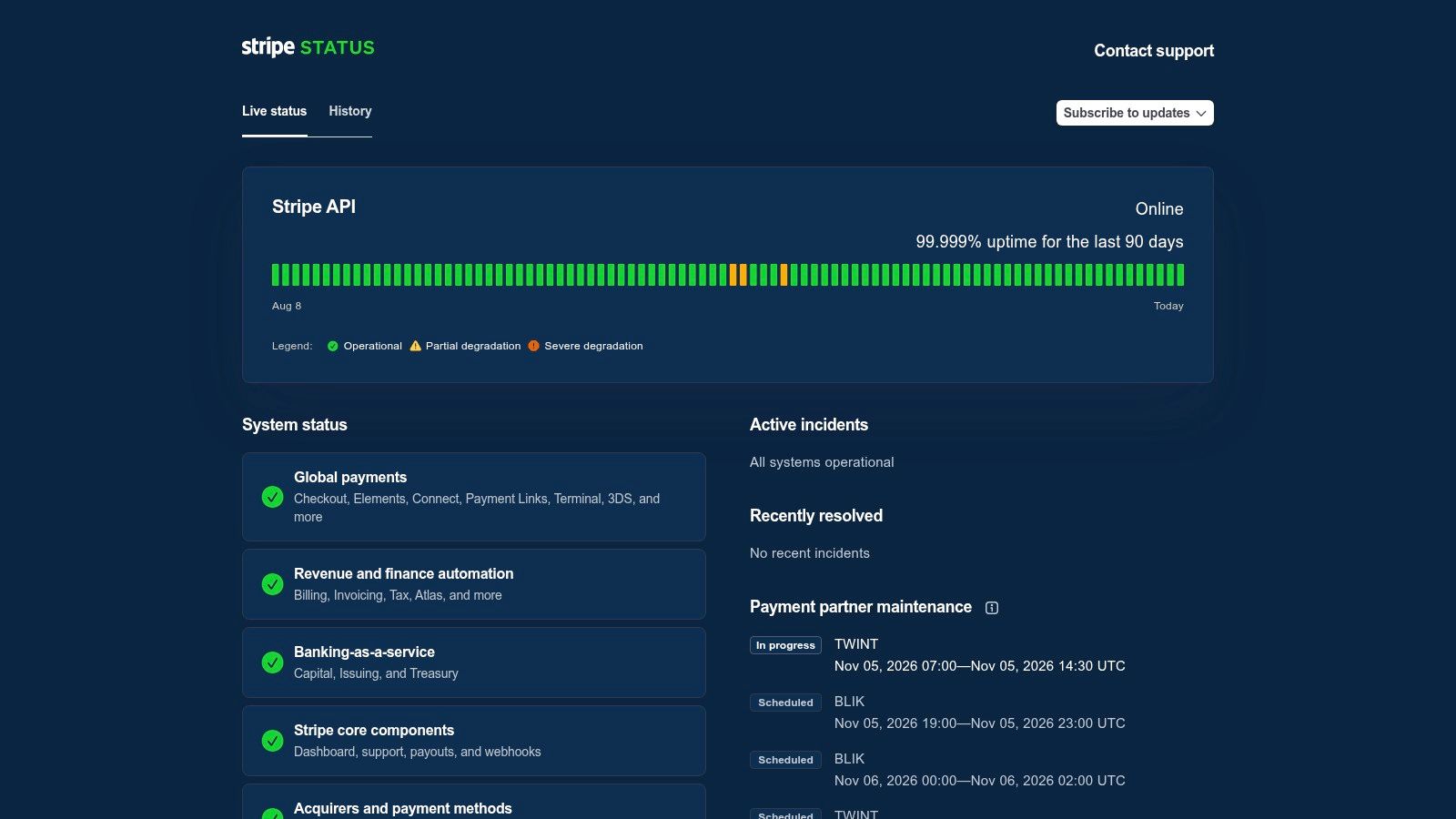
Maintenance should not wear the same clothes as an outage. Stripe lists payment partner maintenance in its own block, with “In progress” and “Scheduled” labels and UTC windows. Atlassian’s incident API docs treat incidents as critical events and split them into historical, real-time and scheduled types. Real-time covers unexpected problems. Scheduled covers planned work, can notify subscribers in advance, can remind them 60 minutes before the start, and can flip to in progress when the window begins.
Use Stripe’s shape when:
- The capability is recognizable: payments, billing, API, dashboard.
- The link is shareable: one URL in the macro, not a screenshot buried in Slack.
- The limit is stated: a status page will not explain an account-specific decline or a single merchant’s tax setup.
Skip the hope that every ticket maps to a public incident. Individual problems stay in the inbox. What you copy is the split between “our billing path is degraded” and “your account needs a human.” If planned work looks like a surprise outage, you trained people to ignore the page.
What does Linear’s short status page leave out?
Customers need the impact in plain language. Engineers need the diagnostics. Publishing both on one page usually helps neither.
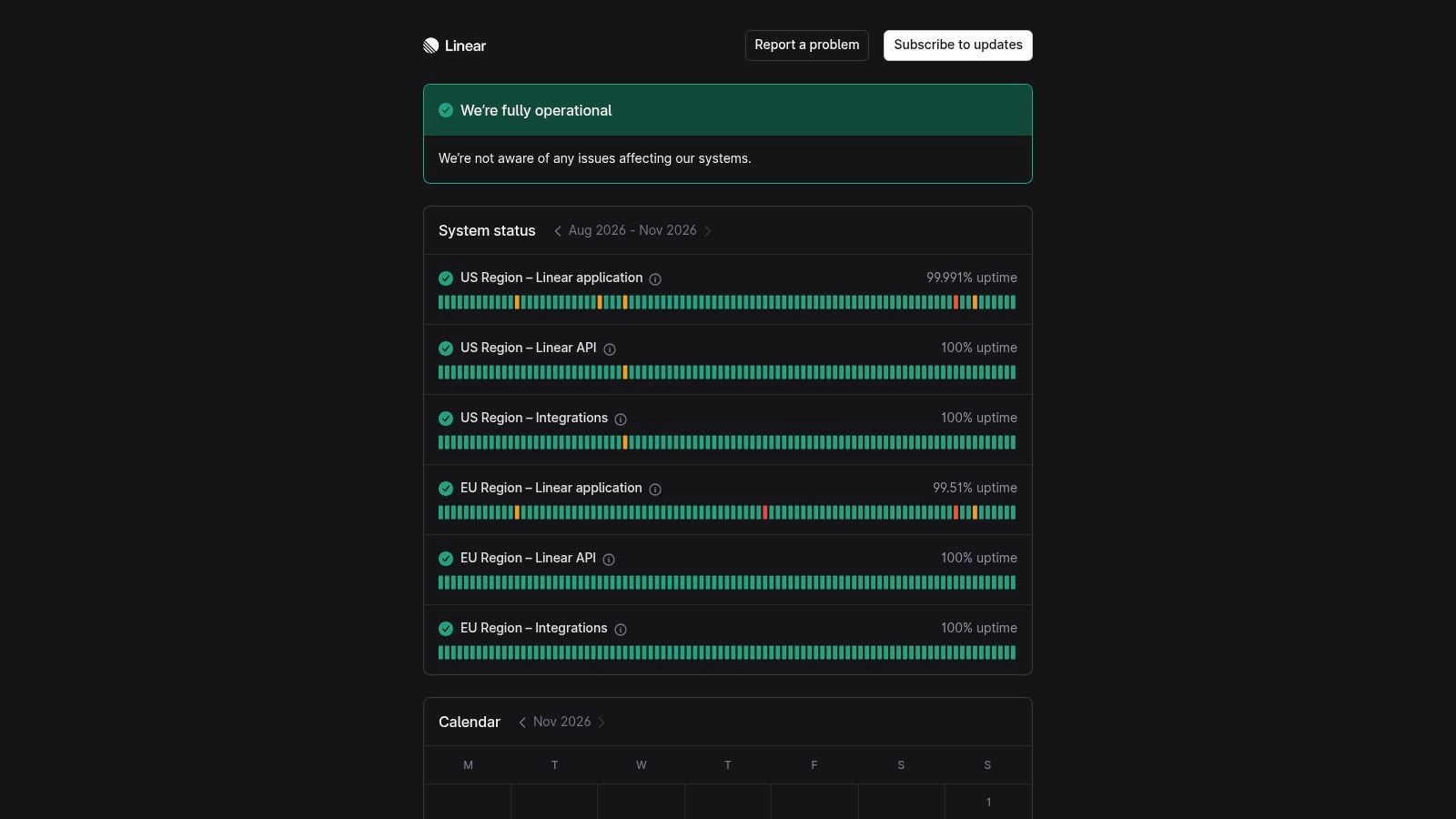
Linear Status is the short version of that rule. On 9 November 2026 it listed exactly six components: Linear application, Linear API and Integrations, once for the US region and once for the EU region, each with an uptime percentage over the last few months and a calendar view. There is no infrastructure inventory to scroll, and support can send one link. A team with many independent services will outgrow that brevity. A product team with one app usually will not. For a deeper read of how a status page should be written, Statuspage’s guide to examples covers the same split between customer impact and internal detail.
Pagerly’s incident update templates suggest posting within 10 to 15 minutes of confirming customer-visible impact, updates every 15 to 20 minutes in the first hour of the most severe incidents, a 30-minute default cadence, and about 60 minutes once you are only monitoring. That is operating advice, not proof that more messages are better. I would rather every note say what customers feel, what still works, and when the next update lands.
Skip a fake granularity you cannot maintain. A help desk that also holds the changelog and the status page, which is what we look at in help desks with a changelog and status page, only works if the public words stay shorter than the private notes.
What does Convot’s status page do?
A small team does not need another login for a banner. Convot’s status page is a branded public page for each app, with built-in uptime monitoring, sitting next to the help center, live chat, shared inbox, changelog and roadmap. Per the product page, you add a URL to a component and Convot pings it as often as every 2 minutes. If two consecutive checks fail, an incident opens on its own, and it resolves when the URL comes back. Components have five states (Operational, Degraded, Partial outage, Major outage, Under maintenance), each shows 90 days of uptime bars, and you can add a Status tab inside the chat widget so customers see service health without leaving the page.
The replicable decision here is the per-app component list. A merchant who cannot load checkout sync does not care about a generic “API” dot. Naming checkout sync, billing, dashboard, API and webhooks gives that merchant a specific place to look and gives support one public link to send. Convot prices by app count, so a studio can run several Shopify apps from one inbox without a separate status subscription for each product. For the head-to-head with a dedicated tool, see Convot versus Instatus and Convot versus Statuspage.
In an outage, wording does more work than the vendor logo. One incident-writing guide says each change should be a timeline update, that state moves forward and not backward, and that you can correct the effective start time when the incident was opened after the outage began. That correction keeps earlier downtime from disappearing out of the history. Copy that discipline whatever tool you use.
What I would copy from a help-desk-native page:
- Plain states: investigating, identified, monitoring, resolved. Say what the merchant sees, not what the internal runbook calls it.
- A human handoff: if an automated reply is not sure, it should stop and pass the thread to a person. Say that in the incident note when support is also replying in chat.
Teams that want a standalone status product, deeper subscriber tooling or an existing Atlassian workflow have a fair reason to stay there. StatusGator tracks the most popular status page providers, and a dedicated tool is still the common default; a help desk is not.
What does a status page cost a small team? (checked 9 November 2026)
We checked each vendor’s public pricing page on 9 November 2026. Prices are per month, for the plan a small team would actually start on.
| Tool | What you get for a small team | Price per month |
|---|---|---|
| Atlassian Statuspage, Free | 100 subscribers, 25 components, 2 team members | $0 |
| Atlassian Statuspage, Hobby | 250 subscribers, 5 team members, custom domain | $29 |
| Atlassian Statuspage, Startup | 1,000 subscribers, 10 team members, custom CSS | $99 |
| Instatus, Starter | Public status page, 200 subscribers, 15 monitors, no custom domain | $0 |
| Instatus, Pro | 5,000 subscribers, 50 monitors, custom domain | from $20 (per the plan page title; 25% off yearly) |
| Better Stack, Free | 1 status page, 10 monitors and heartbeats | $0 |
| Better Stack, paid | One responder licence includes status pages; extra status page $15 | $34 per responder, $29 billed yearly |
| Convot, Community | Status page and uptime monitoring, 1 app, 3 seats, free while under $1,000 MRR | $0 |
| Convot, Starter | Status page plus chat, inbox, help center, changelog, roadmap, 1 app, 3 seats | $49 |
Source: each vendor’s public pricing page, read on 9 November 2026; Convot figures from convot.io/pricing. Convot data, Nov 2026.
Read it honestly. If all you need is a status page, the free tiers of Statuspage, Instatus and Better Stack cost nothing, and Statuspage Hobby at $29 is cheaper than Convot Starter at $49. Convot only wins on cost if you would otherwise also pay for a help desk, a changelog and a roadmap, because the status page is included on every Convot plan rather than billed per page or per subscriber tier. Our own comparison of that stack is in help desks with a changelog and status page.
Status page examples compared
A comparison table like this is only useful if each row tells you what decision that page made. Feature lists blur together. Design choices do not.
| Example | Best known for | Component detail (9 Nov 2026) | Best for teams who want |
|---|---|---|---|
| GitHub Status | Product-area health and chronological incident updates | Git Operations, Webhooks, API Requests, Issues, Pull Requests, Actions, Packages, Pages, Copilot, Codespaces; 90-day strip each | Clear status by feature with timestamped incident timelines |
| Vercel Status | Product area plus edge location | AI Gateway, API, Build & Deploy, CI/CD, CDN with per-location rows; Atom and RSS feeds | Visibility into feature-specific or geographically limited issues |
| Supabase Status | Service by region, with RSS and Atom feeds | Postgres, Storage, Functions, Data APIs and more, mostly per region | Granular, region-level status across platform services |
| Cloudflare Status | Organizing a large service catalog | Overview, Services & Sites, Locations, History; Status API, RSS and notifications | Many services and several ways to distribute updates |
| Stripe Status | Capability groups and separate partner maintenance | Global payments, Revenue and finance automation, Banking-as-a-service, core components, acquirers | A shareable destination for payment or billing dependencies |
| Linear Status | Six components, nothing else | Application, API and Integrations for the US and EU regions | A short page without an infrastructure inventory |
| Convot Status Page | Per-app page with built-in uptime monitoring | Components with 5 states, 90-day bars, auto-incidents after 2 failed checks | Status updates connected to a broader support platform |
Read the component column, not the tagline column. GitHub and Cloudflare earn the split-by-service approach because their customers can name which piece broke. A team whose product has one obvious surface gets nothing from thirty components except a page that looks busy during an outage nobody can localize.
The Stripe row is the one worth copying if your buyers are non-technical. Group components by what a customer was trying to do, not by what your architecture calls the service. Linear takes the opposite trade-off and keeps the list short, which works when the product is small enough that a merchant can guess the culprit.
Convot’s page is the only row here where the status page ships as part of the support stack rather than as its own subscription. The trade-off is real: a standalone status vendor will go deeper on subscriber segmentation and third-party dependency monitoring than an all-in-one tool will. If your incidents and your merchant conversations already land on the same person, keeping them under one login saves the handoff. If a platform team owns reliability separately from support, buy the dedicated tool.
How do you build your own status page?
Name components the way customers describe them. Supabase splits Postgres, Storage, Functions and more rather than internal service names; Stripe frames status around payment capabilities, so a customer asking whether they can take payments gets an answer. Publish timestamped updates in plain language, and correct the start time if you opened the incident late.
Match granularity to the failure mode. Vercel’s regional detail earns its space because CDN failures land in one place; if yours are not local, a short component list reads faster. Linear shows how little inventory a page needs when the incident carries the context.
Distribution is a separate decision. Cloudflare’s feeds, notifications and API access reach people who never reload a tab. Pick the channels your customers already read.
Atlassian’s own marketing page for Statuspage says surveyed Statuspage customers report incident communication processes 50% faster than their previous method. That is a vendor survey, not an independent study, and it only holds when a template exists before the outage.
Draft it on a quiet day. First line: what customers experience. Second: what still works. Third: the next update time. Add a maintenance notice that does not read like a surprise outage, plus a reminder before the window opens. The habit carries over: check service before your online interview the way you would check your own page before telling a merchant the app is fine.
Frequently asked questions
What should a status page include? A banner for overall state, a short list of components named the way customers describe them, 90 days of uptime per component, a timestamped incident history, and at least one way to subscribe. Add scheduled maintenance as a separate block.
How many components should a small team list? Four to six. Linear lists six rows in total, and that is a company with two regions. Publish only what a customer can name and you can monitor.
Should a status page show uptime percentages? Yes if you can measure them honestly. GitHub, Vercel, Stripe and Linear all show 90 days or a few months of uptime per component. Say how you measure the window.
Is a free status page good enough? Often. Statuspage, Instatus and Better Stack all list a free tier (see the table above, checked 9 November 2026). You outgrow free when you need a custom domain, more subscribers or SMS alerts.
Do I need a separate status tool if I already have a help desk? Not if your help desk includes one. Convot includes a status page with uptime monitoring on every plan, including the free Community plan.
Disclosure: Convot makes a status page alongside its help desk, so this is a competing product, not a neutral catalog. The page is branded, with uptime monitoring, and sits with the changelog, roadmap and shared inbox under one login. The Community plan is free under $1,000 MRR. Moves from Zendesk, Intercom and Freshdesk are a free migration done with the founder, not an automatic importer. Crisp comes across in one click.
Write the component list and the first update template before the next outage, not during it.
Convot is a help desk for small software teams, and Shopify app developers are the sharpest fit. The status page sits with live chat, the shared inbox, the help center and the changelog, so an incident update and the merchant reply can come from the same place. If that is the setup you want, see the Convot status page or visit Convot.
Tarang Agarwal is the founder of Convot. Convot is built by Sidepanda, a small studio that runs several Shopify apps of its own and supports all of them from one Convot inbox.
Revenue-aware support for Shopify app teams.
Live chat, help center, and every merchant's MRR, plan, and LTV beside the conversation. Free under $1k MRR.
Start free