FAQ Example Pages: 6 Support Pages Worth Copying in 2026
Six FAQ and help pages checked live on 9 Nov 2026: Shopify, Slack, Zoom, Notion, GitHub and IKEA, with what each does well and a template to copy.
On this page
A good FAQ page gives the direct answer first, says when it applies, and shows where to find a person if it does not work. We checked six live pages on 9 November 2026: Shopify, Slack, Zoom, Notion, GitHub and IKEA. Two are true FAQ pages (Zoom and IKEA) and four are help-center home pages. Each does at least one of those three things well, and you can copy it without copying their scale.
Key takeaways
- Zoom’s FAQ answers in the first sentence, then links to the full guide. Copy that order.
- IKEA puts the human route first. Its first FAQ card is about when and how to reach a person.
- Shopify and Notion give several ways in: topic lists, search and a chat button.
- Slack and GitHub separate “find an answer” from “get help”. Both link a status or support route outside the articles.
- Your own unanswered questions are the best FAQ backlog. On Appointo’s 83-article help center, Cove AI handed 29% of 808 customer messages to a person over 30 days (one app, one month; details below).
FAQ pages predate modern help desks. University of Michigan’s Weave journal traces their origins to online mailing lists and Usenet groups in the 1980s, where they helped people avoid repeated questions.
The problem hasn’t changed much. In our experience, weak FAQ pages fail in two places: the answer hides under a vague heading, and the reader has no useful next step. The pages below show different ways to fix that, from broad software documentation to a retail FAQ. For a sector-specific reference, Edvdo support for educators is another page to consider alongside your own audience’s terminology.
Convot sells a help desk, so we have a stake in help centers. On 9 November 2026 the top Google results for “faq page examples” were mostly design galleries of consumer brands. We looked for what a small software team should do with the questions the FAQ fails to answer, and added that part with our own numbers after the six examples.
1. Shopify Help Center
Product breadth needs clear starting points. The Shopify Help Center opens with an “Ask anything” box and a “Chat with a human” button that stays on screen. Below that, “Browse by topic” lists areas such as Apps, Your account, Payments and Migrate to Shopify, each with its most common articles underneath.
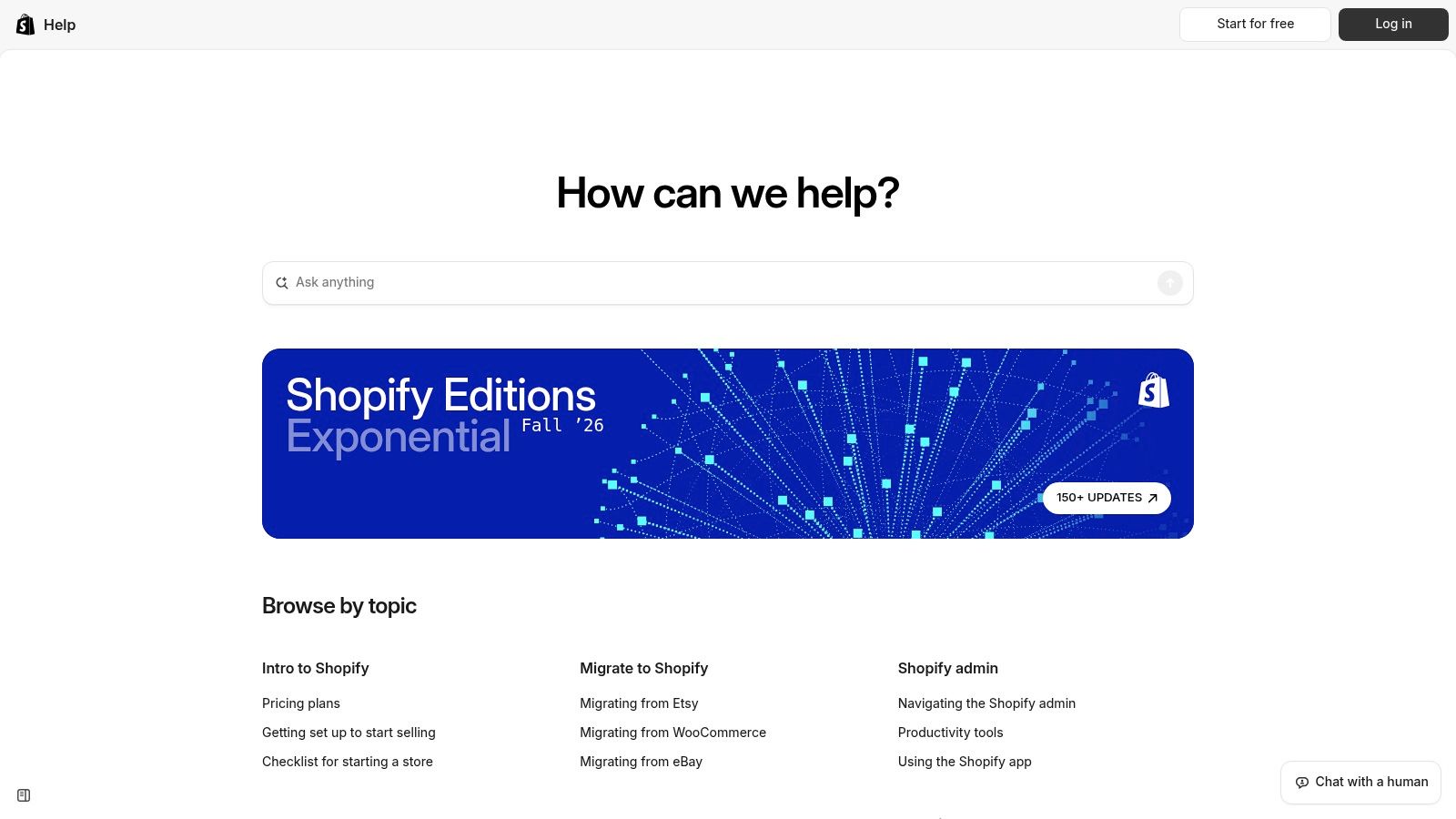
Shopify is worth copying when your product has outgrown a short FAQ. A merchant setting up an app needs a different starting point from someone investigating billing, even when both eventually contact the same support team.
The trade-off is navigation overhead. A large help center gives you room for detailed instructions, but it also asks customers to choose a path. If your product is smaller, start with fewer categories and split them when questions diverge.
Copy the task structure, not the scale
Lead an article with the outcome and prerequisite. Then show the steps, followed by the exception that requires human help.
- Answer copy: Name the exact task, account role, and relevant product area.
- Human handoff: Explain what the advisor needs, rather than ending with a generic contact button.
Our guide to building a help center for your Shopify app develops that structure for app support. Keep support navigation separate from acquisition work such as Shopify blog optimization advice: an existing customer needs a fix, not an introductory sales explanation.
Reusable microcopy template
To complete [task], you need [role or permission]. Follow [instructions]. If your screen differs, contact support with your store domain and the step where you got stuck. Don’t include passwords or access tokens.
2. Slack Help Center
In our view, role differences belong near the answer. The Slack Help Center separates Getting started, Using Slack, Your profile and preferences, Connect tools and automate tasks, Workspace administration, and Tutorials and videos. A header menu leads to Support (sign in to access support and track cases) and Known issues, and the page links to Slack’s status page.
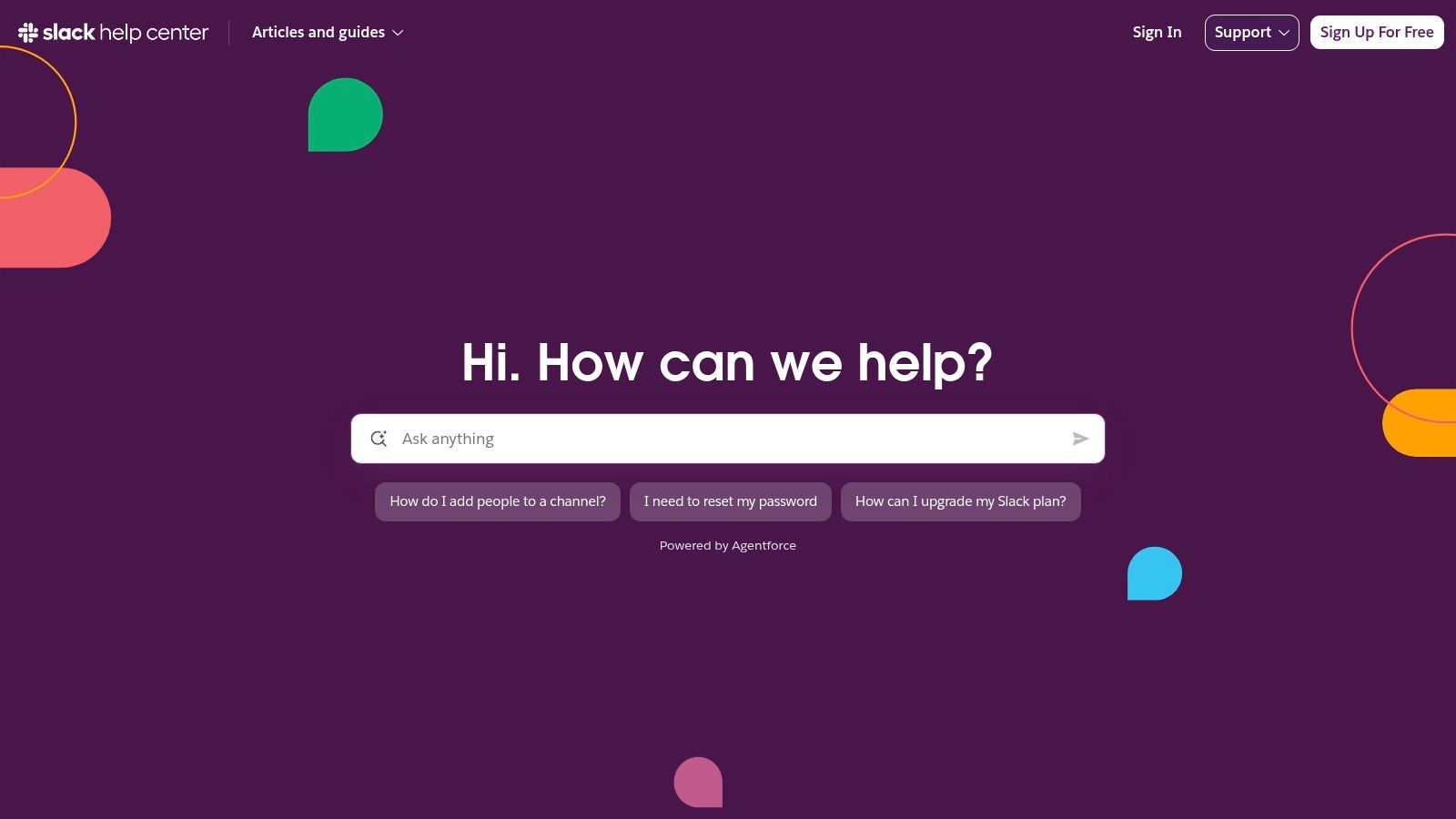
A workspace member and an administrator can ask the same question but need different instructions. Slack’s split between everyday use and workspace administration is one way to handle products where permissions change what customers can see or do. The page also has an ask box with suggested questions.
The trade-off is conditional guidance. Finding an answer may require search or category browsing, and an answer that depends on a role is only useful if the reader learns that before the last step.
Practical rule: Put permission requirements above the procedure, not beneath the troubleshooting notes.
Make the escalation match the problem
Separate a configuration question from a possible service interruption. The links to Known issues and Slack status are a pattern to borrow: customers shouldn’t have to change settings to investigate a platform-wide problem.
For your own page, state whether the next step belongs to the user, their administrator, or your support team.
A self-service support approach to reducing ticket volume should remove unnecessary contact without trapping customers in documentation. Video can explain a workflow, but it shouldn’t be the only place you disclose a permission restriction.
Reusable microcopy template
[Task] requires [workspace role]. If the option is missing, ask your administrator to check [setting]. If your permissions look correct and the task still fails, contact support with the error text and whether other workspace members are affected.
3. Zoom Frequently Asked Questions
Short answers work when they point somewhere useful. Zoom’s Frequently Asked Questions is a single page of about two dozen questions in eight groups: Getting started, Joining a meeting, Scheduling, Hosting a webinar, Meeting and webinar features, My Zoom account, Troubleshooting and Additional products. A contents list on the left jumps to each question, and the page shows when it was last updated (21 October 2026 when we checked).
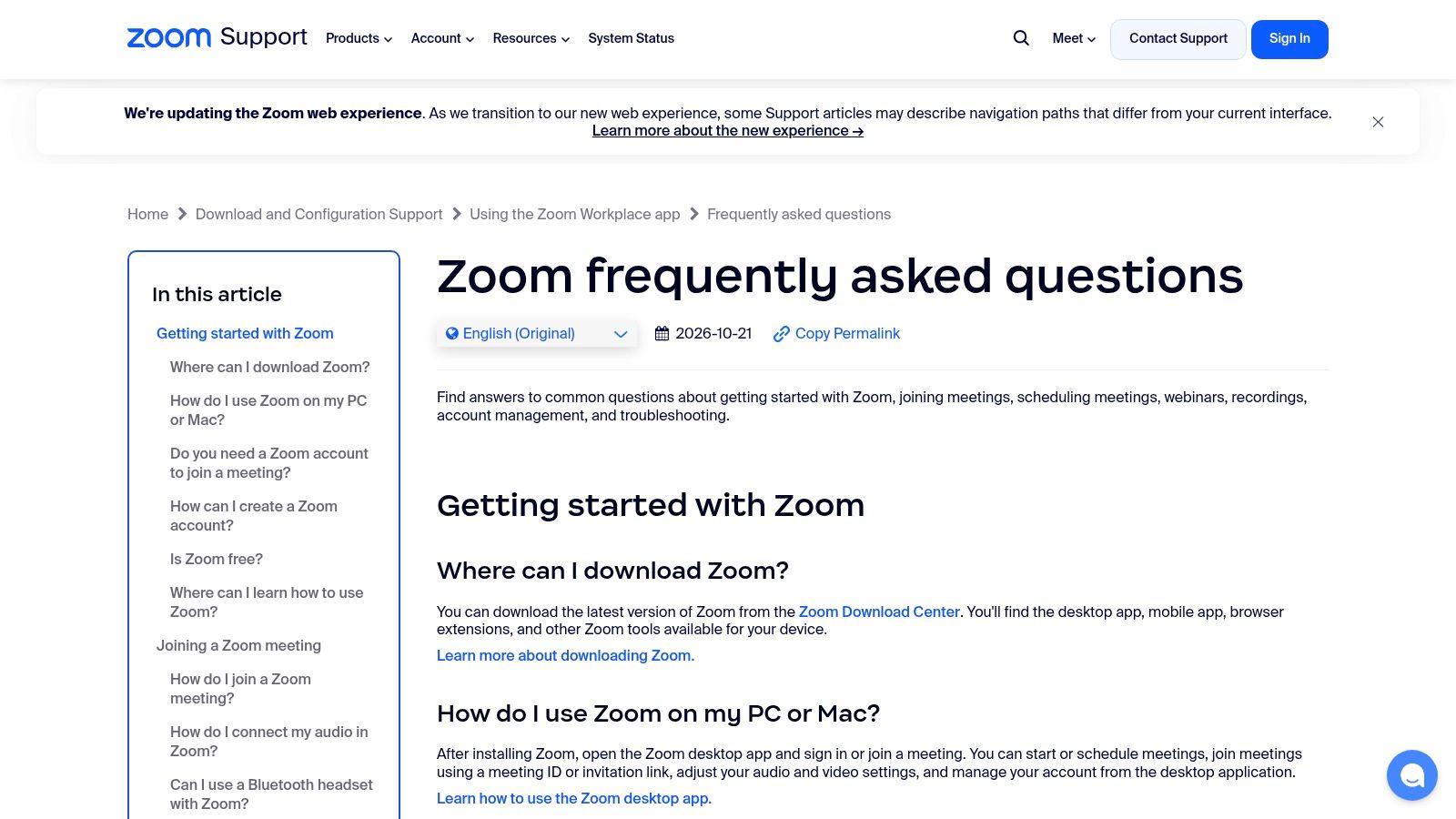
The useful copy pattern is direct response first, detailed guidance second. “Do you need a Zoom account to join a meeting?” is answered with “No. You can join most Zoom meetings without creating a Zoom account if you’re invited by the meeting host”, then the exceptions, then a link to the full guide.
The visible update date and the header “Contact Support” button also do quiet work: the reader can see whether the page is current and where to go next.
Keep the answer separate from the procedure
The trade-off is depth. A compact FAQ can orient a new user, but complex or specialist issues still need other support resources. Don’t squeeze an entire troubleshooting tree into a short answer just to keep everything on the same page.
- Keep in the FAQ: The direct answer, the main condition, and the next action.
- Move to a guide: Branching instructions, detailed settings, and specialist troubleshooting.
- Add at the failure point: A human-support route that asks for the failed step and visible error.
For a small software team, the strongest adaptation is to write the opening answer so it remains useful on its own. The documentation link should add detail, not conceal the answer behind another click.
Reusable microcopy template
[Feature] is available when [condition]. Start with [action], then follow [detailed guide] for the remaining steps. If [specific failure] occurs, contact support with your device, app version, and exact error message.
4. Notion Help Center
Notion gives several ways in. The Notion Help Center combines a search box with suggested searches (Billing, Dashboards view, Restoring content, Sharing and permissions), six Popular topics cards, a “Browse by use case” row (Project management, Engineering, Design, Marketing, Startup, Enterprise) and a Support section with Chat with us, Join our community and Find a consultant.
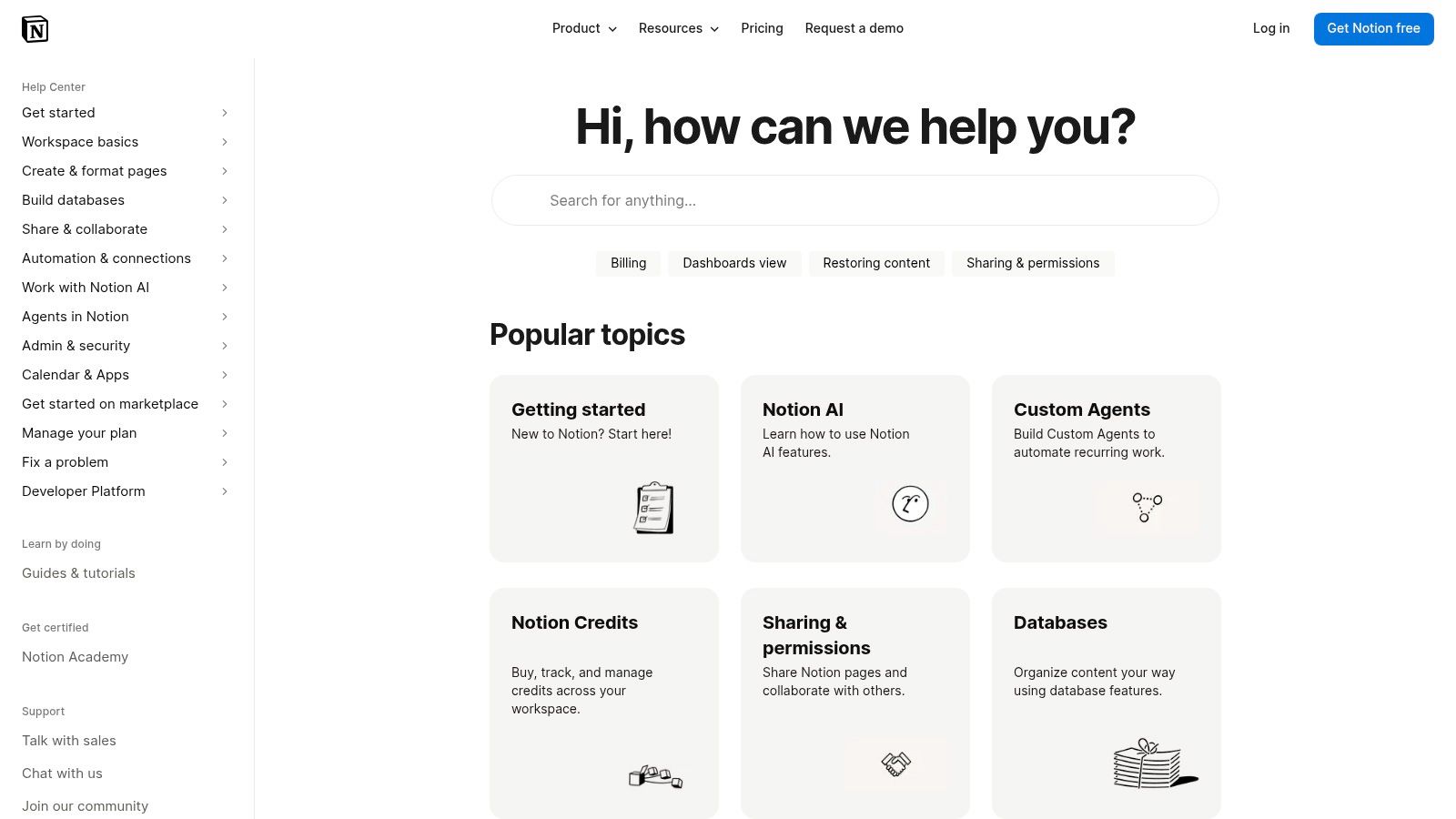
A customer may know the feature name, recognize a common problem, or only understand the job they’re trying to finish. Offering search, topic cards and use-case browsing accommodates those different starting points without requiring everyone to use the same vocabulary.
The trade-off is editorial maintenance. Multiple browsing routes need planning. If you duplicate the answer for each audience, the copies can diverge when the product changes.
Reuse the article. Change the path that helps each audience find it.
Give each answer a clear boundary
For a small team, choose a primary article for each task and link to it from relevant categories. Add audience-specific introductions only when permissions, setup, or expected outcomes differ.
Our guide to building the knowledge base is useful for deciding where those article boundaries belong. Avoid creating separate pages merely because different departments use different names for the same workflow.
The handoff should preserve that context. A customer who arrived through use-case guidance shouldn’t need to explain their entire use case again, but don’t assume a contact link automatically carries it. Build that behavior deliberately.
Reusable microcopy template
For [team or use case], start with [recommended workflow]. These instructions apply to [scope]. If you need a different result, contact support and tell us what you’re trying to achieve, which guide you followed, and where the result differed.
5. GitHub Help
Technical depth needs explicit support boundaries. GitHub Help opens with a “Search or ask Copilot” box and a Popular panel with tabs for GitHub Copilot, Collaborative coding, Security and code quality, and CI/CD and DevOps. Each result is labelled Docs, Learn or Blog, so readers know what they will open. The header separates Support, Learn, Docs and Community.
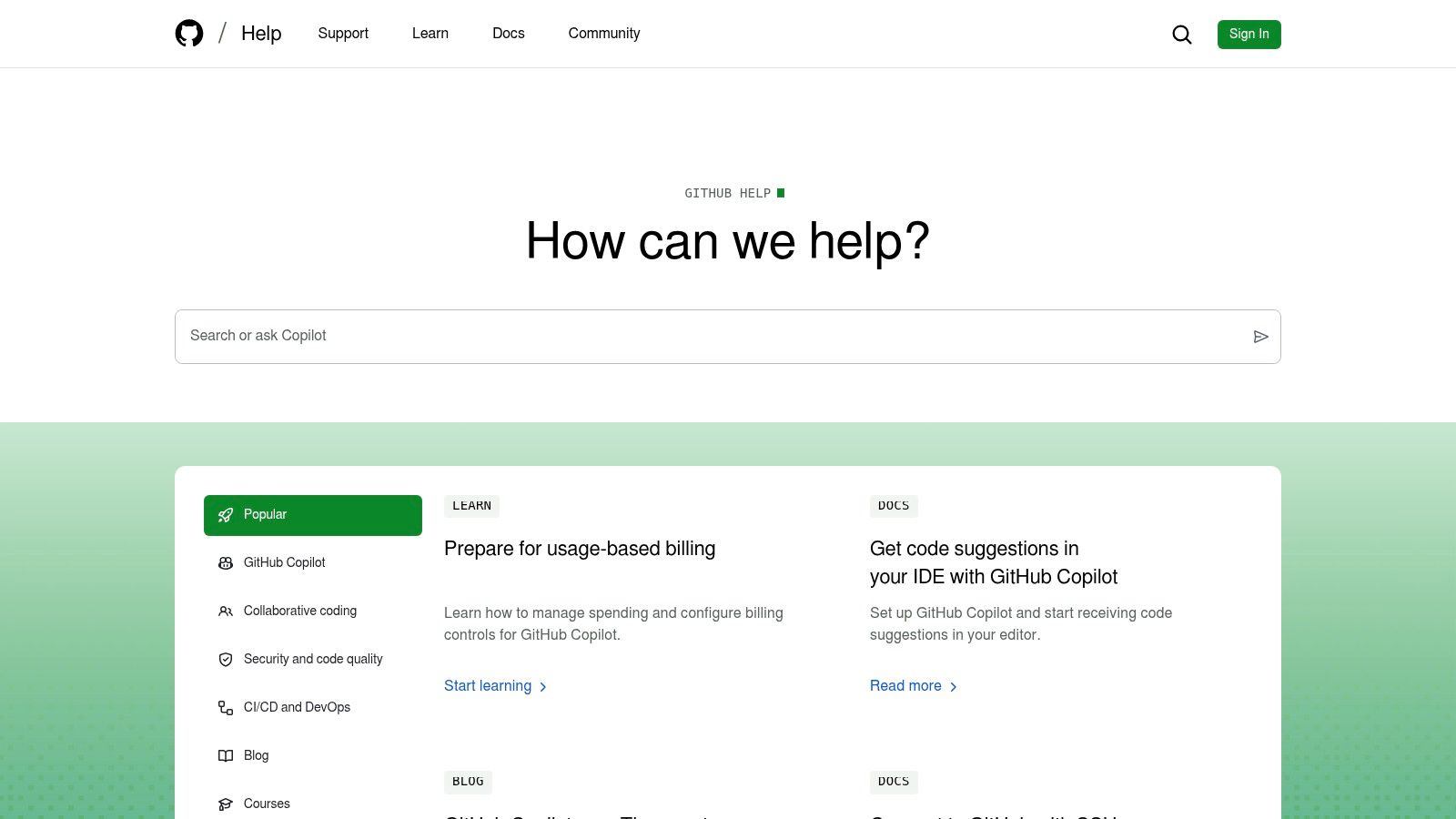
Developer-facing products need that distinction. A question about how an API works is different from an account-access failure, and neither should disappear into an undifferentiated contact form. GitHub’s Contacting Support page sends account problems to a support portal where you create a ticket, and offers Copilot in GitHub Support to find an answer before you submit one.
GitHub is a useful reference for serving both readers who search precisely and newcomers who browse by subject. The trade-off is breadth: extensive documentation can feel demanding when someone doesn’t yet know the right technical term.
State what the answer assumes
Technical FAQ copy should name the environment, permissions, or configuration that makes the answer applicable. State those assumptions before offering a command or procedure.
- Answer quality: Explain the expected result, not just the action to perform.
- Support route: Tell customers which channel applies before they prepare a request.
- Safe handoff: Ask for reproducible details while warning against sharing credentials.
For your own support page, distinguish documentation, community discussion, and account-specific help in plain language. Don’t imply that every channel offers the same access or response expectations.
A useful escalation request also separates facts from guesses. Ask what the customer expected, what happened instead, and what they already tried. That’s more actionable than a large free-text box labeled description.
Reusable microcopy template
These instructions apply to [environment] with [permissions]. You should see [expected result]. If the result differs, send support the reproduction steps and sanitized error output. Remove tokens, credentials, and customer data before sharing logs.
6. IKEA FAQs
Customer problems make better categories than internal departments. IKEA’s customer-service pages lead to a US “Frequently asked questions” page. Its first card is “When can I contact IKEA Customer Support?”, which gives the hours (Sunday to Saturday, 8:00 am to 12:00 am Eastern) and says customers can use phone or chat. The questions below are grouped under Orders, Missing items, Damaged items and Missing parts, and many give the support phone number inside the answer.
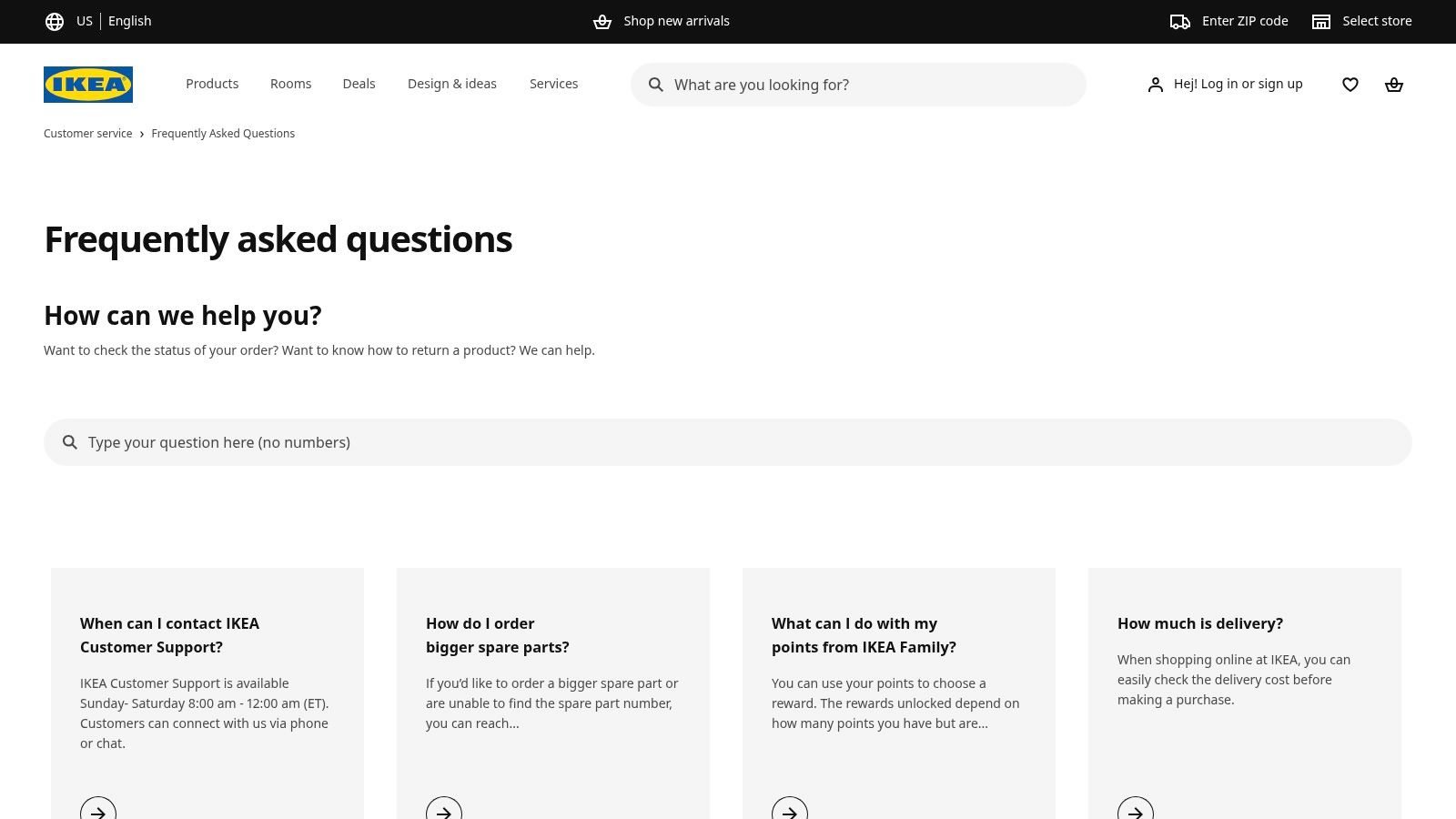
The useful lesson for software founders isn’t retail policy. It’s question wording: customers describe the thing that went wrong, not the department responsible for fixing it. One IKEA question reads “I don’t have the middle support of my bed. Was it missing from the package?”
Translate that approach into headings such as payment failed, data hasn’t synced, or I can’t access my account. Those phrases give customers a recognizable starting point before you introduce technical terminology.
Borrow the language, not the purchase journey
The trade-off is domain fit. Retail delivery and returns differ from software permissions, integrations, and recurring billing. Copying IKEA’s categories would create the wrong structure for a SaaS help center.
Borrow the customer-centered organization instead. Then add the product-specific conditions that make an answer safe to follow, including plan differences, region, and whether a process is still pending.
Handoff test: A customer should know what to send your team without knowing which internal system failed.
Don’t create a new article for every wording variation; use those variations to improve titles and article text.
For unresolved cases, request the relevant identifier and observed state. Avoid asking customers to diagnose your integration before they can contact a person.
Reusable microcopy template
If [expected event] hasn’t happened, check [visible status] first. This guidance applies to [region, plan, or workflow]. If the status doesn’t explain the problem, contact support with [relevant identifier] and what you expected to happen.
How the six FAQ and help pages compare
All six checked on 9 November 2026.
| Item | Page type | Search and browsing | Human support route on the page | Best for |
|---|---|---|---|---|
| Shopify Help Center | Broad software help center | ”Ask anything” search and Browse by topic | ”Chat with a human” button | Large knowledge bases covering setup and product tasks |
| Slack Help Center | Software help center | Ask box, six article categories, Tutorials and videos | Support menu (sign in to access support), Known issues, status link | Products serving both everyday users and workspace administrators |
| Zoom Frequently Asked Questions | Single-page FAQ | Contents list of about two dozen questions in eight groups | Contact Support button in the header | Short answers to common product and account questions |
| Notion Help Center | Help and learning hub | Search, popular topics, browse by use case | Chat with us, community, consultants | Hubs offering multiple paths to guidance and learning |
| GitHub Help | Technical help hub | Search or ask Copilot, Popular tabs, Docs, Learn, Blog labels | Support, Community, and a support portal for tickets | Developer-facing products with extensive technical guidance |
| IKEA FAQs | Retail customer-service FAQ | Search, top-question cards, groups by problem | Hours and phone or chat listed in the first card | Retail FAQs organized around practical customer needs |
What happens to the questions your FAQ doesn’t answer
A FAQ is only as good as its coverage, and you can measure coverage if an AI agent or a person is answering from it. Here is a real split from our own app. Appointo is a Shopify app we run at Sidepanda, and its help center has 83 published articles. Over the 30 days to 14 October 2026, Cove AI evaluated 808 customer messages in 230 conversations:
| What Cove did | Share of messages |
|---|---|
| Answered directly from the articles | 16% of 808 |
| Suggested a draft reply for a person to send | 55% of 808 |
| Handed over to a person (no article met its confidence threshold) | 29% of 808 |
Source: Convot production data for Appointo, 30 days to 14 October 2026. Counts are customer messages, not conversations. One app, one month: treat the rates as an example, not a benchmark.
The 29% is the useful number. Some handed-over messages are gaps in the articles; others, such as account-specific or billing cases, need a person whatever the FAQ says. We read the list to separate the two, and treat the gaps as the next batch of articles to write or fix.
Here is what our own public help center looks like on the same day, with 28 collections and 175 articles shown on the page:
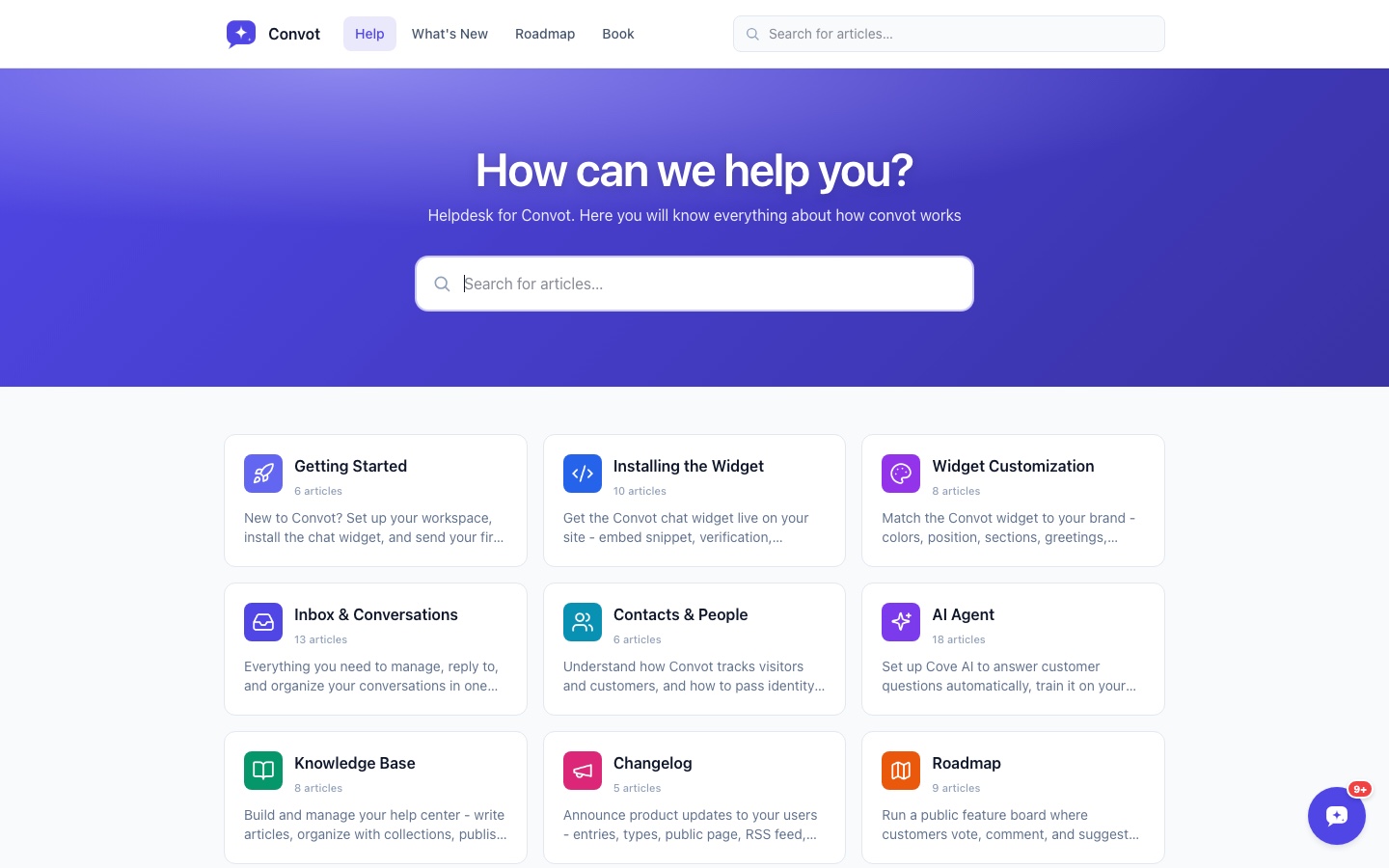
Screenshot: Convot help center, 9 November 2026. If you want one help center per app, with the same articles feeding chat and Cove AI, see how Convot’s help center works.
Turn these patterns into your own FAQ this week
Start with the ten questions your support inbox answers most often. Write each answer in the customer’s words, state the main condition near the top, and give every answer a clear next step.
Choose the smallest structure that fits. Zoom offers a useful pattern for compact answers; Shopify, Slack, Notion, and GitHub offer broader navigation models. IKEA is a reminder to organize around the customer’s problem rather than your team chart. Huel’s FAQ is a smaller consumer example of the same idea: a Popular questions block first, then groups for product, order and delivery, account and subscription questions.
Treat unanswered questions as maintenance work
Publish the direct answer first, then link to the procedure. Add exact interface labels where they help, identify plan or regional exceptions, and assign someone to review the page when the product changes.
- Review failed searches: Find the terms customers use when they can’t locate an answer.
- Review repeat contacts: Identify instructions that customers follow but still can’t complete.
- Review handoffs: Check whether the human receives the question, relevant context, and steps already attempted. In the Appointo split above, the 29% handed to a person is that list.
A page about mobile data help while traveling and a software billing FAQ address different problems, but both should make applicable conditions and next actions clear.
Convot’s help desk puts a help center for each app next to chat. Cove AI, our AI agent, answers from the team’s documentation, cites its sources, and hands off to a human when it isn’t sure.
A useful FAQ doesn’t force every conversation to end in self-service. It resolves the repeatable questions and helps a person take over the uncertain ones without making the customer start again.
FAQ
What makes a good FAQ page?
A good FAQ page answers each question in the first sentence, states when the answer applies, and shows where to get human help. Group questions by the problem the customer has, not by your internal teams.
How many questions should an FAQ page have?
Start with the ten questions your support inbox answers most often. Zoom’s FAQ has about two dozen in eight groups. Our rule of thumb is to move to a searchable help center once you pass 20 to 30.
Should an FAQ page link to human support?
We think an FAQ page should always show a route to a person. IKEA puts the support hours and phone or chat route in its first FAQ card, and Shopify keeps a chat button on screen. Customers who can’t find the answer should not have to search for a way out.
What is the difference between an FAQ page and a help center?
An FAQ page is one short list of common questions. A help center is a searchable set of articles grouped by topic. Small products can start with an FAQ and move to a help center when questions need longer procedures.
How do you know which questions to add?
Use the questions your team answers by hand. If an AI agent answers from your articles, the messages it hands to a person show candidate gaps. On Appointo’s help center (one app) that was 29% of 808 messages in 30 days, and not all of them were gaps.
Convot brings each app’s help center, live chat, and shared inbox into one help desk for small software teams. Use the same documentation to help customers browse answers and to ground Cove AI’s replies, with a human handoff when it’s unsure. See the Convot help center or visit Convot to build a clearer path from FAQ answer to support conversation.
Revenue-aware support for Shopify app teams.
Live chat, help center, and every merchant's MRR, plan, and LTV beside the conversation. Free under $1k MRR.
Start free