Building the knowledge base for a SaaS product: structure, upkeep and AI (2026)
How small SaaS teams build a knowledge base customers actually use: structure, article templates, a testing loop, AI grounding, translation and what to measure.
On this page
- Key takeaways
- Why do most knowledge bases fail?
- How should you structure a knowledge base?
- How do you keep a knowledge base up to date?
- How should AI use your knowledge base?
- Should you consolidate your support tools?
- How do you translate a knowledge base?
- How do you measure whether a knowledge base works?
- FAQ
Building the knowledge base for a SaaS product means organising help articles around the jobs customers try to do, writing each one to a template with conditions and an escalation rule, and testing it against real support questions every month. A knowledge base works when customers can find, trust and apply an answer, not when it has many articles.
Key takeaways
- Structure by customer job, such as “connect your store” or “fix a failed sync”, not by internal team.
- Use a template with what the article applies to, the expected result, a failure path, an escalation rule, an owner and a verified date.
- Test answers, not article counts: run 50 to 100 real support questions against search or AI and fix what fails.
- Ground AI in the knowledge base, show sources and hand off when the evidence is thin.
- Translate by demand, starting with the procedures customers in that language actually need.
Picture a small SaaS team that ships a 40-article help center. A week later, customers are still asking where to change a plan, whether a feature works on their version, and what to do when the documented fix fails. The help center exists, but it doesn’t do the work.
Building the knowledge base is less about producing more articles and more about proving that customers can find, trust, and apply the right answer. The difficult part starts after launch. Small teams need a system for testing real questions, handling uncertainty, assigning ownership, and removing stale instructions before they create new tickets.
Why do most knowledge bases fail?
In my experience, knowledge bases usually fail because nobody owns them after launch: articles go stale, answers live in inboxes and chat threads instead, and there is no test of whether customers can act on what they read. A new help center often looks finished too early. The categories are tidy, the articles are grammatically correct, and the founder can answer every question because the founder wrote the product. Customers still struggle because a repository isn’t the same thing as a working support system.
The numbers back this up. Gartner found that only 14% of customer service issues are fully resolved in self-service (Aug 2024), and 60% of service agents fail to point customers to it, even though customers whose agent did were roughly twice as likely to use it next time (Jun 2025). A knowledge base that nobody maintains or mentions rarely gets used.
I’ve seen this happen after migrations. A team moves content into a new tool, imports old articles, adds a search box, and calls the project complete. The unanswered questions remain in inbox conversations, Slack threads, and the private memory of the person who originally built the feature. Publishing made the information visible. It didn’t make the information usable.
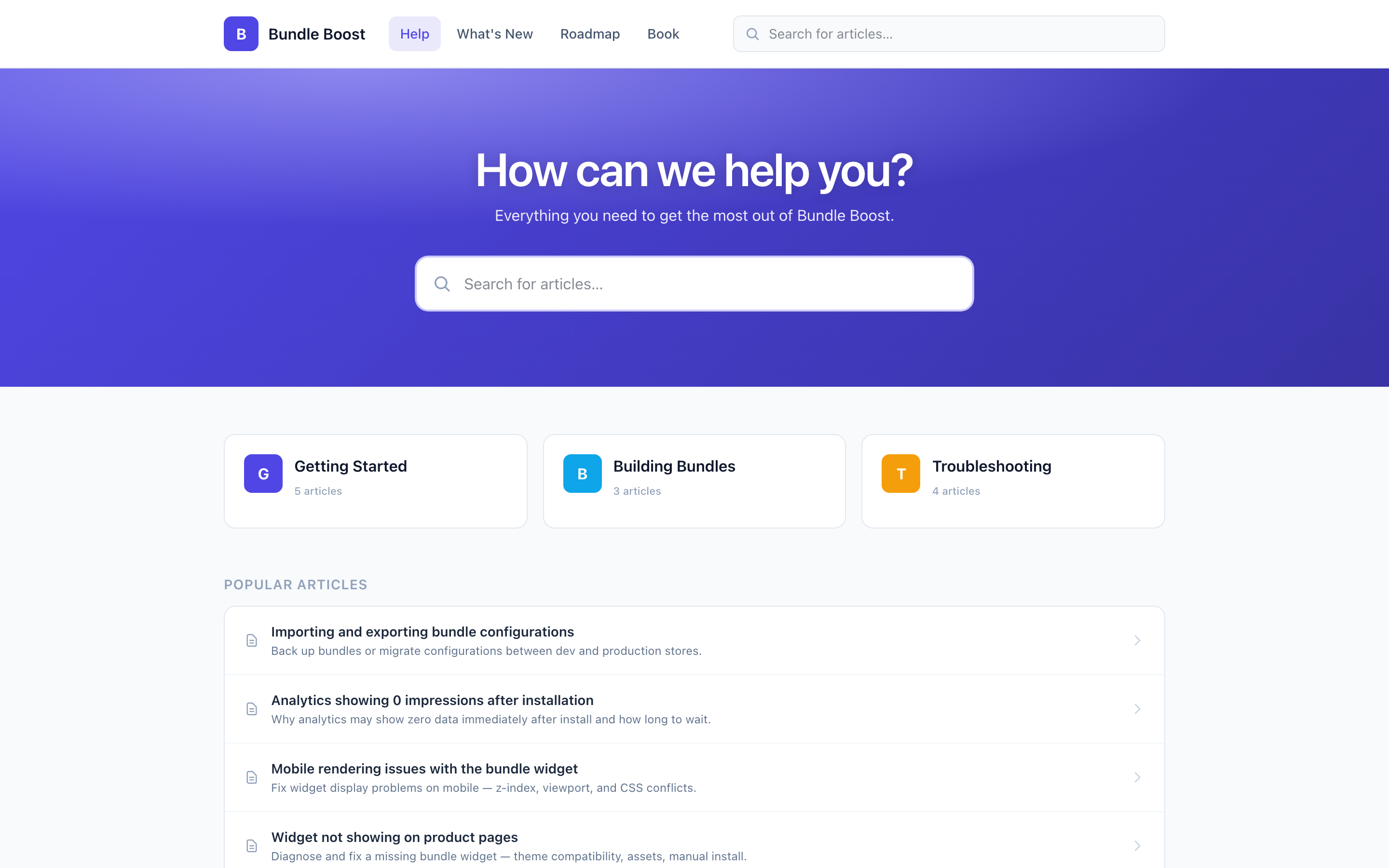 A Convot help center: search first, then categories named after customer jobs, then popular articles.
An archive stores answers, a system delivers them
A published article is not the same as a working answer. An article can be technically correct and still fail if nobody owns it, customers can’t find it, or the answer doesn’t match the situation in front of them. A billing article needs plan context. A troubleshooting article needs version context. A security article needs a clear handoff instead of a confident guess.
Practical rule: An article is finished only when a real user can find it, understand it, and take the intended next step.
Give every answer a place in the workflow
A living knowledge base needs more than article pages. It needs a named owner, a review condition, an escalation path, and a connection to the conversations that generated the answer. Without those links, documentation becomes a quiet archive that grows while its usefulness declines.
Start with the questions customers ask repeatedly. Include questions the system should refuse to answer. A support agent should know that an uncertain answer about an outage, account security issue, billing dispute, or ambiguous technical incident requires a human. That refusal boundary belongs in the knowledge system, not only in an agent’s memory.
For each new article, record the situation it solves, the audience it serves, the product conditions that affect the answer, and the next action when the article doesn’t apply. That structure turns documentation into an operating layer for support. It also gives the team something testable later, instead of a collection of polished pages with no clear standard of success.
How should you structure a knowledge base?
Structure a knowledge base around the jobs customers try to do, with a small top level, clear titles and the words customers actually type. The first structural decision is where a customer should look when they don’t know your internal vocabulary. Organize around jobs, not departments. “Connect your store,” “understand billing,” and “fix a failed sync” are usually better starting points than “engineering,” “operations,” and “product.”
Broad categories help users orient themselves. Deep hierarchies make precise topics easier to isolate but harder to browse. Keep the top level small enough to scan, then use article titles, tags, synonyms, and related links to carry the detail. A customer shouldn’t need to understand your product architecture before asking for help.
Choose a structure that reflects real questions
Search quality depends on more than adding a search field.
Access alone isn’t enough. Questions, corrections, examples, and expert interaction must feed the repository. Build a visible path from support conversation to article update.
A useful initial structure includes:
- Getting started: Setup, installation, permissions, and the first successful outcome.
- Core workflows: The jobs customers perform repeatedly.
- Troubleshooting: Symptoms, causes, checks, and escalation conditions.
- Billing and account: Plans, invoices, usage, cancellations, and access.
- Reference: Limits, integrations, definitions, and version-specific behavior.
Name these sections in your customers’ words, not your company’s. A founder who is also out raising, and reading guides to find early stage investors, should keep that pitch language out of the help center. Customers search using the problem they have.
Make templates enforce clarity
A template should prevent omission, not make every article sound identical. Require fields that affect whether an answer can be trusted:
- Outcome: What the reader will accomplish.
- Applies to: Product, plan, version, role, or integration conditions.
- Steps: The shortest safe path to the result.
- Expected result: What the customer should see.
- Failure path: What to check if the result doesn’t appear.
- Escalation rule: When a human must take over.
- Owner and verification date: Who maintains the answer and when it was last checked.
- Related changes: Links to relevant release notes or incidents.
Search systems also need metadata and structure, because both keyword search and AI retrieval work from the words and labels you give them.
Use exact error messages, alternate customer wording, product names, and plan terms in the article. Search that combines keyword matching with semantic matching can find both the exact words a customer types and a paraphrase of them, so write for both. The content structure still comes first. Poorly labeled sources produce poor retrieval, no matter how polished the search tool looks.
For a Shopify-specific walkthrough, see how to build a help center for your Shopify app. The broader rule applies to any SaaS product: write around customer intent, then attach the product conditions that change the answer.
How do you keep a knowledge base up to date?
Keep a knowledge base up to date with a loop: collect real questions, test them against the help center, fix what fails, and give every article an owner and a review date. A help center decays through small changes. A button moves. A plan is renamed. An integration changes its permissions. A release fixes the issue described in an old troubleshooting article, but the article remains live and sends customers down the wrong path.
Here is what that looks like on our own help center. Appointo, one of Sidepanda’s apps, has 83 published articles. Over the 30 days to 14 October 2026, Convot’s AI agent looked at 808 customer messages: it answered 16% directly, drafted a reply for the team on 55%, and handed 29% to a person because no answer met its confidence threshold. That 29% is the most useful list we have: each hand-off is a question the help center doesn’t answer clearly yet.
The maintenance loop begins with actual support conversations, not an editorial calendar. Collect 50 to 100 real support questions from your inbox, chat, tickets, or call notes. Label the ideal answer, the source that should support it, and the condition that requires escalation. Keep the set stable enough to test after every meaningful documentation change.
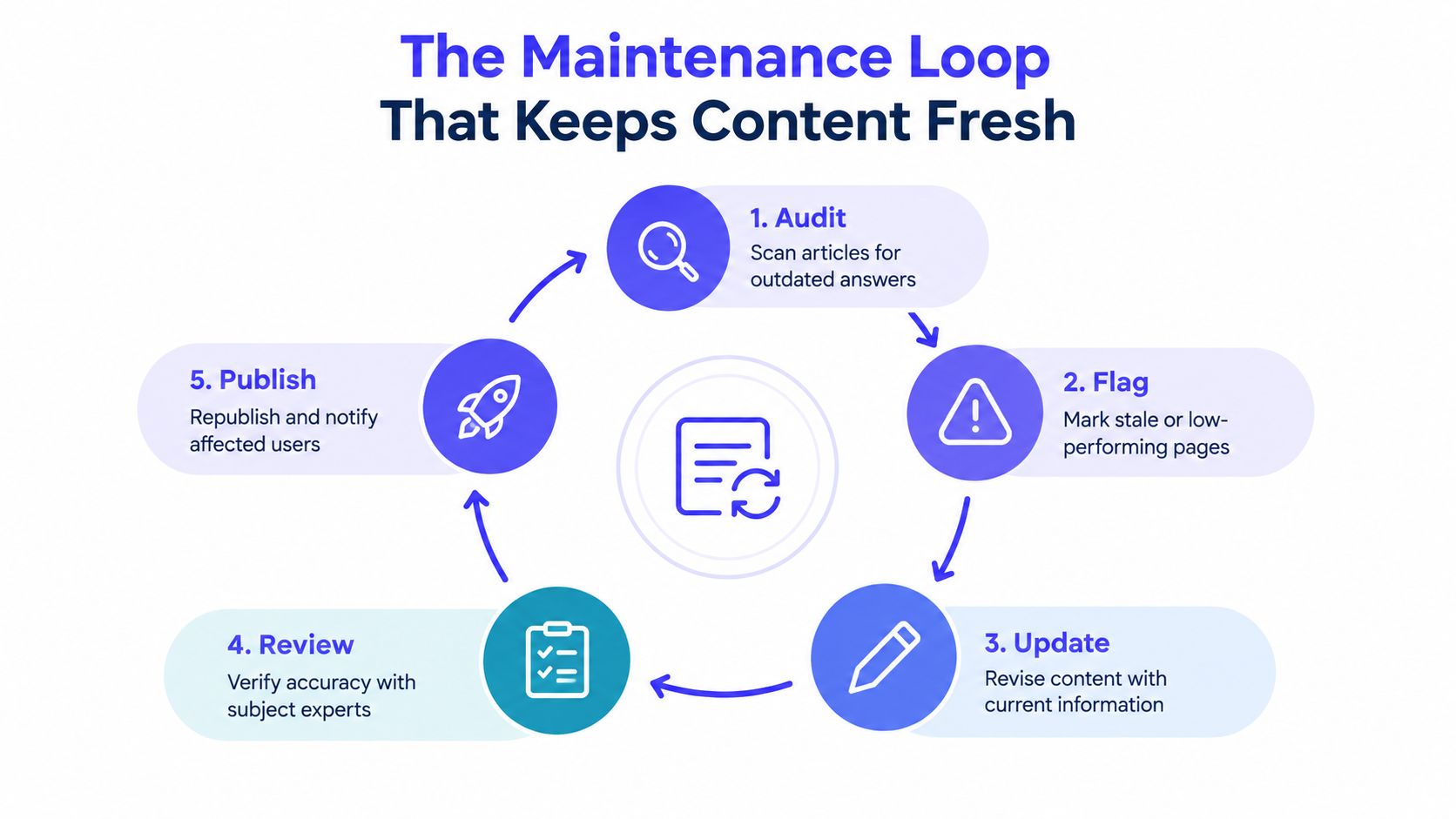 The loop in five steps: audit articles for outdated answers, flag stale or weak pages, update them, review accuracy with whoever owns the feature, then republish and tell affected users.
Test answers, not article counts
Run the question set against your search or AI workflow weekly. You don’t need a large research department. A spreadsheet works if it captures the question, expected answer, returned answer, citations, confidence, and escalation result.
Watch for four failure types:
- Unanswered intent: The system retrieves nothing useful.
- Wrong source: The response cites content that doesn’t apply to the product state.
- Incomplete answer: The response gives steps but omits a prerequisite or exception.
- Unsafe confidence: The response answers an ambiguous or restricted question instead of handing off.
Slow updates and conflicting sources are especially common in small teams because the person changing the product isn’t always the person maintaining the help center. Assign one owner for every correction, add a review date, and link the fix to the release or support conversation that caused it.
A useful maintenance record includes the question, the expected answer, the evidence source, the owner, the review date, and the reason for the change.
Turn failed conversations into durable fixes
Don’t only revise the article that failed. Check why the failure occurred. The answer may be hidden under an internal term, split across two conflicting pages, missing a version label, or absent from the index entirely.
A monthly review should identify the questions that keep returning, pages that produce low-confidence answers, articles with outdated links, and topics that require repeated human explanation. Archive contradictory pages rather than leaving both available. One canonical article per issue is easier for customers, agents, and retrieval systems to trust.
Teams that want a more complete support operating model can also review ways to reduce support ticket volume through self-service. The key is not to deflect every conversation. The key is to remove predictable friction while preserving a clear human path for cases that need judgment.
How should AI use your knowledge base?
AI should answer only from your knowledge base, show which article it used, and hand off to a person when the evidence is thin. AI can answer from a knowledge base, but it can’t repair an ownership problem. If the source material is contradictory, stale, or missing the conditions that matter, an agent can produce a fluent answer that creates more work.
Cost is one part of the decision. Convot’s Cove AI costs $0.20 per resolved conversation, and Intercom lists Fin from $0.99 per outcome, both checked in October 2026; see AI customer service agent pricing compared for other vendors. A lower price doesn’t remove the need to check answer quality, source coverage and escalation behaviour.
Grounding needs visible evidence
A grounded agent should answer from the team’s documentation, cite the source it used, and stop when the evidence doesn’t support a safe answer. Source citations help the customer and the support team inspect the reasoning. They also expose weak content quickly. If an answer repeatedly cites a vague setup page, the problem may be the article structure rather than the model.
Keep automation narrow where the cost of error is high. Billing disputes, account security, outages, permission changes, and ambiguous technical incidents need explicit handoff rules. A human can ask a clarifying question, inspect account context, and recognize when two sources conflict.
The best automation boundary is often a three-part response:
- State what the documentation supports.
- Name the missing condition or uncertainty.
- Hand the conversation to a human with the relevant context attached.
That pattern is more useful than forcing the system to sound certain. It also gives you a clean set of failed or escalated questions for the maintenance loop.
Should you consolidate your support tools?
Consolidate only if one tool removes a place where answers must be updated, and check export, permissions, search and migration support first. Tool consolidation can help when each product owns a separate part of the support journey. One help desk can combine live chat, a help center, a changelog, scheduling, and a revenue dashboard. That can reduce the number of places where an agent has to update an answer, but consolidation isn’t automatically better. Check export options, permissions, search behavior, migration support, and whether the combined workflow fits your team.
If slow replies are the main problem, start by mapping where questions wait in your inbox, then read this partner guide on fixing slow ecommerce support replies. For a small software team, the right choice may be a focused help center and human inbox rather than a broad AI rollout.
How do you translate a knowledge base?
Translate a knowledge base by demand: start with the languages your customers write in and the procedures they need most, and give each version an owner and a verified date. Translation doesn’t finish a support article. It creates another version that can drift from the source, use the wrong product term, or describe a workflow that varies by market, plan, or billing state.
Translate demand before translating everything
Start with support evidence. Identify the languages that generate meaningful customer demand, then translate high-volume procedures first. Setup, payment, cancellation, permissions, and common troubleshooting usually matter more than low-traffic reference pages.
Use the same article identity across languages. Each version should show:
- Canonical topic: The single issue the article addresses.
- Language and market: The audience and regional assumptions.
- Product applicability: Plan, version, integration, and billing conditions.
- Last verified date: When someone checked the localized instructions.
- Escalation route: What happens when translation or product behavior is unclear.
A localized article can be linguistically accurate and operationally wrong. A plan name may differ by market. A payment method may not exist in a region. An app setting may appear only for a particular merchant state. Review localized instructions after product changes, not just when a translator delivers the first draft.
Treat language coverage as a monthly operating decision
Measure which languages produce unanswered intents, repeated clarifications, poor search results, and human handoffs. If one translated article generates more confusion than self-service, inspect its terminology and screenshots before adding more content.
Include localized pages in the monthly quality review below: compare them with the source for changed steps, links, labels and screenshots, and keep a glossary for feature names and billing terms.
For a broader operating view, see how multilingual customer support works. The principle is the same across tools: language coverage is part of content governance, not a checkbox in a translation menu.
How do you measure whether a knowledge base works?
Measure a knowledge base by whether it answers real questions: answer accuracy, citation quality, unanswered questions and the escalations that follow, not page views. Page views are easy to report and weak as a success measure. A popular article may attract people because its title is unclear, because search sends everyone there, or because the instructions fail halfway through.
Measure whether the knowledge base answers real questions. Track answer accuracy, citation quality, unanswered intents, escalation decisions, and changes after documentation updates. Review failed conversations, not just successful deflections. A system that avoids tickets by giving wrong answers is increasing support risk, not reducing it.
Add customer context before judging an answer
The same question can require different answers depending on the customer’s plan, billing state, app version or account history. For Shopify app teams, that context can sit beside the conversation: Convot syncs each merchant’s plan and revenue from the Shopify Partner API, so the agent can tell a general billing question from a plan-specific one without asking the merchant to repeat details.
Run a monthly quality review
Use a short checklist:
- Accuracy: Did the answer match the customer’s actual state?
- Evidence: Did the response cite the right canonical article?
- Coverage: Which customer intents remained unanswered?
- Safety: Did uncertain cases reach a human?
- Freshness: Does each article have an owner and last-verified date?
- Change control: Does each relevant page link to release notes or incident information?
- Context: Did the team capture plan, version, billing, or integration details?
Automation does not fix support on its own. Structured evaluation gives you a way to catch confident errors, while human handoff protects cases that documentation cannot resolve. A knowledge base earns trust through that repeated inspection, not through its article count.
Convot makes a competing help-desk product, so treat it as one option rather than a neutral recommendation. It combines a searchable help center, shared inbox, changelog, scheduling, and a grounded AI agent that cites team documentation and hands off when uncertain. For Shopify app teams, it can show merchant plan, MRR, and past billing beside each conversation using Shopify Partner API data. See the Convot help center if you want to compare that workflow with the system you’re building.
FAQ
What should a SaaS knowledge base include?
A SaaS knowledge base should include getting-started guides, the core workflows customers repeat, troubleshooting by symptom, billing and account answers, and reference pages for limits and integrations. Each article should say what it applies to and when to contact a person.
How many articles does a knowledge base need at launch?
A knowledge base needs enough articles to answer your most common questions, not a target count. As a working rule, collect 50 to 100 real support questions, group them, and write one canonical article per issue, starting with the ones that come up most.
How often should you update a knowledge base?
Update a knowledge base whenever the product changes and review it monthly. Give every article an owner and a last-verified date, retest your saved support questions after each release, and archive pages that contradict the current answer.
Can AI answer customers from a knowledge base?
AI can answer customers from a knowledge base if it uses only your articles, shows which one it used and hands off when the answer is uncertain. Its accuracy depends on the articles: on Appointo’s 83-article help center, our agent handed off 29% of customer messages over 30 days because no article supported a confident answer.
What is the difference between a knowledge base and a help center?
A knowledge base is the collection of answers your team maintains; a help center is the public site where customers search and read them. Many teams use the words interchangeably, and in most help desks the knowledge base is what the help center displays.
About the author
Tarang Agarwal is the founder of Convot. Convot is built by Sidepanda, a small studio that runs several Shopify apps of its own, including Appointo, Depo and Panda Bundle, each with its own help center in Convot.
Revenue-aware support for Shopify app teams.
Live chat, help center, and every merchant's MRR, plan, and LTV beside the conversation. Free under $1k MRR.
Start free