Freshdesk Pricing: Costs, Features, and Alternatives
Freshdesk pricing breakdown per agent, hidden costs for add-ons, sample scenarios, decision criteria, and Convot as a flat-rate alternative.
On this page
- Key takeaways
- How Much Does Freshdesk Cost?
- How Does Freshdesk’s Per-Agent Pricing Add Up?
- What Hidden Costs and Add-Ons Does Freshdesk Have?
- What Does Freshdesk Cost for 3, 5, 10 and 20 Agents?
- How Do You Choose the Right Freshdesk Plan?
- Is There a Flat-Rate Alternative to Freshdesk?
- What Should You Plan Before Leaving Freshdesk?
- FAQ
Freshdesk costs $19, $55 or $89 per agent per month for its Growth, Pro and Enterprise plans billed annually, as listed on Freshworks’ pricing page in October 2026. The page shows no free plan; new accounts get a 14-day Enterprise trial. The real bill depends on how many people need agent access, plus day passes and AI sessions.
Key takeaways
- Per-agent billing is the model: Freshdesk charges for each agent seat, so headcount drives the bill more than ticket volume.
- No free plan is listed today; earlier in 2026 Freshdesk offered free use for one or two agents for six months.
- Occasional helpers can use day passes at $2, $7 or $12 a day, and Pro and Enterprise include 5,000 external collaborators.
- Freddy AI Agent includes 500 sessions once per account, then costs $49 per 100 sessions.
- The Freshdesk bill grows with every paid agent: five Growth agents cost $95 a month, 20 cost $380.
A support team usually notices the problem after the team has already grown. The founder still handles escalations, a developer answers technical questions, a contractor covers weekends, and someone from product needs ticket visibility. Each person may be useful, but each person can also change the monthly subscription.
That’s why Freshdesk pricing needs more than a plan table. You need to model roles, products, billing terms, and actual agent seats. Freshdesk can be a sensible choice for a small, stable support team. It can also become expensive when every occasional contributor needs a paid seat.
How Much Does Freshdesk Cost?
Freshdesk charges per agent: Growth is $19, Pro $55 and Enterprise $89 per agent per month on annual billing, with AI sessions, day passes, connector tasks and MCP actions sold as add-ons. A small support team often starts with a simple assumption: Freshdesk Growth says $19 per agent per month, so the bill should stay modest. The actual bill changes with seats, not company size. Add a founder who jumps into escalations, a developer who answers technical tickets, or a contractor covering weekends, and the monthly total moves with each login that needs agent access.
Freshworks currently lists Freshdesk Growth at $19 per agent per month, Pro at $55, and Enterprise at $89 on annual billing. Its pricing page lists no free plan as of October 2026, and new accounts start with a 14-day trial of the Enterprise plan. Freshworks’ free-versus-paid page frames the paid plans as starting at $19 a month with no hidden charges, which holds per agent, so the total depends on how many agents you count.
For a very small team, Freshdesk can still be a sensible buy. One or two people can test queue setup, routing, knowledge base workflows, and reporting without committing to a large rollout. I’d treat that as a trial of seat economics as much as a trial of the software itself, because the pricing pressure usually appears after you decide more people need to work inside the help desk.
The usual surprise is occasional contributors. Someone who only replies once a week may still need a paid seat if they must assign, triage, or respond in the queue. That is where per-agent pricing starts to bite, and it is also why this article looks at total monthly cost by team size instead of stopping at plan names. Flat team pricing and per-agent pricing behave very differently once access spreads beyond a tight core support group.
Practical rule: Count people who need to act in the inbox, not everyone who needs visibility.
Freshdesk has charged per agent since it launched in 2011; its early Sprout plan cost $9 per agent per month, so five agents paid $45. The original Freshdesk success story shows how early the per-agent structure was built into the product.
How Does Freshdesk’s Per-Agent Pricing Add Up?
Multiply the plan price by the number of paid agents: five Freshdesk agents cost $95 a month on Growth, $275 on Pro and $445 on Enterprise. A per-agent help desk looks cheap until the team chart changes. Add two part-time contributors, give a manager queue access, bring in a contractor for coverage, and the monthly bill rises in a straight line with headcount.
The math itself is simple:
Monthly seat cost = plan price × paid agent count
Using Freshdesk’s current annual per-agent rates noted earlier, a five-person team lands at $95 per month equivalent on Growth, $275 on Pro, and $445 on Enterprise. That is the part buyers usually understand. The part that catches teams later is that seat count often grows faster than ticket volume, because access spreads beyond the core support group.
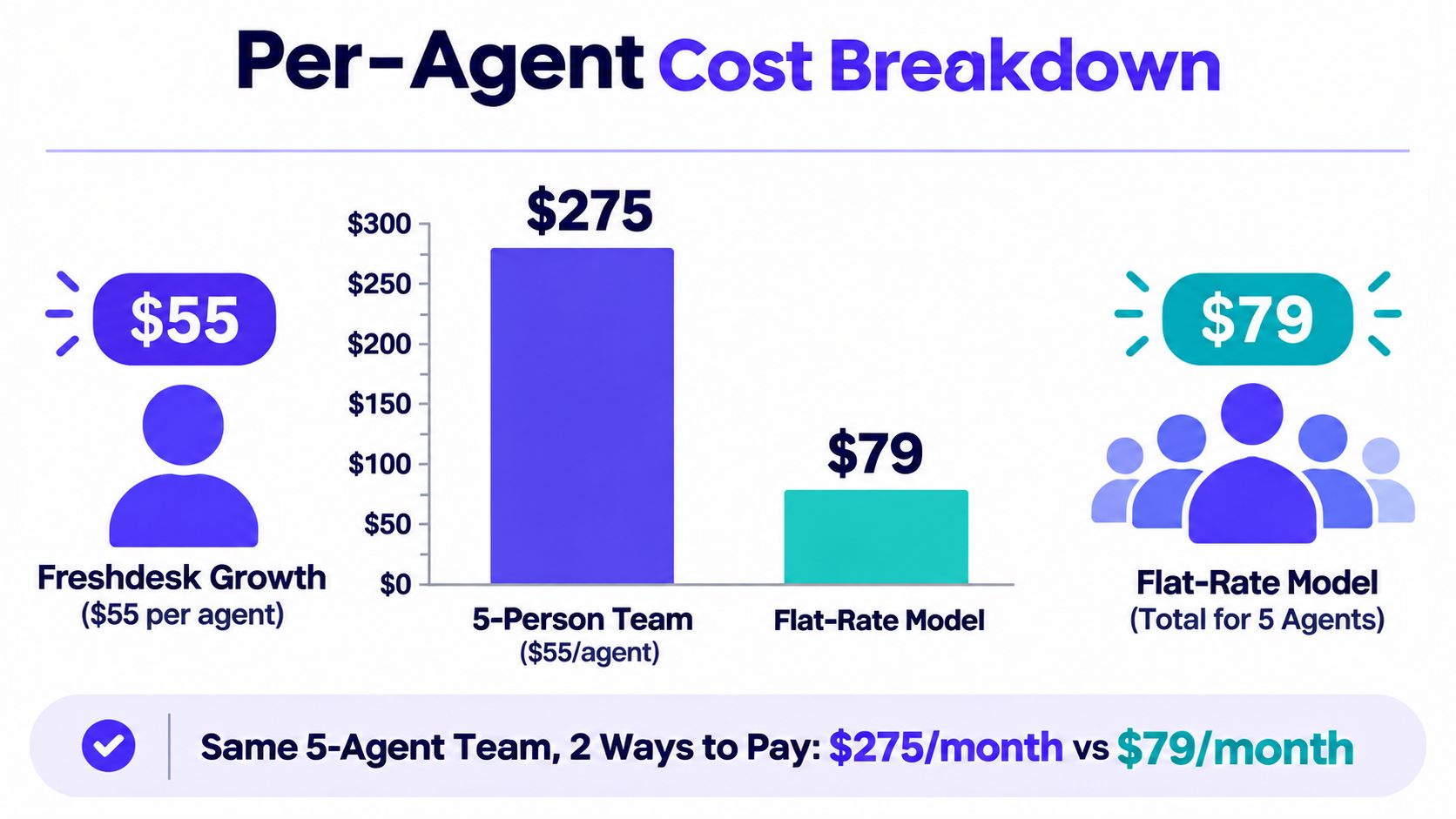
The chart above shows the pressure clearly. A five-person support setup at $275 can look very different next to a flat whole-team price of $79. That does not make per-agent billing wrong. It does show where the model starts to bite: teams where several people need occasional access rather than full-time queue ownership.
Why occasional seats matter
Freshdesk does offer two partial answers for part-time help. Freshdesk day passes give an occasional agent one day of access for $2 on Growth, $7 on Pro or $12 on Enterprise, and Pro and Enterprise include up to 5,000 external collaborators. For anyone who works the queue most weeks, though, a full seat is the realistic way to model cost. The same logic applies to contractors, team leads, or specialists pulled into support for escalations. If they need to reply, assign, triage, or work inside the queue, they belong in the paid agent count when you model cost.
Freshdesk’s 2013 lineup also distinguished between annual and monthly billing, and included Estate at $49 monthly, with the first agent free on every plan. The archived pricing record shows how long the seat-based model has been part of the product.
The free allowance shifted over time as well. Sprout was free for up to three agents in January 2014, then later allowed unlimited agents. By January 2022 the plans had become Free, Growth, Pro and Enterprise, with the free tier still open to unlimited agents; it was capped at 10 agents in 2023, cut to two in 2025, and replaced by a six-month offer for one or two agents in January 2026.
The mental model to use
Compare total monthly spend, not headline seat price.
A two-person team may stay close to the entry cost for a long time. A five-person team has a meaningfully larger fixed bill. A 20-person team needs a stricter pricing review, especially if one queue serves multiple products or functions. That is the core trade-off with Freshdesk. Per-agent pricing stays predictable, but every added contributor pushes the bill higher.
What Hidden Costs and Add-Ons Does Freshdesk Have?
Beyond seats, Freshdesk meters AI Agent sessions after the first 500 ($49 per 100), sells Freddy AI Copilot at $29 per agent, day passes at $2 to $12, connector app tasks at $80 per 5,000 and MCP actions at $15 per 1,000. The final Freshdesk bill can exceed the plan card when your team adds capabilities, channels, or usage-based services. The safest approach is to separate core seats from every extra item before you sign an annual agreement.
Start with billing frequency. Freshdesk’s current annual prices are $19 for Growth, $55 for Pro, and $89 for Enterprise per agent per month, as listed on Freshworks’ pricing page in October 2026. The vendor’s subscription documentation says the total depends on the number of agents in the account. If you’re comparing annual and monthly commitment, ask Freshworks for the monthly figures shown for your account rather than assuming the annual card is the only available rate.
Audit the plan gates
Teams often move up a tier for a capability, not because they need every feature in the higher plan. That can change the economics quickly.
Use this review before choosing a plan:
- List required workflows: Identify the routing, automation, permissions, reporting, and collaboration functions your team needs.
- Separate must-haves from preferences: A feature that sounds useful doesn’t justify a higher tier unless someone will use it.
- Test role permissions: Check whether occasional contributors can work effectively without receiving the same access as core agents.
- Review product scope: Confirm whether you need ticketing only or a broader omnichannel package.
- Model future seats: Include likely hires and contractors, but don’t buy seats for hypothetical roles too early.
AI requires its own line of inquiry. Freddy AI Agent includes 500 sessions once per account on every plan; after that, sessions cost $49 per 100, about $0.49 each, and an email session covers 72 hours of replies. Freddy AI Copilot, the assistant for agents, is a separate $29 per agent per month on Pro and Enterprise. Ask which functions are included, which are metered, and what happens when an allowance ends.
A useful pricing review asks, “What triggers another charge?” It doesn’t stop at, “Which plan includes this feature?”
Avoid the feature-led upgrade
A common mistake is choosing Pro or Enterprise because the feature list looks safer. That approach works poorly for small software teams. Start with actual ticket volume, people who need to respond, products supported, and the workflows that break today.
If the team only needs a shared inbox, organized ticket handling, and a knowledge base, the lower tier may be enough. If advanced reporting or governance is mandatory, include the higher plan in the model from the beginning. The point isn’t to avoid upgrades. It’s to know exactly what causes one.
What Does Freshdesk Cost for 3, 5, 10 and 20 Agents?
On annual billing, Freshdesk Growth costs $57 a month for 3 agents, $95 for 5, $190 for 10 and $380 for 20; Pro and Enterprise scale the same way at $55 and $89 per agent. Freshdesk becomes easier to judge when you stop looking at the individual seat price and calculate the account total. The examples below use the annual rates listed in October 2026: Growth at $19, Pro at $55, and Enterprise at $89 per agent per month from Freshworks’ pricing page.
| Paid agents | Growth | Pro | Enterprise |
|---|---|---|---|
| 3 | $57/mo | $165/mo | $267/mo |
| 5 | $95/mo | $275/mo | $445/mo |
| 10 | $190/mo | $550/mo | $890/mo |
| 20 | $380/mo | $1,100/mo | $1,780/mo |
These are subscription equivalents, not a claim about taxes, optional services, or other account-specific charges. They show the central trade-off: the bill rises directly with the number of paid agents.
Three agents
A three-person team on Freshdesk Growth reaches $57 per month equivalent. That’s close to the size of team many founders picture when they search for Freshdesk pricing. On Pro, the same headcount reaches $165, while Enterprise reaches $267.
Convot’s Starter plan is $49 per month for one app and three seats. That makes flat pricing worth considering when all three people need access, rather than only one person working tickets.
Five agents
Five Growth seats cost $95 per month equivalent. Five Pro seats cost $275, and five Enterprise seats cost $445.
Convot’s Growth plan is $79 per month for two apps and seven seats. The comparison isn’t a claim that one product fits every workflow. It highlights the difference between paying for each agent and paying for a defined team allowance.
Ten and 20 agents
At 10 agents, Freshdesk totals $190 on Growth, $550 on Pro, and $890 on Enterprise per month equivalent. At 20 agents, the totals become $380, $1,100, and $1,780.
Convot’s Pro plan is $149 per month for five apps and 12 seats, while Scale is $299 for unlimited apps and 20 seats. Teams can use the help desk price calculator to test their own mix of seats and products.
The crossover isn’t one universal number. It depends on the Freshdesk tier, how many people need agent permissions, and how many apps one support team operates. A three-person team and a 20-person team should not use the same buying logic.
How Do You Choose the Right Freshdesk Plan?
Choose by who works support, not company size: count the people who reply, the people who only read, occasional escalation helpers and the products you support, then compare today’s setup with the one after your next hire. A stable team with clear roles can forecast per-agent billing. A mixed team with founders, developers, contractors, and product specialists needs to examine access more carefully.
Start with seat behavior
Ask four questions before comparing plan cards:
- Who replies to customers? These people need full working access.
- Who only reads reports? They may not need the same seat or permissions.
- Who handles occasional escalations? Their access pattern can make a flat team model more predictable.
- Who supports more than one product? A single inbox may be more valuable than separate product subscriptions.
Match the model to the team
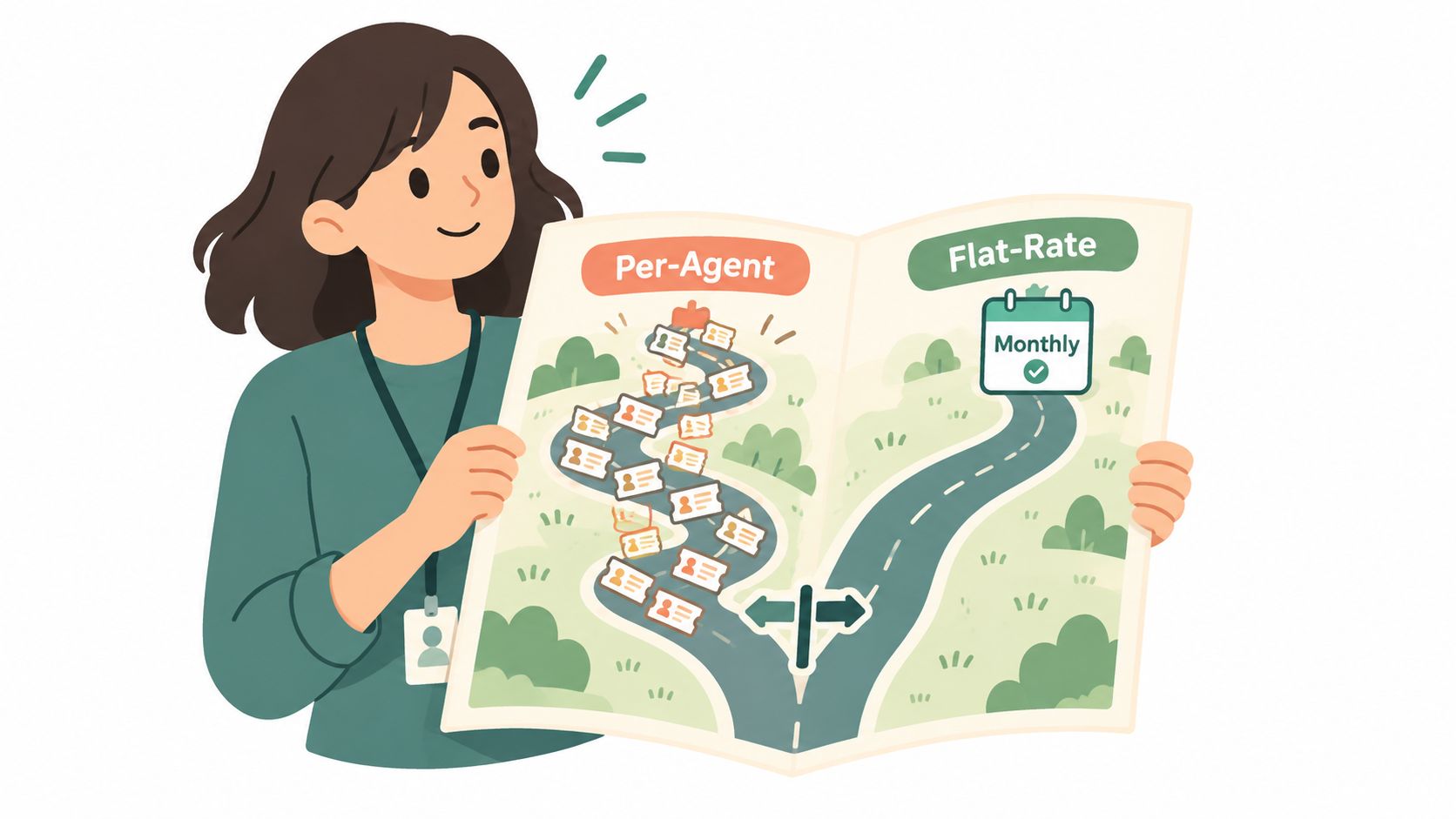
Freshdesk’s per-agent structure suits a small and stable support group. If two people handle nearly every ticket, the account remains easy to forecast. The model also gives larger support departments a clear relationship between headcount and subscription cost.
Flat whole-team pricing suits a different operating pattern. Founders can join escalations without turning every occasional helper into a separate cost decision. A company supporting several apps can also compare the total product footprint rather than multiplying separate help desk subscriptions.
Product requirements still matter. Freshdesk may be the right choice if its ticketing workflows, reporting, permissions, and wider Freshworks ecosystem match your process. A lower bill isn’t useful if the team loses a workflow it relies on every day.
Use a cost floor, not a headline
Write down the smallest setup that can operate support properly. Then write down the likely setup after the next hiring or product change. If the two numbers are far apart, monthly flexibility matters.
The help desk pricing index for 2026 can help frame that comparison, but treat every price as time-sensitive. Vendors change plan names, allowances, and billing rules. Check the vendor page immediately before purchase.
Is There a Flat-Rate Alternative to Freshdesk?
Convot, a competing help desk for small software teams, charges one monthly fee for the whole team instead of per agent, starting at $49 for one app and three seats, against $57 a month for three agents on Freshdesk Growth billed annually. Its published structure is Starter at $49 for one app and three seats, Growth at $79 for two apps and seven seats, Pro at $149 for five apps and 12 seats, and Scale at $299 for unlimited apps and 20 seats. Extra seats cost $10 each, and extra apps cost $20 each.
Convot makes a competing help desk, so this comparison should be read as a pricing and workflow contrast, not as an impartial product ranking.
Where flat pricing helps
The strongest fit is a small software company where support isn’t isolated to a formal department. A founder may handle escalations. Engineering may answer technical questions. Product may need to review feedback. Those people can all be part of the operating team without forcing the company to treat every participant as a new per-agent calculation.
Convot also prices by app count. One team can support several apps from one inbox. That matters to Shopify app developers who operate related products and don’t want support separated into a subscription for each product.
For Shopify apps, each conversation can show the merchant’s plan, MRR, and past billing information, pulled from the Shopify Partner API. That context puts commercial details beside the support request, so an agent doesn’t need to search another system before deciding how to respond.
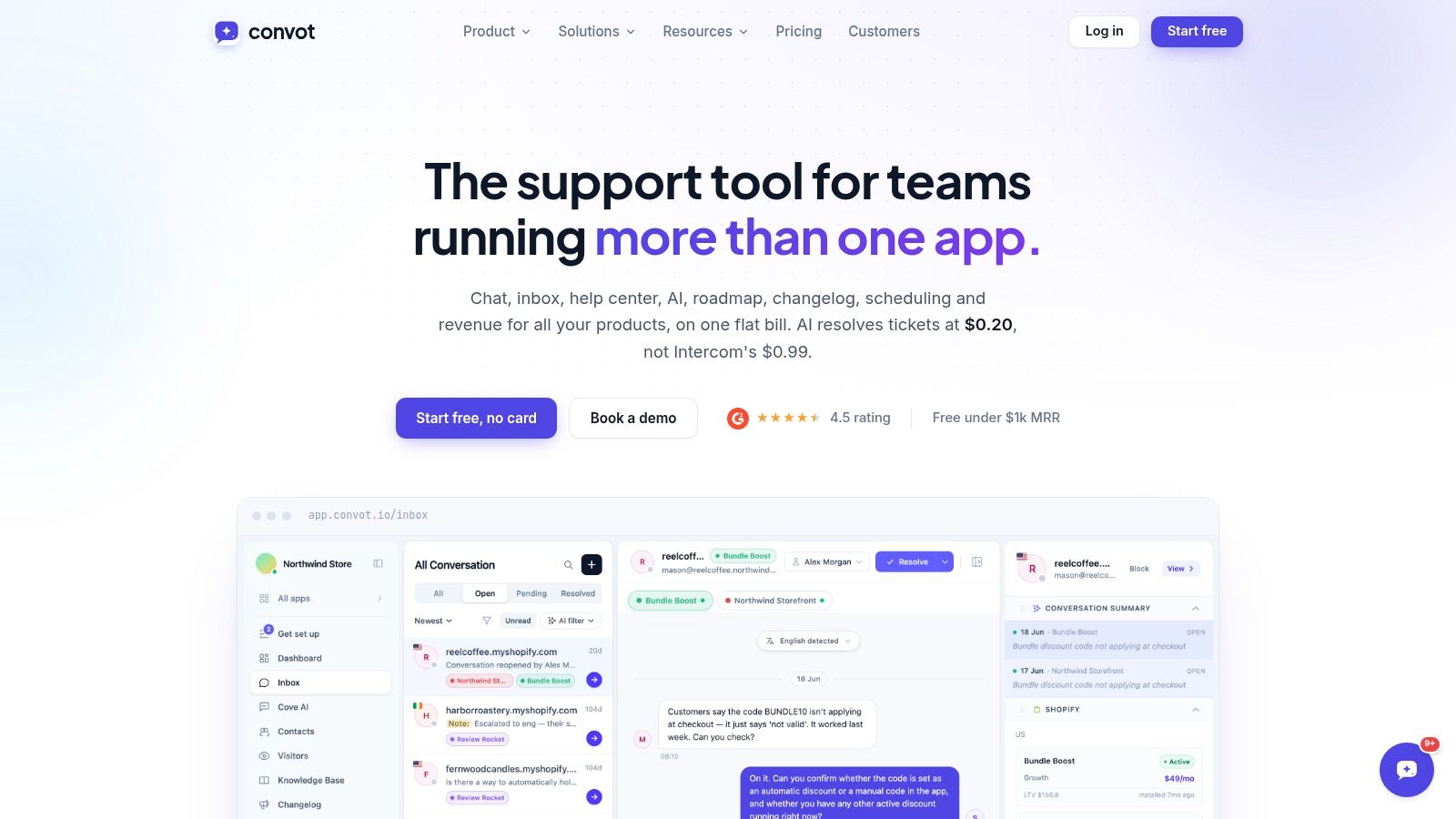
Convot also combines live chat, a help center, changelog, scheduling, and a revenue dashboard in one help desk. That can reduce the number of separate subscriptions a small team maintains, but only if those tools match the team’s actual workflow. For broader customer success planning, a resource on best tools for churn reduction may help teams compare adjacent systems.
Convot’s AI agent, Cove, costs $0.20 per resolved conversation, while Intercom’s Fin costs $0.99. Cove AI hands the conversation to a human when it isn’t sure. That behavior matters more than a generic “AI included” label because unresolved uncertainty still needs an owner. Review Convot’s pricing against your expected seats, apps, and resolved conversations.
What Should You Plan Before Leaving Freshdesk?
Plan the data before the software: active tickets, history, knowledge articles, routing rules, saved replies and the real access list. A help desk migration is a data project before it becomes a software project. Ticket history, customer context, internal notes, saved replies, and agent habits all affect whether the move feels successful.
Convot imports Crisp in one click. A move from Freshdesk, Zendesk, or Intercom is different. The founder handles that migration for free with the team. It isn’t an automatic importer, and that distinction matters when you’re planning the work.
Prepare the Freshdesk account
Before moving anything, create a short inventory:
- Active tickets: Assign an owner and decide which cases must remain open during the switch.
- Historical conversations: Export the records your team needs for context, audits, or customer follow-up.
- Knowledge content: Identify articles that should move, be rewritten, or be retired.
- Workflows: Record routing rules, saved replies, tags, escalation paths, and reporting habits.
- Access list: Separate core agents from occasional contributors so the new seat model reflects real work.
Human migration support takes longer to plan than clicking an importer, but it gives the team a place to resolve exceptions. Ask how attachments, timestamps, customer identities, private notes, and ticket status will be handled before the transfer begins.
Rebuild the daily workflow
Train agents on the new inbox before the cutover. Give them a small set of real examples, including a billing question, a technical escalation, and a conversation that needs a human decision. The AI should hand off when it isn’t confident, and agents should know exactly where that handoff appears.
The migration can also be a chance to consolidate tools. If the team currently runs separate live chat, help center, changelog, scheduling, and revenue systems, compare the cost and maintenance of keeping each one against using one help desk for those jobs.
Don’t choose Freshdesk or an alternative from the headline price alone. Count working seats, product lines, usage, migration effort, and the tools you can retire. Our roundup of Freshdesk alternatives compares the main options.
FAQ
How much does Freshdesk cost per agent?
Freshdesk Growth costs $19, Pro $55 and Enterprise $89 per agent per month billed annually, as listed in October 2026. Add-ons such as AI sessions, Copilot and day passes are extra.
Does Freshdesk have a free plan?
Freshdesk’s pricing page lists no free plan in October 2026. New accounts get a 14-day Enterprise trial; earlier in 2026 it offered free use for one or two agents for six months.
How much does Freshdesk AI cost?
Freddy AI Agent includes 500 sessions once per account on every plan, then costs $49 per 100 sessions. Freddy AI Copilot costs $29 per agent per month on Pro and Enterprise.
Can part-time staff use Freshdesk without a full seat?
Day passes give occasional agents one day of access for $2, $7 or $12 depending on the plan, and Pro and Enterprise include up to 5,000 external collaborators.
What does Freshdesk cost for a five-person team?
Five Freshdesk agents cost $95 a month on Growth, $275 on Pro and $445 on Enterprise, billed annually, before add-ons.
If your support team includes founders, developers, or contractors who only join selected conversations, compare the per-agent Freshdesk bill with Convot’s whole-team plans and multi-app inbox. Visit Convot to review the pricing and see whether its migration support fits your move.
Written by Tarang Agarwal, founder of Convot, a help desk for small software teams. Prices checked on Freshworks’ pricing page, October 2026.
Revenue-aware support for Shopify app teams.
Live chat, help center, and every merchant's MRR, plan, and LTV beside the conversation. Free under $1k MRR.
Start free