AI Customer Service Agent Pricing Compared for Small Teams
AI customer service agent pricing per resolved conversation in 2026: Intercom Fin, Gorgias, Zendesk, Help Scout and Convot, with a handoff playbook.
On this page
- Key takeaways
- What Does an AI Customer Service Agent Actually Do?
- How Much Does an AI Customer Service Agent Cost per Resolved Conversation?
- How Do the Three Common AI Agent Architectures Compare?
- How Can a Small Team Launch an AI Agent in a Week?
- When Should an AI Agent Route a Customer to a Human?
- Which Prompts, Saved Views and KPIs Prove an AI Agent Works?
- Should a Small Team Build, Buy or Switch?
- FAQ
An AI customer service agent costs $0.20 to about $1.00 per resolved conversation at the best-known help desks in 2026. Zendesk does not publish its rate, and third parties report up to $2.00. The spread comes from each vendor’s billing unit, included resolutions and handoff timing, so cost per resolved conversation matters more than seat count.
An AI customer service agent is software that reads a customer question, pulls from approved knowledge, drafts a grounded answer, and either sends it or hands the thread to a human. For a founder, that’s the actual test, not the demo.
Key takeaways
- Intercom Fin costs $0.99 per outcome and Gorgias $0.90 to $1.00 per automated interaction, both published on the vendors’ pricing pages in October 2026.
- Zendesk does not publish a per-resolution price. Third parties report about $1.50 committed and $2.00 pay as you go.
- Convot’s Cove AI costs $0.20 per resolved conversation on every paid plan.
- Start retrieval-augmented: answer from approved docs, cite the source, hand off when unsure.
- Measure cost per resolved conversation and escalation rate, not total messages handled.
What Does an AI Customer Service Agent Actually Do?
An AI customer service agent sits between a customer and your support team. It takes a message, checks trusted sources, drafts a reply, and either resolves the issue or escalates it with context. That is very different from a rules bot, which only follows a fixed script and breaks the moment the customer goes off-menu.
Two modes matter
The first mode is autonomous resolution. The agent answers from your docs, policies, billing data, or product knowledge, then closes the loop when it’s confident. The second mode is agent-assist, where the AI drafts the reply, summarizes the issue, or suggests next steps, and a human sends the final response.
A founder should care about the handoff logic more than the brand name. If the system can’t show its source, can’t explain its confidence, or can’t transfer the transcript cleanly, you don’t have a support agent. You have a chatbot with a nicer interface.
Practical rule: if the customer would be annoyed by repetition, the handoff failed even if the bot “answered” something.
The shared inbox model used by tools like Gorgias, Zendesk, and Intercom matters because support is not one-off chat. It’s a queue, a history, a place where assignments, notes, and context live together. That’s why the agent has to fit the inbox, not replace the inbox.
If you want the deeper definition and how to stop an agent hallucinating, read what an AI support agent is. If you’re training the content source behind the agent, how to train a custom chatbot is a useful companion piece.
How Much Does an AI Customer Service Agent Cost per Resolved Conversation?
Published AI prices at the best-known help desks run from $0.20 to $1.00 per resolved conversation, but each vendor bills a different unit, so the cheapest headline is not always the cheapest invoice. Check what counts as a billable resolution, what is included in the plan, and whether seats are charged on top. One clean number can hide a messy bill.
We read each price from the vendor’s public pricing page on 3 October 2026. Zendesk publishes no per-resolution rate, so its figures are third-party reports and are marked as such.
| Vendor | AI price | What is billed | Source | Checked |
|---|---|---|---|---|
| Convot Cove AI | $0.20 | Resolved conversation in which it replied, every paid plan | Convot pricing | 3 Oct 2026 |
| Help Scout AI Answers | $0.75 | Resolution | Help Scout pricing | 3 Oct 2026 |
| Re:amaze | $0.85 | Additional resolution after 5 to 20 included per user | Re:amaze pricing | 3 Oct 2026 |
| Gorgias AI Agent | $0.90 to $1.00 | Automated interaction, $0.90 billed annually, $1.00 monthly | Gorgias pricing | 3 Oct 2026 |
| Intercom Fin | $0.99 | Outcome | Intercom pricing | 3 Oct 2026 |
| Zendesk AI agents | Not published | Automated resolution; third parties report about $1.50 committed and $2.00 pay as you go | Zendesk pricing | 3 Oct 2026 |
Seat or plan fees usually come on top. Intercom charges per seat, Gorgias charges for its helpdesk plan as well as the AI fee, and Zendesk does not publish its AI resolution rate, so ask for it in writing. Our help desk pricing index lists the full plan prices for 24 tools, and the AI customer service statistics page charts the AI price per unit across nine of them.
The gotcha is simple. Some vendors bill by resolution, some by conversation or session, and some mix usage with seat pricing. If your support volume rises and your AI works, the bill should not punish you for solving more tickets.
Use a support cost calculator to model your own inbox before you request quotes. Compare the table against your monthly ticket volume, not your hope for automation. A hypothetical $0.40 plan that resolves more tickets can beat a hypothetical $0.10 plan that leaves most of the queue for humans.
Founder filter: copy the vendor’s billing rule into your spreadsheet before you compare anything else. If you can’t model the invoice, you can’t judge the product.
How Do the Three Common AI Agent Architectures Compare?
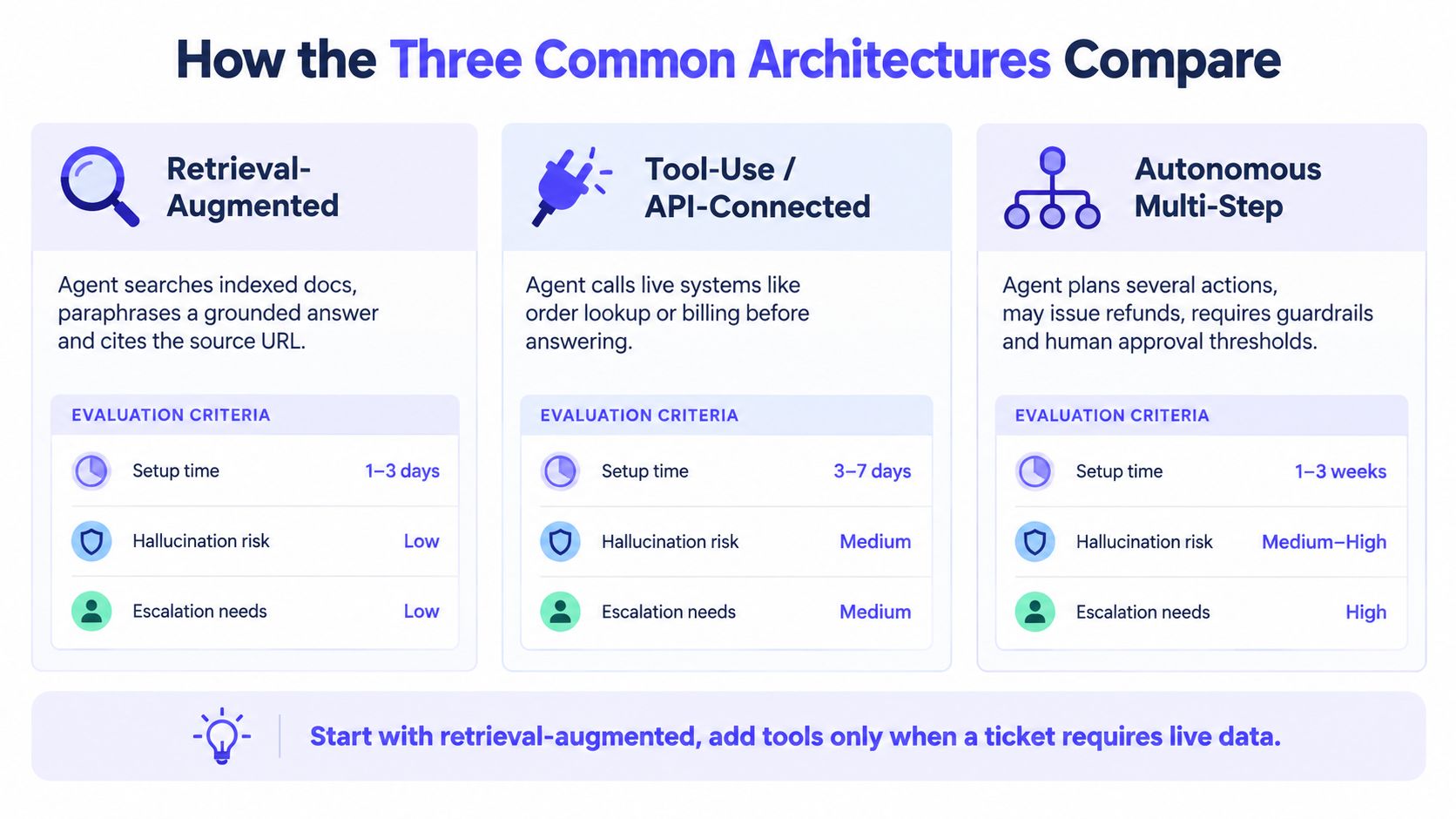
The three common architectures are retrieval-augmented, generative-only and hybrid. Retrieval-augmented answers from your indexed docs and cites them, generative-only answers from model memory and invents more, and hybrid adds live data and rules on top of retrieval. For small software teams, retrieval-augmented is the safe default, because support is full of edge cases, product changes, and policy exceptions.
Retrieval-augmented is the safe default
A retrieval-augmented agent searches indexed docs, paraphrases a grounded answer, and cites the source URL. That keeps auditability high and hallucination risk lower, which is why it fits a single founder shipping a Shopify app better than a freeform model does. It’s the simplest way to make sure the agent answers from what you already approved.
Generative-only is fast and risky
A generative-only system answers from model memory or wide conversation context. It sounds fluent, but support teams pay for that fluency when the model invents policy details, misses product edge cases, or makes a bad promise about refunds and billing. That risk is hard to justify for customer service.
Hybrid is the grown-up option
A hybrid setup uses retrieval for facts, then lets a generative layer draft the response while a rules layer handles known intents like order lookup or refund status. It takes more work, but it’s the right move once you have enough ticket volume to justify ongoing tuning. Start with retrieval-augmented, then add tools only when the ticket needs live data or an action.
For one founder, the sequence is clear. Start with grounded answers, add API calls only where customers need live account data, and keep humans in the loop for anything sensitive. That is boring. It’s also the least expensive way to avoid damaging trust.
How Can a Small Team Launch an AI Agent in a Week?
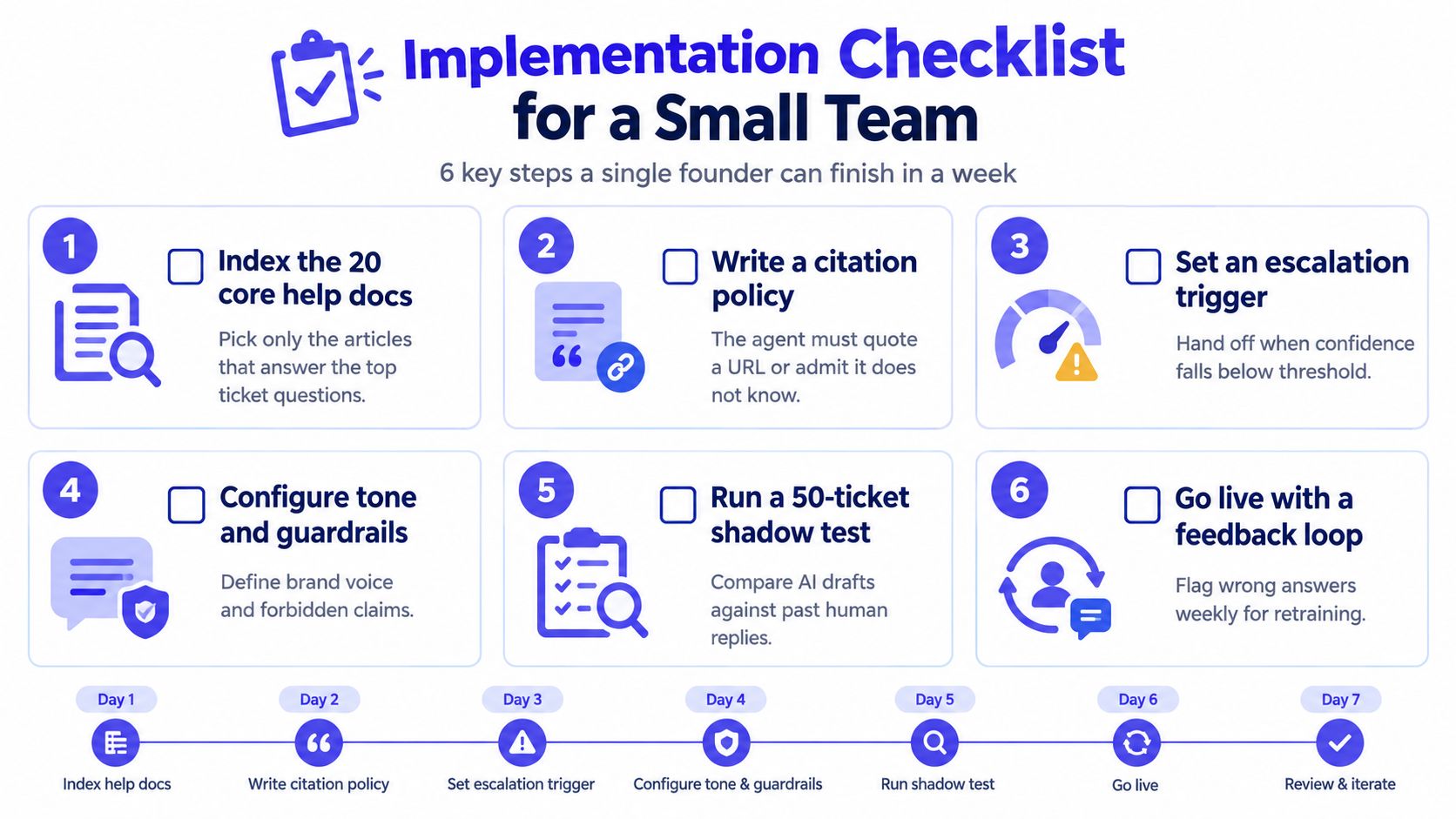
A small team can launch a first AI agent in about a week by keeping the scope narrow: index the 20 help articles that answer the most common questions, write a citation rule, set one confidence threshold with one handoff path, and test against old tickets before any customer sees it. The mistake is trying to automate everything at once.
Start with the docs that already win tickets
Index the 20 help articles that answer the top questions. If your support volume is mostly password resets, plan changes, or setup confusion, don’t feed the agent your whole knowledge base. Give it the pages that already resolve those cases, then expand only after the answers hold up.
Write the rules before you train the model
The agent should quote a URL or say it doesn’t know. That’s the citation policy, and it keeps the system honest. It also makes review easier because every answer is traceable back to approved documentation.
Set one threshold and one exit
Choose a confidence cutoff that forces handoff, then define what the handoff summary must include. The summary should carry the transcript, the detected intent, the source evidence, and the attempted steps so the customer doesn’t repeat themselves. If you need an example of how teams think about integrations and connected systems, read third-party integrations.
Founder rule: if the agent is unsure, it should stop early, not “try harder.”
Test on old tickets before customers see it
Run the agent against 50 recent conversations in shadow mode. Compare its draft to the human reply and note where it missed context, quoted the wrong article, or escalated too late. That one test will tell you more than a polished demo.
One extra step matters and is often skipped. Write a short escalation summary template for the human agent and add a kill switch that pauses the bot if resolution quality slips. If you don’t build a way to stop the agent fast, you’re not operating it, you’re gambling with it.
When Should an AI Agent Route a Customer to a Human?
An AI agent should hand off whenever the issue touches money, judgment or trust: refunds above your threshold, account deletion, legal threats, billing disputes, low confidence, or a customer opening the same ticket twice. A well-run agent hands off early with the transcript, intent and sources attached, so the customer never has to repeat themselves.
Route by intent, not by optimism
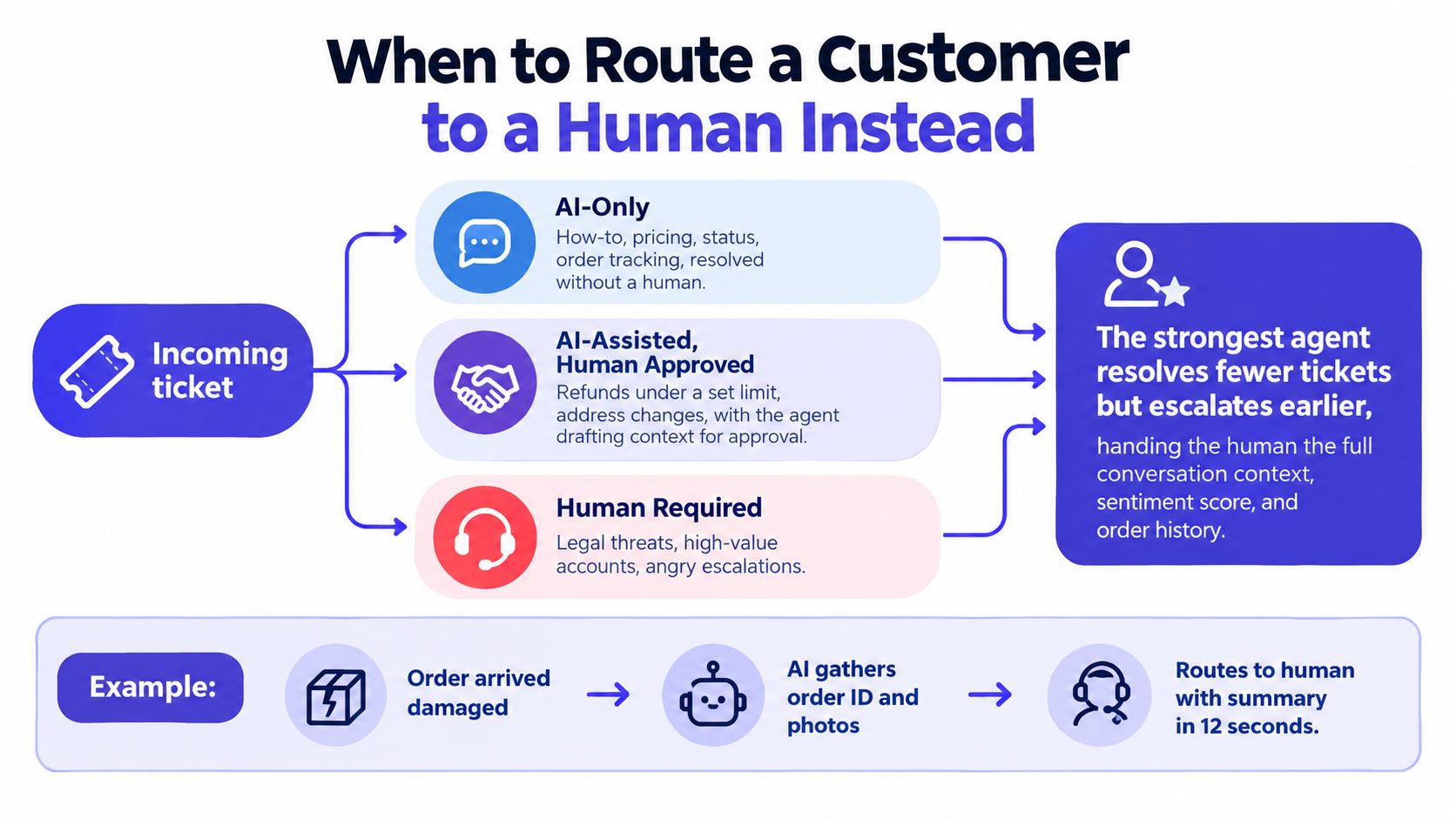
AI-only is for how-to questions, pricing, status checks, and order tracking. Those are documented, repeatable, and low risk. Human-only is for refunds above your threshold, account deletion, legal threats, billing disputes after a chargeback, or any message with a detected slur.
AI-assisted, human-approved is the middle ground. Bug reports, feature requests, and edge-case integrations belong there because the agent can gather context, but the human should decide. That’s especially true for teams serving software products where one wrong answer can keep a merchant’s store stuck.
Use hard triggers
A clean routing rule can be as blunt as confidence below threshold, a blocklisted keyword, or the customer opening the same ticket twice. You do not need a clever rule if a simple rule already protects the relationship. That’s where a remote customer service specialist can still add value, because human judgment matters most when the issue isn’t neatly documented.
The video below, a LangGraph tutorial from Hamza AI Lab, builds an agent with exactly this pattern of routing, lookup and escalation.
A simple illustration, not a customer story: an order arrives damaged, the agent collects the order ID and photos, then routes the full summary to a human. That’s the right pattern because it protects speed without pretending the bot should make the final call.
If the wrong answer would cost more than the human minutes it saves, route to a human.
Which Prompts, Saved Views and KPIs Prove an AI Agent Works?
Three things prove an AI agent works: a system prompt that forces approved sources, a citation and early handoff; two saved views that separate closed conversations from escalations; and KPIs for cost per resolved conversation, resolution without handoff and escalation rate by intent. Total messages handled proves nothing.
Use a system prompt that forces three things: answer from approved sources, include a citation, and hand off when confidence is low. Keep the tone plain and short. A good support prompt doesn’t need personality, it needs discipline.
Saved views matter just as much. One view should show every conversation the agent closed. Another should show every escalation with the agent’s draft reply attached. If your inbox can’t separate those two flows, you’ll never know whether the AI is resolving cases or just creating cleaner handoffs.
For a Shopify app example, imagine a customer asking where a discount code went. The agent checks the coupons article, quotes the line about expired codes, and closes the thread if the evidence matches. If the customer replies with a missing code or a special exception, the thread moves to a human with the context already attached.
| KPI | Why it matters | 30-day target |
|---|---|---|
| Resolution rate without handoff | Shows how often the agent truly finishes the job | Higher than the shadow test baseline |
| Average cost per resolved conversation | Ties AI value to actual support spend | Lower than your current blended cost |
| Time to first reply | Measures responsiveness, not just closure | Faster than the human queue |
| CSAT after AI-only interactions | Checks whether automated answers feel acceptable | Hold steady or improve |
| Escalation rate by intent | Reveals which ticket types the agent should avoid | Decline on routine intents, rise on sensitive ones |
Ignore total messages handled. That number flatters noisy systems and says little about resolution quality. A team should care about fewer repeat contacts, cleaner handoffs, and better answers, not vanity volume.
Should a Small Team Build, Buy or Switch?
Most small software teams should buy rather than build. Building only makes sense with a distinct knowledge base, in-house ML capacity and a cost ceiling no vendor can meet; otherwise the hidden expense is not the AI answer but the prompt and citation maintenance after launch.
The build-versus-buy decision comes down to three questions. How sensitive is your support data, how unique is your knowledge surface, and can you staff prompt and citation maintenance every month? If those answers are messy, buy.
Buy when your docs fit the vendor’s indexing model, your ticket volume is high enough to justify the setup, and you need compliance coverage from day one. Build only if you have a distinct knowledge graph, in-house ML capacity, and a cost ceiling that the vendor can’t hit. If you are switching help desks to change your AI price, the Intercom pricing breakdown shows how Fin and seats add up for a small team.
Whatever the vendor, ask how it defines a billable resolution and whether seats are charged on top. Plans that mix flat seats with metered AI usage make invoice math harder, so model the bill before you commit.
Convot makes a competing product, and its Cove AI agent uses grounded answers with human handoff when confidence is low. That is one option, not a universal answer. The right choice is the one that fits your docs, your volume, and how much risk you can afford in support.
FAQ
How much does an AI customer service agent cost?
Published prices at well-known help desks run from $0.20 to $1.00 per resolved conversation in October 2026: Convot $0.20, Help Scout $0.75, Re:amaze $0.85, Gorgias $0.90 to $1.00 and Intercom Fin $0.99. Zendesk does not publish its rate. Seat or plan fees usually come on top.
What counts as a resolved conversation?
Each vendor defines it differently. Intercom bills an outcome, Gorgias an automated interaction, and Convot a resolved conversation in which Cove AI sent a reply. Read the vendor’s definition before comparing prices, because the unit decides the bill.
Is an AI customer service agent the same as a chatbot?
An AI agent answers from your approved sources, cites them and hands off with context when unsure, while a rules chatbot follows a fixed script. The difference shows up on questions the script never anticipated.
When should the AI hand off to a human?
Hand off on refunds above a threshold, account deletion, legal threats, billing disputes, low confidence, or a repeat ticket. A good handoff passes the transcript, intent and sources so the customer does not repeat themselves.
Which AI agent architecture should a small team start with?
Start retrieval-augmented: index your best help articles, require a citation on every answer and set one confidence threshold. Add live data lookups and rules only once ticket volume justifies the tuning.
If you want a help desk that keeps support, docs, changelog, scheduling, and a grounded AI agent in one place, visit Convot. It’s built for small software teams that want flat pricing, Shopify context beside each thread, and a human handoff when the AI isn’t sure.
Written by Tarang Agarwal, founder of Convot, a help desk for small software teams. Updated October 2026.
Revenue-aware support for Shopify app teams.
Live chat, help center, and every merchant's MRR, plan, and LTV beside the conversation. Free under $1k MRR.
Start free