Intercom vs Zendesk for small teams: pricing, AI costs and which to choose (2026)
Intercom vs Zendesk for small software teams: seat prices, AI costs, workflow fit and migration, with each vendor's prices checked in October 2026.
On this page
- Key takeaways
- What is the difference between Intercom and Zendesk?
- How do Intercom and Zendesk compare on features?
- How much do Intercom and Zendesk cost?
- Which is better for a team supporting several apps?
- How hard is it to migrate from Zendesk to Intercom?
- When should you choose Intercom over Zendesk?
- What are lighter alternatives to Intercom and Zendesk?
- FAQ
Intercom is the better fit for chat-first, product-led support, and Zendesk for ticket-first teams that need routing, SLAs and formal queues. For 3 agents, Intercom costs $87 to $396 a month and Zendesk $57 to $345, billed annually, before AI. Intercom’s Fin is priced from $0.99 per outcome; Zendesk bills AI per automated resolution but publishes no rate.
Disclosure: Convot publishes this comparison and sells a competing help desk. Prices were checked on Intercom’s and Zendesk’s pricing pages in October 2026.
Key takeaways
- Workflow decides more than price: Intercom is built around live conversations, Zendesk around governed tickets.
- Seats: Intercom $29, $85 or $132 per seat; Zendesk $19, $55 or $115 per agent, billed annually.
- AI: Intercom’s Fin is from $0.99 per outcome, charged once per conversation; Zendesk bills per automated resolution without a published rate.
- Migration: Intercom documents a Zendesk importer and a one-click help center import, but tags, macros, triggers and SLA policies have to be rebuilt.
- Several apps: both need their top tiers for multi-brand support.
You’re probably staring at two tabs right now, one with Intercom, one with Zendesk, and trying to decide which mistake will cost less later. The question isn’t which logo looks cleaner. It’s whether your team needs chat-first support or ticket-first control, and how much you’ll pay once AI starts resolving real volume.
| Area | Intercom | Zendesk |
|---|---|---|
| Core workflow | Conversation-first, fast messaging, proactive engagement | Ticket-first, routing, SLAs, structured queues |
| Best for | Product-led support and chat-heavy teams | Complex queues and formal case handling |
| Seat price (billed annually) | $29, $85 or $132 per seat | $19, $55 or $115 per agent |
| AI pricing | Fin from $0.99 per outcome, once per conversation | Per automated resolution; rate not published |
| Migration | Zendesk importer plus a help center import; tags, macros, triggers and SLAs rebuilt | Reverse direction not covered here; check Zendesk’s import documentation |
| Several brands or apps | Multibrand Messenger and help center on Expert only ($132 per seat) | Up to 5 help centers on Suite Professional ($115 per agent) |
Intercom vs Zendesk is really a choice between two operating rhythms. Intercom is built around real-time messaging, proactive engagement, and an AI-first conversation layer. Zendesk is built around formal ticketing, routing, SLA management, reporting, and larger-scale case handling. That split matters most when a small team is supporting more than one product from the same inbox, because the wrong workflow adds clicks before you even notice the price.
Short version: pick Intercom if most threads start in chat, and Zendesk if most start as email or forms that need an owner and a deadline.
What is the difference between Intercom and Zendesk?
Intercom and Zendesk solve different support problems, and the difference shows up in how the work feels by 10 a.m. Intercom pushes agents toward a live conversation model, with messaging, proactive outreach, and automation that fits product-led support. Zendesk pushes agents toward governed work queues, where each issue is a ticket with routing, status, and reporting attached.
What the daily rhythm tells you
A small Shopify-app team usually feels the difference in repetition, not in feature lists. If the queue is full of quick “how do I…” questions, Intercom’s conversation model keeps motion high. If the queue includes layered escalations, handoffs, and service commitments, Zendesk’s ticket structure is easier to govern.
The products’ own positioning says the same thing: Zendesk leads with ticketing, routing and SLAs, while Intercom leads with its Messenger, proactive messages and the Fin AI agent. That’s not a moral judgment. It’s a workflow fit question, and the wrong answer costs time every day.
The best test is a representative week of real conversations, then a side-by-side run through both tools. Don’t compare feature checklists. Compare how many steps it takes to solve repetitive product questions, multi-step escalations, and requests that need account context.
For small teams, the benchmark should include median first-response time, reassignment rate, SLA-breach rate, percentage resolved without ticket escalation, and agent clicks per resolved issue. Those are the numbers that reveal whether the inbox is helping or getting in the way. A platform can look complete and still slow the team down.
Intercom also tends to suit teams that want support and light sales motion in the same place. Zendesk suits teams that care more about structure than speed. If your support motion depends on formal ownership and clean routing, Zendesk is the safer default. If your motion depends on quick conversational handling, Intercom is the lighter one.
How do Intercom and Zendesk compare on features?
Intercom and Zendesk both cover chat, a shared inbox, a help center and reporting; the difference is which one each is built around. The feature comparison that matters is not “who has more boxes.” It’s whether each feature matches the kind of work your team does. A support lead running one shared inbox for several products needs fewer moving parts, not more. A support lead managing formal queues across channels needs the system to do more of the governance work.
Small-team feature fit
| Feature | Intercom | Zendesk |
|---|---|---|
| Chat and messaging | Strong, conversation-first, built for live interaction | Available, but secondary to the ticketing model |
| Shared inbox | Good for fast handling and collaborative replies | Strong for queue management and ticket ownership |
| Help center | Works well for product-led support and in-app guidance | Mature, especially for knowledge-base structure |
| Reporting | Easier to read, lighter operationally | Deeper, better for formal support reporting |
| Integrations | Smaller, modern set that can be enough for SaaS teams centered on chat and product engagement | Broader ecosystem, useful when back-office systems are numerous |
Zendesk’s broader integration ecosystem can reduce friction when a team depends on many back-office systems. Intercom’s integration set is smaller, but it’s often enough for SaaS teams built around chat, CRM, and product engagement. That difference matters more than brand names because every extra system creates another place where customer context can get lost.
Where each model pays off
Intercom tends to feel better when the product itself is part of the support flow. The messenger, in-product contact, and proactive engagement tools fit a founder-led team that wants fewer handoffs. Zendesk tends to feel better when the support organization is already formal, with queues, escalation rules, and reporting that someone has to own.
If your team is already comparing this against a heavier enterprise stack, a useful external reference is the Salesforce Service Cloud guide. It shows how ticketing depth and platform complexity often rise together, which is the trade-off small teams should watch.
Rule of thumb: if you’re spending time inventing process, Zendesk may save you later. If you’re spending time clicking through process, Intercom may be the better fit now.
For teams that support several products from one inbox, the key question is whether you need enterprise-style governance or just enough structure to keep the work moving. A rich ticket management system helps when the queue is large and formal. A lighter conversational inbox helps when the team is small and fast.
How much do Intercom and Zendesk cost?
Intercom costs $29, $85 or $132 per seat a month and Zendesk $19, $55 or $115 per agent, both billed annually, so 3 people pay $87 to $396 on Intercom and $57 to $345 on Zendesk before AI. Zendesk’s $19 Support Team plan is email and ticketing only; messaging and a help center start on Suite Team at $55.
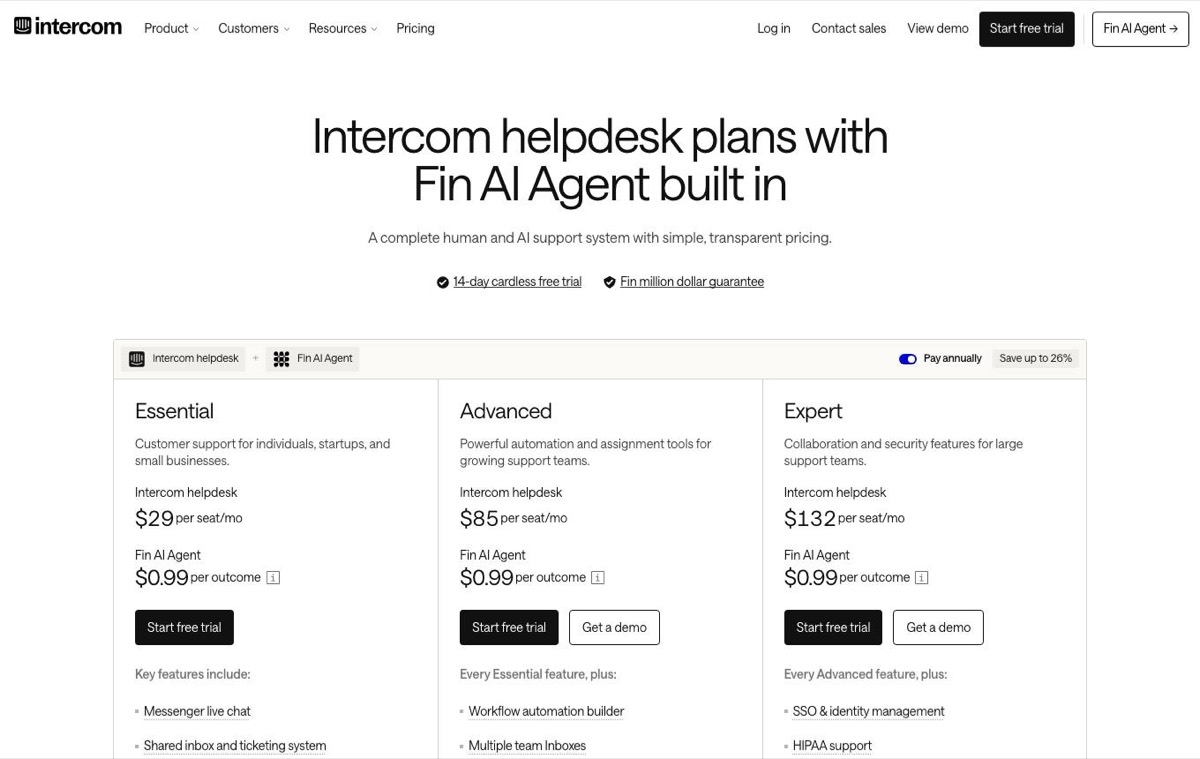 Intercom pricing page, captured 3 October 2026.
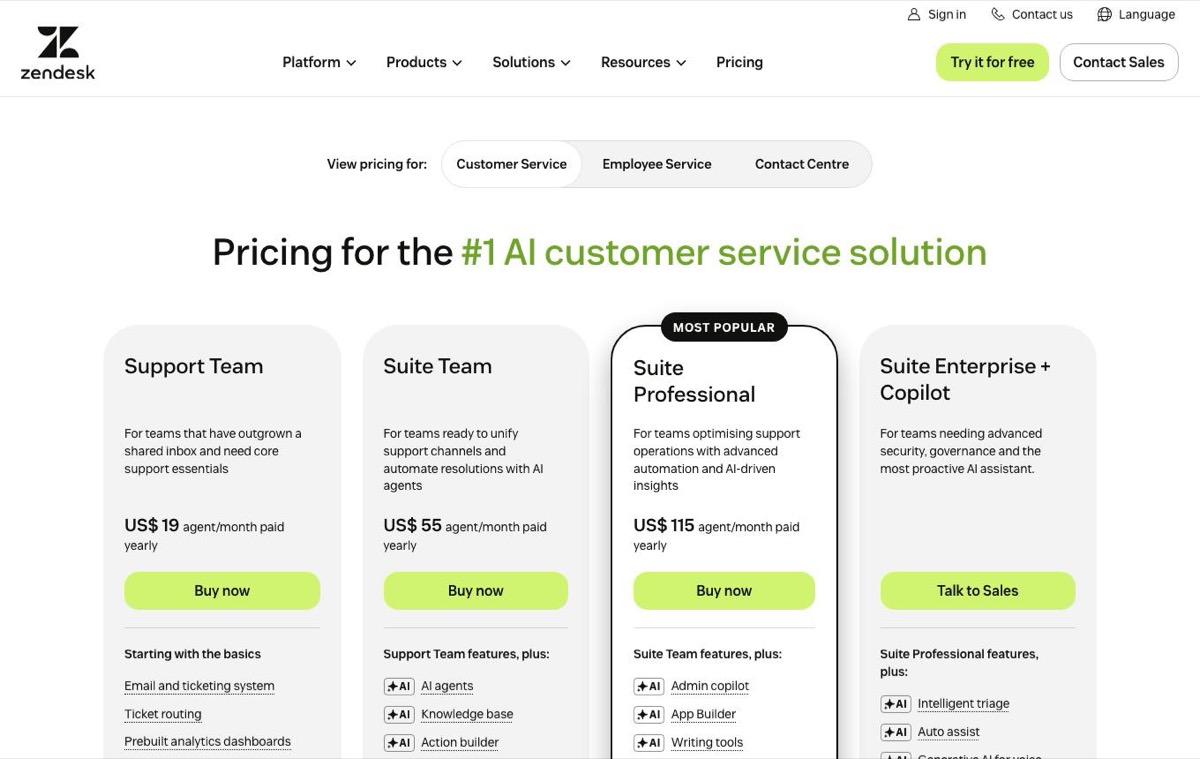 Zendesk pricing page, captured 3 October 2026.
| Plan | Price per seat or agent, billed annually | 3 people | What it adds |
|---|---|---|---|
| Intercom Essential | $29 | $87 | Fin, Messenger, shared inbox, public help center |
| Intercom Advanced | $85 | $255 | Team inboxes, workflows, private and multilingual help center |
| Intercom Expert | $132 | $396 | SSO, SLAs, multibrand Messenger and help center |
| Zendesk Support Team | $19 | $57 | Email and ticketing only |
| Zendesk Suite Team | $55 | $165 | Messaging, a help center, AI agents |
| Zendesk Suite Professional | $115 | $345 | Up to 5 help centers, 10 included AI resolutions per agent |
A low seat price rarely matches the final bill. AI changes the math because resolution-based pricing scales with success. If the agent performs well, the bill rises with it.
Intercom’s AI pricing is easy to underestimate. Fin is priced from $0.99 per outcome, charged once per conversation. Intercom’s pricing page counts an outcome when the customer confirms the issue is resolved, when they don’t ask for more help after Fin replies, or when Fin completes a workflow, including a hand-off. Zendesk bills AI per automated resolution and includes 10 automated resolutions per agent on Suite Professional, but its pricing page does not publish the rate, so ask for a quote.
Why outcome pricing can surprise teams
Intercom can look predictable at low volume and expensive at higher volume, because the AI bill grows with successful automation. Zendesk can look cheaper at the seat level and still produce a larger total once tickets and AI usage are added together. Founder math has to focus on monthly resolved conversations, not just seat count.
Take 3 seats and 500 AI-resolved conversations a month as an illustration. On Intercom Essential that is $87 in seats plus at least $495 for Fin (500 x $0.99), about $582 a month; on Advanced it is $255 plus $495, about $750. On Zendesk Suite Team the seats are $165, but the AI line can’t be priced without a quote. On Convot, which publishes this page, the $49 plan for 1 app and 3 seats plus 500 resolutions at $0.20 ($100) comes to $149. Swap in your own volume.
For the AI price per resolution across help desks, see AI customer service agent pricing compared, which asks the same economic question: what happens to cost when AI resolves more, not less. Then test both platforms on the same historical conversations, with the same knowledge base content and the same permissions.
What to model before signing
- Seat cost: estimate the full team, not one agent.
- AI resolution cost: multiply likely resolved conversations by the per-resolution fee.
- Escalation behavior: check whether the AI admits uncertainty and hands off cleanly.
- Billing definition: confirm what counts as a resolution.
- Volume growth: model a month where automation succeeds.
Fin’s usage-based price is simple to forecast per conversation; Zendesk’s unpublished AI rate means you need a quote before you can forecast at all. It also changes how you judge cost at scale. For multi-product teams, the central question is not whether the entry price is low, but whether per-resolution AI charges and seat costs stay workable once support load spreads across more than one product.
Which is better for a team supporting several apps?
Both reserve multi-brand support for their top plans: Intercom puts its multibrand Messenger and help center on Expert at $132 per seat, and Zendesk’s multiple help centers start on Suite Professional at $115 per agent. Three products from one team change the math fast. The cost problem is duplicate context, duplicate setup, and duplicate admin work across products that should share a support desk, on top of the software spend itself.
Why product count changes the economics
A Shopify app studio often supports several apps with the same small team. That setup creates costs that do not show up in a standard Intercom versus Zendesk table. Knowledge bases get copied. Customer context gets split. Changelogs and status updates get maintained in more than one place. If the workflow is not designed for shared support, cross-product handling slows down.
Convot, which publishes this comparison, is built around this problem and prices by app count rather than by seat. That is one way to avoid turning each product into a separate support stack. Intercom and Zendesk can both handle multi-product support, but neither is primarily built for a small team that wants one desk for several apps.
Where Zendesk can still win
Zendesk can still win on structure. A team with formal queues, several channels and SLA commitments gets more control from Zendesk’s routing and reporting than from a conversation-first tool, and that can be worth the higher admin effort.
That strength does not answer the multi-product question on its own. Smaller teams still have to weigh support governance against the cost of repeating work across products.
If your team supports several apps, administration often costs more than tickets. Every extra workspace, knowledge base, or workflow adds time spent keeping context aligned.
The clean comparison is product separation, shared customer context, migration effort, and the cost of replacing adjacent tools. That gives a more honest view of total cost than seat price alone. For a studio with several products, the better choice may be the tool that reduces setup, not the one that looks cheapest per agent.
How hard is it to migrate from Zendesk to Intercom?
Moving from Zendesk to Intercom is documented: Intercom has a Zendesk importer and a one-click help center import, but automations and some data have to be rebuilt. This covers Zendesk to Intercom, the direction Intercom documents; for the reverse, check Zendesk’s own import documentation. Switching help desks is mostly a data problem, then a workflow problem. The data often moves more easily than the process. What breaks is the logic your team built on top of the old system.
What transfers and what gets rebuilt
Intercom documents a Zendesk import flow under Settings, Data, Imports and exports. The administrator connects the Zendesk account, chooses what to import, and maps incoming fields. Intercom also documents a one-click route for Zendesk Help Center content by entering the Help Center URL, while user records still require a Zendesk CSV export and people import with field mapping.
That split matters. According to Intercom’s Zendesk import guide, the importer moves users, companies, tickets, notes, data attributes and up to 10 attachments per ticket, for accounts under 150,000 tickets. Tags, side conversations and call recordings do not move, and the guide lists no import for macros, triggers or SLA policies, so plan to rebuild those. Help center articles come over separately through Intercom’s help center import from your Zendesk URL.
The migration sequence that avoids pain
- Export first: pull the customer, ticket, and help-center data before changing anything.
- Map fields carefully: check which customer and organization fields need manual mapping.
- Rebuild workflows: recreate automations, SLA policies, macros, and triggers by hand.
- Test with a sample set: run a small batch before moving the full archive.
The reason this matters is simple. A help desk is not just records, it’s the rules around those records. If your support operation depends on routing logic or SLA policies, those pieces need to be rebuilt with care, not assumed to follow automatically. For a deeper view on keeping history intact during a move, see how to leave Intercom or Zendesk and keep your history, which compares ten migration routes.
When should you choose Intercom over Zendesk?
Choose Intercom when support is conversational and product-led, and Zendesk when you need governed queues, SLAs and formal ownership. Intercom makes the most sense when support is already conversational. Teams that live in product chat, in-app support, and proactive customer messaging usually get more out of Intercom than out of a formal ticketing stack. The setup is lighter, and the workflow feels closer to the way customers request help.
Zendesk is the better fit when governance matters more than speed. If your team needs complex queues, strong routing, and formal case handling, Zendesk gives you more control over how work moves. That becomes especially important when multiple people touch the same ticket and you need clear ownership.
When each platform earns the seat
Intercom wins when the team wants to support and engage from the same front end. It also tends to fit founders who want a faster onboarding path, because the conversation model is simpler to adopt. Zendesk wins when support needs disciplined routing, stronger reporting, and a structure that scales with more formal operations.
A good rule is to separate the channel from the queue. If customers mostly arrive through chat and in-product prompts, Intercom is the more natural home. If the team is managing many channels and needs strict queue discipline, Zendesk does the heavier lifting.
For a small team that sits between those extremes, neither platform is automatically wrong. The decision should follow the work, not the brand. If the team spends more time triaging than talking, Zendesk usually fits better. If the team spends more time answering than administrating, Intercom usually fits better.
What are lighter alternatives to Intercom and Zendesk?
Lighter alternatives cover chat, an inbox, a help center and AI in one product with flatter pricing. Some teams do not need a full help desk at all. They want something smaller, flatter, and easier to budget. For those teams, the core question is simpler than Intercom versus Zendesk. What is the lightest setup that still handles support well?
For a broader look at cutting tool sprawl, Contesimal on optimizing creator workflows covers the same fewer-tools, fewer-handoffs idea from the creator side, though it isn’t about support software. Small support teams feel that quickly when one inbox starts turning into three systems and a spreadsheet.
A lighter option still has to cover the basics without adding another stack to manage. It should keep chat, inbox work, help content, and AI in one place. It should also keep pricing predictable, because support teams do not want bills that jump the same month automation improves.
For a broader rundown of what lighter options look like, see Zendesk alternatives for small teams and Intercom alternatives for SaaS support.
Convot is one option in that category. It prices by app count with seats included, from $49 a month for 1 app and 3 seats, and Cove AI costs $0.20 per resolved conversation, against Fin from $0.99 per outcome. One customer, Toolstr, moved 5 apps from Intercom to Convot and went from $400 to $149 a month (customer-reported; see Convot vs Intercom). More detail: Convot vs Intercom and Convot vs Zendesk. It also keeps live chat, a shared inbox, a help center, changelog, roadmap, status page, and scheduling in one product. For a small software team, that can reduce tool sprawl fast.
The trade-offs stay clear. Zendesk still makes sense if you need heavy ticket governance. Intercom fits better if chat-led support and product engagement drive the workflow. A lighter platform fits when the team wants fewer tools, flatter pricing, and a desk that can cover several apps from one team.
FAQ
Is Intercom or Zendesk cheaper for a small team?
Zendesk’s tiers start cheaper: $19, $55 and $115 per agent against Intercom’s $29, $85 and $132, billed annually and checked October 2026. But Zendesk’s $19 plan has no messaging or help center, so for 3 people who need chat and a help center the entry price is $165 on Zendesk Suite Team against $87 on Intercom Essential, before AI.
How much does AI cost on Intercom and Zendesk?
Intercom prices its Fin AI agent from $0.99 per outcome, charged once per conversation. Zendesk bills AI per automated resolution and includes 10 per agent on Suite Professional, but does not publish the rate, so you need a quote.
Can you migrate from Zendesk to Intercom?
You can migrate from Zendesk to Intercom with Intercom’s built-in importer for accounts under 150,000 tickets. It moves users, companies, tickets, notes and attachments; tags, macros, triggers and SLA policies need rebuilding. Help center articles can be imported from the Zendesk help center URL.
Which is better for a Shopify app team?
A Shopify app team with mostly chat questions usually fits Intercom’s conversation model better than Zendesk’s ticket queues. If the team runs several apps, both need their top plans for multi-brand support, so lighter tools priced by app are worth comparing.
Does Salesforce own Intercom now?
Salesforce completed its acquisition of Fin, the company formerly called Intercom, on 10 September 2026; the help desk product keeps the Intercom name. See what the Salesforce deal means for Intercom customers.
About the author
Tarang Agarwal is the founder of Convot. Convot is built by Sidepanda, a small studio that runs several Shopify apps of its own, including Appointo, Depo and Panda Bundle, and supports all of them from one Convot inbox.
Revenue-aware support for Shopify app teams.
Live chat, help center, and every merchant's MRR, plan, and LTV beside the conversation. Free under $1k MRR.
Start free