Ticket Management System Guide for SaaS Support Teams
A practical ticket management system guide for SaaS teams: core workflows, must-have capabilities, buyer criteria, migration steps, and metrics that matter.
On this page
- Key takeaways
- What does a ticket management system do for a SaaS team?
- What belongs in a modern support ticket?
- Which capabilities do small support teams actually use?
- How should you evaluate ticket management tools?
- How do you migrate to a new ticket management system?
- Which support metrics need a real ticket record?
- How should AI resolve tickets safely?
- Which ticket management setup fits your team?
- FAQ
A ticket management system is software that turns every customer request into a tracked case with an owner, a status, a priority and a full history. It lets a small support team see what is open, who acts next and what has already been tried, without relying on anyone’s personal inbox or memory.
Disclosure: Convot publishes this guide and makes a ticket management system, which appears as one option among several. Prices were checked on vendor pages in October 2026.
Key takeaways
- A ticket is a time-stamped record, not a message: owner, status, priority and every change to them stay attached to the case.
- Eight capabilities cover most small teams: shared inbox and assignment, routing, status tracking, automation, a knowledge base, analytics, integrations and SLA targets.
- Ask six buyer questions about pricing model, AI grounding, revenue context, translation, mobile and migration before you compare feature lists.
- Metrics only work if the record keeps the events behind them, such as creation time, first reply, ownership changes and reopens.
- Keep a visible human route. In Five9’s 2026 survey, trust in AI support rose from 26% to 55% when a clear human option was available.
Your support inbox is open beside a chat window, a billing dashboard, and a spreadsheet of bugs. A customer has already explained the problem in one place, but the next teammate to reply can’t see the details. You don’t need another place to read messages. You need a ticket management system that keeps each issue, its owner, and its history together.
Two terms before we start. A ticket is one customer issue tracked from first message to closure. A help desk is the wider tool that holds tickets alongside a help center, reporting and automation; a ticket management system is its core.
For a small software team, the buying decision shouldn’t start with a feature checklist. Start with three costs: what AI charges per resolved conversation, what seats or apps cost as you add products, and how many separate tools you’ll keep paying for and maintaining.
What does a ticket management system do for a SaaS team?
A ticket management system gives every customer issue an owner, a status and a record the whole team can see. Instead of a founder remembering who promised what, each case shows the reporter, priority, assignee, internal notes and resolution, so anyone can pick it up without asking the customer to repeat themselves.
Ticket management systems come in two families. Customer support tools (Zendesk, Freshdesk, Help Scout, Convot) handle questions from the people who use your product. IT service desk tools (Jira Service Management, ServiceNow) handle internal requests from employees, such as access and hardware. This guide covers the first kind, for SaaS and app teams.
A bug report lands in chat while a billing question arrives by email. If the founder who handled the last issue is away, a shared inbox may show the messages, but it won’t reliably show who owns each case or what has already happened. A ticket management system fixes that.
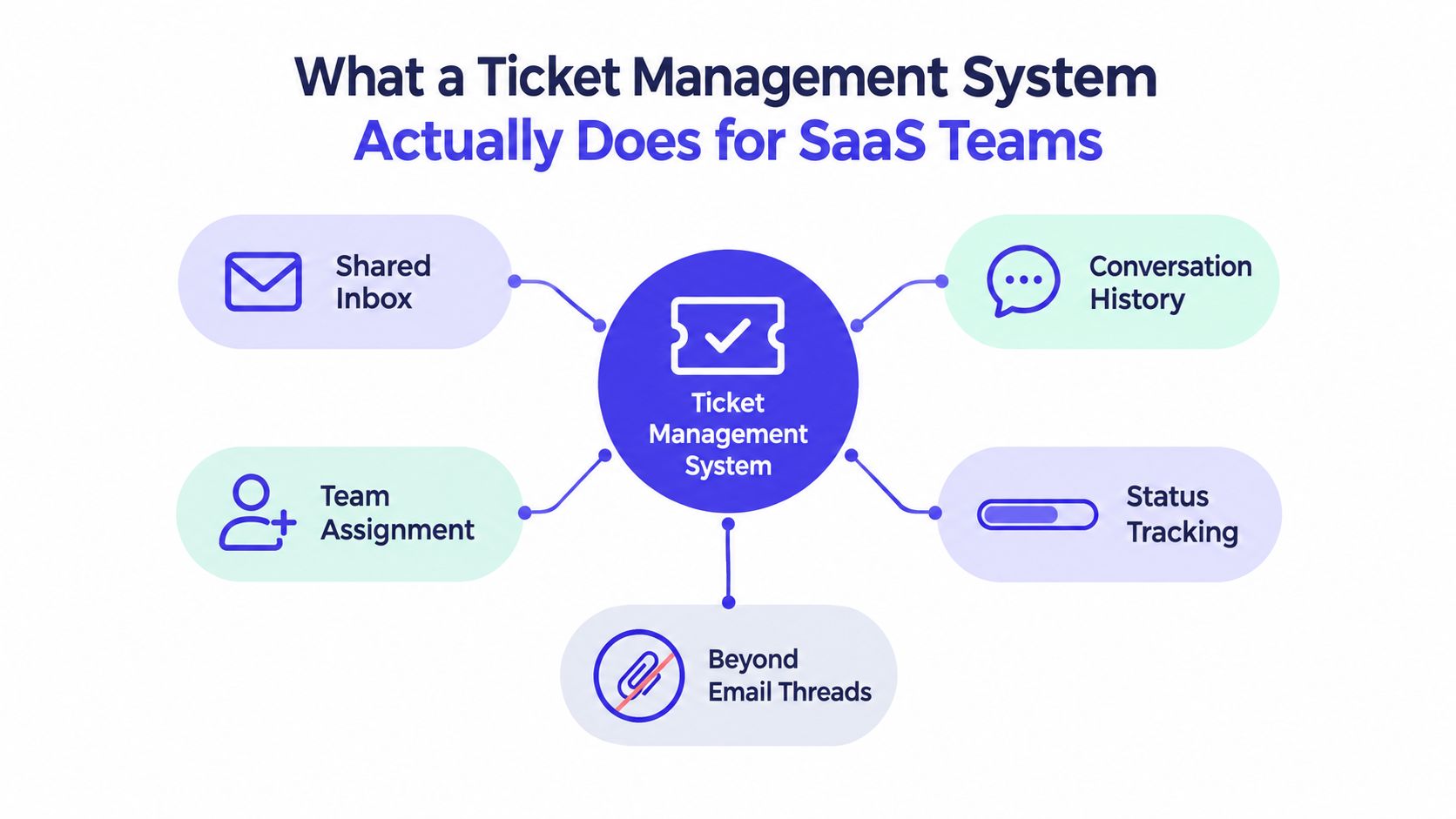
One case file can bring together the reporter, issue category, priority, project, assignee, timestamps, internal notes, and resolution. Teammates can check what remains open and who should act next, rather than piecing together details from scattered threads, screenshots, and informal handoffs.
A ticket is a time-stamped record moving through ownership, investigation, escalation, resolution, and closure. A public help-desk ticket dataset from a software company’s support team, covering January 2016 to March 2023, logs every change of assignee and status and keeps separate records for tickets that several assignees handled. For a small SaaS team, that history shows what to inspect in a product demo: ask the vendor to show how a case’s ownership and status changes are recorded. That record helps teams review handoffs, queue duration, and resolution time without reconstructing events from memory.
Move from inbox memory to case ownership
Set one operating rule: every request becomes a case, every case has an owner, and each meaningful state change stays attached to it. Use controlled categories and saved views to keep urgent access issues visible alongside routine feature questions.
For a small team, the value is practical: fewer repeated explanations, clearer responsibility, and a useful history when an issue returns. Choose a system that makes the next action clear without adding more administrative work than support work. If you are still deciding between a lighter tool and a full help desk, our shared inbox software comparison covers where one ends and the other begins.
What belongs in a modern support ticket?
A useful ticket answers four questions: who reported the issue, what is affected, who owns the response, and what happened next. Give each case a unique identifier, reporter, product, category, priority, assignee, status and timestamps, plus internal notes and a resolution summary so the outcome stays clear after the conversation closes.
Keep structured fields controlled. If teammates enter different spellings for a product or priority, reporting becomes unreliable. Define options for product, category, status, and escalation reason, then let customers describe the issue in their own words.
Preserve the lifecycle, not just the latest reply
Cases that pass through several assignees are common, so preserve the full history of each one. Without retained state changes, a ticket that sat unassigned for four days looks identical to one investigated for four days.
Record who changed an owner or status and when. That lets your team distinguish a handoff delay from time spent investigating, and review what happened without relying on memory.
Practical rule: If a field will guide routing, escalation, or reporting, use a defined value rather than free-form text.
Apply the same rule to work handled outside the ticket system. If someone resolves a customer issue in email or chat, copy the decision and outcome into the case. A fix recorded only in a personal inbox leaves the team without a reliable account of what was done. Keep the customer’s original words available alongside the internal notes, so later review has both the request and the team’s response.
Which capabilities do small support teams actually use?
Small support teams mostly use eight capabilities: a shared inbox with assignment, routing and priority, status tracking, automation, a knowledge base, analytics, integrations and SLA targets. Score each one by the manual task it replaces, not by how prominently a vendor lists it, because a small team needs fewer lost requests, not more settings.
| Capability | What it replaces | Small-team payoff |
|---|---|---|
| Shared inbox and assignment | Separate personal inboxes | One visible owner per case |
| Routing rules and priority | Manual sorting | Urgent or specialist work reaches the right queue |
| Status tracking | “Did anyone handle this?” messages | Clear progress through resolution |
| Automation | Repeated tagging and sorting | Less routine administration |
| Knowledge base | Rewriting the same explanation | Reusable answers for common questions |
| Analytics | Guesswork about workload | A view of response, resolution, and backlog |
| Integrations | Switching between tools to find context | Relevant product and customer details beside the case |
| SLA targets | Guessing whether a reply is late | Overdue cases flagged before the customer chases |
Shared inbox and assignment are table stakes. Every request should have a clear owner and remain visible when that person is unavailable. Saved views should let each teammate focus on unassigned, urgent, or waiting cases without creating shadow spreadsheets.
Routing and status tracking keep work moving. Route by product, issue type, or priority, and make the current state plain to the team. Automation can handle predictable tasks, but don’t let a rule close a case or send a sensitive answer without a human check.
Knowledge and reporting reduce repeated effort. A help center can give customers a place to find stable answers, while ticket analytics show whether delays come from intake, handoffs, or resolution. Our guide to self-serve support that reduces ticket volume covers what to publish first. For a view from outside software, this list of features tutoring businesses actually need shows the same habit: match the tool to the day-to-day work, not the feature count.
Integrations matter when agents need account or product context to answer correctly. The right connection can save a tab switch; a pile of loosely maintained integrations can create more upkeep than it removes. Start with the data your team needs while handling a case.
How should you evaluate ticket management tools?
Evaluate ticket management tools by asking every vendor the same six questions about pricing model, AI grounding, revenue context, translation, mobile access and migration, then test the answers against your real workflow. A feature list shows what a product can do; these questions show what it will cost, what context it keeps and where it can fail.
Six questions to use in a product evaluation
-
Pricing model: Is the bill based on seats, the whole workspace, or the number of apps? Model what happens when more teammates join or you launch another product. Our help desk pricing index lists the pricing unit for 24 tools.
-
AI grounding: Does the agent answer from approved documentation, show its sources, and hand the conversation to a person when it isn’t confident? A confident tone is not evidence that an answer is correct.
-
Revenue context: For a Shopify app, can the support view show the merchant’s plan and billing history beside the conversation? Shopify’s Partner API exposes subscription sale records with the app, shop, billing interval and amounts (Shopify app pricing and billing, AppSubscriptionSale object). That context can help an agent investigate a billing question.
-
Translation: Can customers and agents communicate in the languages your product supports? Ask whether translation happens in the chat widget and whether it covers the full exchange, not just one reply.
-
Mobile access: Can an agent triage and reply from the iOS and Android apps, or does mobile access only show notifications? Test the actual support tasks your team handles away from a desk.
-
Migration: Does the vendor offer an automatic import, or will a person help move the data? Get the migration scope in writing, including which records and attachments will carry over.
For Shopify app teams, billing context deserves a careful test. Most app charges are billed through Shopify and appear on the merchant’s Shopify bill, but some apps charge merchants directly outside Shopify (Shopify’s guide to app billing). Ask the vendor how its support view distinguishes those cases.
Use this overview of third-party integrations to think through which connections belong in the buying checklist, and our help desk integrations comparison to see what each tool connects to. Don’t buy an integration because it exists. Buy it if it removes a real support task or puts necessary context beside the ticket.
How do you migrate to a new ticket management system?
Migrate in five steps: start with one product, decide which open conversations move as live work, map tags and statuses to controlled values, run the old and new inbox in parallel, then cut over on one fixed date. Treat it as an operations project and check the first weeks of history before you expand.
Migration quality shows up after launch, when an agent searches for an old answer or needs a note from a previous conversation. Start with one app or product, confirm the data maps correctly, then expand once the team trusts the new record.
The five migration steps
- Start small. Choose one product or app and agree on what counts as an active conversation.
- Archive open conversations. Decide which records need to move as live work and which should remain searchable history.
- Map fields. Match existing tags, priorities, statuses, and custom fields to the new system’s controlled values.
- Run a parallel inbox. Keep the old workflow available while the team checks that incoming cases and replies appear where expected.
- Cut over and review. Set one clear date for the new system to become the source of truth, then inspect the migration for missing context.
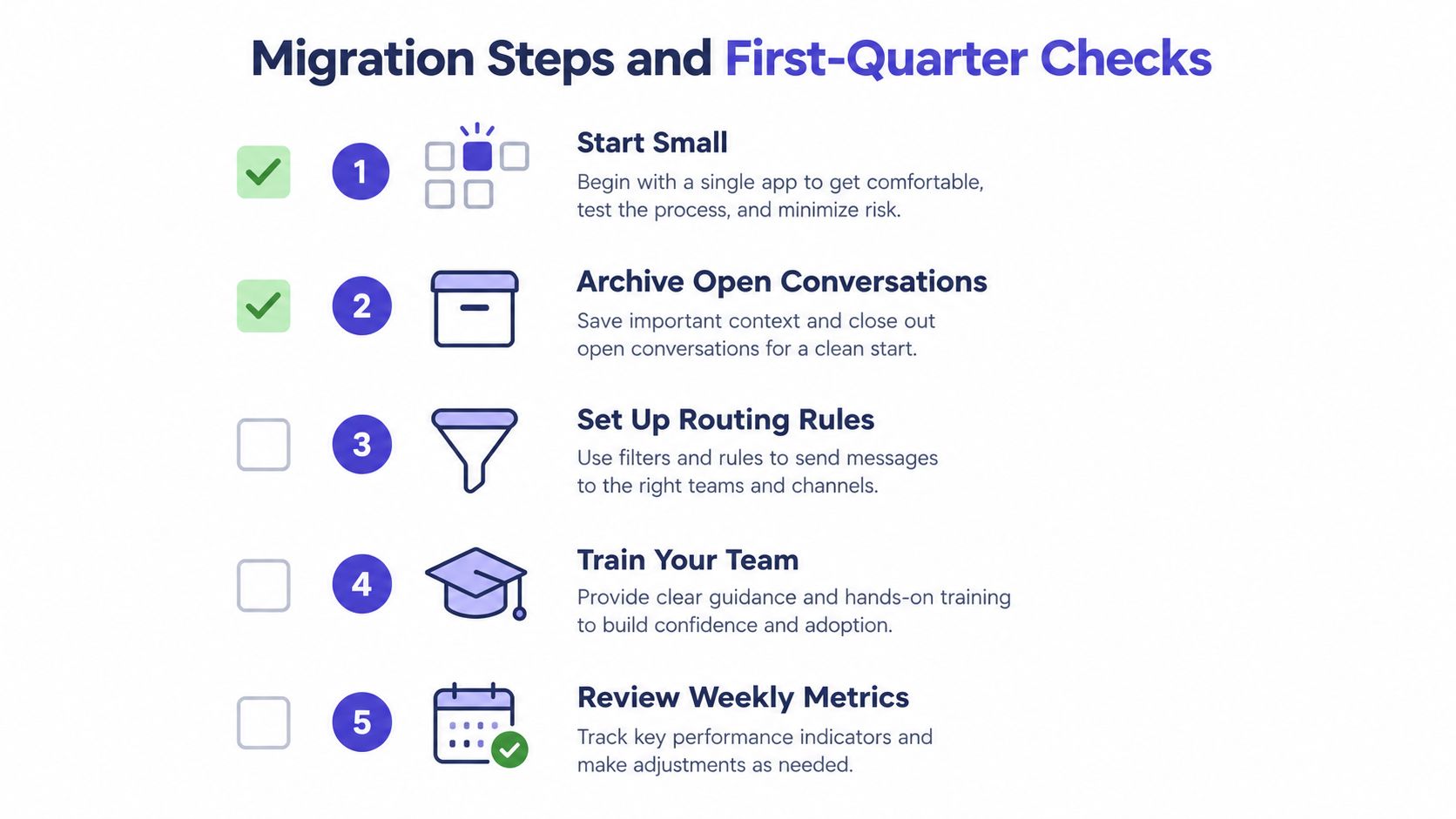
Step 3 is where most of the work hides. A worked example: a team leaving Zendesk with years of free-form tags should collapse them into a short controlled list before import, so reporting works from day one.
| Old Zendesk tag | New controlled value | Field |
|---|---|---|
| billing, billing_issue, refund_req | Billing | Category |
| bug, bug-report, broken | Bug | Category |
| urgent, p1, asap | High | Priority |
| app_bundle, bundles | Bundles app | Product |
| pending_customer, waiting | Waiting on customer | Status |
Agree in the migration scope what happens to tags that don’t map; keeping them as plain text on the imported conversation preserves the history without letting them drive routing.
Before you sign, ask whether ticket history, internal notes, attachments, contact records, and macros will survive the move. Ask the vendor to explain how it handles records that don’t map neatly to the new schema. A helpdesk migration guide from SourceX can help you plan the work and spot questions to settle before the cutover.
The import method matters. In Convot, Crisp supports a one-click import. Moves from Zendesk, Intercom, and Freshdesk are different: Convot’s migration is a free, founder-led service, not an automatic importer. Confirm the scope and timeline with any vendor before you rely on either route.
For a more detailed walkthrough of preserving history during a vendor change, use this guide to migrating from Intercom or Zendesk while keeping ticket history. Then test the result with real searches: find an old customer conversation, inspect its notes and attachments, and verify that the right person can understand what happened without asking the customer to repeat it.
Which support metrics need a real ticket record?
First-response time, time to resolution, reopen rate, handoff count, backlog age and workload by agent or project all need a ticket record that keeps timestamps and state changes. An inbox shows the latest message; a system of record shows when each case was created, answered, reassigned, closed and reopened, which is what these numbers are built from.
A dashboard is useful only if the ticket system captures the events behind its numbers. Each metric should map to a timestamp or state change that the record preserves.
First-response time needs the creation time and the first meaningful reply. Time to resolution needs a clear start and resolution event. Reopens require a reliable record of when a case closed and returned to active work. Handoffs need a history of ownership changes, while backlog age depends on when the ticket entered its current queue or status.
Measure labor as well as closure
Every case has two parts: solving the customer’s problem and recording what was done. Time them separately, because a team can look slow when the real cost is documentation, not investigation. If documentation takes a meaningful part of the handling cycle, a better intake form or reusable answer may free staff time. But don’t celebrate faster closure if customers reopen cases or contact another channel because the original answer missed the issue.
For a stricter standard, NIST SP 800-53 control IR-5, Incident Monitoring, requires organizations to track and document incidents (NIST SP 800-53 Rev. 5). Daydream’s implementation guidance for that control lists a minimum record: a unique ID, timestamps from first observation to closure, severity with its rationale, the owner, affected assets, investigation notes, a communications log, corrective actions, and closure criteria with an approver (NIST-aligned incident-tracking requirements). That’s the difference between a chart that looks convincing and an audit trail your team can inspect.
How should AI resolve tickets safely?
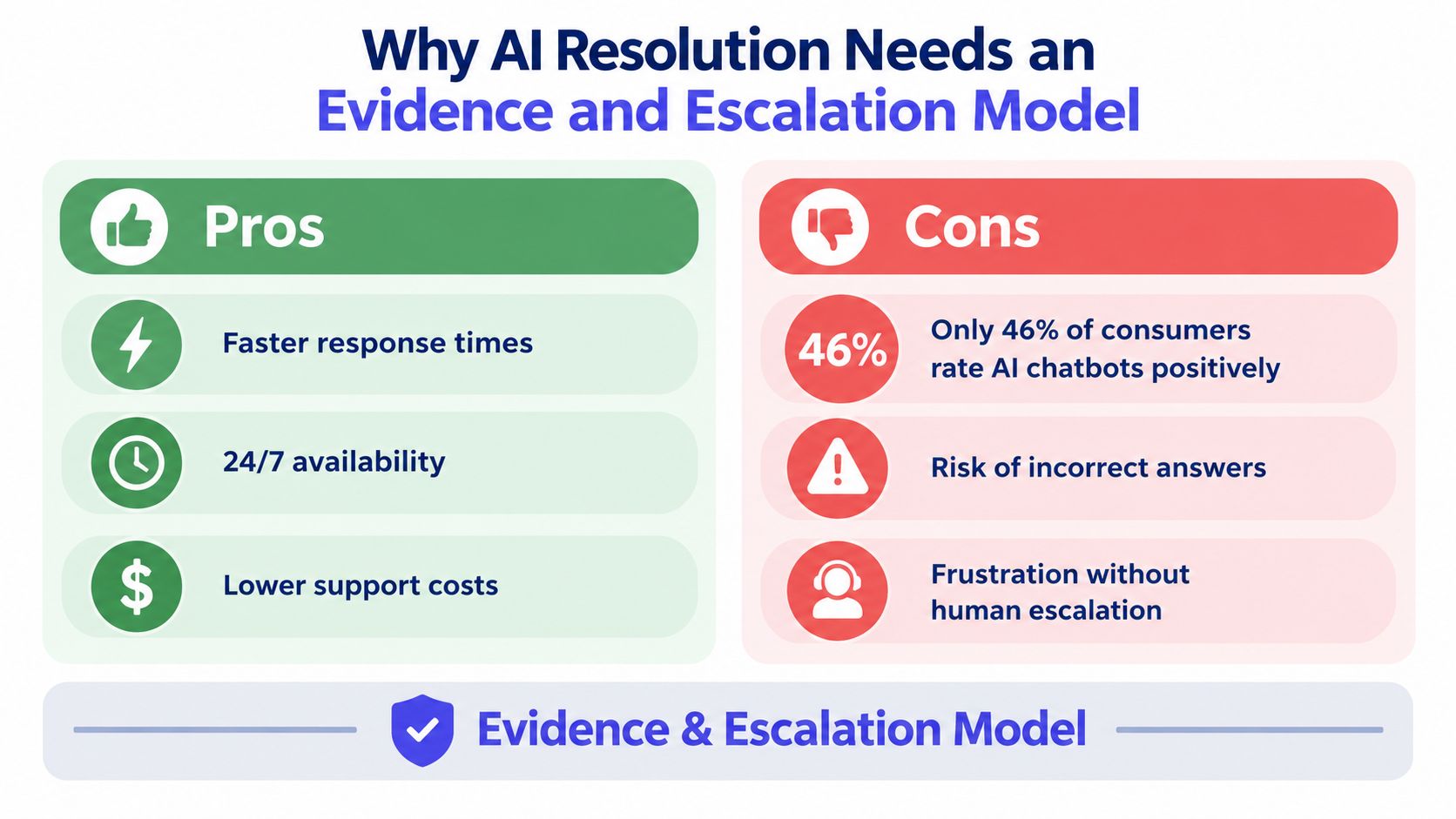
AI should resolve only tickets it can answer from approved documentation, cite that source, and hand everything uncertain or sensitive to a person with the context attached. A ticket closed by AI isn’t automatically resolved well, so measure grounding, reopens and handoff quality, not deflection alone.
Measure whether the answer was grounded in approved material, whether its citations support the claim, whether the customer returned with the same issue, and whether a human received useful context at handoff. Deflection alone can hide extra work when a customer reopens a case or switches channels.
Consumer trust also argues against hiding the human path. In Five9’s 2026 Consumer CX Report, a Hanover Research survey of 3,000 consumers in the US, UK and Germany run in April 2026, 46% rated their latest AI or chatbot experience positively, the lowest of any channel. Trust that AI could resolve an issue rose to 55% when a clear human option was available, against 26% without one (CMSWire’s report on the survey).
Route by consequence, not by convenience
Let AI handle narrow questions when it can cite reliable documentation, such as setup steps or a stable status update. Require confirmation or a human review for refunds, subscription changes, account recovery, security incidents, and disputes. Those cases can involve money, identity, or access, so a wrong autonomous action carries more cost than a slower handoff.
Set a confidence threshold, and make the fallback visible in every channel. High-confidence answers can be offered with citations; uncertain cases should reach a person with the customer’s context intact. A useful agent doesn’t pretend to know. It stops, explains what it can’t verify, and passes the work to someone who can.
Here is what that handoff looks like in practice, from the Convot inbox Sidepanda uses for its own apps. The escalated case carries a named owner, when it was escalated and acknowledged, an SLA flag once the target is missed, and a written summary of what the customer needs, so whoever picks it up starts with the context rather than the customer’s first message.
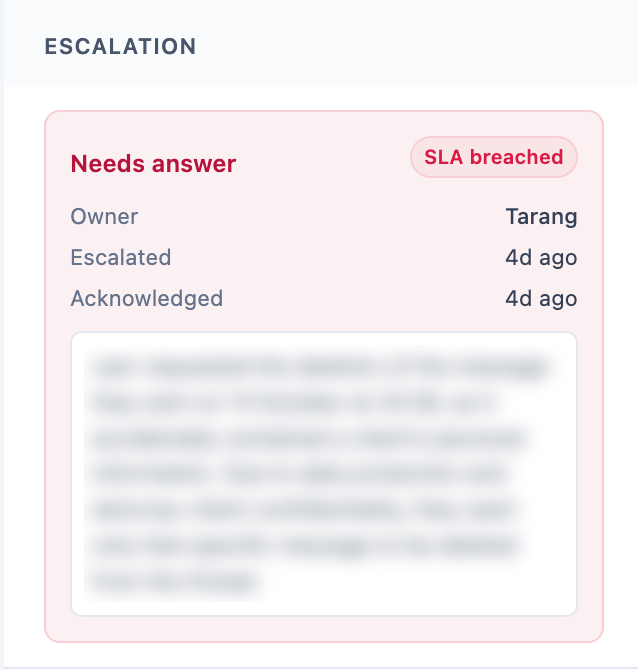
A real escalated ticket in Sidepanda’s Convot inbox, October 2026. The handoff summary is blurred to protect the customer. The SLA flag is left in: a missed target should be visible, not hidden.
Teams should review failed conversations and human overrides, then improve the documentation or routing rule that caused the miss. This article on AI support agents that cite their sources gives a practical way to evaluate evidence-backed answers. Keep the policy simple: allow grounded automation for low-consequence questions, and keep a clear human route for anything sensitive.
Which ticket management setup fits your team?
Pick for the team you have: a solo developer needs a simple shared inbox with clear history, a Shopify app team with several products needs per-app separation and billing context, and a funded SaaS team running campaigns may need a broader platform. The right tool depends on how you work, not on how many features it lists.
Seven tools compared for a team of three
Prices below are the monthly cost for a three-person team on each vendor’s entry plan, checked on vendor pricing pages in October 2026 and listed in our help desk pricing index.
| Tool | Pricing unit | Entry cost, 3 people | AI charge | Best for |
|---|---|---|---|---|
| Crisp | Workspace | $45 (Mini, 4 seats) | AI credits bundled in paid plans | Solo founders and chat-first teams |
| Convot | App, seats included | $49 (Starter, 1 app, 3 seats) | Cove AI, $0.20 per resolved conversation | Small teams running several apps |
| Freshdesk | Agent | $57 (Growth, billed annually) | 500 sessions included, then $49 per 100 | Teams that want classic ticketing |
| Intercom | Seat | $87 (Essential, billed annually) | Fin from $0.99 per outcome | Funded SaaS with outbound campaigns |
| Zendesk | Agent | $165 (Suite Team, billed annually) | Not published on Zendesk’s pricing page | Formal service workflows |
| Jira Service Management | Agent | $0 (Free plan, up to 3 agents) | Rovo AI on paid plans | IT and internal service desks |
| Zoho Desk | Agent | $0 (Free edition, 3 users, basic email ticketing) | Zia AI on paid editions | Teams already on Zoho |
The two free options are real starting points but limited: Jira Service Management’s Free plan is built for internal IT requests, and Zoho Desk’s free edition drops automation, SLAs and AI.
Match the product to the operating model
Solo developer with one app: Start with a shared inbox that makes ownership and conversation history clear. Don’t pay for a large service platform if one person can answer reliably and your main risk is losing a request. Crisp is worth considering at this size.
Small Shopify app team with several products: Compare the total cost of supporting every app, not just the first one. Shopify billing context beside a conversation can help an agent resolve merchant questions with fewer back-and-forths. Choose a system that shows the relevant plan and billing history and keeps the support record tied to the correct app. Our roundup of the best help desks for multiple apps compares the options.
Funded SaaS team that needs outbound campaigns: A broader customer platform may fit if campaigns, customer data, and support workflows need to live together. Intercom is a reasonable option to evaluate for teams that value that kind of platform; compare its pricing model and AI charges against the way your team expects to use it. Zendesk may suit teams with more formal service workflows, while Freshdesk can be a sensible candidate if its tools align with your existing support process.
For a small software team that wants per-app pricing with seats included, several apps in one shared inbox, and an AI agent that cites its sources and hands off when unsure, Convot is one option. Its Cove AI agent costs $0.20 per resolved conversation, against Intercom Fin from $0.99 per outcome, and Convot’s paid plans start at $49 per month for 1 app and 3 seats, priced per app rather than per seat. Prices checked October 2026; see Convot pricing for current figures.
Make the decision this week by testing the same real support cases in your leading candidates. Compare the record each tool leaves behind, the human handoff, and the bill under your actual team and app structure.
FAQ
What is a ticket management system?
A ticket management system is software that turns each customer request into a tracked case with an owner, status, priority and history. It lets a support team see what is open, who is responsible and what has already been tried, instead of relying on individual inboxes.
What is the difference between a ticket management system and a shared inbox?
A shared inbox lets a team read and assign messages from one address. A ticket management system adds structured fields, routing rules, status workflows, reporting and a full change history. Many small teams start with a shared inbox and grow into ticketing as volume and products increase.
Do small teams need a ticket management system?
A small team needs one as soon as more than one person answers support or a request gets lost between tools. The trigger is uncertainty about ownership, not ticket volume. A lightweight system with clear assignment and history usually pays for itself in fewer repeated explanations.
How much does a ticket management system cost?
Pricing depends on the unit: per seat, per workspace, or per app, plus a separate AI charge on many tools. Convot starts at $49 per month for 1 app and 3 seats with Cove AI at $0.20 per resolution; Intercom Fin starts at $0.99 per outcome. Model your own team and app count before comparing.
Is there a free ticket management system?
Several have free tiers: Jira Service Management is free for up to 3 agents, Zoho Desk’s free edition covers 3 users, Help Scout’s free plan covers up to 5 users, and Convot is free for 1 app and 3 seats under $1,000 MRR. Free tiers usually drop automation, SLAs or AI, so check those limits first.
Is Jira a ticketing tool?
Jira Service Management is Atlassian’s ticketing tool, aimed mainly at IT and internal service desks; plain Jira tracks software work rather than customer requests. Customer-facing SaaS teams usually pick a support help desk instead, because it adds chat, a help center and customer context.
Can AI fully replace a ticket management system?
AI cannot fully replace one. It can resolve narrow, well-documented questions, but it still needs a ticket record to hand off from, cite against and be measured in. Refunds, account access, disputes and anything uncertain should reach a person, with the case history attached.
About the author
Tarang Agarwal is the founder of Convot and of Sidepanda, a small studio that builds and supports its own Shopify apps, including Appointo, Depo, Panda Bundle and SignPanda. Sidepanda runs support for all of them from one shared Convot inbox, with a separate help center per app; Appointo’s alone holds 83 published articles. The ticket workflow in this guide, one owner per case, controlled statuses and AI that hands off when unsure, is the one that team uses every day. Find him on X at @tarang8811.
Revenue-aware support for Shopify app teams.
Live chat, help center, and every merchant's MRR, plan, and LTV beside the conversation. Free under $1k MRR.
Start free