How to leave Intercom or Zendesk without losing your conversation history (2026)
The three ways to move years of support history to a new help desk, what each keeps and drops, how long it takes, and how to switch without downtime.

On this page
- Which help desks migrate your full conversation history for you?
- How does a Convot-run migration from Intercom, Zendesk or Freshdesk work?
- What should you look for in a promise to migrate full history?
- How long does a help desk migration take?
- How do you get your data out of Intercom?
- How do you get your data out of Zendesk?
- How do you switch from Intercom or Zendesk without downtime or lost context?
- What mistakes lose history when you leave Intercom or Zendesk?
- Can you migrate several apps into one help desk?
- Which migration route fits a small SaaS team?
- FAQ
You can leave Intercom or Zendesk without losing conversation history in three ways: a new help desk that migrates it for you, a built-in importer, or a paid migration service. Convot, a help desk for small SaaS and app teams, runs Intercom, Zendesk and Freshdesk migrations for free, and puts a typical migration at a few hours to a day.
Ownership update, October 2026: the company behind Intercom renamed itself Fin, after its AI agent, and Salesforce completed its acquisition of Fin, formerly Intercom, on 10 September 2026. The help desk keeps the Intercom name, and Salesforce says Fin will continue to serve its customers as part of its AI Labs.
Disclosure: Convot publishes this guide and offers one of the routes it describes. Competitor facts come from each vendor’s own documentation or pricing page, except where the text names a third-party guide as the source, and were checked on 30 September and 1 October 2026. Convot’s own claims rest on its importer documentation and two real migrations, both described below.
- Which help desks migrate your full conversation history for you?
- How does a Convot-run migration from Intercom, Zendesk or Freshdesk work?
- What should you look for in a promise to migrate full history?
- How long does a help desk migration take?
- How do you get your data out of Intercom?
- How do you get your data out of Zendesk?
- How do you switch from Intercom or Zendesk without downtime or lost context?
- What mistakes lose history when you leave Intercom or Zendesk?
- Can you migrate several apps into one help desk?
- Which migration route fits a small SaaS team?
- FAQ
Which help desks migrate your full conversation history for you?
Convot runs Intercom, Zendesk and Freshdesk migrations for you at no cost, and has its own importers for Crisp and Sleekplan. Help Scout and Gorgias offer built-in importers that you run yourself, each with documented limits. Help Desk Migration is a paid third-party service that supports Intercom and Zendesk and charges per record. So far Convot has run one Intercom migration; Zendesk and Freshdesk moves have not yet been run, and Convot expects the process to be similar.
| Route | Sources | Who runs it | What moves | Known limits | Cost |
|---|---|---|---|---|---|
| Convot, run for you | Intercom, Zendesk, Freshdesk | Convot | Conversations and their contacts; original dates kept on the Intercom move so far | Scheduled with Convot; the one Intercom move so far covered one year | Free |
| Convot Crisp importer | Crisp | You, from settings | Contacts, conversations with timestamps and agent attribution, help articles | Defaults to a recent window, shown before the run starts | Free |
| Help Scout importer | Zendesk, Intercom and others | You | Emails and tickets as conversations | Does not import knowledge base or help center articles | Self-serve; price not stated |
| Gorgias Zendesk importer | Zendesk | You | Up to 2 years of tickets, macros, tags, ticket fields | Attachments and CSAT do not transfer; tickets over 250 comments are split | Built into Gorgias |
| Help Desk Migration | Intercom, Zendesk and others | The service | Tickets, contacts, companies, agents, knowledge base articles | Price grows with record count | $100 for 1,000 records, $514 for 10,000 |
Help Desk Migration offers a free demo run of 20 tickets and 20 knowledge base articles before you pay, and does not count attachments, comments or notes as separate records. Convot’s Sleekplan importer, for teams also moving a roadmap, brings roadmap items, votes, comments and changelog entries.
How does a Convot-run migration from Intercom, Zendesk or Freshdesk work?
A Convot-run migration from Intercom, Zendesk or Freshdesk is done by Convot for you, not started from an import button. You tell Convot which tool you are leaving and which Convot app the history should go into, Convot tells you what it needs from the old help desk, and you check a sample before switching over. Conversations come across with the contacts behind them, since every Convot conversation belongs to a contact.
The Intercom migration Convot has run so far moved a year of a SaaS team’s history in a day and kept the original dates. Convot puts a typical migration at a few hours to a day, depending on volume, and it costs nothing. Original dates are confirmed for that Intercom move; ask Convot to confirm the same for Zendesk or Freshdesk before you start.
Whichever route you pick, five pieces of preparation make the move faster and catch problems early:
- Count what you have. Note the number of conversations, contacts and help articles in the old tool, so you can compare the totals after the move.
- List your workspaces or brands. Decide which Convot app each one goes into before anything moves.
- Pick the date range. Decide whether you need every conversation since you started, or only the last year or two that your team actually searches.
- Keep your own export. Save whatever export the old tool offers as a backup, even if it is metadata only.
- Write down the tags and fields you rely on. Custom fields and tags need a mapping decision.
Two things to settle before the start date. First, how far back you need: the one Intercom move so far covered a year, so a team with three years should ask Convot to check its workspace first. Second, help center articles, saved replies and attachments: Convot has not yet moved these from Intercom, so treat them as manual work unless Convot confirms otherwise for your move.
What should you look for in a promise to migrate full history?
A full-history migration should keep original dates, message authors, help center articles, attachments, enough of the past, and one record per customer, and it should let you test before you commit. Check these seven things against the vendor’s own documentation, not its sales page.
- Original dates. Old conversations should keep the date they happened. A history where every message is dated migration day is searchable but breaks reporting and makes old threads look new.
- Who said what. Each message should keep its author. Convot’s Crisp importer matches agents by email, so their messages stay attributed to them.
- Help center articles and their links. Help Scout’s importer does not move articles. Convot’s Crisp importer moves them and rewrites the links between them so they keep working.
- Attachments. Gorgias’s Zendesk importer does not move attachments. If customers sent screenshots your team still needs, check this first.
- How far back. Gorgias imports up to 2 years of Zendesk tickets, and Intercom’s own data export covers the last 2 years. Three years of history needs a route that is not capped at 2 years, so ask any vendor in writing how far back it will pull.
- One record per customer. Convot’s Crisp and Sleekplan importers match contacts by email, so an existing contact is updated rather than duplicated.
- A test run. Help Desk Migration’s free demo moves 20 tickets. Convot’s Crisp importer shows a preview of how many contacts, conversations and articles are in scope before it starts.
How long does a help desk migration take?
Convot puts a typical migration at a few hours to a day, and both recent migrations into Convot finished within one day: Birdchime, a Shopify app team, moved 3 years of Crisp history with the Crisp importer, and a SaaS team moved a year of Intercom history through a migration Convot ran. Gorgias imports the most recent two weeks of Zendesk tickets first, so recent work is available within hours, then the rest of up to two years at roughly 720 tickets per hour.
At Gorgias’s rate, a team with 50,000 historical tickets should plan for about three days of importing after the first two weeks arrive. A migration service prices by record instead: at Help Desk Migration’s published rates, 10,000 records cost $514. Volume is what decides the timeline, so count your conversations before you pick a date.
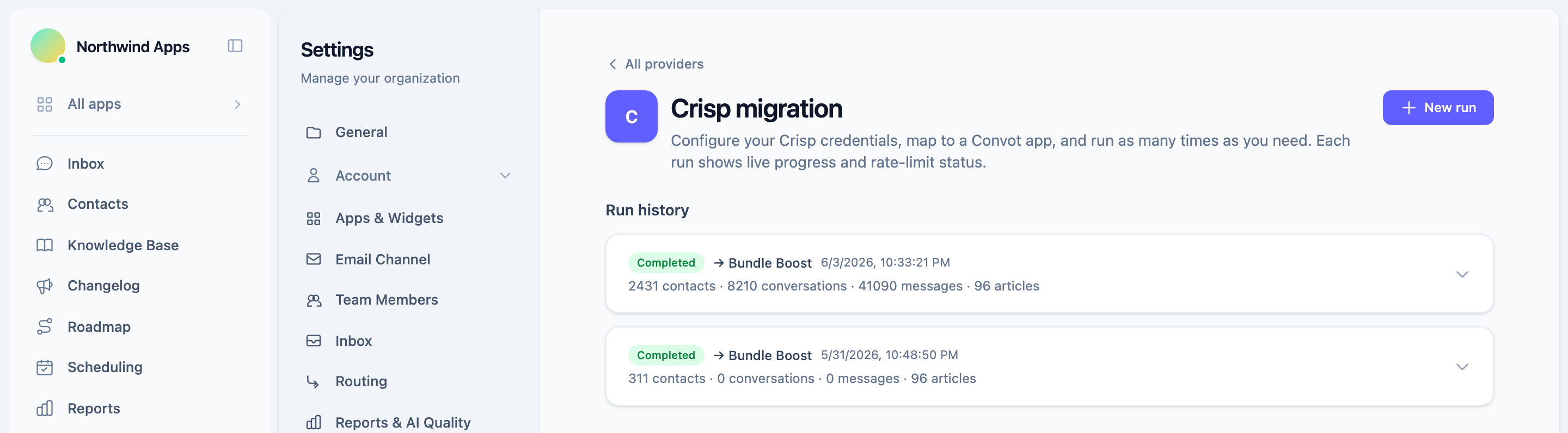
Convot’s Crisp migration screen. Each run shows what moved: contacts, conversations, messages and help articles. Demo workspace.
How do you get your data out of Intercom?
Intercom’s CSV export does not include conversation content. The Data Export in Intercom’s Reports section produces conversation metadata such as IDs, timestamps and participants, but not the messages themselves. Getting the message text means using Intercom’s Conversations API, which lists conversation IDs and then fetches each conversation in full. Intercom’s export covers the last 2 years of data, and each export request covers at most 90 days, so a long history takes many requests. That repeated, conversation-by-conversation work is what a migration Convot runs for you takes off your hands, and it is why keeping the Intercom account open until the move is checked matters.
How do you get your data out of Zendesk?
Zendesk’s REST API is available on every Zendesk plan, including Team, so the full ticket history can be pulled through it. Zendesk’s developer documentation recommends the Incremental Export API for large exports: each request returns tickets created or updated since a start time, with cursor-based paging recommended over time-based paging, so years of tickets come out in batches. Zendesk’s built-in data export in the Admin Center is more limited. Third-party guides report it is available on the Professional and Enterprise plans, so a team on a lower plan should plan on the API, or on a migration someone runs through it.
How do you switch from Intercom or Zendesk without downtime or lost context?
A small SaaS team can switch to Convot from Intercom or Zendesk with no downtime by keeping the old tool live while Convot moves the history, then swapping the chat widget once a sample of old conversations checks out. Customers keep writing in through the old widget until the swap, so they always have a working inbox.
- Start the history move while the old tool is live. For a Convot-run move, agree the start date with Convot; with the Crisp importer, the organization owner starts it from settings with a Crisp API key.
- Check a sample of old conversations. Open long threads from different years and confirm dates, authors and attachments.
- Recreate saved replies and routing. Shortcuts, tags and assignment rules are worth rebuilding by hand for the ones your team uses daily.
- Agree the cut-over moment. Pick the hour you swap the widget, so conversations that arrive in between are part of the plan. The Crisp importer can simply be run again.
- Swap the chat widget. Replace the old snippet with the new one. New conversations now land in the new help desk.
- Redirect links and the support address. Point old help center URLs at their new locations, keep the same support email address pointed at the new inbox, and update the help link in your product. Customers then need no announcement.
- Keep the old tool read-only for a month, then cancel after one billing cycle.
For the Crisp version of this sequence, see migrating from Crisp step by step.
What mistakes lose history when you leave Intercom or Zendesk?
The costliest mistake is canceling Intercom or Zendesk before opening your oldest conversations in the new help desk; once the account closes, you may lose access to the export. Check your old plan’s data-retention terms before you set the date.
The next two are about what gets left behind. Moving conversations but not the help center means rewriting articles later, while every link to them in old replies breaks; Help Scout’s importer, for example, does not move knowledge base articles. Attachments are the other gap: screenshots and files customers sent are often the context an agent needs, and Gorgias’s Zendesk importer does not move them. A route capped at 2 years, like Gorgias’s importer or Intercom’s own export, also leaves older history behind unless you plan for it.
The last two are about the people in the data. Importing the same customers twice splits one customer’s history across two records, which is why matching contacts by email matters; Convot’s Crisp and Sleekplan importers do this. And a team that does not rebuild its saved replies before the switch can answer more slowly in its first week on the new tool.
Can you migrate several apps into one help desk?
Teams that run several apps on Intercom or Zendesk usually keep them in separate Intercom workspaces or Zendesk brands, and a migration into Convot should keep them apart. Each source goes into the Convot app you choose, whether Convot runs the move from Intercom or Zendesk or you use the Crisp importer, so each app’s conversations stay with that app. Contacts work the other way: Convot keeps one contact record per person across all your apps, so a customer who wrote to two of your apps ends up with one record showing both histories, and the Crisp importer updates an existing contact with the same email rather than creating a duplicate. Move one app first, check it, then move the rest; a first app that goes cleanly is the best test of how the others will go.
Which migration route fits a small SaaS team?
Convot fits small SaaS teams leaving Intercom, Zendesk or Freshdesk who want the history moved for free; Help Desk Migration fits teams moving between two help desks that have no importer; a built-in importer fits teams already committed to that help desk.
- You are leaving Intercom, Zendesk or Freshdesk and want the history moved for you, free: Convot.
- You are leaving Crisp: Convot’s Crisp importer.
- You are moving to Help Scout and will rebuild your help center separately: Help Scout’s importer.
- You are moving from Zendesk to Gorgias and do not need attachments: Gorgias’s importer.
- Your tools have no importer and you are willing to pay per record: Help Desk Migration.
If you are still choosing where to go, see the best help desks for teams running more than one app and the best help desks with flat pricing.
FAQ
Can I leave Intercom without losing three years of conversation history?
Intercom’s own export cannot give you three years: it covers the last 2 years and leaves out message text, so the full content has to come through Intercom’s Conversations API, conversation by conversation. Convot runs Intercom migrations for free, but the only one it has run so far moved a year of history in a day with original dates, so it has not yet moved three years. Ask Convot to check how far back your workspace goes, and keep Intercom open until you have opened your oldest conversations in Convot.
Which help desks handle migration for me?
Convot handles Intercom, Zendesk and Freshdesk migrations for free: you agree a start date, Convot runs the move, and you check a sample before switching. Help Desk Migration is a paid service for migrations between help desks it supports. Help Scout and Gorgias provide importers that you run yourself.
Is help desk migration free?
Migration into Convot is free. Gorgias’s importer is built into Gorgias, and Help Scout’s importer is self-serve, with its price not stated on the pages we checked. Help Desk Migration charges per record, $100 for 1,000 records and $514 for 10,000, after a free 20-ticket demo.
Will my help center articles move too?
Help center articles move with Convot’s Crisp importer, which also rewrites the links between them, and with Help Desk Migration. Help Scout’s importer does not move knowledge base articles. Convot has not yet moved help center articles from Intercom, so for an Intercom, Zendesk or Freshdesk move, treat articles as manual work unless Convot confirms otherwise.
About the author
Tarang Agarwal is the founder of Convot. Convot is built by Sidepanda, a small studio that runs several apps of its own, including Appointo, Depo and Panda Bundle, and supports all of them from one Convot inbox.
Revenue-aware support for Shopify app teams.
Live chat, help center, and every merchant's MRR, plan, and LTV beside the conversation. Free under $1k MRR.
Start free