Zoho Desk Pricing in 2026: Plans, Add-Ons and Real Costs
Zoho Desk pricing, October 2026: free for 3 users, then $7 to $40 per agent a month billed annually, plus support fees, AI tokens and worked team costs.
On this page
- Zoho Desk pricing per agent for every tier
- Which features unlock at each Zoho Desk tier
- Hidden costs beyond the per-agent price
- Zoho Desk AI costs and why the bill is hard to predict
- Worked cost examples from three to twenty-five agents
- Zoho Desk versus flat and per-resolution pricing
- Which Zoho Desk plan fits your team?
- FAQ
Zoho Desk is free for up to 3 users, then costs $7, $14, $23 or $40 per agent a month billed annually for Express, Standard, Professional and Enterprise (Zoho Desk pricing, US prices checked 26 October 2026). Premium vendor support adds 20% of the subscription, and AI runs on a token allowance rather than a price per resolution.
Key takeaways
- Zoho Desk charges per agent. Ten agents on Zoho Desk Professional cost $230 a month billed annually, before support plans and taxes.
- The free edition covers 3 users with email ticketing. Upgrading drops those free users; every agent becomes a paid license.
- After an upgrade from Free, Zoho’s FAQ lists a 5-user limit on Standard, so a team of 6 or more should confirm the limit or price Professional at $23 an agent.
- Premium support costs 20% of the subscription, and Enterprise support 25% of the annual fee with at least 25 licenses.
- AI comes with up to 30M free tokens a month from Express up, with no published rate above that.
The larger budget question is what sits beyond the seat price. Vendor support, billing frequency, light users and AI usage can change the bill without changing how many people answer tickets.
Zoho Desk pricing per agent for every tier
Zoho Desk bills by licensed agent. The free edition supports a very small team without a subscription, and the paid ladder adds channels, automation and AI as you climb. The official Zoho Desk pricing page is the purchasing reference.
| Zoho Desk edition | Price per agent a month, billed annually | Best fit |
|---|---|---|
| Zoho Desk Free | $0 for 3 users | Email-only ticketing for a founder or tiny team |
| Zoho Desk Express | $7 | Micro businesses: email, social, web forms, AI agents |
| Zoho Desk Standard | $14 | Live chat for logged-in customers, knowledge base, reporting |
| Zoho Desk Professional | $23 | Routing, Blueprints, telephony, Zia AI, multiple departments |
| Zoho Desk Enterprise | $40 | Website live chat via SalesIQ, skill-based routing, multi-brand help centers |
Source: Zoho Desk pricing, US view, checked 26 October 2026. Monthly billing is offered and Zoho says yearly saves “up to 34%”; monthly per-agent prices were not visible in our capture, so get them in a quote. Local taxes are extra. There is a 15-day free trial.
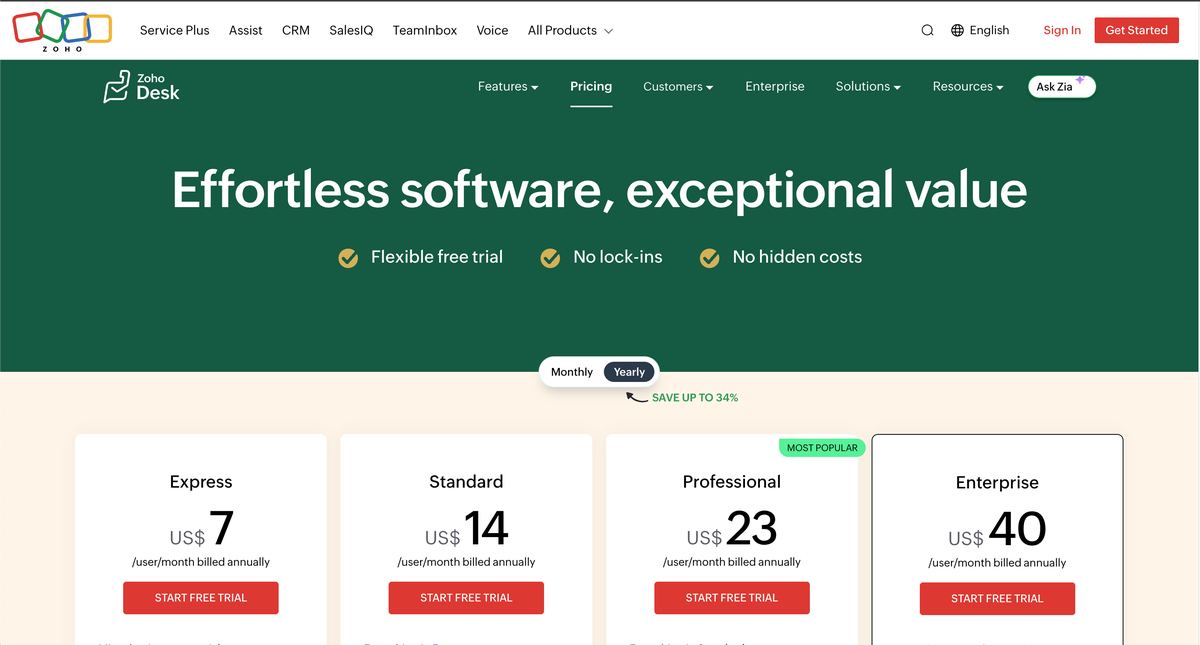 Zoho Desk pricing page, US view, captured 3 October 2026. Same prices on 26 October.
Read the annual price as a commitment
The Enterprise rate is about 5.7 times the Express rate, so headcount and tier multiply each other. A higher tier doesn’t replace the seat charge; you pay the higher rate for every agent you license.
For a team of 10 agents, the annual-billing equivalents are $70 a month on Express, $140 on Standard, $230 on Professional and $400 on Enterprise. Those are seat costs before taxes and optional services, and Standard may not be available at 10 users (see the next section).
The monthly equivalent printed beside an annual plan is not a month-to-month contract. Annual billing means paying for the year up front, which matters when your staffing plan is still changing.
Budget rule: Compare the amount you commit to, not just the monthly equivalent printed beside the plan.
- Count licensed agents. Include everyone who needs full access, not only full-time support staff.
- Multiply by the required tier. Use the lowest edition that supports the actual workflow.
- Compare billing commitments. Put annual and monthly quotes side by side before approving either.
Which features unlock at each Zoho Desk tier
Zoho Desk’s feature gates matter more than the length of each plan’s list. The buying question is which edition runs the work your team does without manual workarounds. The official Zoho Desk edition comparison has the full grid.
| Edition | Relevant additions | Buying reason |
|---|---|---|
| Express | Email, social, web forms, workflows, escalations, AI agents with up to 30M free tokens a month, bring-your-own-key generative AI | Cheapest paid entry with automation |
| Standard | Business Messaging (live chat for logged-in customers), WhatsApp and other messaging apps, Answer bot, knowledge base, community, ASAP widget, happiness ratings, custom reports | Self-service and reporting |
| Professional | Telephony, Zia AI, Blueprints, multi-department, round-robin, multilingual help center, webhooks | Repeatable routing and integrations |
| Enterprise | Live chat via Zoho SalesIQ, guided conversations, skill-based assignment, IVR, multi-brand help centers, sandbox | Specialized routing and brand separation |
Standard buys customer-facing infrastructure
Standard is the practical starting point when customers need a public knowledge base and the support lead needs custom reports. Read the chat wording closely: Standard’s Business Messaging is described as live chat “with logged-in customers,” while the full website live chat tool (Zoho SalesIQ) is listed under Enterprise. If you need chat with anonymous website visitors, confirm which edition covers it before you price the team.
Zoho’s pricing FAQ adds a limit that may change the math for growing teams: after upgrading from Free, “your user limit will increase to 5 users in Standard or unlimited users in all higher plans.” The FAQ doesn’t mention Express, and we couldn’t confirm whether the cap applies to accounts that never used Free, so a team of six or more should get it in writing before pricing Standard.
Professional buys workflow control
Professional adds ways to distribute work and enforce a process. Round-robin handles allocation, Blueprints handle process steps and webhooks handle other systems. The Standard-to-Professional premium is $9 per agent a month, or $108 per agent a year, on annual billing.
That makes the upgrade a workflow purchase. The useful question isn’t how many features appear in the table but whether those controls remove work your team does by hand today.
- Document essential channels. Name the exact chat, messaging, phone or self-service experience.
- Document essential controls. Name the routing, escalation and integration requirements.
- Choose the lowest complete fit. Avoid a lower edition that forces you to rebuild missing controls elsewhere.
Hidden costs beyond the per-agent price
Zoho Desk’s seat price is the sticker. Support plans, light users, monthly billing and AI usage are the lines to understand before signing.
Enhanced support is a separate purchase
Classic support comes with paid editions. Premium support costs 20% of the subscription fee, and Enterprise support costs 25% of the annual subscription fee with a minimum of 25 user licenses, according to Zoho’s support-plan terms (checked 26 October 2026).
Because the support charge is a percentage, it rises every time you add agents or move tiers. Enterprise support is also separate from the Enterprise edition: buying the top software tier doesn’t buy the top support service.
A support upgrade belongs on the budget before approval, not in a footnote after the subscription has been signed.
Separate confirmed charges from open questions
- Light users. Teammates who only view tickets and comment cost $6 a month each on Professional and Enterprise; Enterprise includes 50 free.
- AI tokens above the allowance. Zoho lists up to 30M free tokens a month but no rate above that.
- Mid-cycle agents. Confirm proration and whether removing access reduces an annual commitment.
- Telephony. Separate the software entitlement from your phone provider’s call charges.
- Taxes and renewal. Confirm the final invoice and cancellation terms.
The same invoice-level method helps when comparing Freshdesk pricing and support costs. Compare equivalent workflows and service levels, not entry plans.
Put one question to Zoho in writing: What will you bill beyond our licensed agent count, and on which invoice line will each charge appear?
Zoho Desk AI costs and why the bill is hard to predict
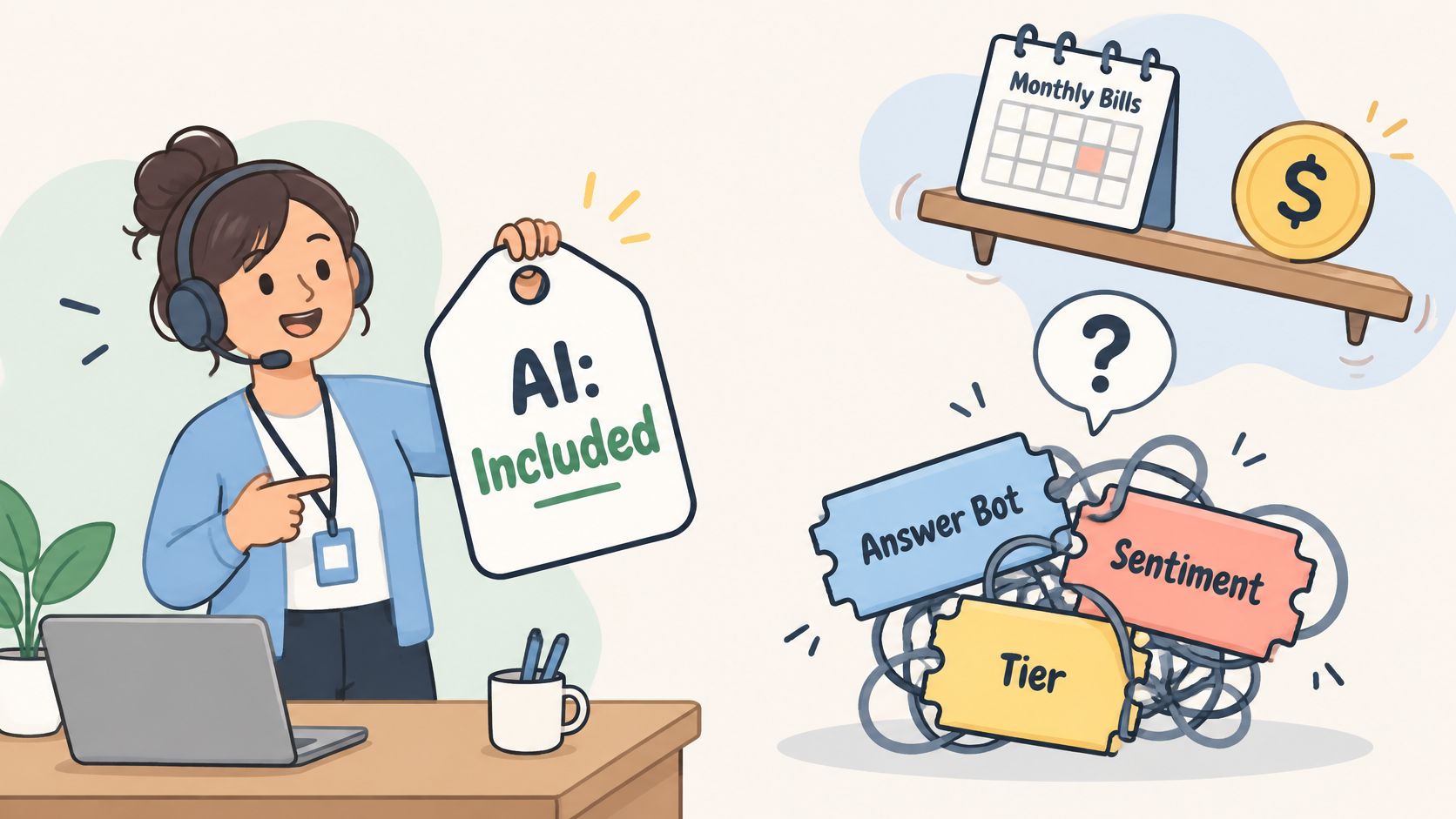
Zoho Desk AI is priced as an allowance, not per outcome. From Express up, Zoho lists AI agents with “up to 30M free tokens/month” using Zoho’s model or your own key, and Zoho’s generative AI features run on your own OpenAI key (DeepSeek in China). Standard adds Answer bot, which replies from knowledge base articles, and Professional adds Zia AI.
That structure has a hidden line. With your own key, model usage is typically billed by OpenAI to your account, not by Zoho, so the AI cost moves to a second invoice rather than disappearing. Above the free token allowance, Zoho’s page shows no rate.
The distinction matters when evaluating an AI customer service agent. An assistant drafting replies for a person and an agent closing conversations on its own create different costs and risks.
Keep unpublished rates out of the committed budget
Treat any reported token rate as unconfirmed until Zoho documents it for your account. Request these terms together:
- Included capability. Whether the subscription covers answering, drafting, analysis or autonomous actions.
- Allowance scope. Whether the 30M tokens are shared across the account or per agent or AI agent.
- Metering rules. Which inputs, outputs and tool calls count.
- Overage behavior. Whether service stops, continues or needs approval.
- External-model billing. What your own OpenAI key will cost at your volume.
Model conversations from actual consumption
A useful estimate starts with your logs, not a universal tokens-per-conversation guess. Prompt length, history, tool calls and escalation all change consumption. Then compare AI-assisted conversations with genuinely resolved ones: a draft, an attempted answer and a completed resolution are different outcomes.
Worked cost examples from three to twenty-five agents
Zoho Desk’s base calculation is licensed agents times the edition rate, plus any support plan. These examples use the annual prices above, before taxes and AI usage.
| Scenario | Agents | Edition | Seats a month | Support a month | Total a year |
|---|---|---|---|---|---|
| Three-person team, email only | 3 | Free | $0 | None | $0 |
| Five-agent team | 5 | Standard | $70 | $0, Classic | $840 |
| Ten-agent team with Premium support | 10 | Professional | $230 | $46 | $3,312 |
| Twenty-five-agent team with Enterprise support | 25 | Enterprise | $1,000 | $250 equivalent | $15,000 |
Our calculation from Zoho Desk pricing and support plans, 26 October 2026. The Enterprise support figure is a monthly equivalent of a 25% annual charge.
Read each example as a purchasing condition
The free scenario shows the boundary: three users, email ticketing, and no paid support. The Standard scenario sits exactly at Zoho’s stated five-user limit, so the sixth hire moves the whole team to Professional, from $70 to $138 a month. The Professional scenario adds Premium support at the published 20%. The Enterprise scenario reaches the 25-license minimum for Enterprise support.
Check the boundaries before using the totals
- Free-plan transition. The three free users stop being free when you upgrade.
- Peak staffing. Count everyone who needs access during busy periods.
- Light users. Price view-and-comment teammates at $6 instead of full seats.
- Payment timing. Separate annual expense from cash due at signing.
Zoho Desk versus flat and per-resolution pricing
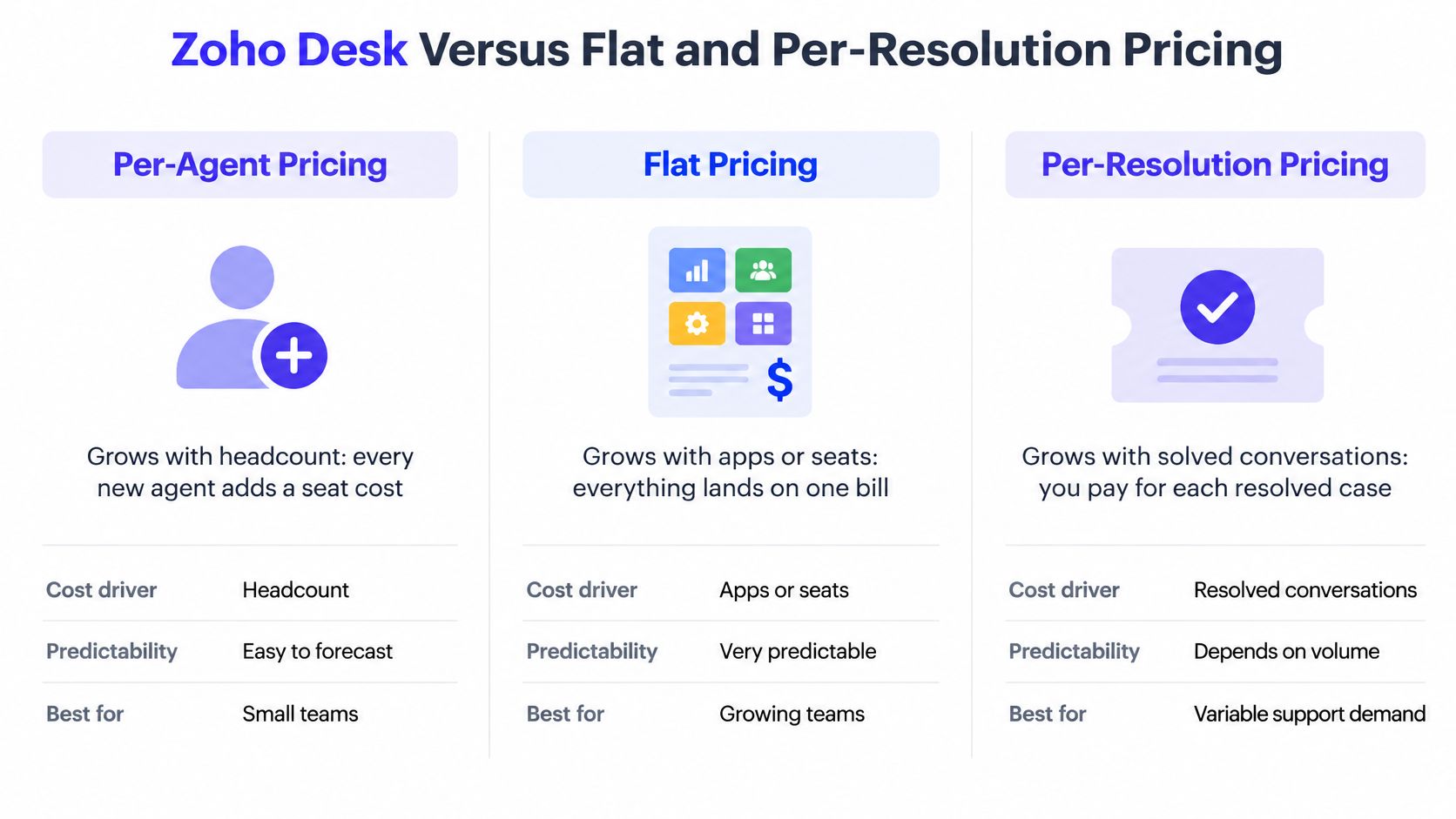
Zoho Desk charges for licensed agents and their edition. Flat bundles charge for apps with seats included. Per-resolution AI charges for completed outcomes. Each model answers a different budgeting question: a stable headcount makes a seat bill easy to forecast, and a stable ticket volume makes an outcome bill easier to estimate.
| Pricing model | Cost driver | Example price |
|---|---|---|
| Per agent, Zoho Desk | Headcount and edition | Zoho Desk Standard $14 per agent a month, billed annually |
| Token allowance AI, Zoho Desk | Model usage | Up to 30M free tokens a month; no published rate above |
| Per outcome, Intercom Fin | Billable outcomes | From $0.99 per outcome |
| Per resolution, Cove AI | Resolved conversations | $0.20 per resolved conversation |
| App-based bundles, Convot | Apps, with seats included | $49 to $299 a month; free under $1,000 MRR |
Convot is the help desk we make, so weigh this section with that in mind.
Compare the same team on both models
The same software team costs less on Zoho Desk at three people using logged-in chat or on Express, and more with website chat or Standard-tier features from seven people, priced on Zoho’s ladder and on an app-based plan below.
| Team | Zoho Desk (billed annually) | Convot (billed monthly) |
|---|---|---|
| 3 people, chat for logged-in users and a help center | Zoho Desk Standard, $42 | Starter, $49 |
| 3 people, live chat for website visitors (SalesIQ, per Zoho’s edition list) | Zoho Desk Enterprise, $120 | Starter, $49 |
| 7 people, email and social only | Zoho Desk Express, $49 | Growth, $79 |
| 7 people, needing Standard-tier features | Zoho Desk Professional, $161 (FAQ lists Standard at 5 users) | Growth, $79 |
| 12 people | Zoho Desk Professional, $276 | Pro, $149 |
Our calculation from Zoho Desk pricing and Convot pricing, 26 October 2026. AI is extra on both: Zoho by token allowance, Convot at $0.20 per resolution.
Zoho wins the three-person logged-in-chat row and the seven-person Express row on price. Once a team needs Standard-tier features past five people, or website chat, the per-agent ladder climbs faster than an app-based plan.
Flat pricing still has boundaries
Convot Starter at $49 a month includes 1 app and 3 seats with chat, inbox, help center, changelog, roadmap, status page and scheduling. Community stays free under $1,000 MRR with 1 app and 3 seats, shows “Powered by Convot” branding and has no Cove AI. Extra seats cost $10 a month and extra apps $20 a month (apps are unlimited on Scale). Our flat-pricing help desk comparison separates true bundles from offers that only look flat.
Cove AI answers setup and billing questions from each app’s own documentation at $0.20 per resolution, and hands off to a human when it isn’t sure, so the $0.20 only covers questions it closes.
If a paid contract is premature, Cyndra’s guide can help you explore free support ticketing platforms, and our own list of free help desks for startups compares the free limits. Compare free limits before comparing paid upgrades.
Which Zoho Desk plan fits your team?
Zoho Desk plan selection should follow your workflow. Team size is a useful shortcut, not a substitute for naming the channels, controls and service terms you need.
| Team type | Likely plan | Why it fits | Trap to check |
|---|---|---|---|
| Founder or up to 3 people, email only | Free | Inside the 3-user free limit | Adding chat or a fourth agent means paying for everyone |
| Small team, email and social only | Express | Cheapest paid tier, AI agents, workflows | No knowledge base or live chat |
| 4 to 5 agents | Standard | Knowledge base, messaging, reporting | Zoho’s FAQ lists 5 users on Standard after a Free upgrade |
| 6 to 25 agents | Professional | Round-robin, Blueprints, webhooks, Zia | Premium support adds 20% |
| Large or multi-brand team | Enterprise | Skill-based routing, multi-brand help centers, SalesIQ chat | Enterprise support needs 25 licenses |
| Software team supporting several apps | Professional (multi-department) or an app-based desk | Separate queues per product | Every agent is licensed per edition |
Run the purchasing checklist in order
- Count agents at peak. Compare planned access with the free and Standard limits, and price light users separately.
- Choose the lowest complete workflow. Match each channel, report, routing rule and integration to the edition comparison.
- Compare billing periods. Get annual and monthly quotes for the same configuration.
- Set vendor support deliberately. Classic, Premium or Enterprise, according to your service needs.
- Estimate AI from recent tickets. Use real token logs where available and compare with the 30M allowance.
- Collect the terms together. Edition, AI metering, overage, support basis, taxes and renewal in one record.
Before signing: Ask for a complete quote and a sample invoice showing licenses, support, usage and taxes separately.
Choose by the work your team performs
Free fits a genuinely small email-only operation. Evaluate it as a product, not a trial.
Express fits a paid email and social queue at the lowest per-agent price.
Standard fits self-service and reporting; check the user limit above five people.
Professional fits process-dependent support where routing, departments or webhooks are part of daily work.
Enterprise fits specialized routing, brand separation and website chat through SalesIQ.
Flat or per-resolution alternatives deserve a look when your team supports several apps, includes occasional contributors or wants AI spend tied to resolved conversations. For a startup moving off Zoho, Convot’s pricing page shows what the same team costs on an app-based plan.
FAQ
How much does Zoho Desk cost per agent?
Zoho Desk costs $7 (Express), $14 (Standard), $23 (Professional) or $40 (Enterprise) per agent a month billed annually in the US, checked on 26 October 2026. Monthly billing costs more; Zoho says yearly saves up to 34%.
Is Zoho Desk free?
Zoho Desk has a free edition for 3 users with email ticketing. Paid editions start at $7 per agent a month billed annually, and a 15-day trial of any paid plan downgrades to Free when it ends.
How many users does Zoho Desk Standard allow?
Zoho’s pricing FAQ says that after an upgrade from the Free edition, the user limit rises to 5 users on Standard and is unlimited on higher plans. A team of six or more should confirm the Standard limit in writing or price Professional at $23 per agent.
Does Zoho Desk charge for AI?
Zoho Desk includes AI agents with up to 30M free tokens a month from Express up, and generative AI features use your own OpenAI key. Zoho publishes no rate above the free allowance.
What does Zoho Desk premium support cost?
Premium support costs 20% of your subscription fee. Enterprise support costs 25% of the annual subscription fee and needs at least 25 user licenses. Classic support is included with paid editions.
Convot combines live chat, an inbox, help center, changelog and scheduling in app-based plans with seats included, and Cove AI at $0.20 per resolution. Compare plans against your Zoho Desk quote.
Tarang Agarwal, founder of Convot. Zoho Desk prices checked on zoho.com (US view) on 26 October 2026.
Revenue-aware support for Shopify app teams.
Live chat, help center, and every merchant's MRR, plan, and LTV beside the conversation. Free under $1k MRR.
Start free