Gorgias Pricing in 2026: Plans, Add-Ons and Real Costs
Gorgias pricing, October 2026: $10 to $900 a month by ticket volume, AI at $0.90 to $1.00 per interaction, and the real bill at four volumes.
On this page
Gorgias costs $10 to $900 a month on monthly billing, priced by tickets, not seats: Starter is $10 for 50 tickets, Basic $60 for 300, Pro $360 for 2,000 and Advanced $900 for 5,000 (checked 26 October 2026). AI Agent adds $0.90 per automated interaction billed annually, or $1.00 monthly, and each AI interaction also counts as a ticket.
Key takeaways
- Gorgias charges by ticket volume. Basic and above include 500 seats, so headcount barely moves the bill.
- Annual billing cuts the helpdesk price by about 17%: Gorgias Basic $50, Gorgias Pro $300, Gorgias Advanced $750 a month. Starter is monthly only.
- AI comes in bundles: 30, 30, 190 and 530 automated interactions a month on Starter to Advanced. Gorgias’s pricing data lists $1.50 per interaction above the bundle.
- Every AI interaction also uses a ticket, so automation fills both allowances at once.
- At 300 tickets with 100 AI resolutions, Gorgias Basic with AI works out to about $182 a month on our worked example below.
You might be comparing help desks with your current invoice open beside a ticket report. Your team hasn’t grown, but support volume has. The useful question is what happens to the bill when customers need more help, or when AI starts resolving more conversations. Two stores on the same plan can pay very different amounts once overages and AI interactions stack up, so the plan name alone tells you little about the final figure.
Gorgias plans and monthly prices in 2026
Gorgias sells four self-serve helpdesk tiers plus a custom plan above 5,000 conversations a month. Ticket volume, not agent headcount, is the main billing variable. The Gorgias billing documentation explains how billable tickets are counted.
| Gorgias plan | Monthly billing | Annual billing | Tickets a month | Seats | Ticket overage |
|---|---|---|---|---|---|
| Gorgias Starter | $10 | Not offered | 50 | 3 | $0.40 per ticket |
| Gorgias Basic | $60 | $50 | 300 | 500 | $40 per 100 |
| Gorgias Pro | $360 | $300 | 2,000 | 500 | $36 per 100 |
| Gorgias Advanced | $900 | $750 | 5,000 | 500 | $36 per 100 |
Source: Gorgias pricing, checked 26 October 2026. Advanced is sold through sales (“Talk to sales”). There is a free trial and no free plan.
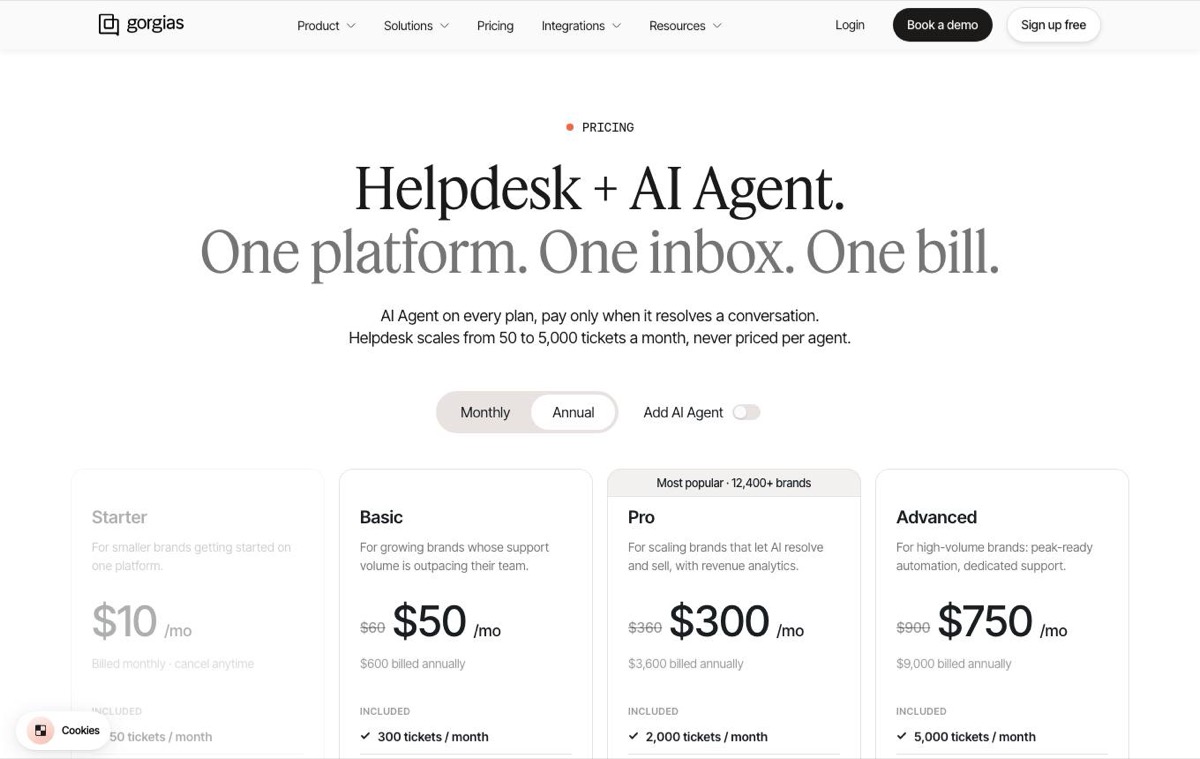 Gorgias pricing page, captured 3 October 2026. Prices unchanged when rechecked on 26 October.
Separate the subscription from the quote
A quote showing a monthly price under annual billing describes an annual payment divided by twelve. That is a different commitment from a month-to-month subscription you can cancel at the next cycle. Compare both the payment schedule and the contract length before signing.
Before choosing a tier, establish:
- Normal demand. Export your monthly billable-ticket totals, not just incoming messages.
- Peak demand. Identify the busiest period and its cause.
- Billing scope. Confirm whether the quote includes an AI Agent bundle.
- Contract terms. Record the billing cycle, renewal terms and usage rates beside the price.
Buying rule: A price without its allowance, billing cycle and included services isn’t a usable comparison.
Pick the allowance that covers normal demand with room for a busy month. A larger team doesn’t need a larger tier, because seats aren’t what the plan charges for.
How ticket volume sets your base bill
A Gorgias plan prices support volume, not seats. Conversations your team replies to count against the monthly allowance, and every ticket past it carries a charge: $0.40 a ticket on Starter, $40 per 100 on Basic and $36 per 100 on Pro and Advanced.
Follow the ticket count through the month
- Choose an allowance. Match the plan to expected billable conversations.
- Pay the subscription. Keep its cost separate from variable charges.
- Track usage. Compare the running count with the allowance, AI interactions included.
- Add overages. Apply your plan’s rate to the excess.
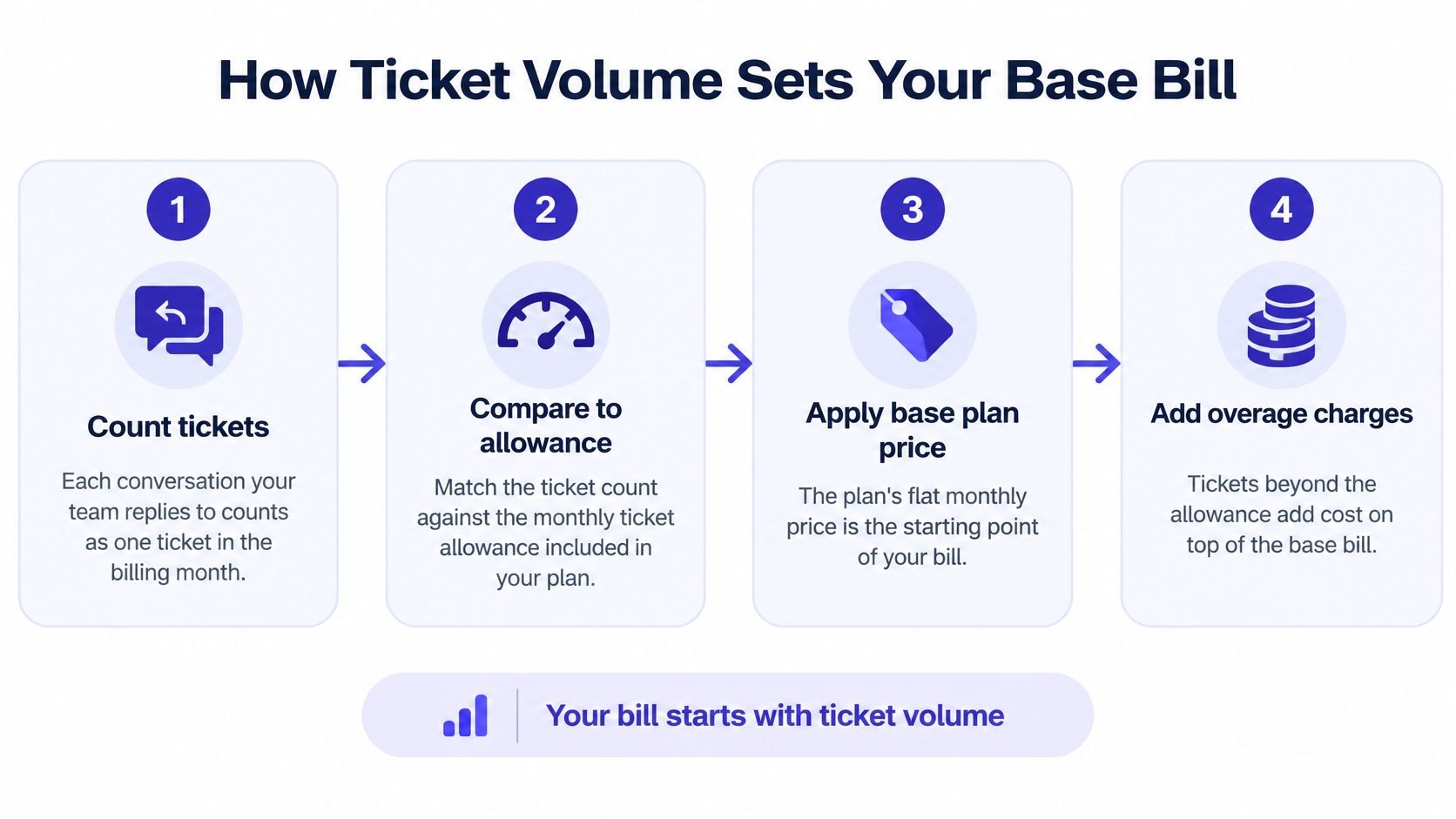
Take a store on Basic, with a 300-ticket allowance, that handles 340 billable tickets. At $40 per 100, the 40 extra tickets cost about $16 on top of the subscription, assuming Gorgias bills the overage per ticket rather than in whole blocks of 100; confirm the increment in your quote. Small numbers look harmless in one month. Multiply that gap across a year and the allowance choice starts to matter more than the sticker price.
A seasonal sale, product launch or shipping delay can push a store past its allowance without any hiring. For a software team, a bad release does the same. More agents clear the queue faster, but they don’t reduce the number of billable conversations.
Decide whether the meter suits your business
A usage model makes sense when support demand is predictable and you want costs to follow activity. SnapDial’s explanation of when metered billing makes sense is useful context for that decision.
Set a usage alert before the allowance runs out. An alert at 80% is our suggestion, not a Gorgias billing rule. Use it to forecast the rest of the month and decide whether to accept overages or move to a plan that fits your normal volume.
What the AI Agent adds per resolution
Gorgias AI Agent charges per automated interaction: $0.90 on an annual contract and $1.00 monthly, according to the Gorgias pricing page and its AI Agent pricing explanation. It is sold as a monthly bundle on top of the helpdesk plan.
| Gorgias plan with AI Agent | Monthly billing | Annual billing | AI interactions included | Helpdesk part + AI part (annual) |
|---|---|---|---|---|
| Gorgias Starter | $40 | Not offered | 30 | $10 + $30 (monthly) |
| Gorgias Basic | $90 | $77 | 30 | $50 + $27 |
| Gorgias Pro | $550 | $471 | 190 | $300 + $171 |
| Gorgias Advanced | $1,430 | $1,227 | 530 | $750 + $477 |
Source: Gorgias pricing, checked 26 October 2026. The page’s comparison table still lists $0.85 for Advanced, while the Advanced bundle itself works out to $0.90 per interaction ($477 for 530). Ask which rate your contract uses.
Two lines in Gorgias’s own pricing data change the math. First, “each automated interaction also counts as one helpdesk ticket.” Second, interactions above the plan’s included allowance are “billed at $1.50 per interaction.” Those two rules appear in the page’s product data rather than the plan cards, so get both confirmed in writing.
Calculate the AI line separately
Budgeting formula: helpdesk plan + AI bundle + (AI interactions above the bundle × overage rate) + ticket overages.
Suppose AI resolves 400 conversations a month on Pro billed annually. The bundle covers 190 for $171. The other 210 cost $315 at $1.50, or $189 if your contract prices them at the $0.90 unit rate. That one assumption moves the bill by $126 a month, so it is the first thing to settle in a quote.
That calculation measures software spend, not the value of automation. To judge value, compare the human work avoided with the AI charge, and check that the conversations were resolved correctly.
Automation can reduce the work your team performs without removing the conversation from ticket-based billing.
Account for both meters
An AI-resolved conversation uses a ticket and an AI interaction. The seat count doesn’t change; two billable units attach to the same customer conversation. Keep ticket usage and AI interactions in separate spreadsheet columns, or a successful automation rollout will look like a billing error.
For a small software team, the other question is escalation: what happens when the agent can’t safely answer? Our guide to an AI customer service agent explains how to evaluate that handoff alongside resolution performance.
Monthly cost scenarios by team size and ticket volume
The full Gorgias bill at four volumes, worked from Gorgias’s own published numbers, is the calculation most pricing pages skip. It assumes annual billing where offered, AI interactions counted inside the ticket total, and no Voice or SMS add-ons.
| Team profile | Tickets a month | AI resolutions | Gorgias plan | Gorgias bill (extra AI at $1.50) | Gorgias bill (extra AI at $0.90) |
|---|---|---|---|---|---|
| Solo founder | 50 | 0 | Starter, AI off | $10 | $10 |
| Three people, small store | 300 | 100 | Basic + AI | $182 | $140 |
| Eight people, growing brand | 2,000 | 400 | Pro + AI | $786 | $660 |
| 20 people, high volume | 5,000 | 1,000 | Advanced + AI | $1,932 | $1,650 |
Our calculation from Gorgias pricing, 26 October 2026. Example: Basic with AI is $77 for 30 interactions; the other 70 cost $105 at $1.50 ($63 at $0.90). Team sizes are illustrations, not plan rules.
Read each row as a different operating problem
The solo founder is buying coverage for routine support. With AI off and 50 tickets, Gorgias Starter at $10 is hard to beat on price.
The small store should watch mix, not size. A 300-ticket inbox where AI handles a third of conversations already pays more for AI than for the helpdesk.
The growing brand has to compare the bundle with real outcomes. At 400 resolutions, more than half the AI usage sits above the 190-interaction bundle.
The high-volume operation needs a peak-month forecast. If 5,000 tickets is the average rather than the ceiling, ticket overages land on top of the figures above.
Compare workload rather than headcount
Agent count appears only to make the scenarios relatable. A larger team handling the same billable workload doesn’t need a larger Gorgias plan. That favors Gorgias when many people need inbox access but conversation volume stays controlled. A small team with a busy inbox can still face substantial usage charges with few agents.
- Replace sample volumes. Use your actual billable-ticket and AI-interaction counts.
- Use the contracted rate. Recalculate the AI line if your agreement differs.
- Add a peak case. Include the month that would strain both allowances.
Hidden costs to check before you sign
The subscription is the stable part of the invoice. The risk sits in the lines that appear when volume, automation, channels or contract terms change. A store can hold headcount flat and still raise the bill through a ticket spike, or hold ticket volume flat and raise it because AI resolves more.
Audit the charges outside the subscription
- Ticket overages. Confirm the rate and whether it is billed per ticket or in blocks of 100.
- AI interactions above the bundle. Confirm whether they cost $1.50, the unit rate, or require a bigger bundle, and what counts as automated when the agent hands off.
- Billing-cycle differences. Recalculate AI spending under the exact contract offered. Starter has no annual option.
- Voice and SMS. Both are add-ons on Basic and up, priced by volume, so they need their own forecast.
- Exit work. Price the export of history, macros, routing rules and team retraining as a project cost.
Check the account’s billing history
Ask whether your account predates Gorgias’s current pricing and whether turning on AI Agent or Shopping Assistant features would move it onto new terms. Get the cutoff, trigger and effective date in writing. An existing account may need a different comparison from a new one.
For a second billing model to test with the same checklist, SupportGPT’s Crisp pricing breakdown for 2026 lays out a seat-and-plan structure.
Before signing: Get a written breakdown of the subscription, usage charges, add-ons and any action that changes legacy terms.
Gorgias billing against a flat app-based model
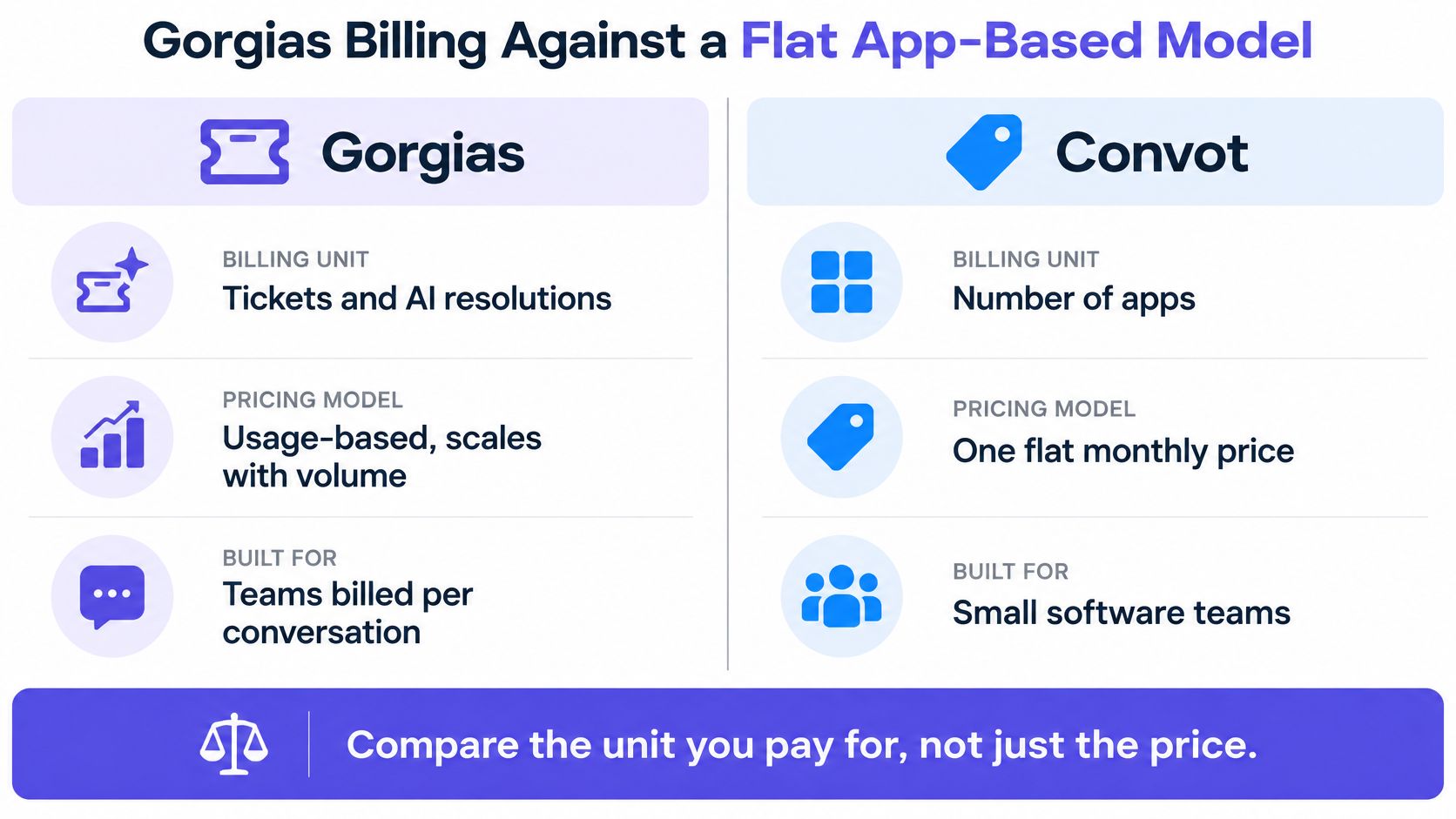
Gorgias bills support activity through tickets and AI interactions. Convot, the help desk we make for small software teams, prices by the number of apps you support, with seats included and no ticket allowance. We make that competing product, so weigh this comparison with that in mind.
Compare the subscription and AI separately
Our pricing page lists a free plan and four paid tiers:
| Plan | Monthly price | Apps included | Seats included |
|---|---|---|---|
| Community | Free while under $1,000 MRR | 1 | 3 |
| Starter | $49 | 1 | 3 |
| Growth | $79 | 2 | 7 |
| Pro | $149 | 5 | 12 |
| Scale | $299 | Unlimited | 20 |
Community doesn’t include Cove AI. Extra seats cost $10 a month each and extra apps $20 a month each (apps are unlimited on Scale). Cove AI costs $0.20 per resolved conversation on paid plans, charged when Cove replied in a conversation that ends resolved; it hands off to a human when it isn’t sure.
Run the same four rows through that model:
| Team profile | Convot plan | Monthly bill |
|---|---|---|
| Solo founder, 50 tickets, AI off | Community (under $1,000 MRR) or Starter | $0 or $49 |
| Three people, 100 AI resolutions | Starter + Cove AI | $69 |
| Eight people, 400 AI resolutions | Growth + 1 seat + Cove AI | $169 |
| 20 people, 1,000 AI resolutions | Scale + Cove AI | $499 |
Our calculation from Convot pricing, October 2026. Gorgias wins the solo, AI-off row. The gap opens once AI does real work. The full side-by-side lives on our Convot vs Gorgias comparison.
| Item | Gorgias | Convot |
|---|---|---|
| Billing unit | Tickets and AI interactions | Apps, with seats included |
| AI cost for 1,000 resolutions | $900 to $1,000 at the unit rate, more above the bundle | $200 |
| Entry price | $10 Starter, 50 tickets | Free under $1,000 MRR, one app and three seats |
| Migration help | Export your own history | Free founder-assisted Zendesk, Intercom and Freshdesk moves; one-click Crisp import. A Gorgias move isn’t on that list. |
Choose according to the work
Gorgias’s ecommerce depth is a legitimate reason to choose it: it is built around storefronts, with Shopify, Shopify Plus and WooCommerce on every plan and AI Actions such as cancel, discount and apply from Basic up. A store should weigh that fit against the cost of its actual workload.
The sharper fit for app-based pricing is a small software team supporting several apps, particularly Shopify app developers, whose customers are merchants rather than shoppers. Conversations can show the merchant’s plan, MRR and billing history, pulled from the Shopify Partner API. One inbox serves every app alongside a help center, changelog, scheduling and a revenue dashboard. “I love that it helps me connect multiple businesses in the same account without having to go through multiple logins,” writes Yuvraj T. on G2.
We built Convot after trying Crisp, Intercom and Gorgias and finding none built for one small team supporting several products. That is a product-design reason, not proof another help desk can’t serve your business.
The product walkthrough shows how the multi-app workspace is organized.
Our migration guide explains which moves are founder-assisted and which use the Crisp importer. For a wider shortlist priced by team rather than by ticket, see help desks with flat pricing, and for AI rates across 24 vendors, our help desk pricing index.
Should you pick, stay with or leave Gorgias?
Pick or stay with Gorgias when its ecommerce fit justifies the complete bill and you can forecast both meters. Reconsider when you can’t explain what drives the invoice, or when another billing model better matches how your products receive support.
Run the purchase checklist
- Export recent ticket counts. Use the last three months, plus a seasonal peak if those months miss it.
- Price normal and peak demand. Find the allowance each needs and the cost of staying on the smaller tier during a spike.
- Reconcile AI interactions. Count them inside the ticket total, then price the share above the bundle.
- Include add-ons. Add Voice and SMS if you plan to use them.
- Confirm legacy status. Get the financial consequences of an upgrade in writing.
- Prepare the exit route. Export ticket history and confirm migration scope before cancelling anything.
Match the verdict to your situation
Stay when the workflow earns its cost. A helpdesk that fits a store’s order work may justify a higher software bill. Include the disruption of changing systems in that judgment.
Compare alternatives when the unit feels wrong. A team supporting several software apps may prefer an app-based subscription. Our guide to Gorgias alternatives builds a shortlist around those requirements.
Don’t switch on a spreadsheet alone. Test routing, escalation, search and daily support work before deciding. Two months of real results is a practical trial; a seasonal business may need longer.
FAQ
How much does Gorgias cost per month?
Gorgias costs $10 (Starter, 50 tickets), $60 (Basic, 300 tickets), $360 (Pro, 2,000 tickets) or $900 (Advanced, 5,000 tickets) a month on monthly billing. Billed annually, Gorgias Basic drops to $50, Gorgias Pro to $300 and Gorgias Advanced to $750. Prices checked on Gorgias’s pricing page on 26 October 2026.
Does Gorgias charge per agent?
Gorgias doesn’t charge per agent; it charges by ticket volume. Starter includes 3 seats and Basic, Pro and Advanced include 500, so adding agents doesn’t change the plan price.
How much does Gorgias AI Agent cost?
AI Agent costs $0.90 per automated interaction on an annual contract and $1.00 monthly, sold as bundles of 30, 30, 190 or 530 interactions a month from Starter to Advanced. Gorgias’s pricing data lists $1.50 per interaction above the bundle, and each interaction also counts as a ticket.
Is there a free Gorgias plan?
Gorgias has no free plan. It offers a free trial, and the cheapest paid plan is Gorgias Starter at $10 a month for 50 tickets.
What is a cheaper alternative to Gorgias for software teams?
For teams supporting software apps rather than a storefront, Convot starts free under $1,000 MRR, with paid plans from $49 a month and AI at $0.20 per resolution. For storefronts, our Gorgias alternatives guide compares Re:amaze, Richpanel, DelightChat and others.
Convot gives small software teams one help desk for several apps, with seats included and Cove AI at $0.20 per resolution. See how it compares with Gorgias or start on the free plan.
Tarang Agarwal, founder of Convot. Gorgias prices checked on gorgias.com on 26 October 2026.
Revenue-aware support for Shopify app teams.
Live chat, help center, and every merchant's MRR, plan, and LTV beside the conversation. Free under $1k MRR.
Start free