Live chat widget for your website: features, setup and best practices (2026)
What a website live chat widget does, which features matter, and how to set response times, accessibility and privacy before you add one.
On this page
- Key takeaways
- Why does a live chat widget fail on so many websites?
- How do you set up a live chat widget on your website?
- How does a website chat widget work?
- When is live chat worth adding to a website?
- How fast should you answer website live chat?
- Which features should a live chat widget have?
- How do you make a chat widget accessible, private and measurable?
- How do you switch chat widgets without losing history?
- FAQ
A live chat widget for a website is a small script that adds a chat button and message window to your pages, so visitors can reach your team or an AI agent without leaving. It helps only when someone answers quickly, the widget works on phones and with a keyboard, and transcripts are handled with care.
You’ve added a chat bubble to your SaaS site. Then a visitor asks a billing question while you’re fixing a production issue. The widget sends a notification, the visitor waits, and the sale disappears before you can open the inbox.
A live chat widget for a website only helps when it connects visitors to a clear support process. The script is the easy part. Routing, response expectations, accessibility, privacy, language handling, and product context determine whether chat becomes a useful channel or another tab you have to monitor.
The right approach is practical: understand what the widget does, measure the service promise, choose features that reduce tool sprawl, and test the experience like a customer who uses a keyboard or a phone. Shopify app founders also have a useful integration path, because billing context can sit beside a support conversation instead of forcing an agent to search another system.
Key takeaways
- The script is the easy part. Routing, response promises, accessibility and privacy decide whether chat helps.
- Speed is the benchmark. On LiveChat’s platform agents send a first reply in 35 seconds on average, and 27.4% of customers leave the queue before anyone answers.
- AI should answer only from your own docs, show its sources and hand off when unsure.
- Test without a mouse and on a phone before launch.
- Collect the minimum, set a retention period, and tell visitors when an AI is replying.
Why does a live chat widget fail on so many websites?
A live chat widget usually fails because nobody owns the conversations it creates, not because the script broke. A founder launches a new SaaS landing page with a clear headline, a short demo, and a pricing page. A visitor arrives from search, understands most of the product, and opens chat with one question: “Does this plan include the integration I need?”
The founder is away from the inbox. The visitor closes the tab and sends no email. Nothing broke technically, but the support channel failed at the moment it mattered.
Live chat creates a direct path between a visitor and the team behind the product. It can answer pre-sales questions, guide onboarding, clarify an error, and collect feedback without making the customer find a contact page. It can also create a service obligation. Once the bubble is visible, visitors reasonably expect acknowledgment and a useful next step.
That’s why choosing a widget isn’t a matter of matching colors to your brand. You need to evaluate response operations, mobile behavior, accessibility, privacy, translation, integrations, and reporting. A small team should avoid adding a chat tool that creates more disconnected systems than it removes.
How do you set up a live chat widget on your website?
Setting up a live chat widget takes five steps: paste the embed script, verify who the visitor is, set business hours and an away message, decide who receives new chats, then test on a phone and with a keyboard. In Convot, for example:
- Embed: add two script tags to your site’s
<head>, one settingwindow.Convot = { app_id }and one loading the widget. It runs in a sandboxed iframe, so it cannot break your page (developer docs). - Identity: call
Convot.identifywith the signed-in user’s ID and email, signed with your app’s HMAC secret, so agents know which customer they are talking to and nobody can impersonate one. - Hours and away message: set business hours so the widget shows an honest “back in” estimate and sends an away auto-reply instead of going silent.
- Routing: decide who gets new conversations, and which questions an AI agent may answer.
- Test: open the widget on a phone and with only a keyboard before you announce it.
How does a website chat widget work?
A website chat widget usually has five working parts. The launcher gives visitors a visible way to start. The message pane displays the conversation, composer, attachments, and status. A backend receives messages, assigns conversations, stores transcripts, and sends notifications. Agent tools provide routing, saved replies, internal notes, and escalation. Triggers decide when the interface appears or when a proactive message is offered.
The browser normally loads the widget through a small script. That script renders the launcher and conversation interface, often in an isolated frame, while the support system handles the data exchange. Whether the connection uses persistent messaging or repeated requests matters less to a founder than the practical result: the interface must stay responsive, reconnect cleanly, and avoid blocking the page’s main content.
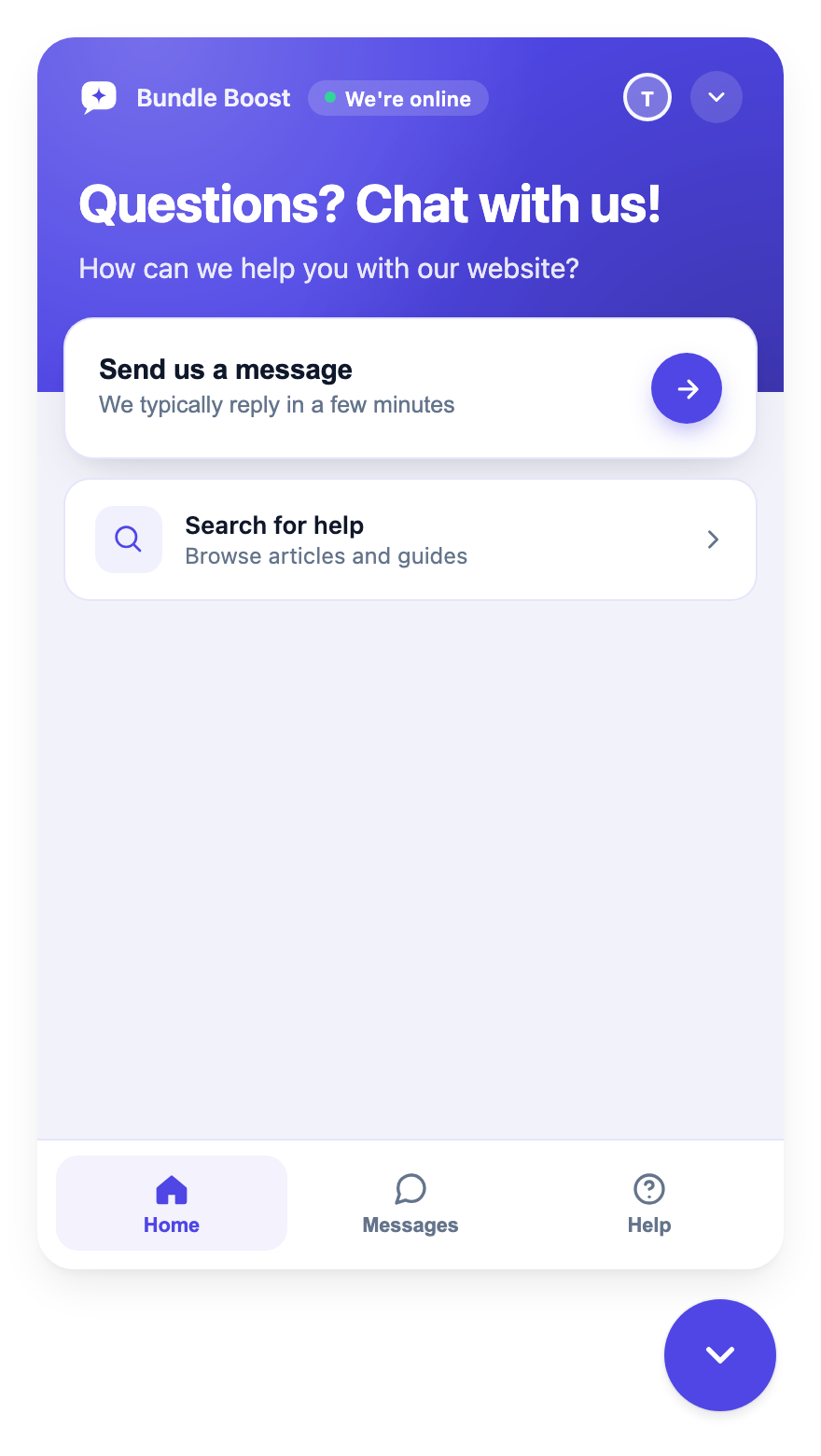 A Convot chat widget: it sets a reply-time expectation and offers help-center search before a message.
A useful widget separates visitor experience from agent workflow. Visitors need a simple entry point and clear status. Agents need enough context to answer without asking the customer to repeat information. Triggers should support a specific purpose, such as offering help on a complex pricing page, rather than interrupting every visitor immediately.
Performance deserves attention before launch. Many visitors will open chat on a phone, so responsive layout and touch-friendly controls are basic requirements. Test the launcher, composer, keyboard, file handling, and close behavior on a phone, not only in a desktop browser.
Your implementation should also define ownership. Decide who receives new conversations, what happens outside working hours, which questions AI may answer, and when a human must take over. A decorative widget has a visual presence. A working support channel has routing rules and accountability.
When is live chat worth adding to a website?
Live chat is worth adding when visitors have questions at a moment of decision and your team can answer within minutes. Visitors rarely open chat because they want another interface. They open it because a page has failed to answer a question quickly enough, or because the next decision feels risky. Your job is to remove that uncertainty without creating a support queue you can’t operate.
Customer behavior shows why speed matters. Across 2 billion chats on its platform, LiveChat reports an average first reply of 35 seconds, and 27.4% of customers leave the queue before an agent answers (Dec 2024). YouGov found that 31% of Americans tend to use live chat for customer service but only 10% prefer it (Mar 2025), a gap that suggests many visitors use chat because it is available, not because it is their first choice. Treat these as benchmarks, not promises to copy; your product and staffing decide what you can deliver. More numbers are in our live chat statistics.
Use chat where intent is visible
A pricing visitor may need a plan comparison. A new user may need help finding an API key. A customer reporting an error may need to share a screenshot and receive a precise next step. These are different conversations, so your routing and saved replies should reflect the difference.
Use live chat for:
- Pre-sales questions: Clarify compatibility, limits, integrations, and plan differences while the visitor is evaluating the product.
- Onboarding support: Help a new customer reach the first successful outcome instead of sending them through a generic support form.
- Technical diagnosis: Ask for the relevant context, request a screenshot when appropriate, and escalate issues that need engineering attention.
- Product feedback: Tag recurring requests and pass the evidence to the product team instead of letting feedback disappear in private email threads.
- Self-service discovery: Point visitors to a focused help article before an agent spends time repeating the same explanation.
A chat widget won’t automatically reduce tickets or increase sales. It gives you a faster conversation path. The outcome depends on whether your team answers accurately, preserves context, and routes the request to someone who can act.
Measure the service, not the bubble
Track conversation volume, first response time, resolution time, satisfaction, escalation, and repeat contact. Review those measures by page, product area, language, and question type where your system supports it. A growing chat count may indicate stronger adoption, but it may also indicate confusing documentation or a broken workflow.
A practical dashboard should answer three questions. Are visitors reaching the right team? Are agents resolving the actual issue? Are customers returning because the first answer was incomplete? Our guide to adding live chat to a Shopify app shows how to keep response times low with a small team.
How fast should you answer website live chat?
Answer website live chat within a minute or two when you are online, and say honestly when you are not. LiveChat’s 35-second average first reply is the benchmark visitors have learned, and more than a quarter leave a queue before anyone answers. Outside working hours, show when you will be back and offer email or a booked call, rather than leaving a visitor waiting on a silent widget.
Which features should a live chat widget have?
A live chat widget should have the features that remove manual work, keep answers accurate or cut the number of systems agents search: careful translation, an AI agent that answers from your docs, booking, account context, mobile apps and developer controls. Feature lists are easy to copy, so rank them by what they save your team.
Translation needs a quality boundary
Two-way translation can help a team serve visitors who use another language, but language coverage alone says little about support quality. Technical terms, billing details, code, screenshots, and product names can lose meaning during translation.
Require three controls:
- Original text access: Agents should be able to inspect the visitor’s original message.
- Translation visibility: The conversation should make clear when translated text is being used.
- Human escalation: An agent should take over when the translation is ambiguous or the issue carries financial or technical risk.
Automatic translation can misread technical terms, so don’t present broad language coverage as equivalent to native support. Measure first-response time, resolution time, escalation, repeat contact, and customer corrections by language. Our guide to multilingual customer support covers where translation needs a human.
AI should answer from your material
An AI assistant is useful when it works from your own documentation, cites the relevant source, and admits uncertainty. It should hand off to a human when it isn’t sure. Cove AI, Convot’s AI agent, is built around that rule: it can show the source of each answer and starts in suggest mode, where your team reviews each draft before a customer sees it. That behavior matters more than a clever greeting because an incorrect technical answer can create another support conversation.
Keep the AI’s scope narrow at launch. Give it product documentation, billing explanations, setup guides, and known troubleshooting steps. Review unanswered questions and incorrect answers regularly. Don’t allow the assistant to invent a workaround merely to avoid escalation. See which AI support agents cite their sources and hand off.
Scheduling belongs close to the question
Some conversations need a call. A visitor comparing an integration or a customer diagnosing a complex setup may reach a useful stopping point where asynchronous chat becomes inefficient. A booking option inside the conversation can turn that moment into a scheduled next step.
Connect scheduling to the same customer record when possible; booking calls from support chat covers the setup. The agent should know why the call was booked, what has already been tried, and which product area needs attention.
Revenue context changes the conversation
Shopify app teams have a strong reason to connect support with billing data. The Shopify Partner API exposes each merchant’s app charges, so a support tool can show the merchant’s plan and what they pay beside the conversation.
That context helps an agent distinguish a setup question from a plan limitation without asking the merchant to repeat account details. Shopify’s Partner API also models subscription sales with separate gross amount, net amount, Shopify fee, shop, billing interval, charge ID, and creation timestamp fields in its AppSubscriptionSale documentation. Keep revenue context permissioned and visible only to the people who need it.
Mobile agents and developer controls
Support doesn’t stop when you leave your desk. Native iOS and Android apps can help agents respond from a phone, while a one-line embed keeps the website installation simple. REST APIs, HMAC identity verification, and signed webhooks matter when you need to connect conversations to your own product workflows.
Prioritize developer tooling based on a real use case:
- Identity: Know which signed-in customer opened the conversation.
- Events: Send conversation events into your internal workflow.
- Context: Attach the relevant account, product, or plan information.
- Control: Preserve the option to change routing or presentation without rewriting the whole site.
Integration should reduce searching
A help center, changelog, status page, scheduling tool, and inbox can each be useful. The problem starts when agents must copy information between them. Favor a system that keeps the conversation, customer history, documentation, and operational context close together.
How do you make a chat widget accessible, private and measurable?
Make a chat widget accessible, private and measurable by testing it with a keyboard and screen reader, collecting only the data a conversation needs, and tracking response, resolution and repeat contact. A widget can pass a technical installation check and still fail visitors. A keyboard user may be unable to open it, while the same widget collects transcripts without a clear retention policy. Treat accessibility and privacy as launch requirements.
Test the interface without a mouse
The launcher and transcript need keyboard access, visible focus, sensible focus management, screen-reader announcements for new messages, adequate contrast, and a dependable close control. WCAG 2.2 covers each of these: keyboard access (2.1.1), visible focus (2.4.7) and status messages that screen readers announce without moving focus (4.1.3).
Run a manual test before release:
- Keyboard focus: Tab to the launcher, open it, move through the controls, and return focus appropriately when the panel closes.
- Screen-reader announcements: Confirm that new messages are announced without making visitors reread the entire transcript.
- Contrast: Check launcher text, message text, links, errors, and focus indicators.
- Mobile overlay: Test narrow screens, rotation, the virtual keyboard, scrolling, and access to the close control.
- Escape path: Confirm that visitors can close the panel without a mouse and continue using the page.
WCAG compliance comes from the behavior visitors experience, not from a label in the widget settings.
Collect less and retain deliberately
Names, email addresses, IP addresses, page context, and volunteered conversation content can become personal data. Transcripts create responsibilities for retention, deletion, access control, and processor contracts.
Set the data lifecycle before launch. If you serve visitors in the EU, the GDPR’s principles of data minimisation and storage limitation (Article 5(1)(c) and (e)) are the usual anchors; confirm the details with your counsel:
- Consent timing: Decide whether the widget loads before consent, after consent, or with limited functionality until consent is granted.
- Minimum collection: Ask only for fields that support the conversation or a necessary follow-up.
- Access control: Restrict transcript access by role, and review who can export or delete records.
- Retention: Set a period that matches your support and legal needs.
- Deletion workflow: Make deletion requests executable across the inbox, transcript store, exports, and connected processors.
- AI disclosure: Tell visitors when an AI agent is responding and provide a clear human handoff.
Your privacy notice should describe the actual configuration, not a generic promise. Document how your provider handles transcript security on its security page, for Convot convot.io/security, before you write the notice. If the provider processes transcripts or translated messages through additional systems, document those processors and their retention behavior.
Build a dashboard that changes decisions
Analytics should support a decision, not merely fill a report. Track conversation volume, response speed, resolution time, agent escalations, and repeat contact about the same issue. Add events for product areas, article searches, plan questions, and handoffs when they explain demand.
Review these signals alongside documentation and product changes. A rise in technical conversations may indicate a release problem. Repeated plan questions may show that the pricing page needs clearer language. Low satisfaction in one language may point to translation quality rather than agent performance.
How do you switch chat widgets without losing history?
Switch chat widgets by listing what you have, moving history in a tested sample first, and only then replacing the script. Migration should start with inventory, not import. List active conversations, help articles, saved replies, customer identifiers, tags, and integrations. Decide what needs historical context and what can be archived before you move.
Crisp can be imported into Convot with one click. Moves from Intercom, Zendesk, and Freshdesk are different. They’re free migrations done with the founder, not automatic importers. Confirm which history and fields will transfer, then test the result with a small sample before changing the live widget.
Shopify app teams can connect live billing context to the inbox. Convot syncs each merchant’s plan and revenue from the Partner API, so an agent sees billing status during a conversation without a separate billing tool.
Convot is priced by app count, with seats included: free while your app earns under $1,000 a month, then $49 a month for 1 app and 3 seats, rising to $299 for unlimited apps (pricing). Cove AI, Convot’s AI agent, costs $0.20 per resolved conversation, while Intercom lists Fin from $0.99 per outcome; both checked in October 2026.
The product combines live chat, a help center, changelog, scheduling, and a revenue dashboard in one inbox. Before choosing it or any alternative, test the embed, routing, mobile behavior, permissions, transcript export, and API workflow against your actual site. Our guide to third party integrations covers how to judge connection points.
Convot makes a competing product, so treat its fit as a product recommendation with a direct commercial disclosure, not independent vendor advice.
FAQ
What is a live chat widget for a website?
A live chat widget is a script that adds a chat button and message window to your website, so visitors can message your team or an AI agent from any page. Messages land in a support inbox where agents reply, and transcripts are stored with the customer record.
How fast should you reply to website live chat?
Reply within a minute or two if you can. On LiveChat’s platform the average first reply is 35 seconds, and 27.4% of customers leave the queue before an agent answers. If you can’t staff that, set the expectation in the widget and offer email or a booking instead.
Should a live chat widget use an AI agent?
Use an AI agent only if it answers from your own documentation, shows its sources and hands off to a person when unsure. Start in suggest mode so your team reviews answers before customers see them, and tell visitors when an AI is replying.
Is a live chat widget accessible by default?
A live chat widget is not accessible by default. Test keyboard access, visible focus, screen-reader announcements for new messages, contrast and the close control on a phone. WCAG 2.2 success criteria 2.1.1, 2.4.7 and 4.1.3 cover the core requirements.
How much does a live chat widget cost?
A live chat widget costs between nothing and about $90 a month for a team of three. On list prices checked 3 October 2026: tawk.to $0, Zoho SalesIQ $21, Crisp $45, Convot $49, Help Scout $75 and Intercom $87, before AI. AI is extra: Cove AI is $0.20 per resolved conversation and Intercom lists Fin from $0.99 per outcome. The full chart is in our live chat statistics.
Can you switch live chat widgets without losing history?
You can switch without losing history if the new tool imports it or migrates it for you. Convot imports from Crisp directly and migrates Intercom, Zendesk and Freshdesk history for free. Test a sample before replacing the live script.
About the author
Tarang Agarwal is the founder of Convot. Convot is built by Sidepanda, a small studio that runs several Shopify apps of its own, including Appointo, Depo and Panda Bundle, and answers all of their live chat from one Convot inbox.
Revenue-aware support for Shopify app teams.
Live chat, help center, and every merchant's MRR, plan, and LTV beside the conversation. Free under $1k MRR.
Start free