Multilingual Customer Support for SaaS Teams in 2026
How SaaS teams build multilingual customer support: which languages to cover, chat translation vs AI vs help center, human handoff, QA and a 90-day plan.
On this page
- Key takeaways
- Why Does Multilingual Customer Support Break Small SaaS Teams?
- What Should a Team Decide Before Buying Multilingual Support Tools?
- Which Tools Carry Multilingual Support: Chat Translation, AI or a Help Center?
- How Do You Build a Quality-Controlled Multilingual Pipeline?
- How Should AI and Human Agents Share Multilingual Tickets?
- Which Metrics Catch Multilingual Support Drift Early?
- How Do You Roll Out Multilingual Support in 90 Days?
- FAQ
Multilingual customer support for a SaaS team works when language is treated as an operating decision: pick the languages your customers actually write in, use live chat translation for conversations, a grounded AI agent for documented questions and a localized help center for self-service, and route account, payment and security issues to a human every time.
A support inbox can look manageable until three conversations arrive at once, one in German, one in Portuguese, and one in Japanese. The founder translates the first, searches old tickets for the second, and sends an English answer to the third because nobody knows what else to do. The team has “multilingual support,” but the customers experience delay, uncertainty, and inconsistent technical advice.
The useful question isn’t “How many languages can our tool translate?” It’s “Which answers can we safely automate, which interactions need native-language help, and how do we prove the system is working?”
The commercial case is clearest in consumer data, so read it as directional for SaaS buyers. CSA Research’s “Can’t Read, Won’t Buy” survey of 8,709 consumers in 29 countries found that 76% prefer to buy when product information is in their own language, 40% will not buy from a website presented only in a foreign language, and 75% are more likely to buy again when customer care is in their language. CSA Research’s study page has the full methodology.
Key takeaways
- Cover the languages your customers already write in, not a theoretical global list.
- Use three layers for three jobs: live chat translation for conversations, a grounded AI agent for documented questions, a localized help center for self-service.
- Route by risk: account access, payments, security and complex integrations always go to a human.
- Test in native language, not translation: translated test sets overstate how well automation works.
- Track quality per language, because one blended score hides failures in smaller languages.
Why Does Multilingual Customer Support Break Small SaaS Teams?
A small SaaS team usually doesn’t fail because it lacks translation software. It fails because every translated conversation still needs a person to decide what the customer means, find the correct product rule, and check whether the answer is safe.
A merchant asks in German why a feature disappeared. A Brazilian customer reports a billing mismatch in Portuguese. A Japanese user describes an integration failure with terminology that a general translator renders incorrectly. The team replies quickly, but each answer uses a different product term, a different level of certainty, and sometimes a different interpretation of the policy.
Coverage alone creates false confidence. A translated sentence can be grammatically clean and technically wrong. It can also hide a more serious operational issue, such as an account-access request, a payment dispute, or a security incident that should never be handled by an unverified automated answer.
The gap between priority and delivery
Multilingual support has been an operational requirement for contact centers for years. A 2017 HDI survey of 381 support organizations across 23 countries and about 30 industries (most of them in the US) found that nearly three-quarters considered multilingual support a priority, yet only 47% offered support in at least one additional language and 20.7% supported three to five languages. HDI’s multilingual service research shows why the problem involves staffing, routing, documentation, and channel design, not just translation.
A team that adds five languages without those foundations spreads its quality problems across five markets. The founder becomes the escalation path. Support agents copy answers from machine translation. Customers receive help in their language, but not necessarily help they can trust.
Practical rule: A language is supported only when the team can detect it, retrieve the right product answer, explain it clearly, and escalate it without losing context.
That standard changes the target. You don’t need every page and every channel localized on day one. You need a controlled path for the interactions that affect conversion, retention, and customer confidence. For a broader view of how language access affects satisfaction and support design, CallZent’s multilingual support insights are a useful reference.
What Should a Team Decide Before Buying Multilingual Support Tools?
Decide three things before buying any tool: which languages to support, which channels get native-language handling, and which requests automation may answer versus route to a human. Language coverage should follow customer risk and business value. Buying a tool first encourages teams to turn on every available language, then discover that nobody owns the resulting work.
Write a one-page policy before choosing software. Keep it short enough that an agent can use it during a live conversation.
Make three decisions first
Choose the languages. Start with the languages represented in your real conversations, not a theoretical global market. Review ticket volume, failed self-service searches, sales questions, and renewal conversations. Select the languages where better access can change an outcome, then add more only when you can maintain the glossary and review process.
Choose the channels. Native-language handling matters most where misunderstanding carries a high cost. Voice and urgent troubleshooting usually need stronger human coverage than routine email discovery. Chat can use translation for low-risk questions when the customer can see the original and translated messages clearly.
Choose the boundaries. State what automation may answer and what it must route. Account access, payment disputes, security incidents, legal requests, and complex integrations should have a human owner. Routine setup questions, documented feature explanations, and navigation requests can enter an AI workflow if the answer is grounded in current internal material.
| Risk level | Example tickets | Treatment | Owner |
|---|---|---|---|
| Low | Feature location, documented setup, supported configuration | AI answer in the customer’s language, with source grounding | Support automation owner |
| Medium | Troubleshooting with known steps, plan questions, integration setup | AI drafts or answers when evidence is strong, human review when context is incomplete | Language-aware support agent |
| High | Account access, payment dispute, security incident, complex integration failure | Route directly to a human, translate for the assigned agent if needed | Support lead or specialist |
Localize the help center selectively. Translate the articles that answer common, high-intent questions first. Keep internal engineering notes in the team’s working language if that improves maintenance, but expose customer-facing terminology through a controlled glossary.
Document hours and escalation expectations in every supported language. Customers can accept limited coverage when the boundary is clear. They get frustrated when a translated interface suggests full service but the team can’t respond safely.
Technical planning also belongs in the policy. If your support system depends on customer records, billing data, or product events, document those dependencies before rollout. A practical guide to planning third-party integrations can help teams turn that list into an ownership plan.
Which Tools Carry Multilingual Support: Chat Translation, AI or a Help Center?
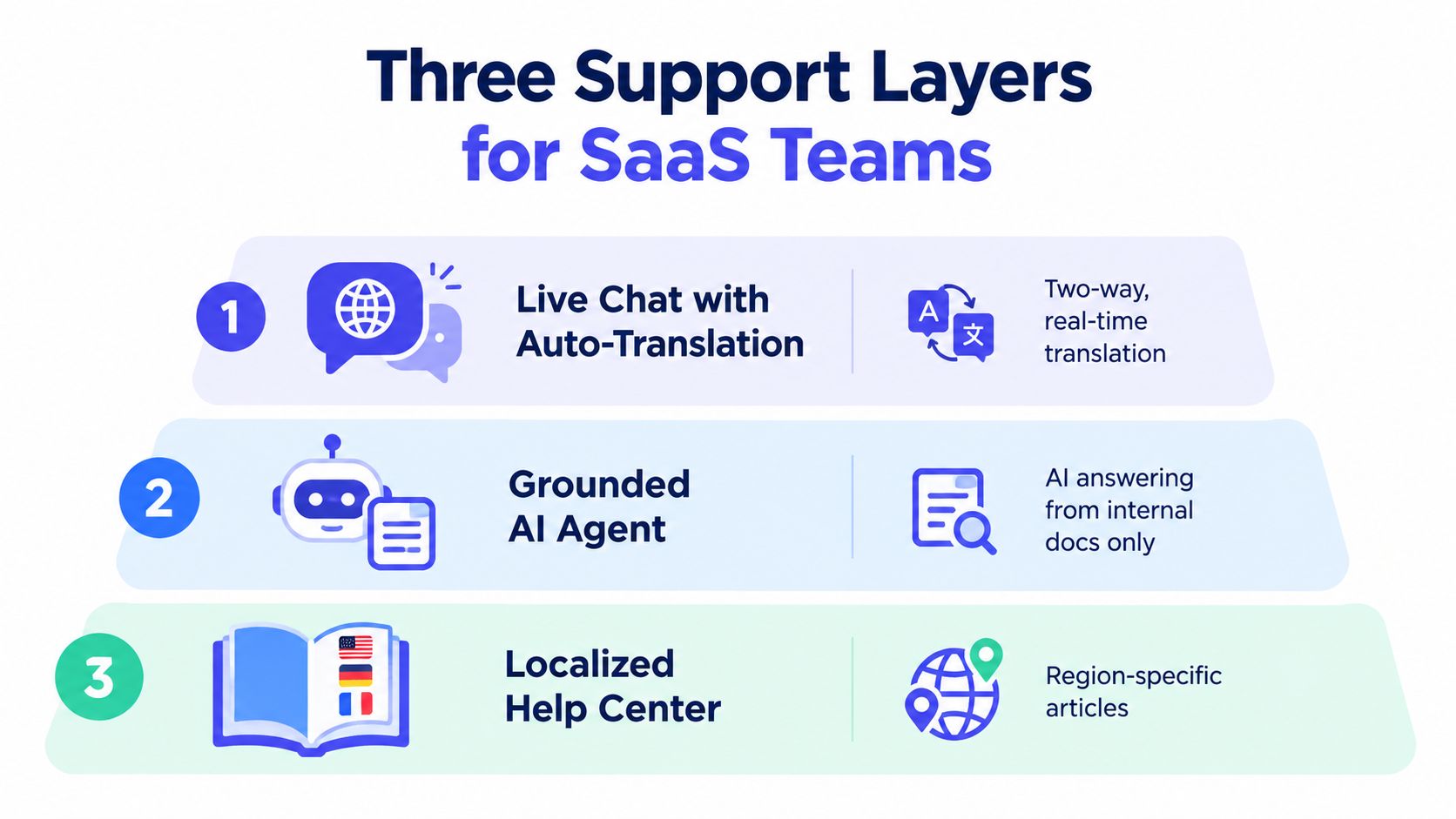
All three, each for a different job: live chat translation for real-time conversations, a grounded AI agent for repeated documented questions, and a localized help center for self-service. Treating them as substitutes creates gaps.
Live chat translation helps two people communicate in real time. A grounded AI agent handles repeatable questions from approved documentation. A localized help center lets customers solve basic issues without waiting for an agent. The strongest setup stacks them in that order, rather than asking one layer to perform every job.
Compare the job, not the feature list
| Layer | Works well for | Breaks when | What to measure |
|---|---|---|---|
| Live chat with two-way auto-translation | Real-time conversations where the agent knows the product and needs language assistance | Idioms, ambiguous terminology, sensitive decisions, and long technical context | Reopen rate, correction rate, escalation quality |
| Grounded AI answer agent | Repeated questions covered by current help articles and internal documentation | Missing sources, new product behavior, account-specific judgment, and unsupported requests | Resolution accuracy, containment, human corrections |
| Localized help center | Discovery, setup, known errors, and self-service across common languages | Articles are stale, poorly localized, or missing regional product context | Search success, article usefulness, deflection by language |
Live translation doesn’t create product knowledge. It helps an agent express an answer, but the agent still needs the right source and the authority to act. Raw auto-translation also struggles with plan names, billing events, API vocabulary, idioms, mixed-language messages, and regional variants.
A grounded AI layer has the opposite strength. It can search approved material and produce a consistent answer, but it should not fill gaps with plausible text. If retrieval is weak or the request falls outside the documentation, the system should say so and hand off.
The help center carries the cheapest volume, but only when customers can find and understand the article. Translation without information architecture leaves customers with a library they still can’t find their way through.
The three layers are complementary: self-service handles discovery, AI handles grounded repetition, and live support handles context and judgment.
Teams moving between tools should preserve conversation history and language context. Convot imports from Crisp in one click, and moves from Intercom, Zendesk or Freshdesk are a free founder-assisted migration. Treat the migration as data and workflow work, not as a button you press at the end of a contract.
How Do You Build a Quality-Controlled Multilingual Pipeline?
A quality-controlled pipeline detects the language, normalizes product terms with a glossary, classifies intent in the original language, retrieves only approved sources, and checks names, numbers, links and policy before an answer goes out.
Take a customer who writes in Spanish, mixes in an English product name and asks about a failed payment. A reliable system must identify the language, recover the right product context, apply the correct policy and decide whether automation is safe. Translation is only one stage in that chain.
Start with language detection that handles mixed-language messages and regional spelling. Store the detected language and confidence with the conversation. That record makes routing decisions visible and gives reviewers evidence when the detector gets a case wrong.
Normalize before retrieval
Build a glossary covering product names, plans, billing events, API terms, error messages, and support actions. Mark approved translations and terms that must stay unchanged. The glossary gives intent classification and retrieval a shared vocabulary, rather than leaving each model call to interpret product language independently.
Classify the request in its original language before translating it into an internal working language. Translation can blur distinctions between a billing question, a cancellation request, and a failed payment. Those intents may share vocabulary but trigger different policies.
Retrieve only from approved documentation, policies, and product records. Pass that evidence to the answer generator instead of an unrestricted prompt. If retrieval returns weak or conflicting evidence, route the conversation to a person. A fluent answer without a supporting source is still a quality failure.
Generate the response in the customer’s language after grounding it. Check five areas before delivery:
- Named entities: Product names, integrations, people, and account identifiers must remain correct.
- Numbers and dates: Prices, limits, billing periods, and renewal dates need explicit checking.
- URLs: Links must point to the intended article and remain intact after translation.
- Policy constraints: Refund, access, security, and escalation rules must survive localization.
- Action claims: The system must not say it changed an account or completed a task unless that action occurred.
Set handoff confidence from retrieval evidence and policy fit, not language fluency alone. A polished response with no reliable evidence should go to a human, even if its wording sounds natural.
Test in the language customers use
Translated test sets can produce flattering results because they preserve the source language’s structure. Native-language tests expose regional phrasing, code-switching, long-tail intents, and product vocabulary that translation may smooth away. Recent multilingual-intent benchmarking in logistics customer service found that translated test sets substantially overestimate performance on noisy native queries, especially for long-tail intents and cross-lingual transfer. The native versus translated evaluation research covers logistics rather than SaaS, but the mechanism carries over, so apply a practical rule: do not expand automation into a market based only on English or back-translated scores.
Build the test set from real conversations. Include incomplete messages, misspellings, ambiguous billing language, and requests that should escalate. The team maintaining multilingual support for Shopify apps will need platform-specific terms, but the same quality controls apply across software support.
How Should AI and Human Agents Share Multilingual Tickets?
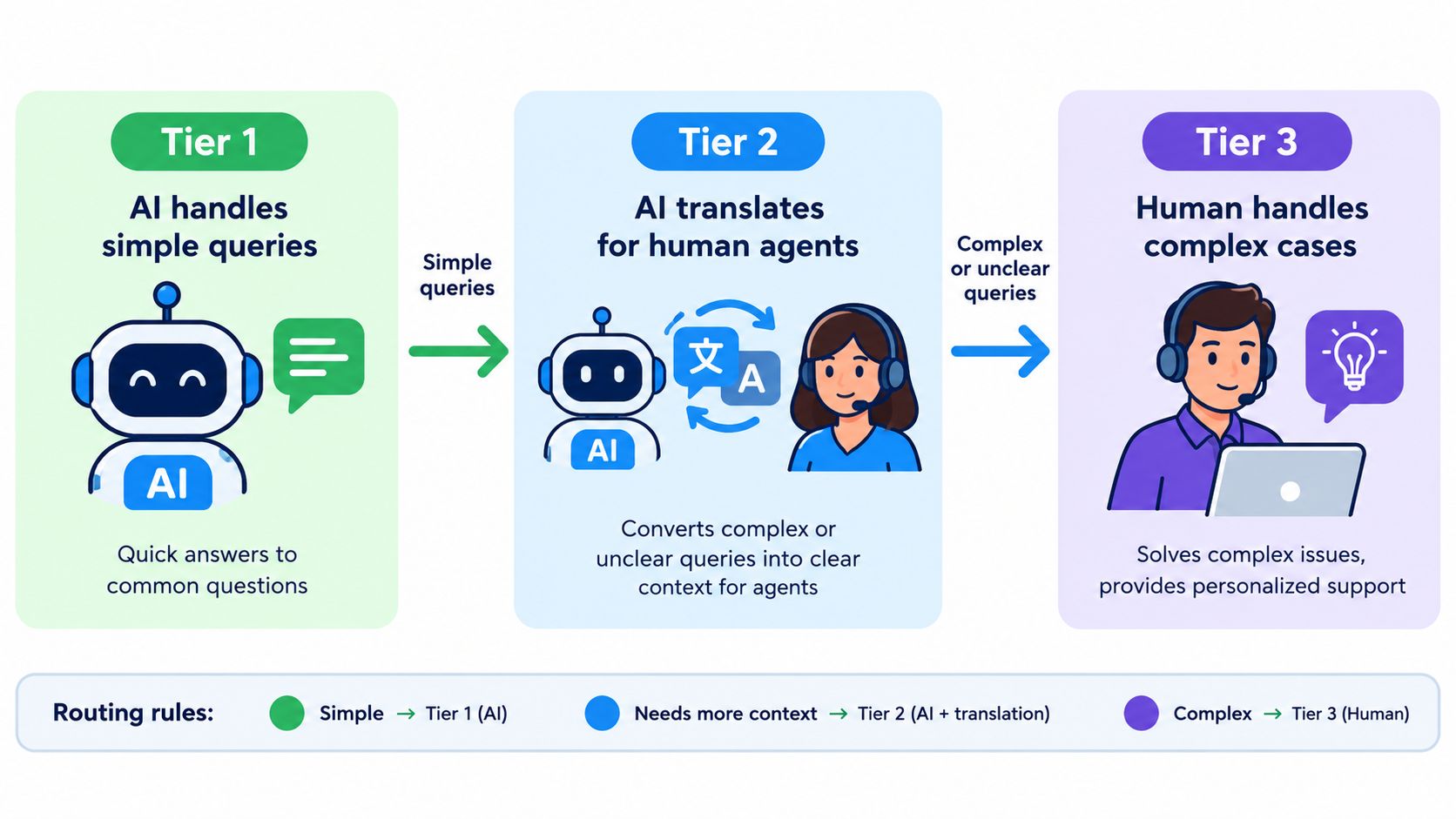
Split tickets into three paths: AI answers documented low-risk questions, AI drafts and a human confirms known troubleshooting, and a human owns account, payment, security and high-impact issues. People should own the routing policy. AI can detect language, translate a conversation, retrieve documentation, and draft or send an answer within defined limits. It shouldn’t decide alone that an uncertain account or security issue is safe.
A useful workflow has three paths:
| Conversation type | AI action | Human action |
|---|---|---|
| Documented, low-risk question | Answer in the customer’s language from approved sources | Review only when sampled or flagged |
| Known troubleshooting request with incomplete context | Translate and draft, or ask a clarifying question | Confirm the diagnosis and next step |
| Account, payment, security, or high-impact issue | Detect, classify, and route with translated context | Own the response and decision |
The first path covers questions such as where to find a setting, how a documented feature works, or which integration is supported. The AI can answer because the source material is stable and the downside of a small delay is limited.
The second path needs more care. A customer may describe a known error but omit the plan, platform version, or sequence of actions. Translation helps the agent work in their own language, yet the agent still has to ask the right follow-up question.
The third path goes directly to a human. Payment disputes and account-access cases require identity and policy judgment. Security incidents require controlled handling. Complex integrations often need product or engineering context that a general answer agent doesn’t possess.
Split coverage without splitting ownership
A follow-the-sun model can reduce founder dependence when handoffs carry the original message, detected language, translation, intent, source articles, and unresolved questions. Don’t hand off a summary alone. The next agent needs to see what the customer said and what the system used to answer.
Set one escalation owner for each supported language or language group. That person doesn’t need to answer every ticket. They maintain terminology, review sampled failures, and decide whether a recurring issue needs a new article or a product fix.
The AI rule should stay plain: answer from internal documentation, and hand off when it isn’t confident. Teams evaluating that model can use AI customer service agent design guidance as a practical reference, while still validating the workflow against their own policies.
Which Metrics Catch Multilingual Support Drift Early?
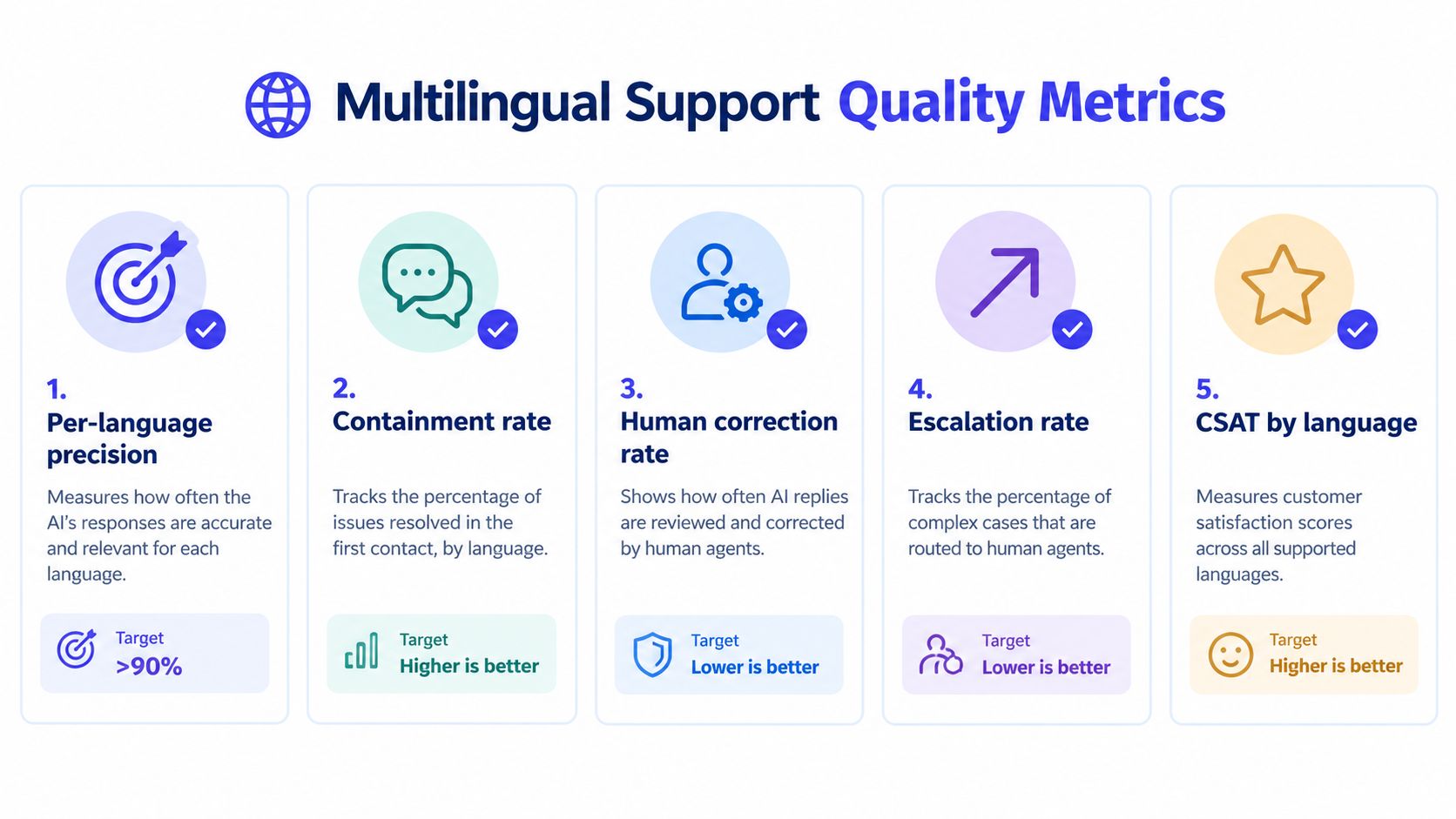
Five signals tracked per language catch drift early: intent precision, containment and resolution, human-correction rate, escalation rate and CSAT. Multilingual support drifts when the product changes faster than the glossary and help center. A feature rename, pricing rule, or billing workflow can make old translations misleading even when the underlying language model performs well.
Track quality by language, channel, and intent. One combined score can hide a serious failure in a smaller language segment.
Use five operational signals
- Per-language precision: Did the system classify the intent and provide the correct answer?
- Containment and resolution: Did the customer reach a useful outcome without an unnecessary handoff or repeat contact?
- Human-correction rate: How often did an agent change an AI-generated or translated response?
- Escalation rate: Which languages and intents require human ownership most frequently?
- CSAT by language: Do customers report a comparable experience across supported languages?
Assign an owner to each dashboard. The support lead can own escalations and resolution. The documentation owner can own glossary changes. Product or engineering can own defects revealed by repeated misunderstandings. Without ownership, metrics become a weekly report nobody uses.
Sample failures every week. Choose conversations where an agent corrected the answer, a customer reopened the ticket, or the system escalated unexpectedly. Tag the failure by cause, such as missing terminology, weak retrieval, language detection, regional phrasing, or policy uncertainty. Update the glossary or source article only when the change addresses the underlying cause.
Keep native-language test sets beside translated test sets. A translated score of 80 isn’t equivalent to a native score of 80, because the two tests measure different risks. Native tests should include code-switching, regional variants, misspellings, long-tail intents, and product-specific vocabulary.
Hallucinations deserve concrete review, not vague concern. These AI hallucination examples from AletheionAGI can help a support team recognize how confident wording may conceal unsupported claims. In production, review whether the answer had evidence, preserved numbers and links, and respected escalation rules.
How Do You Roll Out Multilingual Support in 90 Days?
Spend days 1 to 30 on policy, glossary and routing, days 31 to 60 on one low-risk language and channel with human review, and days 61 to 90 on expansion once quality holds. A multilingual rollout needs operating rules before it needs a widget. Use the first month to define supported languages and channels, build a glossary, map escalation paths, inventory source content, and establish a baseline from existing conversations.
| Phase | Days | Outcome | Owner |
|---|---|---|---|
| Foundation | 1 to 30 | Language policy, glossary, detection, risk routing, source inventory | Support lead with product owner |
| Limited launch | 31 to 60 | One low-risk channel and language live, native test set running, human review active | Support operations owner |
| Expansion | 61 to 90 | Additional languages, tuned thresholds, failure sampling, language-level dashboard | Support lead and language owners |
Days 1 to 30
Export representative conversations and mark where language creates delay, rework, or unnecessary escalation. Write the policy in operational terms: supported languages, supported channels, service hours, low-risk intents, direct human routes, and escalation owners.
Build the glossary from product language that agents and customers use. Include plan names, feature labels, billing terms, API concepts, error messages, and terms that must remain untranslated. Prepare native-language test cases before automation goes live. The first release should have a quality gate, not just a translation setting.
Days 31 to 60
Launch one language through one low-risk channel. A help center or routine chat flow lets the team test retrieval quality without placing sensitive decisions in automation. Keep human review active, and sample failures that change the customer’s next action.
Set thresholds conservatively. Hand off when the system lacks source evidence, detects an ambiguous intent, or reaches a protected policy category. A lower containment rate with correct escalations is healthier than a high rate built on unsupported answers.
Days 61 to 90
Add languages only after the first workflow has a glossary owner, a native test set, and a recurring failure review. Tune routing by intent and channel. One confidence threshold rarely fits every risk level.
Before any migration, inventory conversation history, tags, macros, articles, customer fields, and open escalations, and move them as a checklist, not a button.
Convot is one option for small software teams seeking a help desk with live chat, shared inbox, help center, changelog, scheduling, and a grounded AI agent. Its live chat supports two-way auto-translation in 60+ languages, its help center supports 12 languages, and its AI hands off to a human when confidence is low. Convot offers flat whole-team plans, with Starter at $49 per month, Growth at $79, Pro at $149, and Scale at $299, checked October 2026 on Convot’s pricing page. Evaluate it alongside other tools against the language policy and QA requirements.
FAQ
What is multilingual customer support?
Multilingual customer support means helping customers in their own language across chat, email and self-service. For a SaaS team that usually combines live chat translation, a grounded AI agent and a localized help center, with humans handling sensitive or complex issues.
How many languages should a small SaaS team support?
Start with the languages that already appear in your conversations, sales questions and failed help center searches. Add a language only when you can maintain its glossary, test set and review process.
Is machine translation good enough for customer support?
Machine translation works for low-risk, documented questions when the agent knows the product. Plan names, billing events, API terms, idioms and mixed-language messages still need a glossary and human review.
Which multilingual tickets should always go to a human?
Account access, payment disputes, security incidents, legal requests and complex integration failures. Those need identity checks, policy judgment or engineering context that a translation layer cannot supply.
How do you measure multilingual support quality?
Track intent precision, resolution, human-correction rate, escalation rate and CSAT separately for each language, and test against native-language conversations rather than translated test sets.
If multilingual support is creating founder-level work, write the language policy and glossary before buying another translation feature. Then visit Convot to assess how live translation, a localized help center, and a grounded AI agent can fit into one help desk with human handoff when confidence is low.
Written by Tarang Agarwal, founder of Convot, a help desk for small software teams. Updated October 2026.
Revenue-aware support for Shopify app teams.
Live chat, help center, and every merchant's MRR, plan, and LTV beside the conversation. Free under $1k MRR.
Start free