How to Improve Customer Satisfaction for SaaS Teams
How SaaS teams improve customer satisfaction: the metrics that matter, where service breaks, the support stack, AI handoff rules and a 90-day plan.

On this page
- Key takeaways
- Why Does Customer Satisfaction Stall at SaaS Companies?
- Which Customer Satisfaction Metrics Should a Small Team Track?
- How Do You Find Where Customer Satisfaction Breaks?
- What Support Stack Can a Small Team Actually Run?
- When Should AI Stop Answering and Hand Off to a Human?
- How Do Better Replies and Weekly Reviews Raise Satisfaction?
- How Should a Team Roll This Out Over 90 Days?
- FAQ
To improve customer satisfaction, a SaaS team should fix the service rather than chase the score. Answer accurately from maintained docs, acknowledge every request quickly, resolve it in as few contacts as possible, keep context so customers never repeat themselves, and hand AI conversations to a human early when confidence or stakes call for it.
Your support queue is full of questions you’ve already answered. A merchant asks about billing, someone else reports a broken installation, and a third customer follows up because nobody owns the first message. You check CSAT at the end of the week and see a number that tells you customers are unhappy, but not where the service failed.
Customer satisfaction doesn’t improve because a dashboard gets more attention. It improves when customers receive accurate information, a prompt acknowledgment, a dependable resolution, and a reply that remembers what they already told you. For a small SaaS team, those behaviors form one operating system.
Key takeaways
- Fix the service, not the score. CSAT reports a reaction; it does not tell you which step failed.
- Track the median and the slowest 10% of first responses, plus first-contact resolution, reopen rate and customer effort.
- Map the five journeys with the most volume and remove one friction point from each, every week.
- Hand off to a human on billing disputes, account access, outages, low confidence and repeated failures.
- Turn every repeated complaint into a help article, a product fix or a changelog post.
Why Does Customer Satisfaction Stall at SaaS Companies?
Customer satisfaction score (CSAT) stalls when teams measure the reaction instead of fixing the service. A survey can tell you that a customer disliked an interaction. It can’t assign ownership, correct a broken article, preserve context, or decide when an AI answer should stop.
A 2015 study of 150 usable questionnaires from undergraduate students at a public university in Sarawak found significant relationships between satisfaction and combinations of reliability, responsiveness, assurance, and empathy. The sample is limited and students are not SaaS customers, so treat it as a framework for what to check rather than evidence of how much satisfaction moves. The four dimensions give a usable checklist for software support, as documented in the original service-quality study.
Four behaviors produce better service
Reliability means your help content and replies are correct. Responsiveness means customers aren’t left guessing whether anyone saw the request. Assurance means the person answering communicates clearly and doesn’t hide uncertainty behind confident wording. Empathy means the explanation fits the customer’s actual situation.
For a Shopify app developer, that means checking the merchant’s plan before explaining a billing issue, linking the exact setup article, acknowledging a revenue-impacting problem quickly, and transferring an uncertain case with its full history intact.
Practical rule: Treat your help center, shared inbox, live chat, AI answers, and human escalation as one service system.
A six-part operating system makes the work manageable:
- Define the numbers that reveal friction.
- Map the journeys where customers get stuck.
- Build a support stack your team can maintain.
- Set a firm AI handoff policy.
- Train agents and turn recurring complaints into fixes.
- Roll the system out in stages, then choose tools carefully.
The point isn’t to chase a perfect satisfaction score. The point is to make the reliable action easier for your team to take every time. This guide won’t cover revenue forecasting or large enterprise staffing models. It focuses on what a founder and a small support team can ship, inspect, and improve without creating another administrative job.
Which Customer Satisfaction Metrics Should a Small Team Track?
Track six numbers you can act on weekly: median and 90th-percentile first-response time, first-contact resolution, reopen rate, escalation rate and Customer Effort Score. A lean support team needs a small set of numbers tied to decisions. First-response time matters, but averages hide the customers who wait longest. Track the median and the 90th percentile separately, then read them beside CSAT by response-time bucket.
Compare CSAT by response-time bucket in your own data rather than borrowing a benchmark: the useful question is where satisfaction drops off for your customers. A fast answer that fails to solve the problem creates another contact.
Measure effort before you celebrate delight
Customer Effort Score is a useful leading indicator because it asks whether the customer could complete the task without unnecessary work. Define the desired outcome, map the steps required to reach it, then ask one consistent question such as, “How easy was it to resolve your issue?” on a 1 to 7 scale.
A Customer Effort Score guide from Formbricks summarizes research covering more than 75,000 customer interactions that found ease of resolution predicted loyalty more effectively than exceeding expectations. Another widely cited finding reports that 96% of customers experiencing high effort became more disloyal, compared with 9% after low-effort experiences, as summarized with methodological cautions in this Customer Effort Score guide. Don’t treat either result as a universal benchmark. Wording, channel, industry, and journey change the score.
Track only what you can act on weekly. Our guide to customer support metrics covers how to set each one up. Pull timestamps and status changes from the help desk, conversation tags from the inbox, and survey responses from the resolved thread. For additional KPI ideas, the Italian resource analisi KPI customer service con Spark offers a broader list, while Convot’s guide to customer service statistics helps connect support measures with operational decisions.
| Metric | System part | Leading or lagging | Action trigger |
|---|---|---|---|
| Median first-response time | Acknowledgment | Leading | Route or assign delayed conversations |
| 90th-percentile first-response time | Coverage reliability | Leading | Review the long tail and overdue queue |
| First-contact resolution | Resolution quality | Lagging | Fix missing context, permissions, or documentation |
| Reopen rate | Resolution durability | Lagging | Audit replies marked solved too early |
| Customer Effort Score | Journey friction | Leading | Remove the highest-friction step |
| Escalation rate | AI and routing quality | Leading | Review unclear policies and handoff rules |
How Do You Find Where Customer Satisfaction Breaks?
Map the five journeys that create the most support volume, write every step from the customer’s side, and look for repeated messages, failed help center searches, transfers, repeated information requests and weak AI handoffs. A support team should diagnose the journey before buying another tool. The 2020 National Customer Rage Study reported that 66% of U.S. households had experienced at least one product or service problem during the previous 12 months.
Problems are common, but a survey score only shows that a customer was unhappy, not which step failed. Count the contacts, find the repeated work, and identify where the customer leaves without a visible outcome.
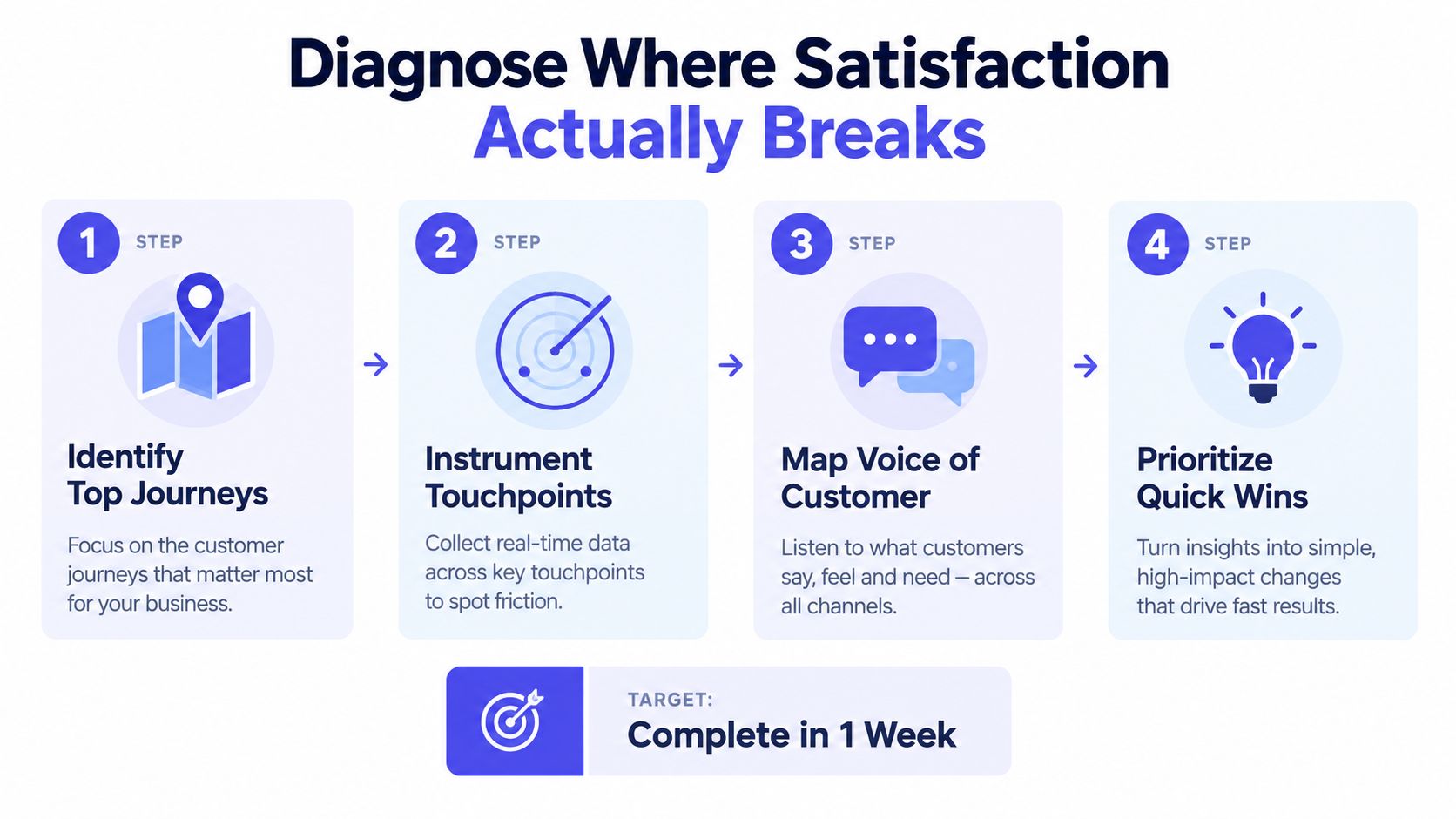
Run the exercise in one week
Start with the five journeys that create the most support volume. For a Shopify app, those might be installation, theme configuration, billing, permissions, and troubleshooting a failed result. Write every step from the customer’s point of view, including finding documentation, authenticating, explaining the problem, waiting, repeating context, and confirming the fix.
Instrument completion and escalation for each journey. Then ask one CES question after the interaction and segment the result by issue type and channel. A low score in billing email means something different from a low score in live chat during installation.
Look for these friction signals:
- Repeated messages: The customer follows up because the first reply didn’t resolve the issue or set an expectation.
- Unresolved searches: Customers search the help center but still open a conversation.
- Transfers: The request changes owners without preserving a clear next step.
- Repeated information requests: An agent asks for data already present in the thread.
- AI handoffs: The customer reaches a human without the answer, source, or context that caused the transfer.
Use the last two days of the week to rank fixes. Remove one friction point from each high-volume journey, then remeasure the following week. You don’t need a new analytics platform. A spreadsheet, conversation tags, timestamps, and a consistent CES question will expose enough to choose the first fixes.
Write the steps first, then check them against your help center search logs and a sample of reopened conversations.
What Support Stack Can a Small Team Actually Run?
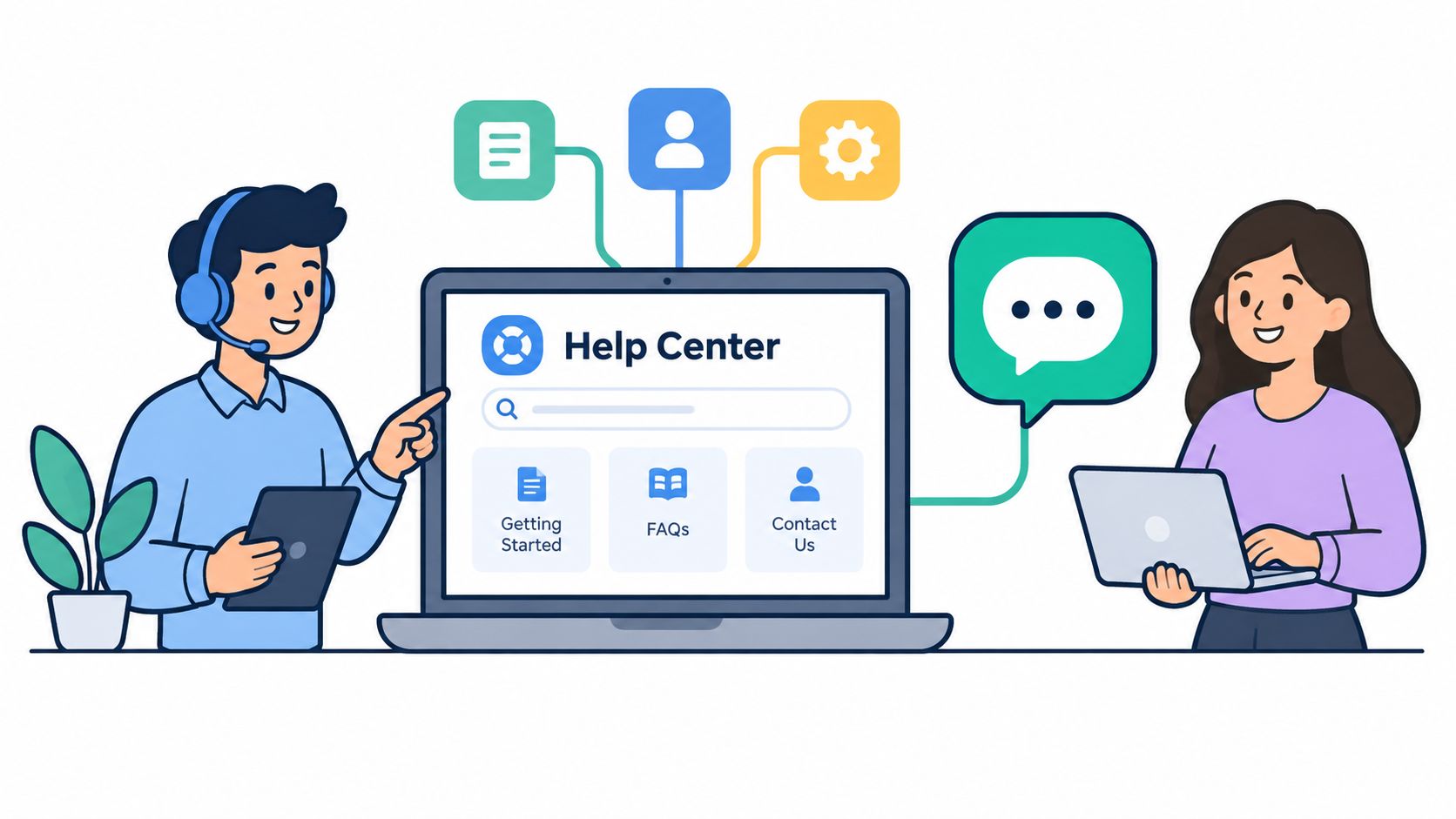
A small team should build its support stack in this order: a help center, then live chat and a shared inbox, then a grounded AI agent, with a changelog, roadmap and status page around the product. Tool choice should follow the failure you need to remove. If customers can’t find answers, publish a searchable help center on your own domain. If conversations disappear between email and chat, use a shared inbox with assignment, saved views, private notes, and mentions. If the same questions arrive repeatedly, ground an AI agent in your documentation.
Build in operating order
A help center comes first because every later answer depends on the source material. Keep articles specific to a task, show the expected result, and state what to do when the normal path fails. Add in-widget search so customers don’t have to leave the conversation to look for documentation.
Live chat helps when the team can acknowledge requests and set a real expectation. Two-way auto-translation can reduce language friction, but it doesn’t replace a clear escalation path. A shared inbox then gives the team one place to assign ownership, preserve internal notes, and see overdue conversations.
Add the communication layer around the product:
- Changelog: Tell customers what changed and which problems were fixed.
- Public roadmap: Let customers vote on planned work without turning every request into a private promise.
- Status page: Publish incidents and recovery updates in one visible place.
- Scheduling: Let a customer book a call from the conversation when text isn’t enough.
Product and engineering teams also need a clean way to connect events. Connect product data to the inbox through the REST API or signed webhooks so agents see account context beside each conversation instead of asking the customer for it. More integration patterns are covered in this guide to third-party integrations.
For Shopify apps, the first reply changes when the agent can see the merchant’s plan, MRR, and past billing beside the conversation, pulled from the Shopify Partner API. That context helps the agent distinguish a configuration question from a revenue-impacting billing problem.
Grounded AI should answer from your own docs, cite the relevant source, and hand off to a human when it isn’t sure. Convot’s AI agent, Cove, costs $0.20 per resolved conversation, while Intercom’s Fin costs $0.99, so the bill doesn’t jump in the month AI starts working. Check each vendor’s current pricing before committing, and judge the system by resolution quality, not automated volume.
Convot imports from Crisp in one click. Moves from Zendesk, Intercom, and Freshdesk can be done as a free migration with the founder, but they aren’t automatic importers.
When Should AI Stop Answering and Hand Off to a Human?
AI should hand off on billing disputes, account access, outages, low answer confidence, hostile or emotional messages, and repeated failed attempts, and it should pass the full context so the customer never repeats the problem. AI should be judged by trust and handoff quality, not containment. 87% of customers say companies using generative AI for service must give them a way to reach a human agent, according to a Gartner survey from August 2026.
Your AI policy needs to be boring and explicit. The agent should cite the source it used, disclose that AI is answering, preserve the complete conversation context, and transfer quickly when confidence is insufficient. It shouldn’t make the customer prove the problem again after the transfer.
Set escalation rules before launch
Billing disputes, account access, outages, and emotionally charged complaints should reach a person quickly. For a Shopify merchant, a broken app can affect store operations or revenue, so the AI must never be the final authority in a case where the customer needs judgment, account action, or a commitment the documentation doesn’t support.
Measure the handoff itself. Track time to meaningful resolution, repeat contacts after transfer, and CSAT for conversations that included a handoff. A lower containment rate can be a positive result if the right cases reach a human earlier and stop reopening.
| Trigger condition | Why escalate | Target response |
|---|---|---|
| Billing dispute | Money and eligibility require judgment | Assign a trained owner and state the next step |
| Account access problem | Incorrect advice can block the customer | Verify safely and transfer with context |
| Outage or degraded behavior | Documentation may be outdated during an incident | Link the status update and provide human ownership |
| Low answer confidence | A guess damages trust | Cite what is known and transfer immediately |
| Emotional or hostile language | The customer needs recognition and care | Acknowledge the impact and involve a person |
| Repeated failed attempts | The normal path isn’t working | Review the journey, then own the resolution |
The AI customer service agent guide is useful for thinking through the agent layer, but the policy belongs in your runbook. Write the confidence threshold in plain language. Define who receives the handoff and what information must travel with it.
A fast wrong answer is not a successful resolution.
How Do Better Replies and Weekly Reviews Raise Satisfaction?
A weekly ticket review scored on accuracy, context, ownership, clarity, empathy and closure, plus a rule that every repeated complaint becomes a fix, raises satisfaction more than any tool. Good tools don’t fix vague replies. Every agent should know the product, the escalation boundary, and the next action the customer can expect.
Run a weekly ticket review. Pick recurring issues, inspect the first reply, compare the diagnosis with the source article, and update the approved macro when the answer is stable. Keep a short tone guide that favors direct language, names uncertainty, and avoids promises nobody can keep.
Make fairness visible
A meta-analysis of 30 independent samples from 21 studies, covering 7,872 participants, found that customer participation in service recovery had generally weak direct effects. Its indirect effects worked through perceived distributive justice and procedural justice, meaning customers care about both the outcome and the process, as described in the service-recovery meta-analysis.
Put ownership, eligibility, timing, and resolution terms in the reply. Don’t bury the important part in a private note. A customer should understand who owns the problem, what happens next, and when they’ll hear from you again.
The customer shouldn’t need to explain their setup twice.
Use this scorecard during ticket review:
- Accuracy: Did the reply match the current product behavior?
- Context: Did the agent use the conversation and account history?
- Ownership: Did one person clearly own the next step?
- Clarity: Could the customer follow the instructions without guessing?
- Empathy: Did the reply acknowledge the impact without overdoing it?
- Closure: Did the agent confirm the outcome or explain the remaining work?
Close the loop every week. Each repeated complaint becomes a help center article, a product fix, or a changelog post. A short review keeps support from becoming a queue that only gets emptied, rather than a source of product decisions.
How Should a Team Roll This Out Over 90 Days?
Diagnose in the first 30 days, set up the shared inbox, escalation policy and weekly review in days 31 to 60, and route recurring complaints into product and documentation work in days 61 to 90. Use the first 30 days to diagnose. Track the core metrics, publish the first ten help center articles, and enable AI only for the three journeys with the clearest documentation. Use days 31 to 60 to establish the shared inbox, assignment rules, escalation policy, and weekly ticket review. Use days 61 to 90 to route recurring complaints into product work, documentation, and changelog updates, then add a satisfaction question after resolution.
Choose tools by operating model:
- Intercom suits funded teams that need outbound campaigns and a mature AI agent, with pricing that uses seats.
- Help Scout fits teams that want a simple shared inbox and a strong help center.
- Crisp works for free or low-cost live chat with a shared inbox, especially when the team supports one app.
- Chatwoot fits teams that want open source and can self-host.
- Tidio suits small Shopify stores that want chat and simple bots in one widget.
Convot makes a competing product, so treat it as one option rather than neutral advice. Its flat whole-team plans are $49 per month, $79 per month, $149 per month, and $299 per month, with a free Community plan under $1,000 MRR, checked in October 2026 on the vendor’s pricing page. Pricing is based on app count, so one inbox can support several apps. Shopify app teams can see merchant plan, MRR, and billing history beside each conversation, and migrations from Intercom, Zendesk, or Freshdesk are done free with the founder, not through an automatic importer.
FAQ
What is the fastest way to improve customer satisfaction?
Fix the highest-volume journey first. Find the step where customers repeat themselves or wait without an answer, remove it, and measure effort and reopen rate the following week.
Which metric matters most for customer satisfaction?
No single metric. First-response time shows whether customers feel heard, first-contact resolution and reopen rate show whether the fix held, and Customer Effort Score shows how hard the journey was.
Does AI improve or hurt customer satisfaction?
AI improves satisfaction on documented, repeatable questions when answers are grounded in your docs, and it hurts when it guesses or blocks the way to a person. Judge it by handoff quality and repeat contacts, not by how many conversations it contained.
How often should a support team review tickets?
Weekly. Review a sample of recurring issues, score the replies, and turn each repeated complaint into a help article, a product fix or a changelog post.
How do small teams improve satisfaction without hiring?
Publish a searchable help center, use one shared inbox with clear ownership, add a grounded AI agent with firm handoff rules, and keep customer context beside each conversation.
Convot combines live chat, a shared inbox, a help center, changelog, roadmap, status page, scheduling, and a source-citing AI agent that hands off when uncertain. If that matches the service system you’re building, visit Convot and see whether it fits your Shopify app or small software team.
Written by Tarang Agarwal, founder of Convot, a help desk for small software teams. Updated October 2026.
Revenue-aware support for Shopify app teams.
Live chat, help center, and every merchant's MRR, plan, and LTV beside the conversation. Free under $1k MRR.
Start free