Zendesk vs Freshdesk: Which Help Desk Fits Small Teams
Compare Zendesk vs Freshdesk for small support teams. Real pricing, AI costs, and which platform fits your team size and use case.
On this page
- Table of Contents
- Why This Comparison Matters for Small Support Teams
- Zendesk and Freshdesk at a Glance
- How Ticketing, Chat, Automation, and AI Compare
- Pricing and Total Cost of Ownership
- Which Platform Fits Your Team Size and Use Case
- Strengths and Weaknesses of Each Platform
- Decision Framework and Recommended Next Steps
A small support team usually starts comparing help desks after the same kind of week: customer questions are arriving in more than one place, the founder is answering tickets between product work, and nobody has time to become a full-time administrator. Zendesk and Freshdesk both handle core support work, but their seat costs, setup demands, and approach to customization can lead to very different day-to-day operations.
The useful question in Zendesk vs Freshdesk isn’t which platform has the longer feature list. It’s what the whole support operation will cost, how much effort it’ll take to run, and whether one inbox can keep several products straight. This comparison focuses on those decisions for small teams, including Shopify app developers supporting multiple apps.
Meta description: Compare Zendesk vs Freshdesk for small teams, including per-seat costs, metered AI, setup effort, and support for multiple products.
Table of Contents
- Why This Comparison Matters for Small Support Teams
- Zendesk and Freshdesk at a Glance
- How Ticketing, Chat, Automation, and AI Compare
- Pricing and Total Cost of Ownership
- Which Platform Fits Your Team Size and Use Case
- Strengths and Weaknesses of Each Platform
- Decision Framework and Recommended Next Steps
Why This Comparison Matters for Small Support Teams
A founder and a few teammates can manage support differently from a large service department. In a small company, the person setting up ticket fields may also be fixing bugs, writing documentation, or talking to customers. A platform that needs extensive configuration can become a second job, even if its features are valuable.
That changes the comparison criteria. Enterprise routing and advanced analytics matter when they solve a real workflow problem. For a small team, it’s just as important to know how much the monthly bill grows with each agent, who will maintain automation, and whether the help desk can handle more than one product without fragmenting customer history.
| What to compare | Why it matters to a small team |
|---|---|
| Total monthly cost | Per-agent plans grow with the roster, and AI may add usage charges. |
| Setup and upkeep | Configuration time competes with product and customer work. |
| Multi-product support | One team may need to identify the right app, customer, and documentation from a single conversation. |
| Tool coordination | Chat, status updates, help content, and scheduling may live outside the help desk. |
The usual comparison can miss a founder’s actual workload. A Shopify app studio, for example, might need to tell which app a merchant uses, find the right product documentation, and respond without switching between a ticketing tool and several separate systems. A feature checklist won’t show how much work that coordination takes.
Support operations also depend on how a team collects and organizes customer input. For a useful perspective on collecting feedback across channels, see Capgo’s guide to feedback channels for mobile teams.
This guide looks at the companies’ different starting points, then compares ticketing, automation, AI, and real seat costs. It also considers the multi-product workflow that matters to software studios, before laying out a practical way to choose.
Zendesk and Freshdesk at a Glance
Zendesk and Freshdesk arrived at different points in cloud customer support. Zendesk was founded in Copenhagen in 2007. Freshdesk was founded in 2010 and launched its product in 2011, roughly four years later. Freshdesk’s origin is closely associated with a pricing shock: founder Girish Mathrubootham reportedly saw that Zendesk had raised prices by approximately 60% to 300%, and saw room for a lower-cost alternative. The historical account is summarized in this Freshworks company history.
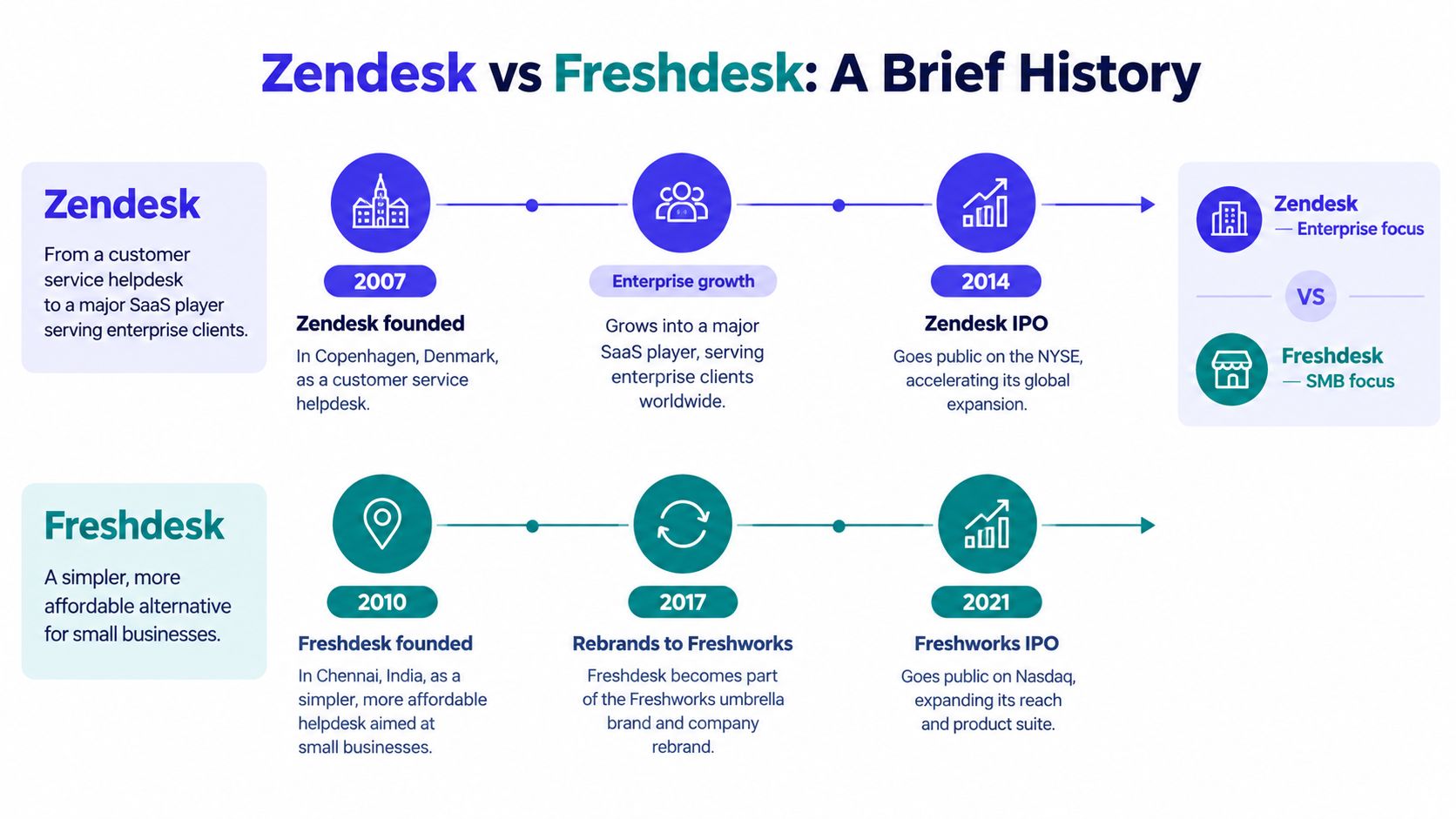
The adoption figures available from that account illustrate that Freshdesk grew substantially despite entering later. By 2017, about 132,000 businesses were reported as using Zendesk, compared with about 92,000 using Freshdesk. Zendesk later became a public software company and was taken private in 2022 in a transaction valued at approximately $10.2 billion. Freshworks, Freshdesk’s parent company, remained publicly listed and reported $172.4 million in company-wide revenue for 2019. That revenue figure covered Freshworks’ broader product portfolio, not Freshdesk alone.
Those histories help explain the products’ different reputations, but they don’t determine which is right for a small team. Zendesk is commonly associated with breadth, customization, and complex workflows. Freshdesk entered as a more accessible challenger and is often evaluated for easier onboarding and lower initial cost. Both have become substantial platforms, rather than niche tools.
Useful distinction: A product’s history gives context for its design priorities. Your own support workflow should decide whether those priorities are useful to your team.
The trade-off is practical. A team that expects complicated routing, escalations, and reporting may get more value from Zendesk’s depth. A team that wants to configure a straightforward support operation without much administration may prefer Freshdesk’s approach. Price still matters, but the plan price alone won’t capture the effort or usage costs of running either platform.
How Ticketing, Chat, Automation, and AI Compare
The products overlap on the basics, but a small team should evaluate how each one behaves in its own support workflow, not just count features. Zendesk leans toward extensive workflow configuration. Freshdesk is commonly positioned as the more approachable starting point, with prebuilt AI-agent capabilities across channels including email, web chat, WhatsApp, and social messaging. The comparison below focuses on operational consequences, not a claim that either vendor will perform better for every team.
| Feature | Zendesk | Freshdesk |
|---|---|---|
| Ticketing | Suits teams that need detailed workflow customization and structured handling of complex requests. | A practical fit for teams that want familiar ticketing with a lighter initial setup. |
| Chat and channels | Supports cross-channel workflows, with customization for more involved support operations. | Offers prebuilt AI-agent capabilities across email, web chat, WhatsApp, and social messaging. |
| Automation | Better suited to sophisticated business rules, escalation paths, and skills-based routing. | A reasonable starting point for common routing and automation needs. |
| AI approach | Organizes AI around its Resolution Platform, automated resolutions, and configurable workflows. | Emphasizes prebuilt AI-agent capabilities and a streamlined route to deployment. |
| Integrations and reporting | Characterized by established integrations, enterprise workflow customization, and advanced reporting. | Reported to support more than 150 integrations, with a more accessible setup emphasis. |
Ticket fields, assignment rules, and escalation paths are only useful when they match the way agents work. Zendesk’s extra configuration can be worthwhile when support depends on detailed routing or cross-channel reporting. If the team has simple queues and a small number of handoffs, that depth may add setup work without solving an immediate problem.
Freshdesk’s more prebuilt approach may help a small team get an initial workflow running sooner. That doesn’t remove the need to check how its channels, reporting, and AI behave in your own account. Neither a vendor feature list nor a review comparison can tell you whether your knowledge base covers the questions your customers ask.
A useful AI pilot compares cost per successfully resolved conversation, not just whether an AI agent is available. Test an anonymized set of real questions and record containment, human handoffs, first-response time, median resolution time, reopened tickets, answer accuracy, and administrator hours. Published comparisons don’t provide a standardized, independently controlled benchmark for latency or accuracy, so validate vendor claims with your own tickets. For practical ways to think about support workflows and customer support automation, start with the tasks your team repeats most often.
Pricing and Total Cost of Ownership
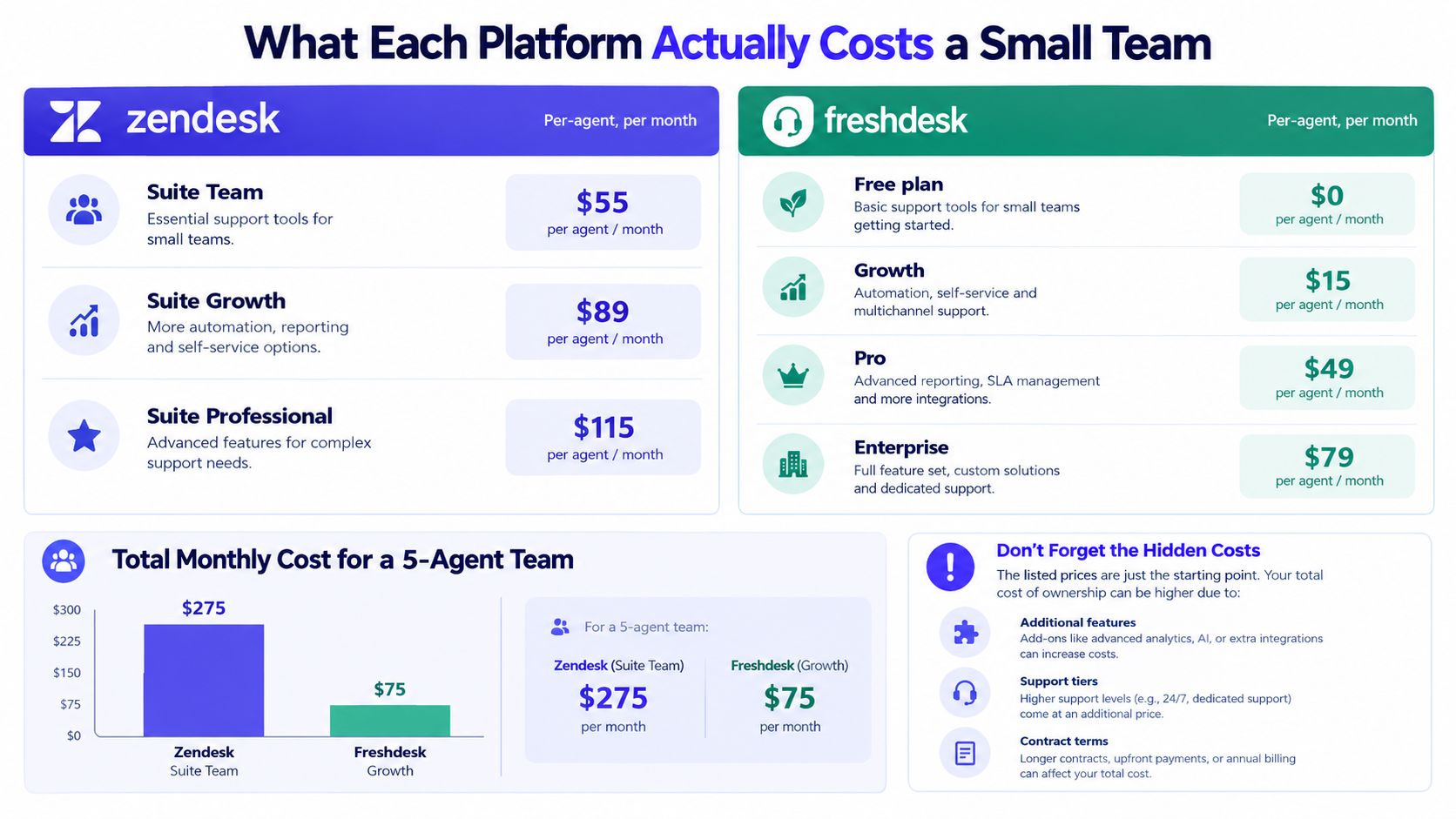
Per-agent pricing looks manageable until the whole roster is on the invoice. Zendesk’s official pricing page lists Support Team at $19 per agent per month with annual billing, or $25 with monthly billing. Suite Team is $55 per agent per month annually, or $69 monthly, and Suite Professional is $115 annually, or $149 monthly. These Zendesk prices were checked in October 2026 on the official Zendesk pricing page.
Freshdesk’s vendor pricing documentation says the subscription total depends on active agent seats, and that each plan is charged per agent. Its pricing page lists AI Agent sessions at $49 per 100 sessions as an additional usage item. These Freshdesk prices were checked in October 2026 on the official Freshdesk pricing page. For plan comparisons, the available data lists Freshdesk at roughly $19, $55, and $89 per agent per month on annual billing. Confirm the current plan and inclusions directly before buying, since plan names, bundles, and terms affect the final comparison.
Multiply the seat price by the real roster
An eight-person team on Zendesk Suite Team would pay $440 per month on annual billing, before any additional usage or other costs. At Suite Professional, the same roster would pay $920 per month on annual billing. Those totals are simple per-agent calculations from the vendor’s listed prices, not complete quotes. They exclude taxes, contract terms, and any usage charges.
The same calculation applies to Freshdesk: multiply the applicable per-agent plan price by the number of active agent seats. A part-time teammate or someone who only needs occasional access may still affect the seat bill if they require an agent account. That’s why the right starting point is a list of people who need agent permissions, rather than the company’s total headcount.
Add AI usage and operating effort
The two vendors also have different AI billing mechanics. Zendesk’s pricing information says AI agents are included in Support and Suite plans, while successful automated resolutions can generate usage charges. Freshdesk lists a per-session charge for AI Agent use. A session and a successful resolution aren’t the same thing: a session-based charge may apply even if the AI doesn’t solve the issue, while a resolution-based charge is tied to an automated resolution.
There’s no responsible way to declare one AI bill universally cheaper without knowing conversation volume, resolution rate, and the terms that apply to the account. Include time spent maintaining the knowledge base, checking AI answers, and handling failed handoffs in the cost model. For a closer look at the components to verify, use this Freshdesk pricing breakdown alongside each vendor’s current pricing page.
Practical rule: Compare the invoice and the hours needed to operate the system. A lower seat price can lose its advantage if usage, configuration, or extra tools add more work and cost.
Which Platform Fits Your Team Size and Use Case
For a founder or very small team, the first test is whether a platform can handle the current queue without demanding more administration than the team can spare. Freshdesk may be the more comfortable fit when the workflow is straightforward and the team values accessibility. Zendesk makes more sense when even a small roster has unusually complex routing, escalation, or reporting needs. The right answer depends on the work, not the title of the plan.
A growing support team should test the system it expects to need, not just the simplest workflow it has today. If requests move between agents, products, or channels, map the handoffs before choosing. Zendesk’s customization may be valuable when those processes require detailed rules. Freshdesk may suit a team that can use prebuilt capabilities and wants a simpler setup. In either case, measure the time needed to configure and maintain the workflows the team will use.
Multi-product support needs its own test
Shopify app developers and small software studios face a different problem from a single-brand support team. One inbox may receive questions from merchants who use different apps, have different plans, or need different documentation. Before selecting a help desk, test whether an agent can identify the relevant product, find the right knowledge base, and report on tickets by app without creating duplicate customer records.
Also count the tools that sit around the help desk. A studio may need separate systems for feedback, changelogs, scheduling, status updates, or customer context. Consolidating those tasks can change the total operating burden more than a small difference in seat price. Compare setup time, routing accuracy across products, the quality of app-level reporting, and how many outside tools the team still needs.
The test isn’t “does it support omnichannel?” It’s “can the next person understand which product this customer needs help with?”
For a broader shortlist, see this guide to help desk software for small teams. Use it to identify alternatives, then compare each candidate against the same real support scenarios. That’s more useful than treating an enterprise feature list as a proxy for small-team fit.
Strengths and Weaknesses of Each Platform
Zendesk’s strength is depth. Teams that need detailed customization, established integrations, and advanced reporting may find that its configuration options support workflows that a simpler system can’t accommodate as well. The trade-off is more setup and a higher per-agent price on its Suite plans. A small team should be confident it’ll use those capabilities before taking on the extra cost and administration.
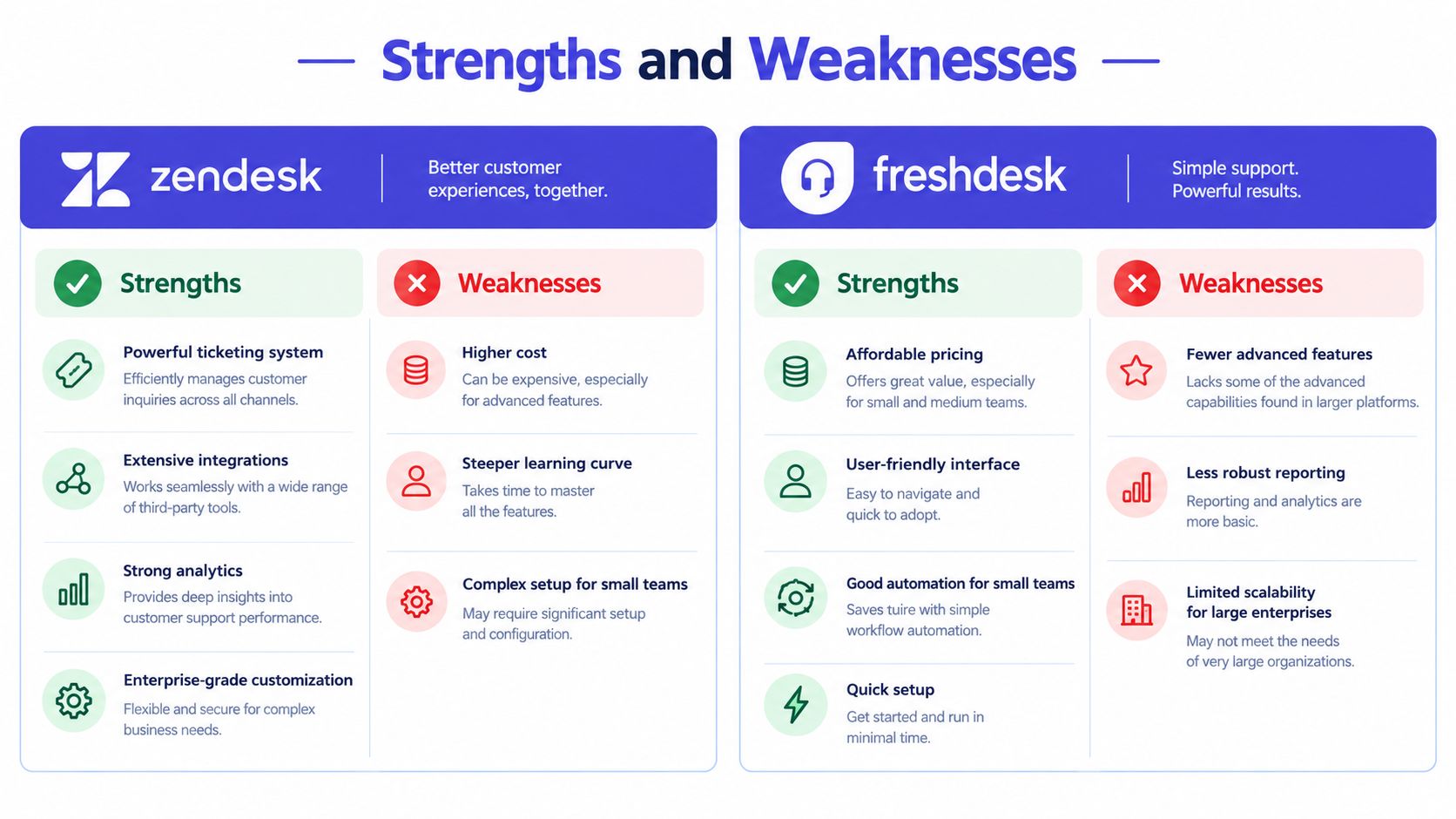
Freshdesk’s appeal is its accessibility. It can be a sensible choice when a team wants to launch a familiar help desk without first building a highly customized operation. Its potential drawbacks for some buyers are fewer options for complex enterprise workflows and AI billing based on sessions. Neither issue automatically rules it out. They’re reasons to test the workflows and pricing model that matter to your team.
Independent G2 comparison data gives Freshdesk an 8.8/10 ease-of-use score, compared with Zendesk’s 8.5/10. Those are review-based ratings, not controlled tests of rollout time or technical performance. The comparison also associates Zendesk more strongly with complex, enterprise-grade workflows and customization. You can review the rating context in the G2 Zendesk and Freshdesk comparison.
Before deciding, configure a production-like workflow in each trial environment. Add ticket fields, SLA policies, automation rules, macros, knowledge-base permissions, and the reporting views the team needs. The more complicated the setup becomes, the more important it is to include ongoing admin time in the evaluation, not just initial setup.
Decision Framework and Recommended Next Steps
Make the choice using the work your team has to do, not the feature set you hope you’ll use someday.
- Count the agent seats. Include teammates who need access to handle support, then calculate the monthly cost at the plan level you would use.
- Write down your routing needs. If your team needs intricate rules, escalations, or custom reporting, test those directly in Zendesk. If the workflow is simpler, see whether Freshdesk’s setup covers it without extra administration.
- Model AI separately. Check what triggers a charge, then test the agent on real, anonymized questions. Track resolution quality, human handoffs, and the time needed to maintain its knowledge sources.
- Test products and tools together. If you support multiple apps, verify product identification, app-specific reporting, customer records, and the outside systems needed for feedback, scheduling, status communication, and announcements.
- Verify current terms before committing. Vendor plan details and pricing can change. Check the official pages and confirm which features and usage rules apply to your account.
Convot makes a competing help desk product, so treat it as another option to evaluate, not an independent recommendation. It uses flat whole-team pricing, prices accounts by the number of apps, combines support functions in one product, and charges $0.20 per resolved conversation for Cove AI; the product is built by a solo founder, with Shopify app developers as its sharpest fit.
A good help desk is the one your team can operate consistently. Run a focused pilot, compare the full bill and the work required to maintain it, then choose the platform that fits the support you provide now and the workflow you expect to keep.
If your team supports Shopify apps or several software products, Convot brings the shared inbox, live chat, help center, changelog, scheduling, and revenue context into one help desk with flat whole-team pricing. Review the app-based plans and Cove AI’s per-resolution cost, then see whether that setup fits your support workflow.
Revenue-aware support for Shopify app teams.
Live chat, help center, and every merchant's MRR, plan, and LTV beside the conversation. Free under $1k MRR.
Start free