How to support Shopify app merchants in any language
How a small Shopify app team can support merchants in their own language: live chat translation, a multilingual help center, and where people still matter.
On this page
- Why does language matter in Shopify app support?
- What are the options for multilingual customer support?
- How does live translation in a support inbox work?
- Is machine translation good enough for customer support?
- What are the limits of automatic translation?
- How do you write support replies that translate well?
- Which conversations need a person who speaks the language?
- How do you set up a multilingual help center?
- How do you decide which languages to support first?
- Should a Shopify app translate its own screens as well as its support?
- Can an AI agent answer in other languages?
- How do you support merchants in other time zones?
- How do you measure multilingual support?
- Common questions about multilingual support for Shopify apps
- Multilingual support, in seven steps
To support Shopify app merchants in any language without hiring a multilingual team, use live translation in your support inbox, so merchants write in their language and read your replies in it while your team works in its own, and add translated versions of your most-read help articles. Keep a person in charge of anything sensitive, such as billing or legal questions, where a translation mistake costs more. Many of the merchants installing your app do not have English as a first language.
Multilingual customer support means answering customers in the language they write in, whether through bilingual staff, a translated help center, or live translation inside the support inbox. Live chat translation detects the customer’s language, translates their message for your agent, and translates your reply before it is sent. For small teams, live translation plus a translated help center covers most languages without extra hires.
This guide covers why language matters for app support, the options from copy-paste to automatic translation, how to set up a multilingual help center, and what to watch for.
Why does language matter in Shopify app support?
Language matters in Shopify app support because merchants explain problems best, and understand fixes most reliably, in their own language. Shopify says its merchants run businesses in more than 175 countries, so a large share of the merchants installing your app do not work in English. An app team that supports only English asks them to describe a technical problem in a second language.
Three things improve when merchants can use their own language:
- Problem descriptions. A merchant writing in their first language gives clearer detail about what went wrong.
- Understanding the fix. Setup steps are easier to follow in a familiar language, so fewer follow-up questions.
- Trust. Merchants connect their store to your app. Help in their language shows you take them seriously.
What are the options for multilingual customer support?
A small app team has four options for multilingual support, and most combine two or three:
| Option | How it works | Good for | Limits |
|---|---|---|---|
| Copy and paste into a translation tool | An agent translates each message by hand | Occasional conversations | Slow, error-prone, adds to response time |
| Multilingual staff | Hire people who speak your merchants’ languages | Your biggest markets | Expensive, covers only the languages you hire |
| A translated help center | Publish articles in several languages | Common questions | Does not cover live conversations |
| Live translation in the inbox | Messages are translated automatically both ways | Every conversation | Quality depends on the translation model |
Copying messages into a translation tool works for a handful of conversations but slows down first response time, the metric customers feel first. The guide to customer support metrics covers how to measure it.
How does live translation in a support inbox work?
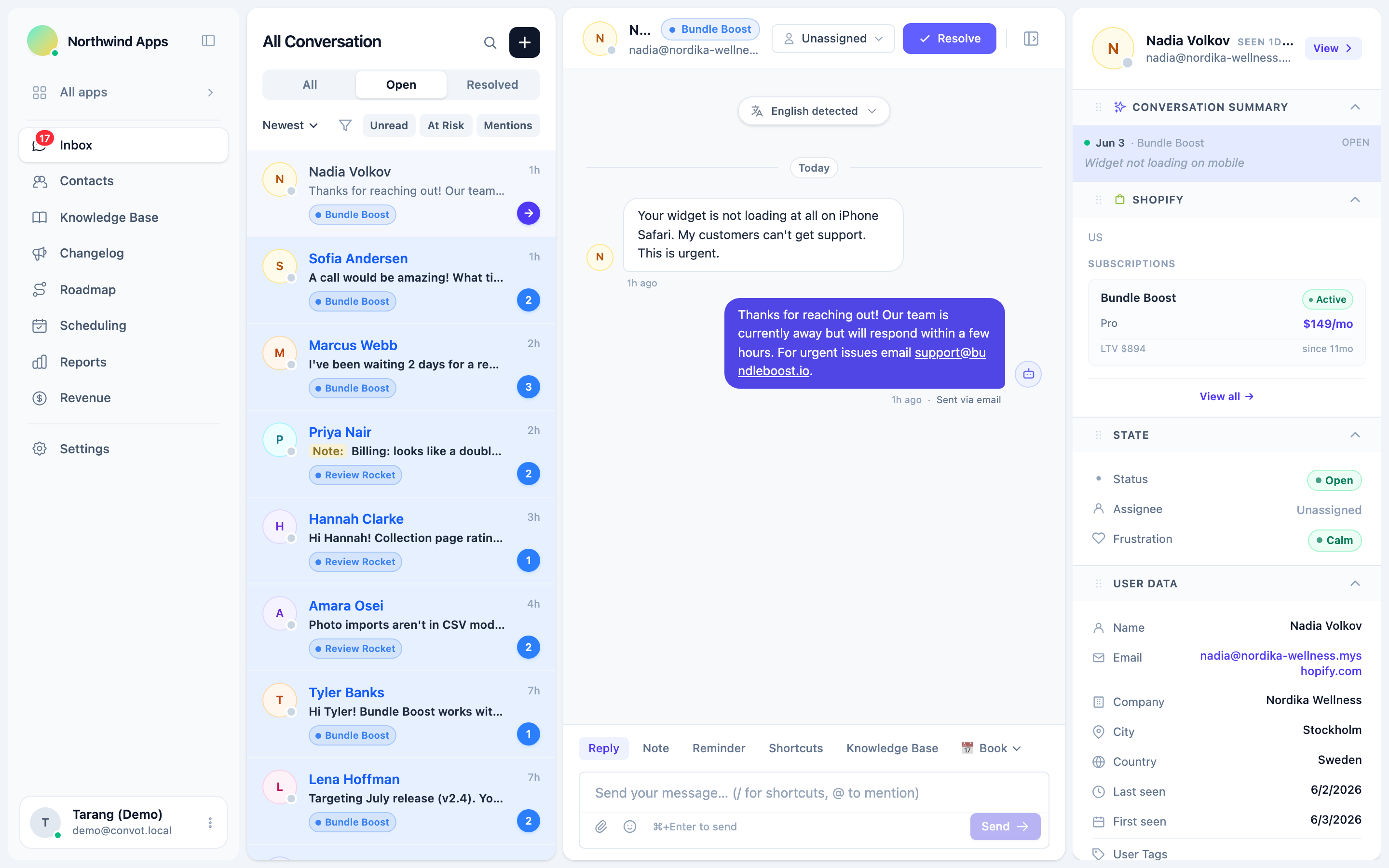
Live translation in a support inbox works by detecting the merchant’s language, translating their messages into your team’s language, and translating your replies into theirs before they are delivered. Your team writes in one language; each merchant reads in their own.
In Convot, it works like this:
- Detection. The widget takes a first guess from the merchant’s browser language, and Convot confirms or corrects it from their first typed message. The detected language is stored on the contact.
- Incoming messages. A merchant’s message can be shown to your agent in the agent’s language, with a “Translated from” label.
- Your replies. When the merchant’s language differs from yours, your reply is translated before it reaches the widget. You see the original in the thread; they see the translation.
Translation uses Anthropic’s Claude Haiku model, and Convot supports more than 60 languages. It is included on every plan, including the free plan.
Is machine translation good enough for customer support?
Machine translation is good enough for routine support questions and not for anything where one wrong word costs money or trust. Setup steps, bug reports and how-to answers translate reliably when written in short, literal sentences. Refunds, billing disputes, legal or data requests and upset merchants need extra care, because amounts, commitments and tone must be exact.
Test it on your own conversations before relying on it: translate 20 past replies into your top non-English language and ask a native speaker to mark each one as fine, awkward or wrong. As a rule of thumb, if 18 or more of the 20 are fine, rely on live translation for everyday questions in that language; if more than 2 are wrong, keep a native speaker involved.
What are the limits of automatic translation?
Limits to know, the first two specific to Convot:
- Very short messages, such as greetings or single words, may not give enough context to detect the language correctly.
- There is no manual language override in the interface yet, so if detection is wrong for a particular merchant, contact Convot support.
- Technical terms and product names can be translated when they should not be, as with any machine translation. Use the exact names from your app, and keep replies short and clear.
- Translation uses AI credits. Convot’s live translation runs on the AI credits included with your plan; if those run out, translation is skipped and messages are delivered in their original language until the credits renew.
How do you write support replies that translate well?
Write support replies that translate well by using short sentences, one instruction per step, exact names for buttons and settings, and no idioms, slang or jokes that depend on English wording. Machine translation handles plain, literal language best, and a merchant following steps in a second language benefits from the same clarity.
An illustrative before and after:
| Before | After |
|---|---|
| ”No worries, we’ll get this sorted in a jiffy. Just pop over to settings and flip the toggle." | "We can fix this. Go to Settings. Turn on Show booking button. Save." |
| "It should be good to go once that’s done, give it a whirl." | "Then open your store and check the button appears.” |
Three more habits help:
- Use numbers, not words, for dates, amounts and times, such as 3 October, $19 and 15:00.
- Quote the exact text on screen in quotation marks, so the merchant can match it even if the translation of the surrounding sentence differs.
- Send a screenshot for any step involving a screen, because an image needs no translation.
These habits also make replies easier for an AI agent to learn from if you later add one.
Which conversations need a person who speaks the language?
Refunds, billing disputes, legal or data requests and upset merchants need a person who reads the language, or at least extra care, because a translation mistake in those conversations costs money or trust. Use automatic translation for setup questions, bugs and how-to questions, and be more careful with:
| Conversation | Why it needs care |
|---|---|
| Refunds and billing disputes | Amounts, dates and commitments must be exact |
| Legal or data requests | Wording can carry legal weight |
| A frustrated or upset merchant | Tone is easy to get wrong in translation |
| Anything you will quote back later | The merchant read a machine translation of your wording, not your exact words |
For these, keep replies especially plain, confirm key details in numbers rather than words, and, if you have someone on the team who speaks the language, ask them to review the conversation afterwards. Keep your source text plain, because the translation is applied when you send and you review your own wording, not the translated text.
How do you set up a multilingual help center?
Set up a multilingual help center by translating your most-read articles first, starting with the languages your merchants use most. Look at where your installs and conversations come from before deciding which languages to add; a few well-translated core articles help more than a full library with mistakes.
In Convot, each app’s help center supports 12 languages: English, Spanish, French, German, Italian, Portuguese, Dutch, Japanese, Chinese, Arabic, Hindi and Russian. You add a language, then write the translated version of each article. The help center lives on your own subdomain and is searchable inside the chat widget, so merchants can find answers in their language before they start a conversation. The guide to building a help center covers what to write first.
Live chat translation and a translated help center do different jobs:
| Live chat translation | Help center | |
|---|---|---|
| Languages in Convot | 60+ | 12 |
| How the text is produced | Automatically, at send time | Written and reviewed by you |
| Best for | Every conversation | The most common questions |
How do you decide which languages to support first?
Decide which languages to support first from your own data: the countries your installs come from, the languages merchants already write to you in, and the markets you want to grow in. Three steps:
- List your top countries by installs, from your Shopify Partner Dashboard.
- Check which languages merchants write in, from your support conversations.
- Translate help articles for the top two or three languages, and rely on live translation for the rest.
Revisit the list every few months. A new language appearing in your conversations is often the first sign of a new market for your app.
Should a Shopify app translate its own screens as well as its support?
Translating the app itself helps merchants use it without support, but it is a separate and larger project than translating support. If your app’s screens are only in English, multilingual support becomes more important, because more merchants will need help understanding them.
Start with the screens merchants see first: onboarding, the main settings page and any error messages. Error messages are especially worth translating, because a merchant who cannot read an error writes in. The Shopify app onboarding guide covers where setup usually breaks.
Can an AI agent answer in other languages?
An AI support agent can answer in the merchant’s language if it is set to reply in the customer’s language, even when your help articles are in English. Quality is strongest for major languages, and native-language articles improve accuracy. In Convot, the Cove AI agent, available on paid plans, has a setting to reply in the customer’s language, answers from the help center and sources you connect, and hands off to a person when it is not confident.
That combination covers routine questions at any hour in the major European and Asian languages, while your team handles the rest with live translation. For less common languages, Cove may answer in English, so check those conversations first.
How do you support merchants in other time zones?
Support merchants in other time zones by being honest about when you reply, answering simple questions without a person, and covering your biggest markets’ working hours where you can. Language and time zone usually come together: a merchant writing in Japanese is often writing while your team is asleep.
Four practical steps:
- Show your working hours and an away message in the chat widget, so merchants know when to expect a reply. In Convot, each agent sets their own working hours, and the widget shows the away message with an estimated return time outside them.
- Let the help center answer first. Translated articles in the widget answer common questions at any hour.
- Use an AI agent outside working hours for routine questions. Convot’s Cove AI, on paid plans, can run in Auto when offline mode, replying only when no one on your team is online.
- Stagger hours if you have more than one person, so the gap with your biggest market is shorter.
Track first response time by the hour messages arrive, using a conversation heatmap, to see which time zones wait longest.
How do you measure multilingual support?
Measure multilingual support by comparing the same metrics across languages, so you can see whether merchants in some languages get worse service. Useful comparisons:
- First response and resolution time by language. Slower times in one language can mean agents are hesitating over translated conversations.
- Reopen rate by language. A higher rate suggests answers were misunderstood.
- Conversation volume by language over time. Rising volume in a language is a reason to translate more help articles into it.
Common questions about multilingual support for Shopify apps
Do I need to hire multilingual support staff? Most small app teams do not need to hire for every language. Live translation covers everyday conversations; consider a native speaker only for your largest non-English market, or for sensitive conversations.
Can merchants see that a reply was translated? Merchants see the reply in their language, and your team sees the original in the thread, with a “Translated from” label on incoming messages. If a merchant asks, say plainly that replies are translated automatically.
Is automatic translation accurate enough for support? Automatic translation works well for routine questions written in short, clear sentences. Take extra care with billing, legal and frustrated conversations, and test it on your own past replies first.
Does live translation cost extra in Convot? Live translation is included on every Convot plan, including the free plan for teams under $1,000 MRR, and runs on the AI credits included with the plan.
Multilingual support, in seven steps
- Turn on live translation so merchants can write in their own language.
- Write replies in short, plain sentences that translate well.
- Take extra care with billing, legal and frustrated conversations.
- Find your top languages from installs and conversations.
- Translate your most-read help articles into those languages.
- Translate the app’s onboarding screens and error messages.
- Compare response times and reopen rates by language.
Start free with live translation while you are under $1,000 MRR, with 1 app and 3 seats.
About the author
Tarang Agarwal is the founder of Convot. Convot is built by Sidepanda, a small studio that runs several Shopify apps of its own, including Appointo, Depo and Panda Bundle, and supports all of them from one Convot inbox.
Revenue-aware support for Shopify app teams.
Live chat, help center, and every merchant's MRR, plan, and LTV beside the conversation. Free under $1k MRR.
Start free