Shared inbox software for small teams: 5 tools compared with prices (2026)
Shared inbox software for small SaaS and support teams: what it does, how Crisp, Help Scout, Intercom, Front and Convot price it, and how to choose.
On this page
- Key takeaways
- When do you need shared inbox software?
- What does shared inbox software do?
- What are the main types of shared inbox?
- How is shared inbox software priced?
- Which shared inbox software should a small team choose?
- How do you evaluate shared inbox software in a trial?
- How do you switch to a shared inbox?
- FAQ
Shared inbox software turns a shared address like support@ into a queue where every conversation has an owner, a status and internal notes, so nothing is answered twice or not at all. For a small team, Crisp, Help Scout, Intercom, Front and Convot price it by workspace, user, seat or app, with free tiers and paid entry points from $25 per user to $49 for one app.
Disclosure: Convot publishes this comparison and is one of the five tools in it. Competitor prices were checked on each vendor’s pricing page in October 2026 and match our help desk pricing index.
Key takeaways
- You need shared inbox software once more than one person answers support and you can’t tell who owns a message.
- The controls that matter first: ownership, status, internal notes and collision warnings.
- Pricing units differ: Crisp per workspace ($45 Mini, 4 seats), Help Scout per user ($25 billed annually), Front per seat ($25 billed annually), Convot per app ($49 for 1 app and 3 seats).
- AI is a second meter: Convot’s Cove AI is $0.20 per resolved conversation and Intercom’s Fin from $0.99 per outcome.
- AI cost at volume: 1,000 AI resolutions cost about $200 on Cove AI and $990 on Intercom Fin, before any seats.
- Several products? Test routing and permissions so a reply about one app never carries another’s policy. Sidepanda answers support for Appointo, Depo and Panda Bundle from one shared inbox, so this is the case we test daily.
- Also worth a look: Missive, Hiver and HubSpot, plus the free Google and Microsoft options for teams of one or two.
You’re a solo developer with two Shopify apps, one Gmail tab, and support that only gets answered between releases. A merchant replies to an old thread, a teammate gets copied manually, and a vacation auto-responder claims ownership of the conversation. By the time you find the message, the customer has already sent it again.
That’s the point where personal email stops being a support system. The right shared inbox software won’t fix a weak product or unclear policies, but it can make ownership, handoffs, and response times visible. This roundup compares the main approaches for small support teams, models AI costs where vendors publish them, and records prices checked in October 2026. Convot is one of the options, with the disclosure at the top because its founder makes a competing product.
When do you need shared inbox software?
You need shared inbox software when more than one person answers support and nobody can say who owns a message without checking several tabs. The first symptom usually isn’t volume. It’s uncertainty.
You open Gmail and see a merchant asking about billing, a bug report from a second app, and a teammate’s forwarded message with no explanation. You remember replying to one of them, but you can’t tell whether the customer received the answer or whether someone else is drafting a reply. A shared password gives everyone access, not anyone responsibility.
Start by naming the failure you’re trying to remove. If the issue is only that two people need to read the same address, Google Workspace or Microsoft 365 may be enough. If requests need assignment, status changes, internal discussion, saved replies, escalation, and response-time reporting, you need a workflow layer.
A useful first pass is simple:
- List the addresses: Separate support, billing, sales, and product feedback if different people own them.
- Record the handoffs: Note where a request waits because nobody knows who should answer.
- Mark repeated work: Include duplicate replies, copied teammates, manual forwarding, and searches through personal folders.
- Choose the smallest control: Add assignment and a shared queue before buying advanced automation.
A personal inbox works while the founder is the only person answering. It becomes fragile when support crosses products, time zones, or responsibilities. Vacation responders expose the problem because they turn an individual mailbox into an accidental queue without an owner.
Practical rule: If you can’t answer “who owns this conversation?” without opening three tabs, your email setup has already outgrown personal use.
The cheapest solution isn’t always the lowest monthly price. It’s the option that adds enough structure without forcing a small team into an enterprise ticketing process. Verify current vendor pricing before renewal, especially where AI is billed by resolution rather than included in a team plan.
What does shared inbox software do?
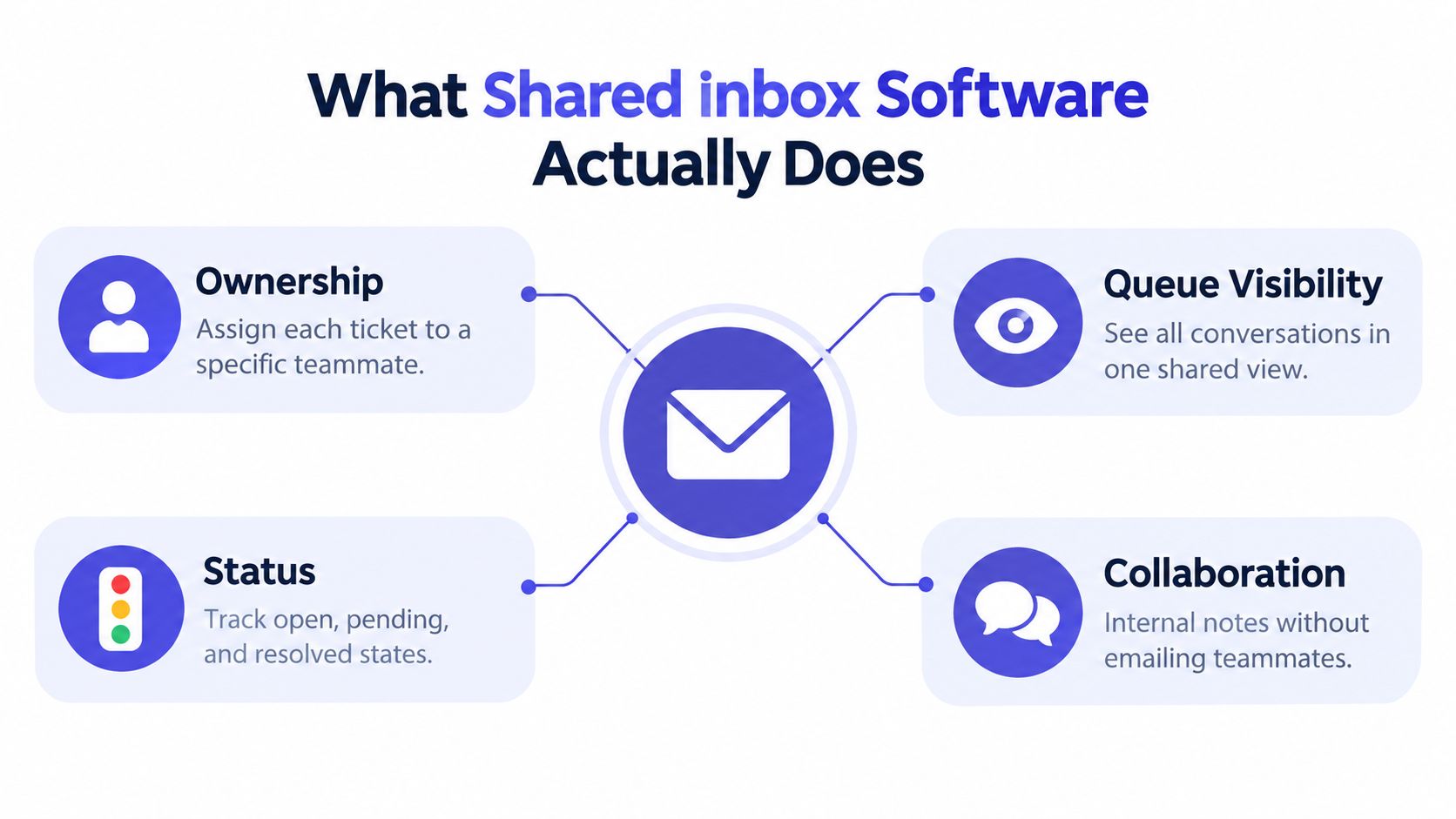
Shared inbox software adds workflow control to a shared email address. The important controls are ownership, queue visibility, status transitions, internal notes, and timestamps for first response. Without them, [email protected] is one address that several people inspect and interpret differently.
In SuperOffice’s customer service benchmark of 1,000 companies, a few years old now but still often cited, 62% never answered a customer email and only 20% fully answered the question in the first reply. The same benchmark found that 90% failed to acknowledge receipt and 97% didn’t send a follow-up satisfaction message. Those figures describe execution failures that a managed queue is designed to reduce, not problems solved by adding another shared password.
The controls that matter first
Ownership assigns each conversation to a named teammate. An unassigned queue shows triage debt instead of hiding it inside personal inboxes.
Status distinguishes open, pending, and resolved work. That prevents a “done” reply from disappearing without recording what happens next.
Internal notes keep technical context away from the customer. An agent can explain a billing exception or bug reproduction without forwarding the thread.
Collision avoidance shows when another agent is viewing or drafting a reply. It reduces duplicate responses, but it doesn’t replace clear ownership.
The best dashboard isn’t a message counter. It shows backlog age, first-response time, reopen rate, reassignment count, and simultaneous-agent activity. Those measures help a manager tell routing failure from capacity failure. Many unassigned messages indicate weak triage. Many assigned but unanswered messages indicate workload, escalation, or priority problems.
Shared inbox, chat, ticketing, and CRM
A shared inbox is the collaboration layer around customer conversations. Live chat is a channel. A ticketing system adds more formal workflows, escalation, and reporting. A CRM stores broader customer and commercial context; this guide on how CRM helps accounting clients shows that wider role in a service business.
The boundaries overlap. A small product team may want one tool for chat, email, help content, and customer identity. A larger support operation may prefer a dedicated help desk connected to its CRM. The buying question is not which label sounds better. It’s whether the system makes the next owner, next action, and customer history clear.
What are the main types of shared inbox?
Shared inboxes come in five patterns: a native Google or Microsoft shared mailbox, a chat-led workspace, a traditional help desk, a contact-centric help desk and a product-aware inbox for teams running several apps. The architecture matters more than the feature list when one team supports several products. A shared mailbox can expose every message while still leaving agents to decide which product, brand, policy, or billing context applies.
Five patterns buyers encounter
| Pattern | What it provides | Best fit |
|---|---|---|
| Google Workspace or Microsoft 365 shared mailbox | Native access to an existing address | Small teams that need shared visibility |
| Chat-led workspace such as Crisp | Customer conversations across chat and email | Teams where website chat is central |
| Traditional help desk such as Zendesk | Structured tickets, routing, automation, and reporting | Larger or more formal support operations |
| Contact-centric help desk | One customer record with related conversations | Teams that need history across products |
| Product-aware inbox | One queue with app labels, routing, and product context | Studios supporting multiple apps |
A native mailbox is inexpensive and familiar, but it usually needs additional controls for ownership and reporting. A chat-led product can be a strong choice when conversations begin in a widget. A traditional help desk earns its cost when escalation policies, ticket fields, and formal reporting matter more than a lightweight interface.
A contact-centric system changes the unit of work from “this email thread” to “this customer.” That helps an agent see prior context, but it creates a permission question: should every agent see every product and billing record?
Multi-product routing is the hard case
Suppose one merchant uses two Shopify apps from the same company. The support team wants one customer record, but the agent still needs the correct app name, help content, plan, billing state, and brand voice. A reply about App A must not accidentally include instructions for App B.
Product-aware routing should answer four questions before purchase:
- Identity: Which merchant and app generated the conversation?
- Context: Can the agent see the relevant plan and billing information?
- Permissions: Can access rules prevent replies from the wrong brand?
- Knowledge: Can saved replies and help content stay product-specific?
The choice between Zendesk and Intercom is often less important than understanding the workflow each product must support. Our Intercom vs Zendesk comparison is useful background, but test both against your own product-routing edge cases rather than choosing from a generic feature table.
How is shared inbox software priced?
Shared inbox software is priced per seat, per workspace, per app or per AI resolution, and each unit grows with a different part of your business. Read a pricing page like a support forecast, not a brochure. Count seats, apps, inboxes, required tiers, and AI resolutions separately, because each unit behaves differently as volume changes.
Per-seat pricing charges for the people using the system. Per-workspace pricing charges for a team with several users. Per-app pricing charges according to the number of products connected. Per-resolution pricing charges when an AI system resolves a conversation. The last model is the one that surprises founders, because it scales with success rather than headcount.
Convot publishes $0.20 per resolved conversation for Cove AI, while Intercom lists Fin from $0.99 per outcome. Convot’s paid plans start at $49 a month for one app and three seats (pricing), checked in October 2026.
| AI agent | Price per unit | 100 | 500 | 1,000 |
|---|---|---|---|---|
| Convot Cove AI | $0.20 per resolved conversation | $20 | $100 | $200 |
| Intercom Fin | From $0.99 per outcome | $99 | $495 | $990 |
The table shows AI usage only. It excludes the base subscription, seats, apps, implementation, and add-ons. At 100 resolutions, the difference is $79. At 1,000 resolutions, it becomes $790. Vendors define a resolution differently, so treat this table as a rough usage comparison, not a like-for-like quote. Intercom also charges its seat price ($29 per seat billed annually on Essential) on top of Fin.
Three practical billing scenarios
At 100 resolutions, a small team may prefer outcome pricing because the usage bill stays limited. A flat team plan can still be cheaper if it already includes the required workflow and AI.
At 500 resolutions, compare the AI fee against the full monthly subscription. A per-seat plan that looks expensive at signup may become more predictable as usage rises, because you pay for people rather than outcomes.
At 1,000 resolutions, the marginal cost deserves its own budget line. 1,000 Cove AI resolutions cost about $200 in usage, while the Intercom Fin rate produces $990 before the base plan. That gap is the break point where per-seat or flat pricing starts beating outcome pricing for a growing team.
AI also needs a quality definition. Does a resolution mean the AI replied, the customer stopped responding, or the issue was solved? Ask how repeated messages, escalations, low-confidence handoffs, and reopened conversations are counted. A confident answer that routes the wrong customer to the wrong workflow costs more than its usage fee.
Founders comparing AI agents can start with AI customer service agent pricing compared, then model their own monthly resolution count. The right pricing model depends on volume stability, not on which headline looks smaller.
Which shared inbox software should a small team choose?
Crisp fits chat-first teams, Help Scout email-first teams, Intercom teams that want deep automation and outbound messaging, Front teams that live in email threads, and Convot small software teams running several apps.
| Tool | Pricing unit | Entry paid plan (checked October 2026) | AI | Best for |
|---|---|---|---|---|
| Crisp | Workspace | Mini, $45 a month, 4 seats | AI credits included by plan | Chat-first teams |
| Help Scout | User | Standard, $25 per user billed annually | AI Answers, $0.75 per resolution | Email-first teams |
| Intercom | Seat plus usage | Essential, $29 per seat billed annually | Fin, from $0.99 per outcome | Automation and outbound |
| Front | Seat | Starter, $25 per seat billed annually | Autopilot, from $0.05 | Shared-email workflows |
| Convot | App, seats included | $49 a month for 1 app and 3 seats | Cove AI, $0.20 per resolved conversation | Teams running several apps |
A chat-heavy Shopify app shop needs a different inbox from a support team handling formal tickets. Compare the billing unit before comparing the headline price. Prices below were checked on vendor pages in October 2026, although vendors package seats, workspaces, outcomes, and apps differently.
Crisp suits a small team that wants a chat-first workspace. Crisp’s free plan covers 2 seats, and the Mini plan is $45 per workspace a month with four seats (see our Crisp pricing breakdown). The free tier gives a team a low-risk way to test the conversation model. Shared email and broader inbox functions sit in paid plans. Choose Crisp when website chat drives support and agents want a familiar conversation workspace.
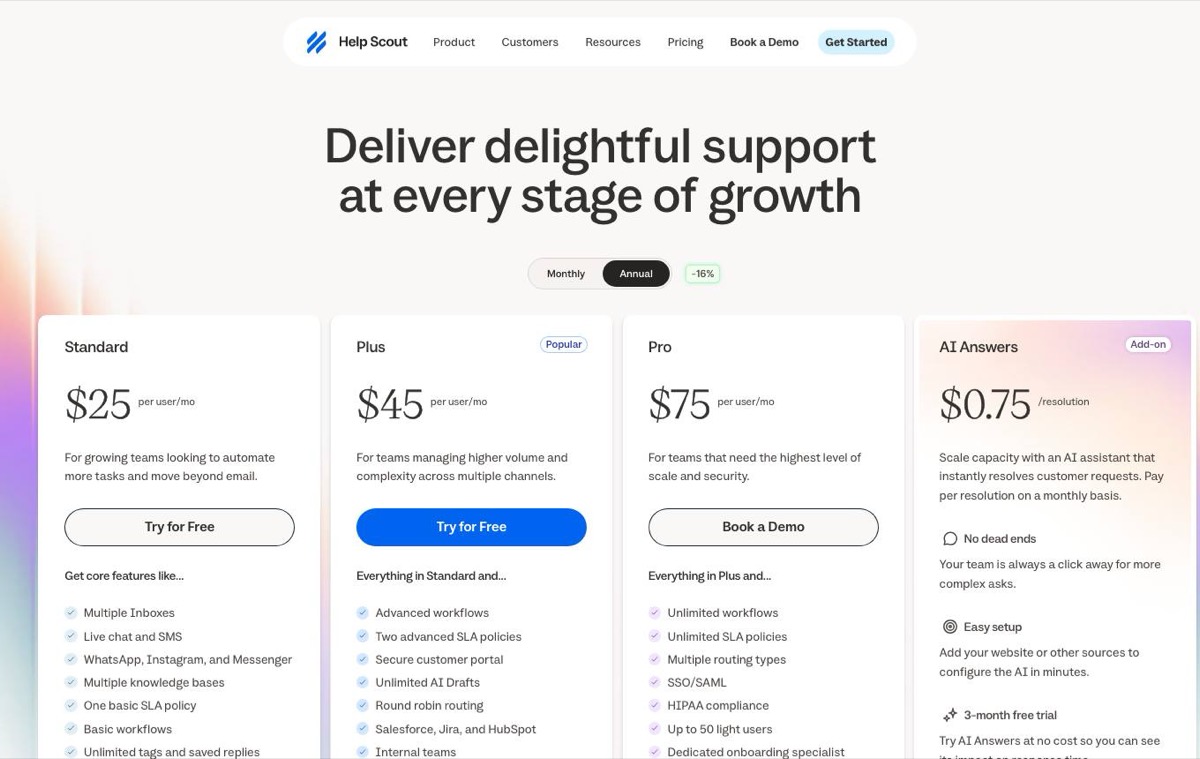 Help Scout pricing page, captured 3 October 2026.
Help Scout fits teams that handle human-first email support and want a clean interface with knowledge-base workflows. Its Standard plan is $25 per user a month billed annually ($30 billed monthly), and a free plan covers up to 5 users and 100 contacts a month. AI Answers costs $0.75 per resolution. Pick Help Scout when email is the main channel and the team wants a conventional help desk rather than product-specific routing.
Intercom suits teams that need outbound communication, automation, and a mature customer-facing platform. Its Fin pricing is published at $0.99 per outcome, checked in October 2026, on Intercom’s Fin pricing page. Outcome pricing can work when autonomous resolution is central to support. It is harder to forecast during seasonal demand or when customers reopen conversations.
Front keeps the team close to email while adding structured collaboration. Its Starter plan is $25 per seat a month billed annually ($35 billed monthly) on Front’s pricing page. The product focuses on shared-conversation workflows such as routing and collaborative drafting. Choose it when agents work primarily in email threads and operational queues rather than traditional tickets.
Convot, which publishes this comparison, is a help desk for small software teams built around a shared inbox for several apps. It prices by app count with seats included, and is free for 1 app and 3 seats while your app earns under $1,000 a month (pricing). It also adds Shopify-oriented customer context. The published plans are $49 per month for one app, $79 for two apps, $149 for five apps, and $299 for unlimited apps, all checked in October 2026 on Convot’s pricing page as cited above. Cove AI is metered separately at the rate described earlier. Shopify app teams can display a merchant’s plan, MRR, and billing history beside a conversation through Partner API context. Convot supports one-click Crisp imports. Zendesk, Intercom, and Freshdesk migrations are handled as a free migration with the founder rather than through an automatic importer.
Autopilot (Front, from $0.05) and AI Answers (Help Scout, $0.75 per resolution) are priced per use too, so ask each vendor what counts as a billable resolution before you compare totals.
Other shared inboxes worth a look
Three more tools come up in almost every shortlist, and two free options cover the smallest teams. Prices were checked on each vendor’s page on 18 October 2026.
- Missive is an email-first team inbox with chat and SMS, from $14 per user a month billed monthly, with a 30-day free trial (Missive pricing). Good for small teams that want email, internal chat and shared drafts in one app.
- Hiver offers a shared inbox inside Gmail and a standalone omnichannel version, with Growth from $25 per user a month on its default annual view (Hiver pricing). Good for teams that don’t want to leave Gmail.
- HubSpot Service Hub is free for up to 2 users, and Starter is $20 per seat a month billed monthly (HubSpot pricing). Good when sales and support already live in HubSpot’s CRM.
- Google Workspace Collaborative Inbox turns a Google Group into a shared inbox where members can take and assign conversations, at no extra cost if you already pay for Workspace (Google’s guide).
- A Microsoft 365 shared mailbox lets a group read and send from one address, and replies appear to come from the shared mailbox rather than the person (Microsoft’s documentation). On its own it is a common address to read and send from; ownership, statuses and reporting are what the tools above add.
The practical split is clear. Crisp fits chat-first teams. Help Scout keeps email support approachable. Intercom suits deeper automation and outbound work. Front fits complex shared-email workflows. Convot fits small software teams supporting several apps in one inbox. Treat product claims as vendor claims and confirm the workflow, migration, and billing details during a trial.
How do you evaluate shared inbox software in a trial?
Evaluate shared inbox software by running the same five real scenarios through each trial and scoring workflow, AI, multi-product fit, migration and total cost. A founder can score three finalists in one afternoon if the test uses real conversations instead of feature-tour examples. Put the same five scenarios into each trial: a new billing question, a bug report, a reassignment, an AI handoff, and a message about the wrong product.
Workflow controls
Check assignment, unassigned queues, statuses, private notes, collision warnings, saved replies, and first-response timestamps. Ask: Can a new agent tell what happens next without asking the founder?
AI behavior
Require clear answers about confidence thresholds, human handoff, resolution counting, repeated customer messages, and reopened conversations. Ask: What exactly creates a billable AI resolution, and what happens when the agent isn’t sure?
Multi-product fit
Use two products with similar names and deliberately test a cross-product reply. Check labels, branding, help content, customer history, permissions, plan context, and billing context. Ask: What stops an agent from replying with the wrong product’s policy?
Migration path
Crisp supports a one-click import. Moves from Zendesk, Intercom, and Freshdesk may be handled as a service rather than an automatic importer, so confirm who performs the work, what history transfers, and whether attachments and internal notes remain intact. Ask: What will be migrated, by whom, and at what charge?
Total cost
Calculate the base plan, seats, apps, extra channels, AI usage, migration work, and required upgrades. Keep support tooling separate from formal finance systems in this sum; teams sorting out the second can compare accounting software for UAE on its own terms. Ask: What is the highest realistic monthly bill at our expected resolution volume?
Give each finalist the same evidence, not a subjective “feel.” The winner should make ownership clearer, keep product boundaries safe, and produce a bill you can explain before the invoice arrives.
How do you switch to a shared inbox?
Switch to a shared inbox by exporting your current mail, running old and new systems side by side for a short shadow period, then cutting over once routing works. Migration should be a controlled change, not a weekend switch. Export the current system first, preserving the fields your team relies on. Score finalists against the checklist, then run the old and new systems together during a shadow period. Compare routing, replies, and edge cases before cutover. Keep the old system available for historical lookup until the new records are trusted.
Measure the business case through operations. Track median and 90th-percentile first-response time, after-hours response share, reopen rate, reassignment count, and resolution time by category. A shared inbox creates value only when routing and notifications reduce unnecessary checking.
One side note for founders still setting up a business entity: company formation is separate from support tooling, and Irish founders can start with Irish company formation for residents before picking a support stack. For support budgeting, use the help desk price calculator and model 100, 500, and 1,000 AI-resolved conversations, including seats and usage charges.
Convot provides a shared inbox and help desk for small software teams, with multi-app routing, Shopify billing context, team collaboration, and usage-priced Cove AI. If your team supports several apps, see how Convot’s shared inbox labels and routes each app and compare that model with the alternatives above.
FAQ
What is shared inbox software?
Shared inbox software lets a team work from one support address with ownership, status, internal notes and collision warnings on every conversation. It sits between a plain shared mailbox and a full ticketing help desk.
What is the cheapest shared inbox for a small team?
The cheapest options start free: Crisp and Help Scout both have free plans, and Convot is free under $1,000 in monthly app revenue. Paid entry points checked in October 2026 are Crisp Mini at $45 a workspace, Help Scout Standard and Front Starter at $25 per user billed annually, and Convot at $49 for 1 app and 3 seats.
Is a Gmail or Outlook shared mailbox enough?
A Gmail or Outlook shared mailbox is enough while one or two people only need to read the same address. Once you need assignment, status, internal notes or response-time reporting, a shared inbox tool adds the missing workflow.
What is the difference between a shared inbox and a help desk?
A shared inbox is the collaboration layer on top of email and chat; a help desk adds formal ticket fields, routing rules, SLAs and reporting. Many small teams start with a shared inbox and add help desk features as volume grows; our ticket management system guide covers that next step.
How do you create a shared inbox?
The quickest free route is a Google Group with Collaborative Inbox turned on, or a Microsoft 365 shared mailbox, both set up by your workspace admin. Point your support address at it and add the team. When you need assignment, statuses and reporting, move the same address into a shared inbox tool.
What are the disadvantages of a shared mailbox?
A shared mailbox shows everyone the same messages but not who owns each one. There is no assignment, status, collision warning or response-time reporting, so replies get duplicated or missed as soon as two or more people answer. It also has no AI, help center or per-product routing.
Which shared inbox works for several products?
Choose one that labels each conversation by product and keeps saved replies, help content and permissions separate per product. Test a cross-product reply in the trial before you commit.
About the author
Tarang Agarwal is the founder of Convot. Convot is built by Sidepanda, a small studio that runs several Shopify apps of its own, including Appointo, Depo and Panda Bundle, and supports all of them from one shared Convot inbox.
Revenue-aware support for Shopify app teams.
Live chat, help center, and every merchant's MRR, plan, and LTV beside the conversation. Free under $1k MRR.
Start free