Customer Support Automation, from Plan to Proof
Learn how customer support automation works, where it pays off, how to implement it, and which metrics prove that it works.
On this page
- Table of Contents
- Why Full Automation Is the Wrong Goal
- Understanding Customer Support Automation
- Choosing the Right Automation Technology
- Proving Business Benefits and ROI
- Applying Automation to Real Support Journeys
- Building an Implementation Roadmap and Scorecard
- Selecting a Help Desk or AI Vendor
- Making a Decision That Holds Up in Practice
Stop chasing a deflection rate. That advice sounds efficient, but it teaches your team to block customers instead of resolving their problems. Customer support automation earns its keep when it answers predictable questions fast, knows when to stop, and gives a person the full context. Build that system first. Buy a chatbot second.
Table of Contents
- Why Full Automation Is the Wrong Goal
- Understanding Customer Support Automation
- Choosing the Right Automation Technology
- Proving Business Benefits and ROI
- Applying Automation to Real Support Journeys
- Building an Implementation Roadmap and Scorecard
- Selecting a Help Desk or AI Vendor
- Making a Decision That Holds Up in Practice
Why Full Automation Is the Wrong Goal
A higher automation rate does not prove customers received better support. Your agent can close a conversation, mark it contained, and still leave a Shopify merchant unable to install your app or reconcile a charge. Loop a customer twice and you’ve turned one ticket into two, plus a refund risk.
Customer tolerance has a clear limit. A 2023 survey summarized in a research review found 72% of respondents were satisfied with chatbot responses, yet 58% still preferred human assistance for complex questions, according to the IJRTI review of customer service automation research. Only about 60% considered chatbots fully effective at solving their issues in that same cited summary.
Speed is the easier part. Structured, repeated requests fit automation well because the answer, steps, and success condition rarely change. Ambiguous, emotional, account-specific, or technically difficult cases need judgment, access checks, and sometimes a product decision.
Use One Simple Division of Labor
- Automate predictable work: Answer documented setup, plan, and how-to questions from approved sources.
- Escalate uncertain work: Move billing disputes, access problems, outages, and low-confidence answers to a named owner.
- Preserve context: Pass the transcript, cited sources, customer details, and attempted steps with every handoff.
Operating rule: Automation should shorten the path to a correct answer, never lengthen the path to a human.
Your goal is a faster first response and more agent capacity. Don’t trade accuracy or trust for a containment number you can show in a board deck.
Understanding Customer Support Automation
A restaurant kitchen runs on automation you never notice. The ticket printer, the timers, and the standard prep list speed up repeatable work, while the cook still decides when an ingredient is off, when a substitution is safe, and when a dish should not leave the pass. Support works the same way.
Customer support automation uses software and workflows to handle, route, organize, or accelerate work without a person performing every step. The tools differ. The job stays narrow: software repeats known actions well, and people own judgment, exceptions, and accountability.
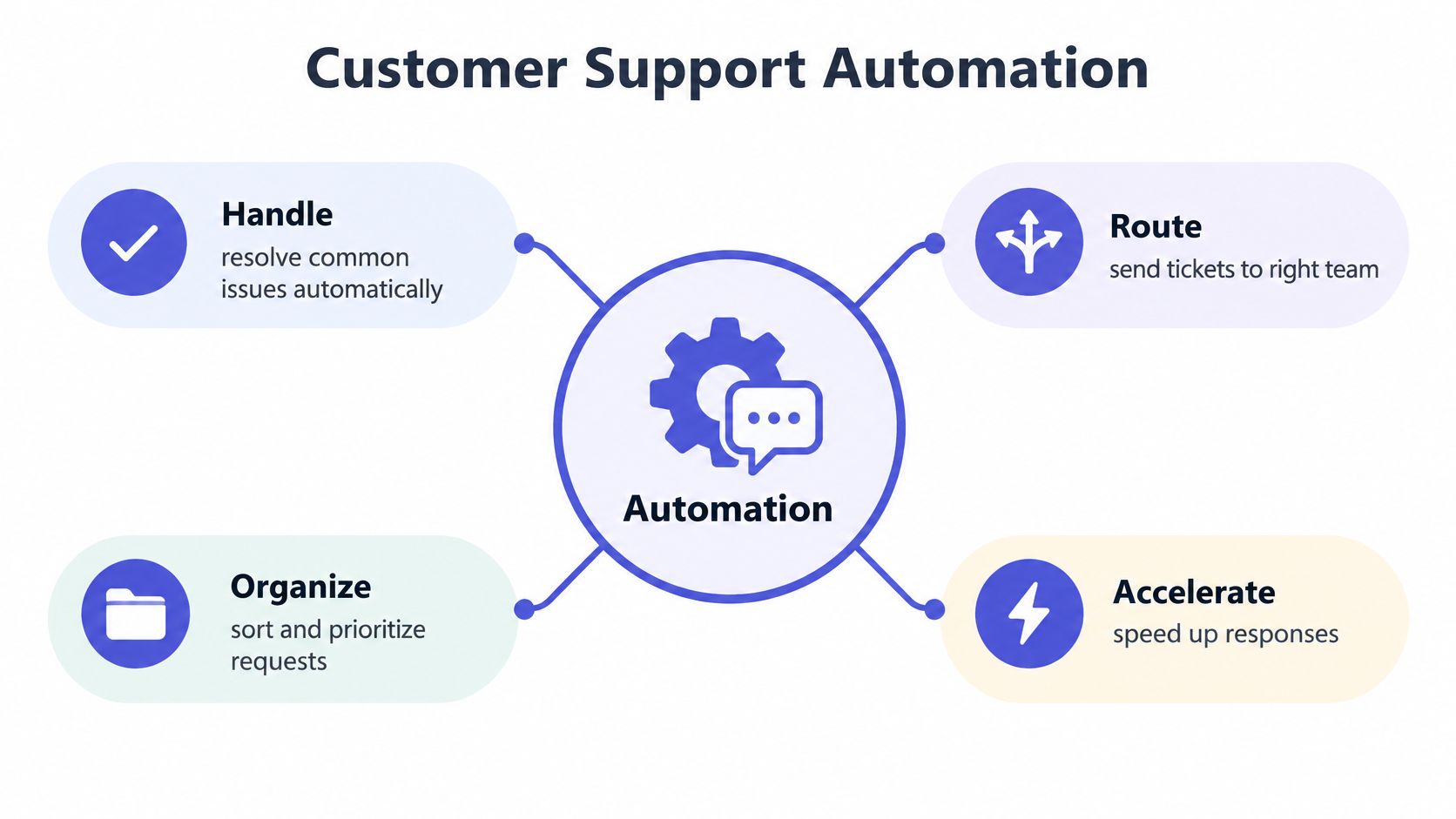
The work splits in two directions, and the split decides how you measure each tool. Customer-facing automation talks to the buyer directly: rules-based bots, AI agents, help center search, and status pages. The customer sees the output and judges whether the problem moved forward. Agent augmentation stays behind the desk, where software classifies a ticket, drafts a reply, summarizes prior messages, or pulls account context while the agent controls the conversation and the final answer.
Four jobs sit safely on the software side of that line. Handle covers common questions that approved documentation already answers. Route sends each conversation to the right app, language, skill, or risk queue. Organize tags, prioritizes, assigns, and merges duplicate requests. Accelerate drafts replies and surfaces history so agents skip the reading and start at the answer.
The stack works like an operating system for support, connecting answer quality, human handoffs, and account context into one flow. A chatbot purchase alone never gets you there. A narrow rule, a grounded AI agent, and an agent copilot solve different problems, and no single product performs all four jobs equally well. Label all three “AI support” and expect one metric to misjudge them.
Choosing the Right Automation Technology
Your technology choice should start with the support job, not the demo. Pick the least complex system that can finish that job safely. Add intelligence only where fixed rules or search can’t cope.
Even outside software support, buyers compare intake, routing, and human backup in similar ways, as shown by this roundup of best AI receptionists for clinics. Clinics route appointments and calls, while your team routes apps, plans, and technical risk. The decision logic transfers.
Match the Technology to the Work
| Support problem | Least complex fit | Human boundary |
|---|---|---|
| Order, plan, or status check | Rules-based bot or self-service | Account mismatch or disputed charge |
| Natural language how-to question | AI agent grounded in approved docs | Low confidence or missing source |
| Message belongs to another app | Routing rule | Unclear product or mixed issue |
| Tagging, alerts, summaries | Workflow automation | Actions that change customer data |
| Repeat setup question | Help center search and articles | Steps fail or case needs account context |
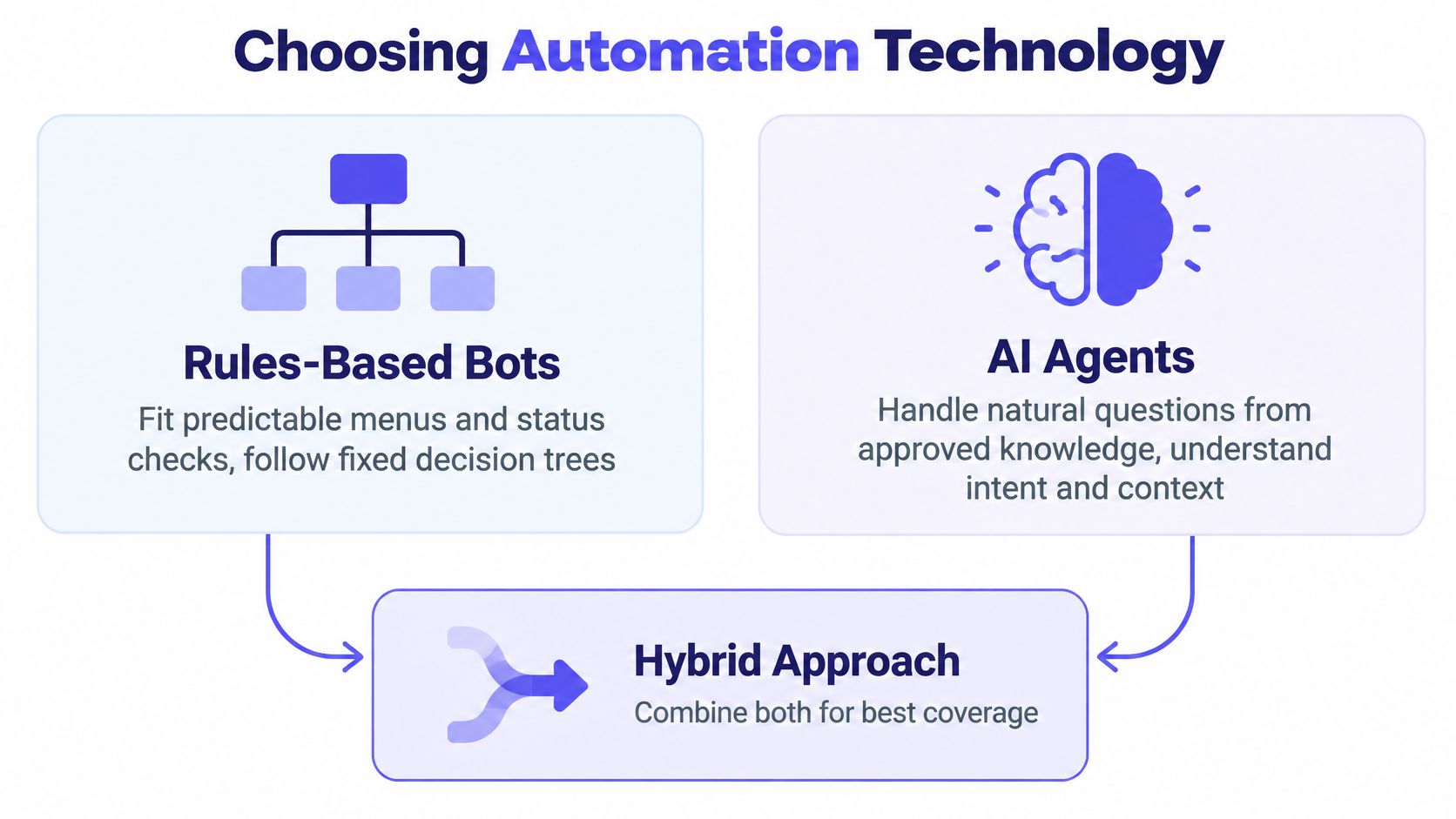
Rules-based bots suit menus, status checks, and intake forms because every branch is known. AI agents handle wording variations, but retrieval and visible citations set their limits. Read why source citations matter for AI support agents before you let one answer from memory alone.
Routing assigns work by app, language, account, or risk. Workflow automation tags tickets, sends internal alerts, and prepares summaries. Self-service gives customers searchable documentation and current status information without opening a conversation.
Watch this short overview after you’ve mapped your own queues, then test each claim against your tickets.
Combine components instead of forcing one system to do everything. Let search answer first, let a grounded agent handle natural questions, and let routing send exceptions to people. Humans still control refunds, permissions, security decisions, and anything that changes an account.
Proving Business Benefits and ROI
Your ROI case should measure capacity, speed, consistency, and tool cost together. Automation rate alone can’t tell you whether customers got correct answers or agents gained useful time. A closed chat that reopens tomorrow isn’t savings.
One 2025 chatbot deployment tracked 574 inquiries in February and handled 349 autonomously, about 61%, then reached 85% autonomous handling as the knowledge base expanded, according to the MDPI study of that deployment. Average response time fell from 118.25 minutes to 64.00 minutes, a 45.88% reduction, while satisfaction rose from 3.73 to 4.27 on a five-point scale in the same study.
Read that result carefully. The study found total inquiry volume didn’t fall significantly, and automation changed service delivery rather than eliminating human support. Your likely win is faster first response and more agent capacity, not zero agents.
Agent augmentation tells a different story. A large field study of 5,172 agents found issues resolved per hour rose 15% and average chat duration fell 3.7 minutes, or 8.5% from a 43-minute baseline, when agents used a generative AI assistant, according to the Quarterly Journal of Economics field study. Novice and lower-skilled agents gained more than experienced specialists, so segment your results by tenure and complexity.
Build the Cost Equation Before Launch
| Input | Calculation | Decision use |
|---|---|---|
| Agent time | Minutes saved multiplied by loaded hourly cost | Capacity gained |
| AI resolutions | Resolved conversations multiplied by unit price | Variable cost exposure |
| Subscriptions avoided | Replaced tools removed from monthly spend | Consolidation value |
| Maintenance | Review, documentation, and testing hours | Ongoing operating cost |
| Quality | Reopens, escalations, and satisfaction change | Whether savings are real |
Separate autonomous answers from drafts a person approves. The cost, risk, and labor profile differ. Our breakdown of how an AI customer service agent fits a human workflow covers that operating split.
Measure before and after with resolved conversations per agent-hour, response time, handle time, satisfaction, escalation rate, and reopen rate. Speed matters because 52% of US consumers expect a response within one hour, according to Emplifi consumer expectations research. Optimizing handle time alone rewards premature closures.
Applying Automation to Real Support Journeys
A merchant clicks Save and nothing changes. Treat that moment as an operating-system test: search, answer, account context, handoff, and recovery either work together or the customer feels the gap.
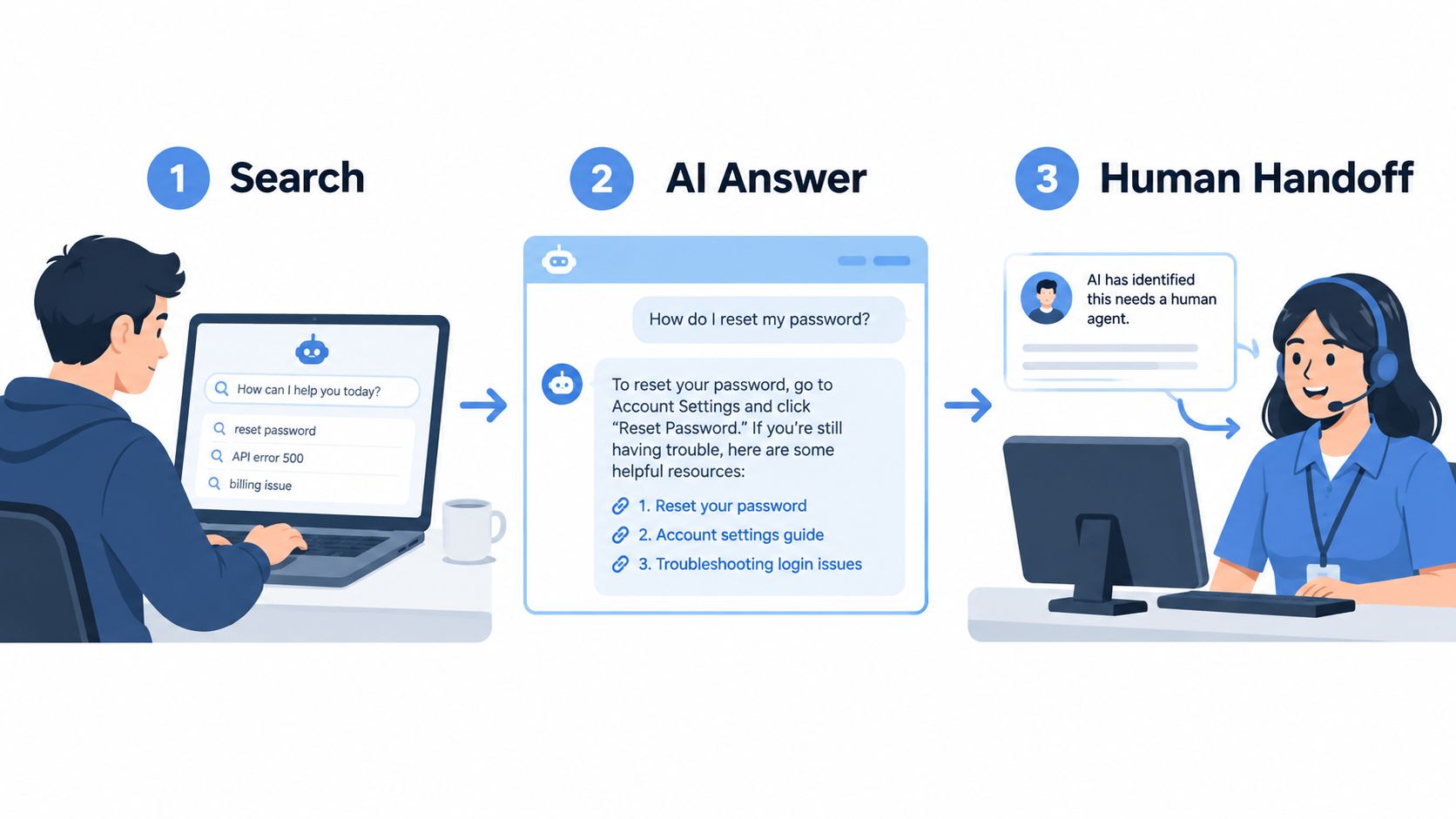
Start with a settings question. The help center finds the right article, a grounded AI agent answers with steps, and the transcript carries the article ID forward. If the toggle is missing on the merchant’s store, confidence drops and a person gets the full thread, plan, app version, and last action. That is the buy: fewer repeated questions and cleaner context.
Billing is stricter. Avaya consumer research found 83% of respondents expect human agents to know their history and 70% expect the same from AI agents, according to Avaya research on context in customer service. For a small Shopify app team, put plan, MRR, past invoices, and refund status beside the conversation before you automate a reply.
Outages need control. Route reports by app and severity, link duplicates, alert the owner, and let the status page carry updates while agents handle affected merchants. The model should never improvise a root cause.
The failure pattern is plain: hidden uncertainty, repeated intake, premature closure. A survey of 7,078 adults found 92% wanted a quick response, yet 7 in 10 preferred a good answer over a direct response, according to CM.com research on speed and answer quality. If your front end behaves like the Expressify AI live chat service, judge it on whether the first reply opens a credible path to resolution.
Building an Implementation Roadmap and Scorecard
A small Shopify app team ships its AI agent in week one, watches automated replies climb, then spends the next month apologizing for confident wrong answers on billing. The model was never the problem. Nobody measured the starting point, so nobody could tell resolution quality from reply volume.
Start with a baseline. Pull recent tickets and group them by question, risk, app, and resolution path. Record first response time, handle time, reopen rate, escalation rate, and satisfaction before anything changes. These numbers are your control group. Without them, every later claim about automation is guesswork.
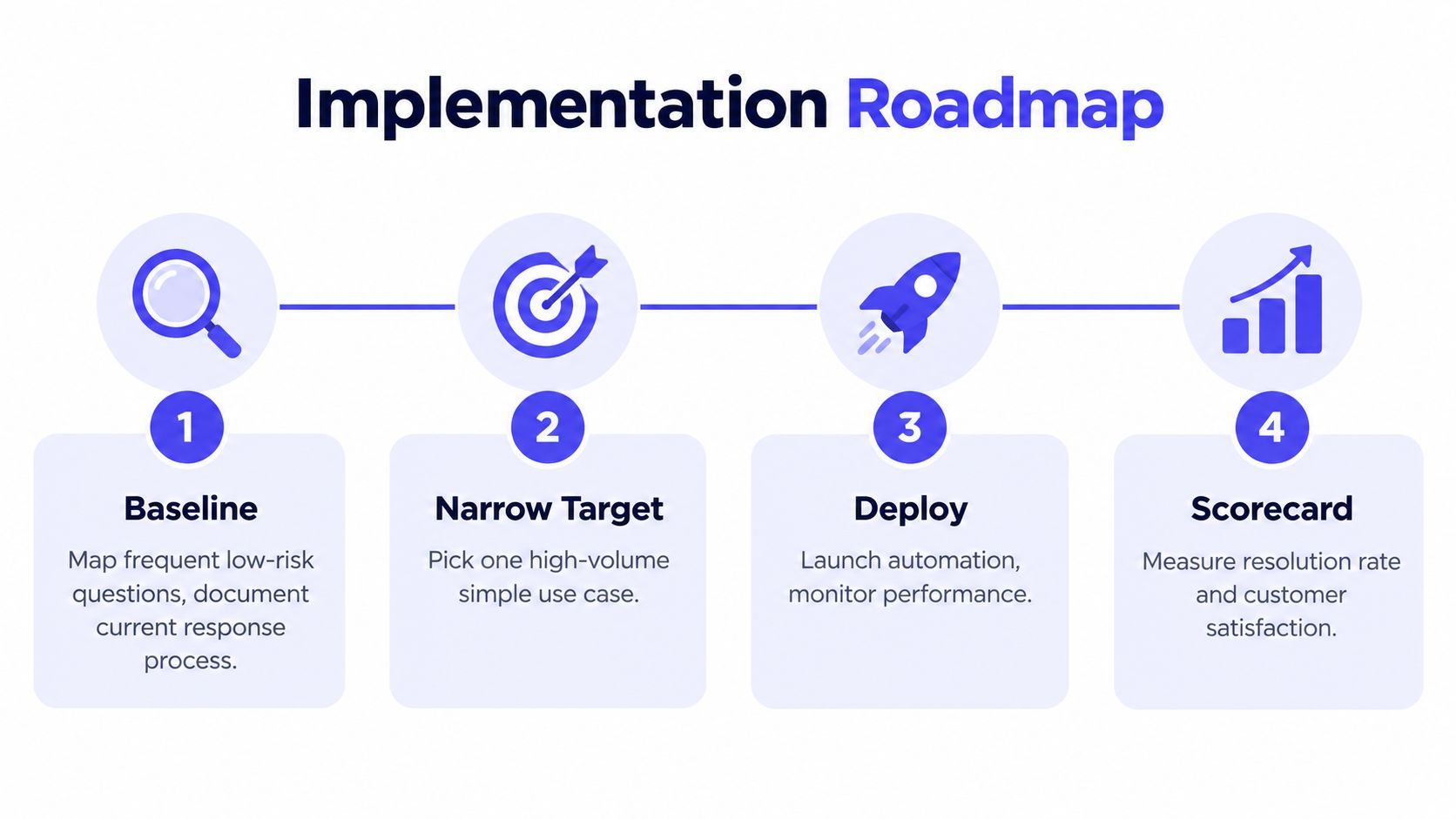
Then run four phases in order, each with an exit signal before you move on:
| Phase | Work | Move on when |
|---|---|---|
| Map demand | Find frequent, low-risk questions with stable documented answers | You can name your top intents and their risk level |
| Clean the knowledge | Fix gaps, duplicates, outdated screenshots, conflicting plan details | Grounding sources answer pilot questions correctly |
| Pilot narrowly | Launch on one channel or use case with explicit handoff rules | Handoffs fire correctly and answers cite approved content |
| Review and expand | Audit unsupported answers and failed handoffs | Error rates hold steady as coverage grows |
Handoff design deserves the same attention as answer generation. A 2025 survey of 503 North American consumers found 55.3% reported some variability in AI-agent experiences, with failure to understand the need and loops without a clear human route as leading frustrations, according to No Jitter reporting on consumer AI service experiences. Set confidence thresholds, risk categories, authentication limits, and escalation ownership before launch, not after the first bad week.
Governance can stay small and still work. A global YouGov survey of roughly 10,000 people found 84% said human interaction should remain an option, according to Zendesk reporting on the global personal AI survey. Label AI clearly, keep the human option visible, restrict billing and personal data access, retain audit logs, and review wrong answers on a fixed schedule.
Review failed handoffs weekly. Each one is a routing bug, a knowledge gap, or a permission problem with a customer attached.
Your scorecard pairs automation rate with resolution quality, response time, agent productivity, satisfaction, failed handoffs, and source accuracy. That pairing follows a practical approach to grading AI support quality rather than grading containment alone. Assign one owner for AI content, one for escalation queues, and one for data access. A small team can hold all three roles in two people. What it cannot skip is the weekly review, because the scorecard is the operating layer that tells you whether the system is resolving work or just deflecting it.
Selecting a Help Desk or AI Vendor
A demo run on sample tickets tells you nothing. Bring five of your own conversations to every evaluation: an easy how-to, a billing edge case, a question in another language, an angry customer, and a case your documentation doesn’t cover. The last one matters most. A confident wrong answer costs more than a slow right one.
Score every vendor against the same rubric:
| Test | What passing looks like |
|---|---|
| Grounding | Answers come only from approved knowledge, with citations shown |
| Handoff | Low confidence triggers a human transfer carrying transcript and sources |
| Context | The agent sees account, plan, billing, and prior conversation history |
| Control | You set permissions, retention, redaction, and audit rules yourself |
| Integration | API and webhooks fit your product and internal tools |
| Migration | A plain answer on what history moves, who does the work, what stays |
| Total cost | Pricing stays predictable as seats, apps, and AI resolutions grow |
Established platforms such as Zendesk, Intercom, and Freshdesk earn their price when you need broad channel coverage, large-team controls, or an enterprise stack already in place. Focused tools earn theirs when a small team wants fewer products, simpler pricing, and several apps supported from one inbox. Your ticket mix decides, not brand size.
Full disclosure: Convot, the company publishing this guide, makes a competing product. Convot is a help desk built by a solo founder for small software teams, with Shopify app developers as the sharpest fit. Its Cove AI costs $0.20 per resolved conversation, checked October 2026, while Intercom Fin costs $0.99, checked October 2026, and the AI hands off to a human when it is not sure.
The pricing structure fits that audience. Plans checked October 2026 list Starter at $49 per month, Growth at $79, Pro at $149, and Scale at $299, billed by apps rather than seats, with a free Community plan under $1,000 MRR. One help desk covers live chat, help center, changelog, scheduling, and a revenue dashboard. Shopify conversations show plan, MRR, and past billing pulled through the Shopify Partner API.
Migration terms need plain language too. Crisp imports in one click. Zendesk, Intercom, and Freshdesk moves are a free migration done with the founder, not an automatic importer. Check current figures on Convot pricing before you budget.
Pilot the finalist on one queue for two weeks. Measure answer accuracy, handoff quality, and cost per resolved conversation. Then commit.
Making a Decision That Holds Up in Practice
Your decision rule can fit on one page. Automate a request when it’s frequent, documented, low-risk, and easy to verify. Keep a person involved when the case is ambiguous, emotionally sensitive, account-specific, security-sensitive, or dependent on product and engineering judgment.
- Automate: Setup steps, plan explanations, status checks, and repeat how-to questions.
- Escalate: Refunds, access failures, outages, data concerns, and unsupported answers.
- Measure: Resolution quality, response time, handoff success, satisfaction, agent effort, cost per resolved conversation, and knowledge freshness.
HubSpot service research found 90% of customers considered an immediate response important or very important and 60% defined immediate as 10 minutes or less, according to HubSpot State of Service research. Meet that expectation with documented answers first, not guesses.
Scale coverage only when quality holds. Customer support automation earns trust when it makes support faster and clearer. Pretending human support is unnecessary does the opposite.
If your small software team supports one or more Shopify apps, Convot puts live chat, a shared inbox, help center, changelog, scheduling, and a grounded AI agent that hands off when unsure into one flat-priced help desk. Start with your most repeated documented questions, keep humans in charge of the hard cases, and judge the result by resolution quality and cost per resolved conversation.
Revenue-aware support for Shopify app teams.
Live chat, help center, and every merchant's MRR, plan, and LTV beside the conversation. Free under $1k MRR.
Start free